Fenix: [Bug] Constantly permission pop-up is displayed after switching the camera.
Steps to reproduce
- Go to Talky.io;
- Share the camera;
- try to switch the camera;
Expected behavior
The camera is switched.
Actual behavior
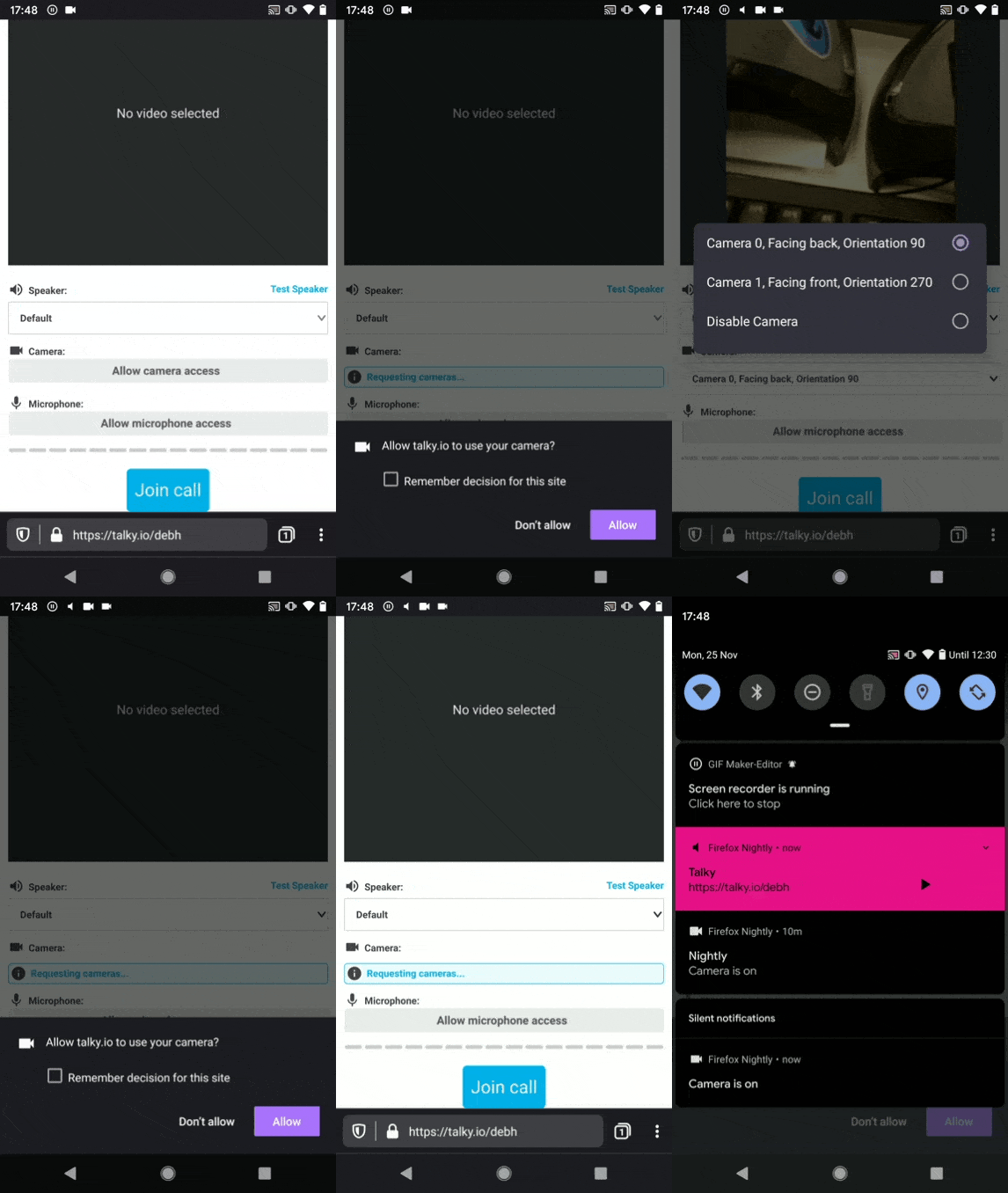
The permission pop-up is triggered constantly after allowing it.
Device information
Android device: Nokia 6 (Android 7.1.1), Samsung Galaxy Note 8 (Android 9), Google Pixel (Android Q).
- Fenix version: Nightly 11/25 #13290608;
Notes
- This issue can be reproduced also on the RC build of Firefox Preview 2.3.0 and Nightly Firefox for Android 68.3a1 (2019-11-22) and Firefox for Android RC 68.2.1;
- Video:
 sv-sdeiac
All 12 comments
I'm not having any issue on Firefox Preview 2.3.0, @sv-sdeiac can you check from your side if the problem still persists?
 obitodarky
on 31 Dec 2019
obitodarky
on 31 Dec 2019
I am still able to reproduce this issue on the latest version of Firefox Preview 3.0.1 #13502256 using Google Pixel (Android Q).
sv-sdeiac
on 31 Dec 2019
Can we try testing this on lower-end devices? Does this also occur in Nokia 6 in the latest build? Also, are you using an emulator or a physical device?
On my Asus Zenfone Max pro m1, Android Pie, it seems to work fine. I also upgraded my Preview to 3.0.1 and still there is no sign of this bug.
obitodarky
on 1 Jan 2020
Hello @obitodarky, I retested this issue on the latest version of Firefox Preview 3.0.1 #13502256 and I can confirm that is reproducible 100% using the following devices:
- Nexus 5 (Android 6.0.1);
- Huawei P9 Lite (Android 7);
- Nokia 6 (Android 7.1.1);
- Motorola Moto G6 (Android 8).
Also, I wasn't able to reproduce the issue on LG G7 fit (Android 8.1).
I want to specify that all my investigation was performed on the physical devices, not an emulator. If I can help you with other information, please let me know, thanks.
sv-sdeiac
on 3 Jan 2020
Hi, this issue is still reproducible using the latest version of Firefox Preview Nightly 4/9 #21000923.
Device:
- Samsung Galaxy Note 8 (Android 9).
sv-sdeiac
on 9 Apr 2020
Reproducible on latest Nightly 6/11 with Nokia 6 (Android 7.1.1) with one update: "Remember decision for this site" is not checked after the front camera is requested.
If it is checked, the popup is not displayed anymore.
 sflorean
on 11 Jun 2020
sflorean
on 11 Jun 2020
It could be an Android version specific issue as tested on Pixel 3 with Android 10 Nightly 6/11. I wasn't able to simulate the issue.
 Amejia481
on 11 Jun 2020
Amejia481
on 11 Jun 2020
Perform additional testing on different Android versions that I have available:
- Huawei MediaPad M2 (Android 5.1.1) - reproducible
- Nokia 6(Android 7.1.1) - reproducible
- LG G7 FIT (Android 8) - not reproducible
- Xiaomi Redmi Note 8T (Android 9) - not reproducible
- Samsung Galaxy Note 10 (Android 10) - not reproducible
sflorean
on 12 Jun 2020
This is a gv bug. I filed this ticked for it
Amejia481
on 16 Jun 2020
Note: besides the bug from GV, I think there's also a different problem regarding how we store the permissions. Since this is an ASK_TO_ALLOW permission, we don't save it to disk, but there's no memory storing it either. So when you switch the camera on the same site, it will always prompt you to accept.
I have a fix for that, but I'm waiting on the GV fix, in order to re-check
 BranescuMihai
on 18 Jun 2020
BranescuMihai
on 18 Jun 2020
Note: besides the bug from GV, I think there's also a different problem regarding how we store the permissions. Since this is an ASK_TO_ALLOW permission, we don't save it to disk, but there's no memory storing it either. So when you switch the camera on the same site, it will always prompt you to accept.
I have a fix for that, but I'm waiting on the GV fix, in order to re-check
Thanks @BranescuMihai for the help :)
For temporary permissions (when the use didn't check the checkbox), we are not storing the result neither on disk nor on memory to follow the same behaviour as desktop and Fennec. For example in desktop and Fennec if a permission is granted and again requested by the site both browsers prompt again. Please, verify and let me know what do you think :)
You could test using https://talky.io/ and switching cameras or microphones.
Amejia481
on 18 Jun 2020
@Amejia481 you're right, I checked the behaviour on Desktop and it's the same. However, on Chrome(both Desktop and Android), they do not ask permission for every camera/microphone switch, so it feels smoother for the user, maybe we should consider doing the same on both platforms.
Sidenote: For phones with pop-up front camera, such as OnePlus 7T Pro, it's even weirder, because grant always calls the callback, it goes into a loop where the camera pops up and down continuously
BranescuMihai
on 25 Jun 2020
Related issues
 ekager
·
3Comments
ekager
·
3Comments
 lindongbin
·
3Comments
lindongbin
·
3Comments
 abodea
·
3Comments
abodea
·
3Comments
 bbinto
·
3Comments
bbinto
·
3Comments
 andreicristianpetcu
·
3Comments
andreicristianpetcu
·
3Comments