Fenix: [Bug] "Open links in a private tab" setting keeps coming back on its own
Steps to reproduce
- Set as default browser
- Ensure that "Open links in a private tab" is unchecked
Expected behavior
That those 2 settings stay that way.
Actual behavior
After a few hours/days of use, links start opening in private tabs, and "Open links in a private tab" is now checked. Unchecking it reverts this behavior, until it happens again.
I've been through this dance at least 3 times, and the setting only sticks for so long. I cannot figure out what triggers the change.
Device information
- Android device: OnePlus 7T
- Fenix version: 2.2.0
 hugoh
hugoh
All 5 comments
For me, whenever I update the nightly, the setting is reset to default.
I wish I don't have to keep toggling it off after every update.
- OnePlus 3T
- Android 9.0
- Nightly version 191031 18:01
 umerf52
on 2 Nov 2019
umerf52
on 2 Nov 2019
Looks like @hugoh is right.
I didn't update the app for a few days and this option turned itself back on automatically.
umerf52
on 4 Nov 2019
Hi, I've checked the above described issues and couldn't reproduce neither of them on the latest Nightly Build #13371032 from 12/3 using the following devices:
• Google Pixel 3a XL (Android 10)
• Google Pixel 3a (Android 9)
• Huawei Mate 20 Lite (Android 8.1.0)
• Samsung Galaxy S7 (Android 7)
• Motorola G4 (Android 6.0.1)
Set Fenix as default Browser, left unchecked "Open links in a private tab", force stopped Fenix, set Date to June 30th 2020, time to 12:00 AM
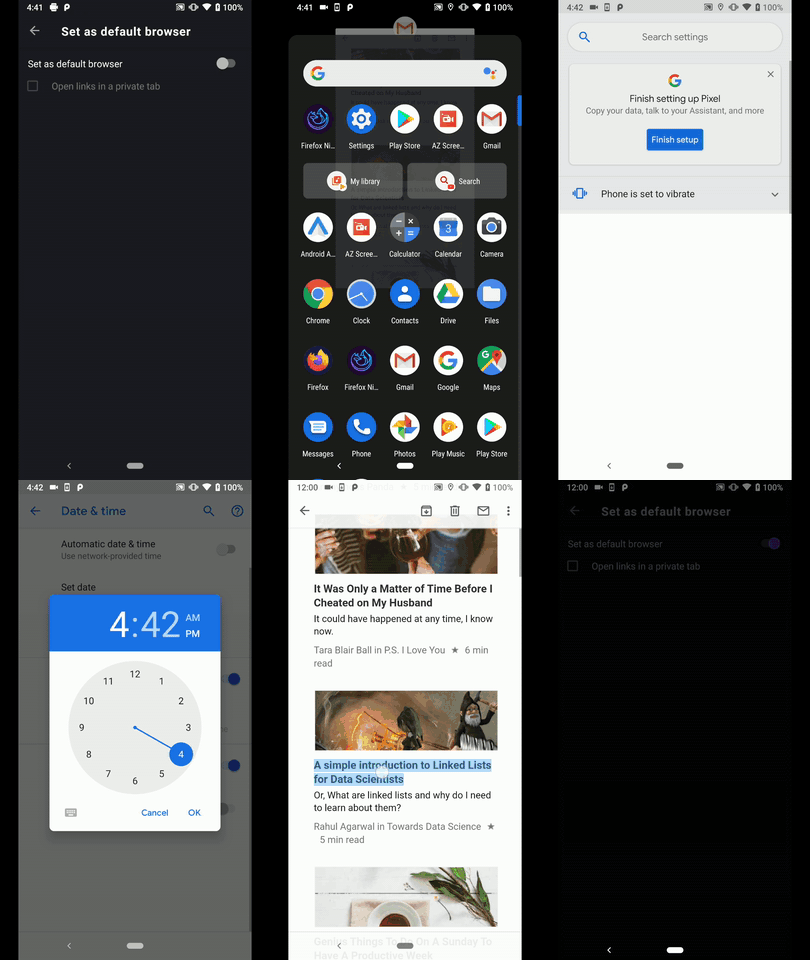
Installed a Fenix Nightly Build from 10/25, set Fenix as default browser and enabled "Open links in a private tab" and made an update to the latest version.

In both cases no changes were made to the "Open links in a private tab" setting.
@hugoh & @umerf52 - I would kindly ask you to let us know if you still encounter these issues.
@ekager - Please let me know how should we proceed based on my findings
I'll remove the QA needed label until further notice.
 AndiAJ
on 3 Dec 2019
AndiAJ
on 3 Dec 2019
Working fine for me now as well.
umerf52
on 5 Dec 2019
In this case, I'll go ahead and close the ticket. :relaxed:
If anything comes up, please re-open it.
AndiAJ
on 6 Dec 2019
Related issues
 bbinto
·
3Comments
bbinto
·
3Comments
 csadilek
·
3Comments
csadilek
·
3Comments
csadilek
·
3Comments
csadilek
·
3Comments
 thelazyoxymoron
·
3Comments
thelazyoxymoron
·
3Comments
 topotropic
·
3Comments
topotropic
·
3Comments
Most helpful comment
Hi, I've checked the above described issues and couldn't reproduce neither of them on the latest Nightly Build #13371032 from 12/3 using the following devices:
• Google Pixel 3a XL (Android 10)
• Google Pixel 3a (Android 9)
• Huawei Mate 20 Lite (Android 8.1.0)
• Samsung Galaxy S7 (Android 7)
• Motorola G4 (Android 6.0.1)
Set Fenix as default Browser, left unchecked "Open links in a private tab", force stopped Fenix, set Date to June 30th 2020, time to 12:00 AM

Installed a Fenix Nightly Build from 10/25, set Fenix as default browser and enabled "Open links in a private tab" and made an update to the latest version.

In both cases no changes were made to the "Open links in a private tab" setting.
@hugoh & @umerf52 - I would kindly ask you to let us know if you still encounter these issues.
@ekager - Please let me know how should we proceed based on my findings
I'll remove the QA needed label until further notice.