Fenix: [Bug] Cannot access search engine selection when clicking URL bar from tab
Steps to reproduce
- Open a tab
- Click URL bar
Expected behavior
Search engine selection is available, like if you clicked url bar from homescreen
Actual behavior
Search engine selection is not available. Due to #5018, search engine selection is inaccessible from this screen
Device information
- Android device: Pixel 2
- Fenix version: Nightly 190912
 mcomella
All 14 comments
You can tap the "shortcuts" the bottom to access the search engines.
Poorly named, should be "search with.."
Also should be able to tap the search engine icon in the address bar to perform the same function
 nahuhh
on 20 Sep 2019
nahuhh
on 20 Sep 2019
Dup of #5979, since there were two issues I will bump to group triage to decide if this is actually a bug 👍
 boek
on 28 Dec 2019
boek
on 28 Dec 2019
@Verdi Just to confirm: we don't want to show search shortcuts when the user goes from Browser Screen -> Search Screen (URL is selected) correct?
 sblatz
on 21 Jan 2020
sblatz
on 21 Jan 2020
@Verdi Just to confirm: we don't want to show search shortcuts when the user goes from Browser Screen -> Search Screen (URL is selected) correct?
No. We DO want to show the search shortcuts here.
 Verdi
on 6 Feb 2020
Verdi
on 6 Feb 2020
@Verdi is that the case even when the URL from the website is selected? When I go from browser -> search, the URL from the website I'm on is shown in the URL bar, highlighted, with no suggestions currently. Are you wanting shortcuts to appear "enabled" in this state or only after the user backspaces the URL?
sblatz
on 7 Feb 2020
Fixing this will also fix the "flicker" of "this time search with" showing then disappearing.
sblatz
on 7 Feb 2020
@sblatz wrote:
Are you wanting shortcuts to appear "enabled" in this state [when the URL from the website is selected] or only after the user backspaces the URL?
~We should show the shortcuts only after the user modifies the text. To do this, they can backspace or just start typing to enter a new query.~
I am backing out of this decision, in favour of showing shortcuts directly when user taps the address bar, without modifying text.
 brampitoyo
on 11 Feb 2020
brampitoyo
on 11 Feb 2020
My view:
A.
Only show shortcuts after user modifies text
Vs
B.
Show shortcuts when user taps the address bar
And
Show suggestions when user modifies text
A.
1 - user modifies text
2 - shortcuts appear
3 - suggestions are lost? Flicker remains?
B.
1 - user taps address bar
2 - shortcuts appear
3 - user modifies text
4 - shortcuts disappear and suggestions appear
Personally, I'd go B.
Also IMO
- "shortcuts" should be renamed to "search with.."
nahuhh
on 11 Feb 2020
@nahuhh Great point.
When user taps the address bar, there’s nothing else to show below it, except maybe “Pasted text”. So your thinking is “Why not show search shortcuts?”:
Scenario 1: I want to search with the default search engine, or go to another URL
- Tap address bar
- Shortcuts appear
- Modifies text
- Suggestions from default search engine are shown
Scenario 2: I want to search with other search engines
- Tap address bar
- Shortcuts appear
- Select another search engine
- Modify text
- Suggestions from the other search engine are shown
This makes search engine selection directly accessible every time the user taps the address bar, no matter which page the address bar belongs to.
I wonder if there are any unintended consequences of doing this?
brampitoyo
on 11 Feb 2020
@nahuhh I’ve just consulted with Verdi, and am in full agreement with your proposal.
@sblatz the behaviour that we should implement is exactly as @nahuhh wrote:
- When user taps the address bar (and the full URL is highlighted), show search shortcuts
- When the text is modified, show search suggestions
brampitoyo
on 11 Feb 2020
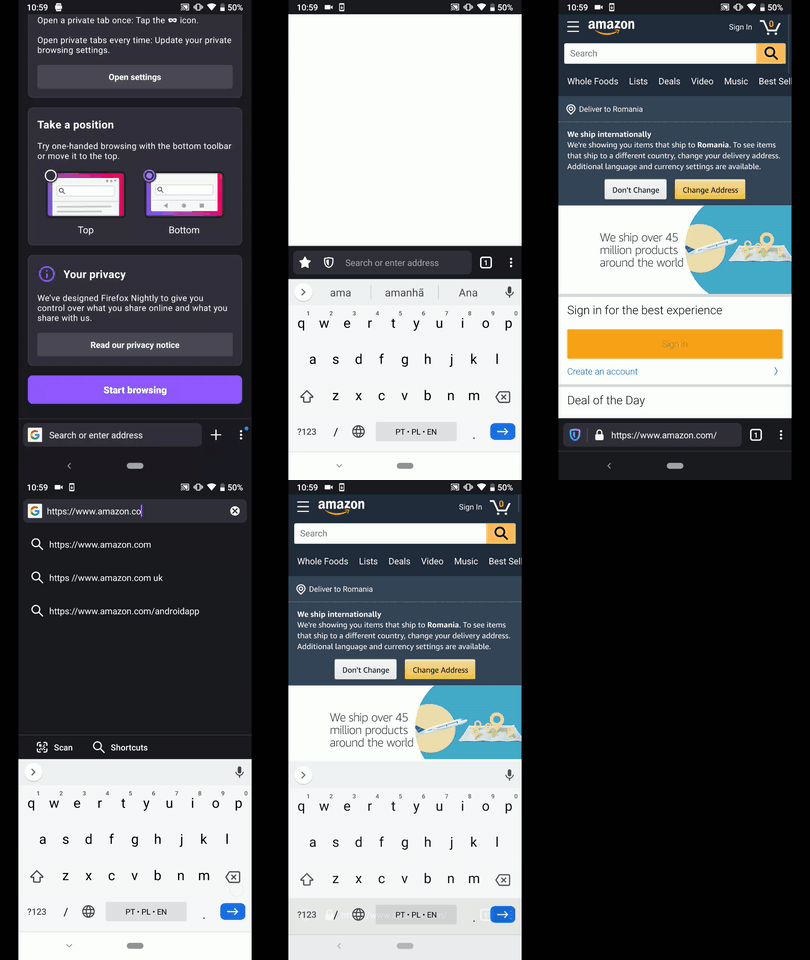
Hi, I've checked this matter on the latest Nightly Build #20630607 from 03/03 using the following devices:
• Google Pixel 3a (Android 9)
• Huawei Mate 20 Lite (Android 8.1.0)
• Samsung Galaxy S7 (Android 7)
• OnePlus A3 (Android 6.0.1)
• LG Nexus 4 (Android 5.1.1)
| Status | Requirement|
| ------------- | ------------- |
| ✔️ | Show search shortcuts - When user taps the address bar to start a new search session |
| ✔️ | Show search shortcuts - When user taps the address bar (and the full URL is highlighted) |
| ✔️ | When the URL text is modified, show search suggestions |
| ❓ | When user taps the address bar after performing a search using a suggestion |
❓ What should be displayed after the user performs a a search using a suggestion and taps the address bar ?
► Video
@brampitoyo - Could you please review and advise? ☺️
 AndiAJ
on 3 Mar 2020
AndiAJ
on 3 Mar 2020
I'm pretty sure we're wanting to show the search shortcuts in those cases too. I will dig into this.
sblatz
on 3 Mar 2020
Agreed with @sblatz. We should show search shortcuts in that case.
brampitoyo
on 3 Mar 2020
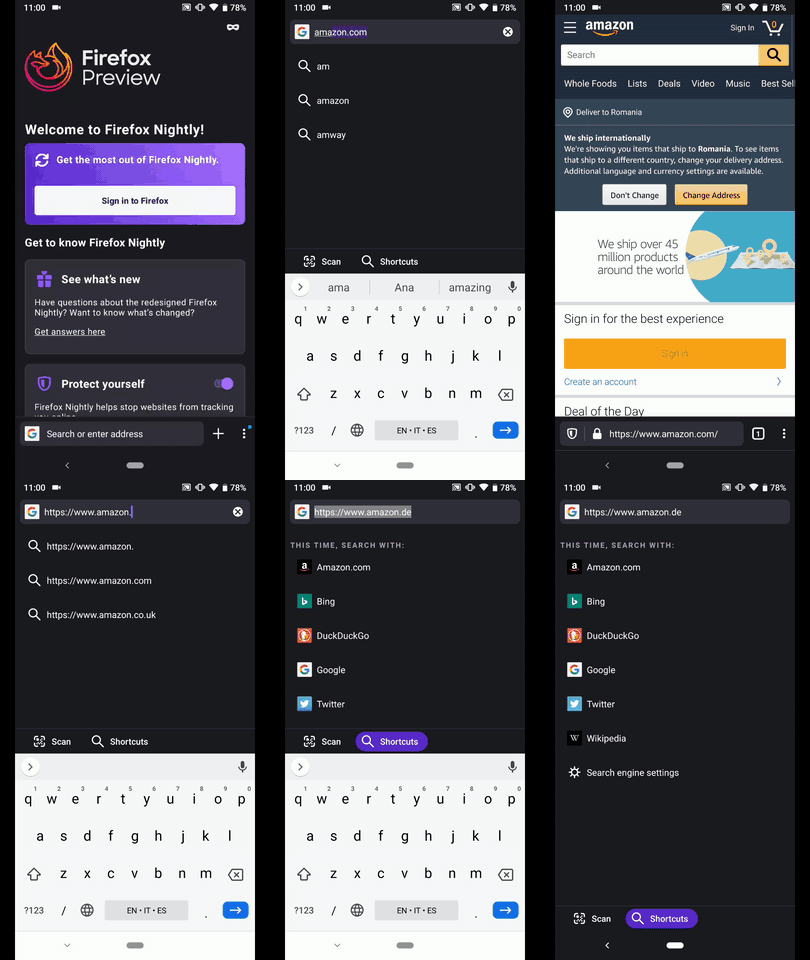
Hi, verified as fixed on the latest Nightly Build #20650606 from 03/05 using the following devices:
• Google Pixel 3a (Android 9)
• Huawei Mate 20 Lite (Android 8.1.0)
• Samsung Galaxy S7 (Android 7)
• OnePlus A3 (Android 6.0.1)
• LG Nexus 4 (Android 5.1.1)
| Status | Requirement|
| ------------- | ------------- |
| ✔️ | Show search shortcuts - When user taps the address bar to start a new search session |
| ✔️ | Show search shortcuts - When user taps the address bar (and the full URL is highlighted) |
| ✔️ | When the URL text is modified, show search suggestions |
| ✔️ | When user taps the address bar after performing a search using a suggestion |
►Video
AndiAJ
on 5 Mar 2020
Related issues
 ekager
·
3Comments
ekager
·
3Comments
 phileastv
·
3Comments
phileastv
·
3Comments
 vesta0
·
3Comments
vesta0
·
3Comments
 clitetailor
·
3Comments
clitetailor
·
3Comments
 lindongbin
·
3Comments
lindongbin
·
3Comments
Most helpful comment
I'm pretty sure we're wanting to show the search shortcuts in those cases too. I will dig into this.