Fenix: [Bug] Favicon not saved when Fenix is closed
Steps to reproduce
- Open Fenix
- Open this page: https://blogs.mediapart.fr/karfa-sira-diallo/blog/260819/erosions-de-souad-el-maysour-conte-de-lesclavage-des-noirs-au-maghreb
- Go back to tab list and check that favicon is here:

- Close Fenix (close the app in the app manager)
- Open Fenix again
Expected behavior
Favicon in the tab list should be here again
Actual behavior
Favicon is not here:

Device information
- Android device: Redmi Note 7 with Android 9
- Fenix version: #12420615
 klint
klint
All 15 comments
In my testing I saw favicons are persisted as expected and in this case in particular there are no issues after restarting the app.
Passing this to QA to verify if this is still an issue and close the ticket otherwise.
 Mugurell
on 26 May 2020
Mugurell
on 26 May 2020
Actually I can see the issue still happening with build #2015742515 (with both new and current tab tray), but not with the same URL as above, that's true.
To sum up with a few examples:
- https://blogs.mediapart.fr/karfa-sira-diallo/blog/260819/erosions-de-souad-el-maysour-conte-de-lesclavage-des-noirs-au-maghreb is now ok
- https://www.lemonde.fr is also ok
but:
- https://www.lemonde.fr/culture/article/2020/04/20/de-killing-eve-a-derapages-quatre-bonnes-raisons-de-rester-devant-la-tele_6037241_3246.html is not OK
- https://www.franceculture.fr is not OK
Thanks
klint
on 26 May 2020
I had tested this on the latest Fenix Nightly Build 21470624, from 5/26, with Nexus 5 (Android 6.0.1), Motorola Moto G6 (Android 8), Pixel 2 (Android 9) and I could not reproduce the issue following the steps from the description and the previously mentioned pages.
@klint Please provide any additional steps for reproducing this issue. Do you leave Fenix in the background for a while before relaunching it? Thanks!
I will remove the qa:needed label for now.
 ebalazs-sv
on 26 May 2020
ebalazs-sv
on 26 May 2020
The steps (that I have just used to reproduce the issue on an other phone, a Samsung A50, and with another URL) are, as far as I can detail them:
- by any mean, navigate to https://www.lemonde.fr/planete/live/2020/05/26/coronavirus-en-direct-suivez-la-presentation-du-plan-de-soutien-a-la-filiere-automobile_6040730_3244.html in Fenix (I did it from the mail application, or from githib app, or directly by typing it in the address bar)
- once the page is loaded, click on the "Tabs" icon to go back to Fenix home page
- check that the favicon for this tab is displayed
- immediately, display the current tasks on the phone (||| button) and remove the Fenix task -this closes Fenix I suppose
- reopen Fenix
- you should land on the home page
- check that the favicon for the above tab is not displayed (but an initial, L)
This video shows the process for another URL (which stangely did not work on my Redmi Note 7 but did work on the A50): https://photos.app.goo.gl/zhWcgZvy6JZLK3dV9
klint
on 26 May 2020
@klint Thanks for the detailed steps to reproduce this issue!
I can reproduce this on the latest Nightly Migration build 2015742705 with Motorola Moto G6 (Android 8) using sportsdirect.com.
Since this is not reproducible on the Fenix builds, this is a Migration issue.
ebalazs-sv
on 27 May 2020
Just asking, but is the Firefox Nightly available on Google play the migration build, while the Firefox Preview Nightly is the Fenix normal build? Thanks
klint
on 27 May 2020
Just asking, but is the Firefox Nightly available on Google play the migration build, while the Firefox Preview Nightly is the Fenix normal build? Thanks
Yes.
The difference is that Firefox Nightly is the old Firefox which got _migrated_ to Fenix.
So users of the old Firefox would get an update to Fenix and all of their data / settings will be migrated automatically to the new app.
While Firefox Preview Nightly is the standalone app that can be installed even side by side to Firefox Nightly.
In this case it would be good to know if you were a user of the old app and got migrated to Fenix or if you are a new Fenix user.
Mugurell
on 27 May 2020
To be true, I can't remember where my migration nightly build comes from. I mean, whether I really migrated from the former "Firefox for Android" nightly build, or I installed it from scratch. I think it was the latter, from scratch.
klint
on 27 May 2020
I still could not reproduce this.
Giving the steps (immediately after loading the page force close the app) it seems like we are interrupted in persisting the icon to disk so when we try to load it we just generate a default one.
@ebalazs-sv can you please try to reproduce this again and if you can post here the logs filtered by "BrowserIcons"?
Mugurell
on 28 May 2020
Giving the steps (immediately after loading the page force close the app) it seems like we are interrupted in persisting the icon to disk so when we try to load it we just generate a default one.
Actually, I don't know if this helps, the issue happens even if I wait for a couple of minutes between each step :)
klint
on 28 May 2020
I reproduced the issue on Nightly Migration build 2015742705 using a OnePlus 6T (Android 9) and extracted a logcat.
logcat.txt
 LaurentiuApahideanSV
on 29 May 2020
LaurentiuApahideanSV
on 29 May 2020
Small update: can consistently reproduce this and am close to the solution.
There's indeed a bug in how we persist and read the favicons from disk.
Mugurell
on 29 May 2020
Seems like this will be resolved by the same patch from https://github.com/mozilla-mobile/android-components/pull/7266
Mugurell
on 12 Jun 2020
With mozilla-mobile/android-components#7266 now being merged there should be no issues anymore with the favicons.
Mugurell
on 26 Jun 2020
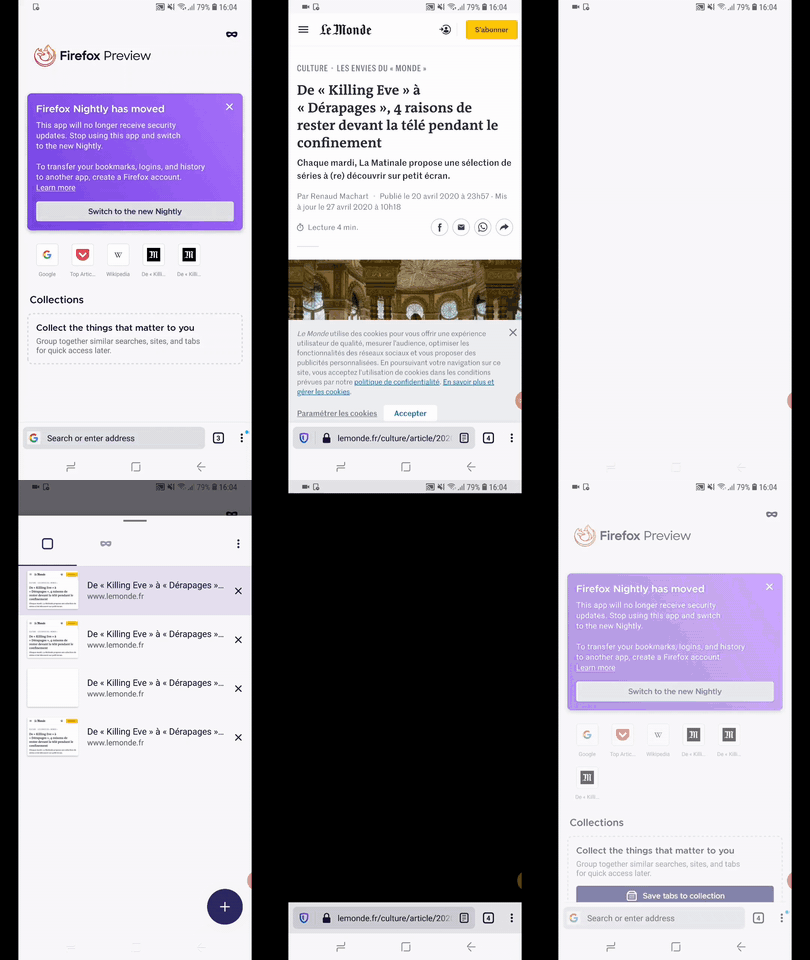
Hi, verified as fixed with the latest Firefox Nightly migration build the favicons are now correctly displayed with Google Pixel 3XL (Android 9) and Samsung Galaxy S9 (Android 8)
- favicons from top sites
- favicons from collection
- favicons from add to home screen
- favicons from history and bookmarks
- favicons from navigation bar (text search after domain from bookmark or history)
GIF
 Diana-Rus
on 2 Jul 2020
Diana-Rus
on 2 Jul 2020
Related issues
 thelazyoxymoron
·
3Comments
thelazyoxymoron
·
3Comments
 abodea
·
3Comments
abodea
·
3Comments
 ekager
·
3Comments
ekager
·
3Comments
 clitetailor
·
3Comments
clitetailor
·
3Comments
 andreicristianpetcu
·
3Comments
andreicristianpetcu
·
3Comments