Fenix: [Bug] Long-tapping on a photo doesn't display the photo's source
Steps to reproduce
- Open a page with at least a photo (like an article from wikipedia.org, or from cnn.com)
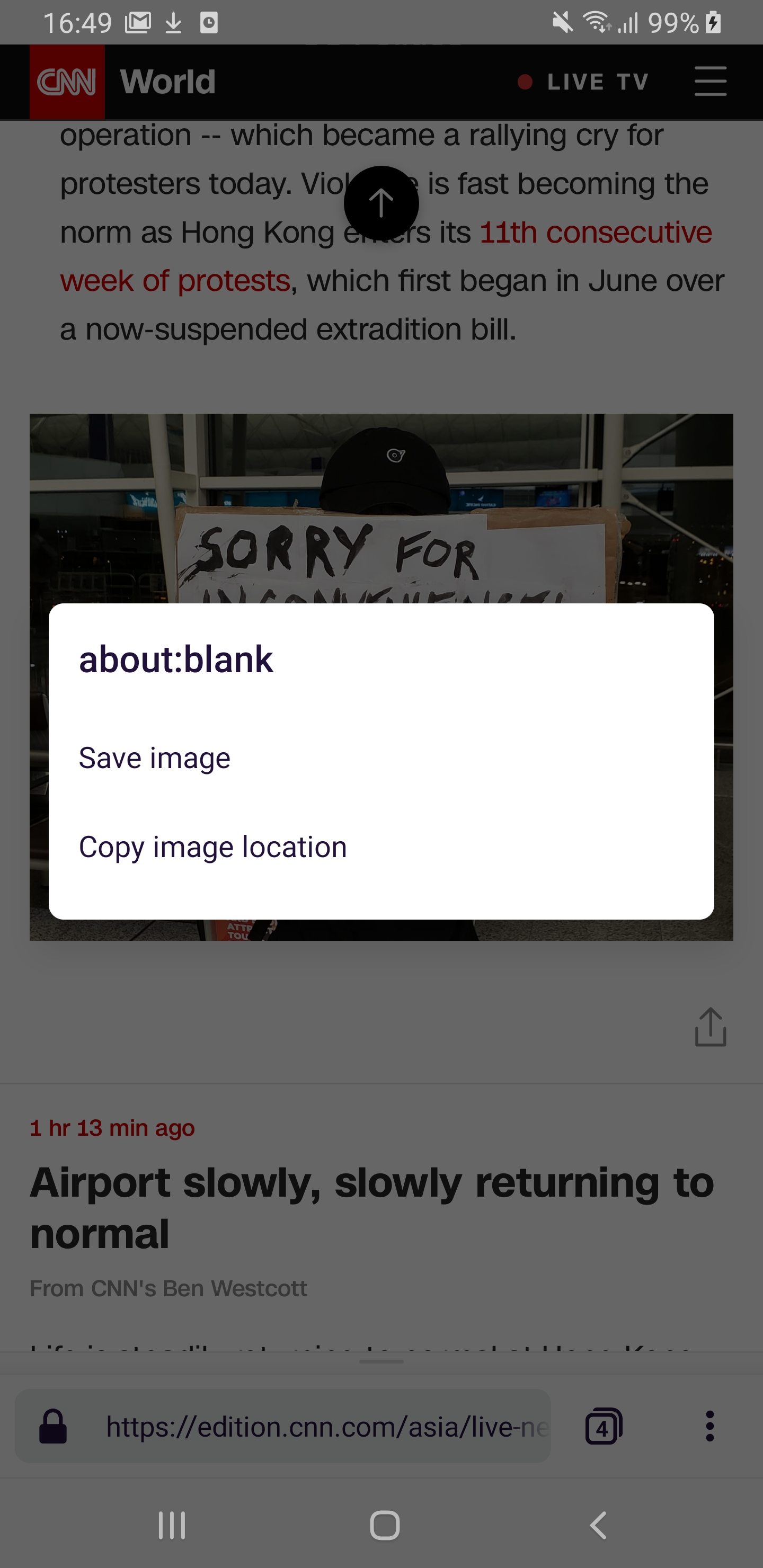
- Long-tap on a non-linked photo.
Expected behavior
The source link of the photo is displayed in the menu, then the options.
Actual behavior
"about:blank" is displayed, then the options.
Device information
- Android device: all
- Fenix version: 190812 (#12240720)
 softvision-miralobontiu
All 5 comments
I was just about to report this. Note that Fennec does even better than the source - it shows the alt text. This can be seen on xkcd.com comics.
 mkaply
on 12 Aug 2019
mkaply
on 12 Aug 2019
👍1
Alt text should only be displayed when the image fails to load. Displaying title text is #580.
 kbrosnan
on 13 Aug 2019
kbrosnan
on 13 Aug 2019
👍2
Is this still an issue? I can't reproduce on the latest A-C and Fenix versions.
 NotWoods
on 12 Sep 2019
NotWoods
on 12 Sep 2019
I'll add QA needed label to retest
 ekager
on 12 Sep 2019
ekager
on 12 Sep 2019
It is no longer reproducible on RC 2.0.0-rc.2. Tested with Samsung Galaxy Tab S3 (Android 8), and OnePlus 5T (Android 9).
softvision-miralobontiu
on 13 Sep 2019
👍1
Was this page helpful?
0 / 5 - 0 ratings
Related issues
 phileastv
·
3Comments
phileastv
·
3Comments
 vesta0
·
3Comments
vesta0
·
3Comments
 abodea
·
3Comments
abodea
·
3Comments
 lindongbin
·
3Comments
softvision-miralobontiu
·
3Comments
lindongbin
·
3Comments
softvision-miralobontiu
·
3Comments
Most helpful comment
Alt text should only be displayed when the image fails to load. Displaying title text is #580.