Fenix: [Bug] [L10N] The control text from Accessibility is not translated in Italian, Russian, Japanese, and simplified Chinese
Steps to reproduce
- Set your device's language to Italian or Russian, Japanese, simplified Chinese.
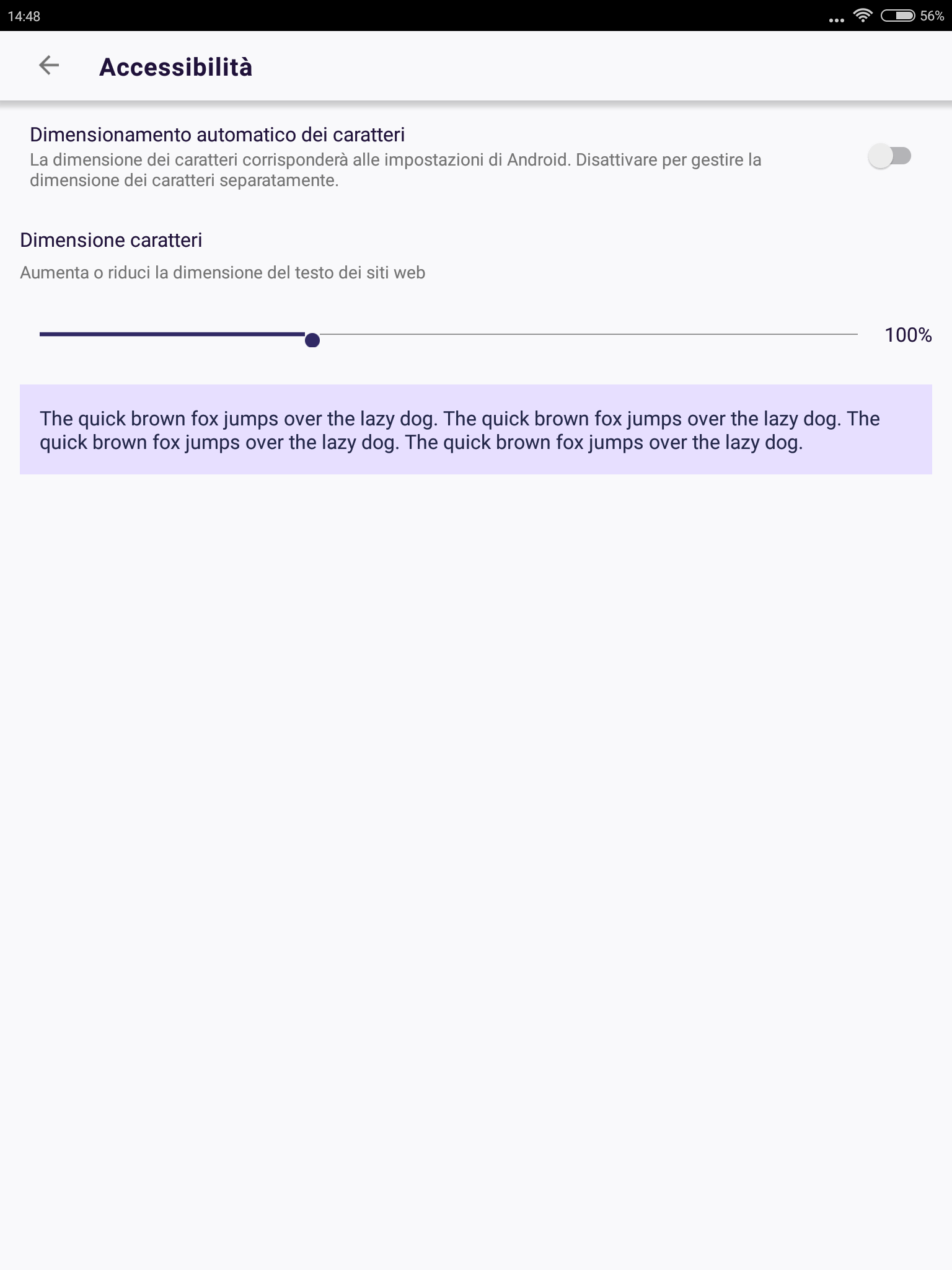
- Go to Settings - Accessibility and observe the text under the scale.
Expected behavior
The text should be in Italian.
Actual behavior
The text is in English.
Device information
- Android device: Xiaomi MiPad2 (Android 5.1) - x86 architecture; Samsung Galaxy S10+ (Android 9)
- Fenix version: RC v1.1.0-rc.1
Acceptance Criteria
- [ ] Replace the "quick brown fox" text in accessibility scale setting to:
This is sample text. It is here to show how text will appear when you increase or decrease the size with this setting. - [ ] Make sure that resource name for the string is not the same, otherwise it will not get picked up for localization. You can append "1" to the end (see other string names in the strings.xml file for example)
- [ ] Add a screenshot of the new setting text in the PR, and tag @apbitner for UX review in a comment
This does not include adding the translated strings. Once the new English strings are merged, the L10N team will translate them and open a PR with the missing languages.
 softvision-miralobontiu
All 14 comments
@apbitner can we switch this to Lorem Ipsum? This is confusing to users and this text is very English-specific (and doesn't even make sense if we were to translate).
 liuche
on 30 Jul 2019
liuche
on 30 Jul 2019
@liuche I'm open to suggestions here. Is Latin text going to be more clear though? Often times Lorem Ipsum is used as placeholder text so it could give the appearance that the feature is unfinished.
@mheubusch do you have any thoughts on this text?
 apbitner
on 5 Aug 2019
apbitner
on 5 Aug 2019
@apbitner can we replace the current text with "This is sample text. It is here to show how text will appear when you increase or decrease the size with this setting." and maybe repeat it if necessary?
 mheubusch
on 6 Aug 2019
mheubusch
on 6 Aug 2019
I'm good with that. @liuche can we update to the string @mheubusch provided above?
apbitner
on 6 Aug 2019
I would like to work on this
 RotBolt
on 20 Aug 2019
RotBolt
on 20 Aug 2019
Great, @KaenDagger take a look at our README, and potentially the contributing guide! Feel free to open a PR.
liuche
on 21 Aug 2019
@liuche & @apbitner I think what we need is this:
http://clagnut.com/blog/2380/
That is a list of sentences in many languages that contain all the characters of the respective alphabet.
 mcarare
on 23 Aug 2019
mcarare
on 23 Aug 2019
Shoud I change the accessibility text according to this now ?
@liuche & @apbitner I think what we need is this:
http://clagnut.com/blog/2380/
That is a list of sentences in many languages that contain all the characters of the respective alphabet.
RotBolt
on 1 Sep 2019
@mcarare I think that's a reasonable proposal, but I'd like to stay within the L10N system, and I think the goal here is more to see what the size of the text is, not necessarily every character.
So @KaenDagger, please follow the suggestion made by @mheubusch !
@apbitner can we replace the current text with "This is sample text. It is here to show how text will appear when you increase or decrease the size with this setting." and maybe repeat it if necessary?
Keep in mind that when we're changing the text, we'll need to change the resource name of the string so that the localizers will pick up the string changes. i.e. renaming accessibility_text_size_sample_text to accessibility_text_size_sample_text2.
Sorry for the confusion.
liuche
on 3 Sep 2019
Yep, I'm good with @mheubusch 's suggestion, that makes the most sense to me and will cause the least confusion to the user while allowing them to accurately evaluate what the setting does.
 jpfaller
on 3 Sep 2019
jpfaller
on 3 Sep 2019
@mcarare I think that's a reasonable proposal, but I'd like to stay within the L10N system, and I think the goal here is more to see what the size of the text is, not necessarily every character.
So @KaenDagger, please follow the suggestion made by @mheubusch !
@apbitner can we replace the current text with "This is sample text. It is here to show how text will appear when you increase or decrease the size with this setting." and maybe repeat it if necessary?
Keep in mind that when we're changing the text, we'll need to change the resource name of the string so that the localizers will pick up the string changes. i.e. renaming
accessibility_text_size_sample_texttoaccessibility_text_size_sample_text2.Sorry for the confusion.
Hey @liuche 👋 there's been no activity on this issue since a month, can I pick this up?
 hackertronix
on 11 Oct 2019
hackertronix
on 11 Oct 2019
i would like to work on this bug
 seydouba95
on 13 Oct 2019
seydouba95
on 13 Oct 2019
@hackertronix feel free to pick this up - I've also updated the Acceptance Criteria in this bug to make sure it's more clear.
liuche
on 15 Oct 2019
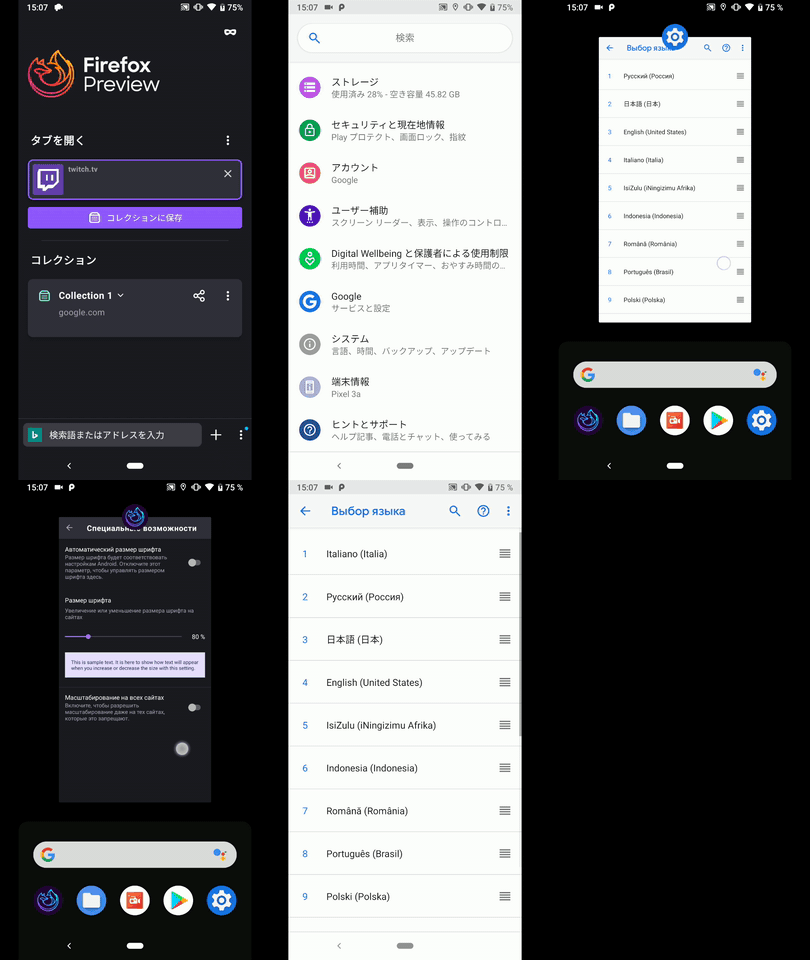
Hi, verified as fixed on the latest Nightly Build #20290608 from 1/29 using the following devices:
• Google Pixel 3a XL (Android 10)
• Google Pixel 3a (Android 9)
• Huawei Mate 20 Lite (Android 8.1.0)
• Samsung Galaxy S7 (Android 7)
►Video
 AndiAJ
on 29 Jan 2020
AndiAJ
on 29 Jan 2020
Related issues
 clitetailor
·
3Comments
clitetailor
·
3Comments
 thelazyoxymoron
·
3Comments
thelazyoxymoron
·
3Comments
 andreicristianpetcu
·
3Comments
andreicristianpetcu
·
3Comments
 phileastv
·
3Comments
AndiAJ
·
3Comments
phileastv
·
3Comments
AndiAJ
·
3Comments