Fenix: [Bug] Lastpass showing mozilla credentials for website HTTP Basic Authentication box
Steps to reproduce
Using device with Lastpass installed and logged in.
Open https://jigsaw.w3.org/HTTP/Basic/ in Fenix
Expected behavior
Any saved credentials for the w3.org website should be shown
Actual behavior
Saved credentials for mozilla.org are shown
Device information
- Android device: Pixel 3 - Android 9
- Fenix version: 1.0.1 (#11891918)
- Lastpass version: 4.10.4395 (beta channel)
 martynhaigh
All 33 comments
Yep I am also reproducing this even with facebook.com ...
 ekager
on 16 Aug 2019
ekager
on 16 Aug 2019
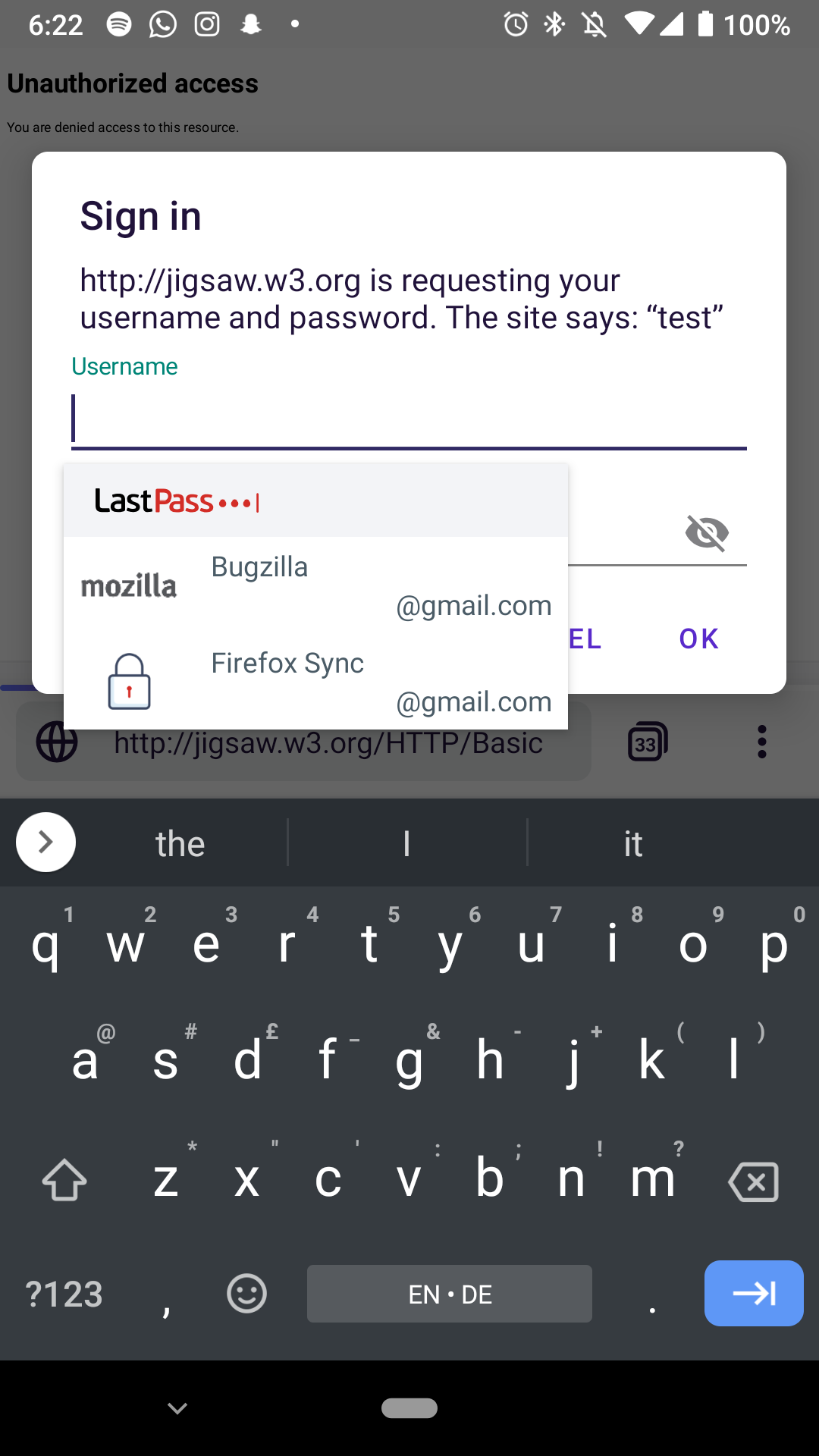
Did a bit more investigation and this seems to be a problem with the LastPass app and not GV/Fenix/AC. It looks like LastPass is detecting our app name and only sending Mozilla/Firefox related passwords. 1Password and Lockwise both work here. Similarly using Chrome with Lastpass will only show Google/Gmail related logins. Do we have any contacts at LastPass to reach out to and report this?
ekager
on 16 Aug 2019
Here's a screenshot of the issue for reference using LastPass 4.11.4509 (the latest beta).
 jonalmeida
on 17 Aug 2019
jonalmeida
on 17 Aug 2019
We completed this investigation and decided it is a LastPass issue so I am adding a waiting label.
ekager
on 22 Aug 2019
Hey @ekager, see #4992, I seem to get a similar problem using Lockwise. This seems to point towards a problem in Fenix rather than in passwords managers, what do you think?
Thanks!
 julienw
on 28 Aug 2019
julienw
on 28 Aug 2019
At the time of filing, this specific bug about Lastpass was also reproducible on Chrome. Now it seems to work in Chrome, and on Firefox Preview Nightly for me but does not work on master. So maybe works in GV71? 🤔
Are you seeing similar behavior @julienw?
ekager
on 12 Sep 2019
Mmm I use Firefox Preview release so it's on GV 69. I still see the issue in this setup.
I'd be happy to try nightly but not sure how to install it :-)
julienw
on 12 Sep 2019
Thanks to Emily, I could install the nightly version, but I still have the issue there (nightly 190912, GV 71 20190910095613) :(
julienw
on 13 Sep 2019
@julienw are you still seeing this with Lockwise?
@martynhaigh are you still seeing this with Lastpass?
ekager
on 8 Nov 2019
@ekager yeah, still seeing this
martynhaigh
on 9 Nov 2019
@ekager Yes, still seeing this too!
julienw
on 12 Nov 2019
This is a missing feature of Fenix's BasicAuth dialog. Android triggers an autofill request when an EditText is entered, and guesses at the autofill ViewStructure that password managers will use.
The password managers use the package name to find the account to offer to autofill.
For browsers, it needs to add the webDomain property for page specific text boxes. GeckoView is already doing this, so this is why it works in web content already, but not in Fenix's chrome.
You need to implement onProvideAutofillStructure on the dialog, and the set the webDomain property.
This will fix the problem in all password managers, including Lockwise. Until then, it's impossible for them to know the correct hostname.
The Android doc Optimize your app for autofill seems to be pretty comprehensive.
 jhugman
on 12 Nov 2019
jhugman
on 12 Nov 2019
Thanks to Emily, I could install the nightly version, but I still have the issue there (nightly 190912, GV 71 20190910095613) :(
As far as I know, LastPass have not whitelisted the Preview Nightly app ID, so this test may not be valid. @ekager might be able to correct me.
jonalmeida
on 12 Nov 2019
In theory, we should be able to add the domain to the dialog views of AuthenticationDialogFragment in AC feature-prompts as @jhugman described.
ekager
on 13 Nov 2019
Couldn't figure this out in a short time box so I opened to track in AC https://github.com/mozilla-mobile/android-components/issues/5097
ekager
on 19 Nov 2019
I can still reproduce this issue following the steps from the description, for more details please check the following:
| Fenix version | Website | Device | Reproducible? |
| :---: | :---: | :---: | :---: |
| Nightly 2/19 |https://jigsaw.w3.org/HTTP/Basic/ | Google Pixel 3a XL(A10) | ✔️ |
| Beta 4.0.0 | www.facebook.com | Google Pixel 3a XL(A10) | ✔️ |
| Nightly 2/19 |https://jigsaw.w3.org/HTTP/Basic/ | OnePlus 6T(A9) | ✔️ |
| Beta 4.0.0 | www.facebook.com | OnePlus 6T(A9) | ✔️ |
Also, I noticed that sometimes jigsaw.w3.org is loading very slow.
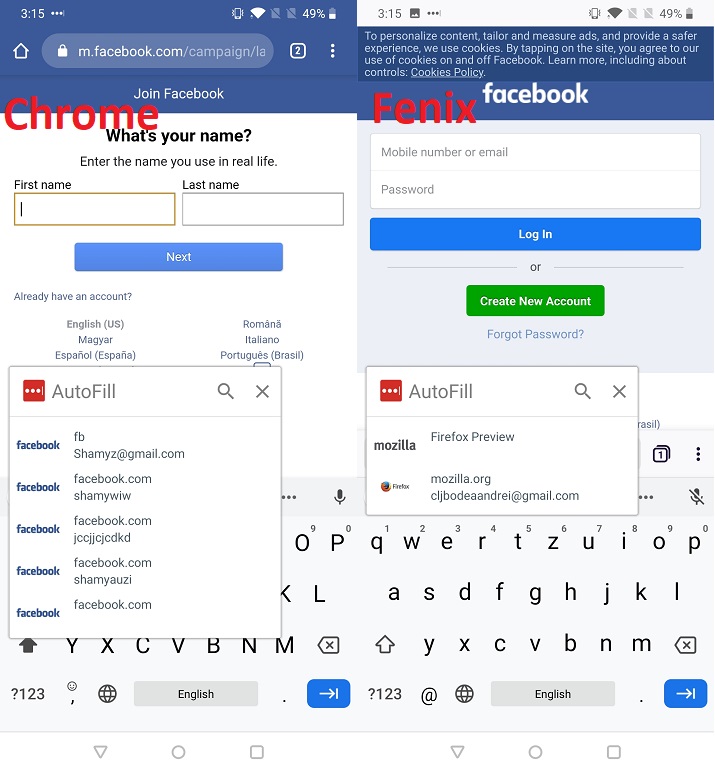
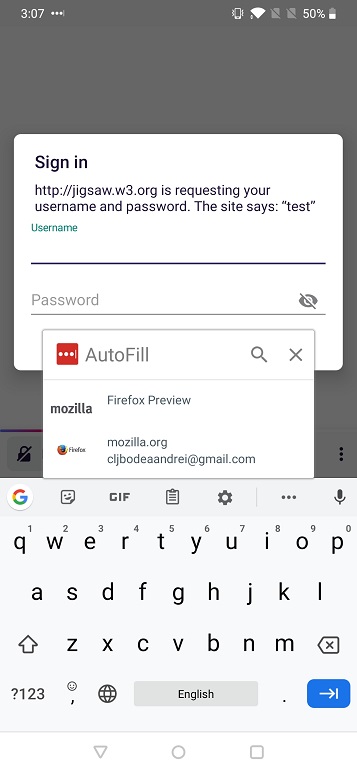
Until further notice, I will remove eng:qa:needed.
 abodea
on 19 Feb 2020
abodea
on 19 Feb 2020
I've compared LastPass with Lockwise and Bitwarden's auto-fill and I believe our implementation is correct.
As @abodea mentioned above, it seems like Lastpass' autofill regressed (maybe by our implementation changes or theirs) and no longer works with regular sites let alone authentication dialogs.
I've tried all Firefox Preview builds, and even the Firefox Nightly build, which used to work in my testing, that now has been migrated to Fenix - none of these browsers seem to work.
I think it's safe to ask LastPass to look into this issue on their side to see how they whitelist browser apps to show the Auto-fill UI.
Looking at Bitwarden's source for comparison, I wonder if LastPass also has us listed as a compat browser instead of the using the auto-fill framework.
We should request the following app IDs to be whitelisted:
org.mozilla.fenixorg.mozilla.fenix.nightlyorg.mozilla.reference.browser
Verify that whitelisting is correct on:
org.mozilla.fennec_aurora
If they also look for a view in compat mode, the ID is: mozac_browser_toolbar_url_view
jonalmeida
on 9 Mar 2020
@jonalmeida I reached out to my contacts at LastPass about a month ago and haven't heard back. Perhaps it's best to submit a support request for them in the meantime?
 vesta0
on 10 Mar 2020
vesta0
on 10 Mar 2020
No a-c work here needed.
jonalmeida
on 16 Mar 2020
Can we please test this again to see if the issue with LastPass has been fixed?
vesta0
on 28 Jun 2020
Re-tested with the latest Nightly version from 6/3 with Google Pixel 4 XL (10).
Note that nothing changed and the issue is still reproducible as described above.
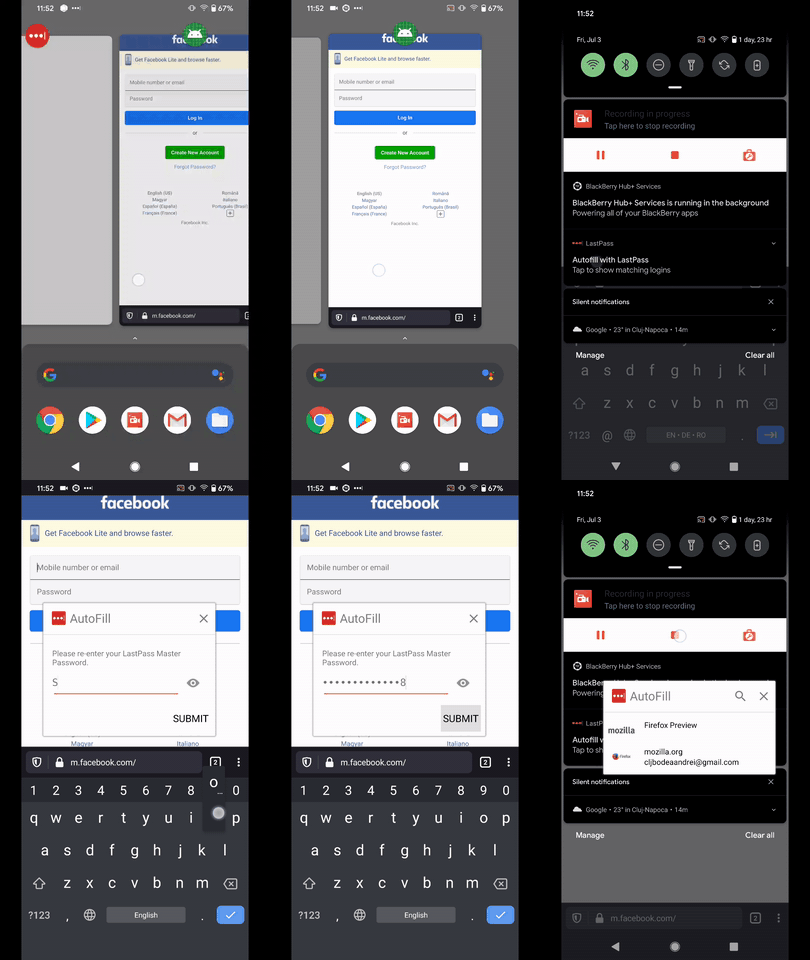
Removing the eng:qa:needed until further notice.
@vesta0 I do believe this is still a LastPass issue as on our part everything is working correctly.
abodea
on 3 Jul 2020
This is now working for me in nightly 200702 06:03
 shawnz
on 5 Jul 2020
shawnz
on 5 Jul 2020
@abodea would you please test this one more time in light of @shawnz comment?
vesta0
on 8 Jul 2020
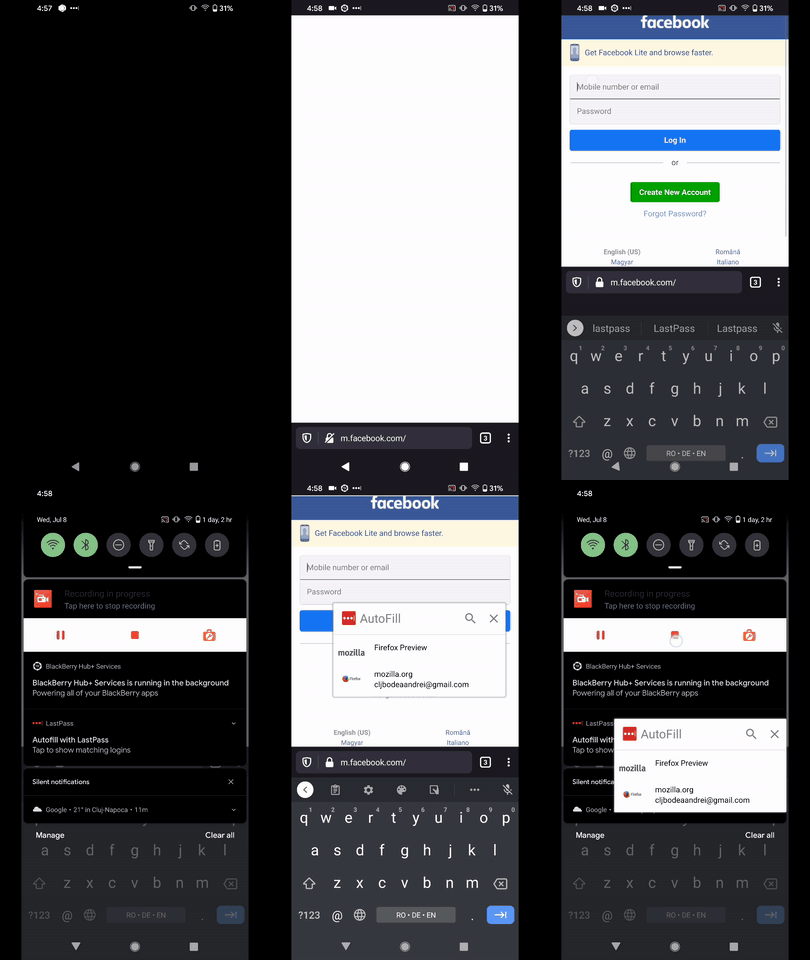
@vesta0 I re-tested this on the latest Nightly from 7/8 with Google Pixel 4 XL (10).
Note that I'm still able to reproduce this issue as the Mozilla credentials for website HTTP Basic Authentication box are still displayed instead of the account, in this example facebook.
For more details please check the attachment.
Also, note that the issue is still reproducing exactly how is in the description.
The screen is black in LastPass due to security reasons, but I was showing the Facebook accounts that I have saved there.
abodea
on 8 Jul 2020
Recently it seems like the different Firefox apps have gotten switched around in the Google Play store. I am now using the one with app id "org.mozilla.fenix"... not sure what it was before. Could that have something to do with the issue? I remember reading in another thread that the issue may have to do with some kind of app id whitelist by LastPass. [EDIT: It was earlier in this thread]
Also I think there is some confusion here. @abodea that animation seems to show an HTML form based auth, not an HTTP basic auth. I was also having the issue with HTML form based auth pages, same as @abodea. I haven't tested with HTTP basic auth.
shawnz
on 9 Jul 2020
@abodea could we verify the auth dialog works for requesting the correct website for any password manager other than LastPass? General LastPass investigation will happen in https://github.com/mozilla-mobile/fenix/issues/12128
ekager
on 2 Aug 2020
This doesn't work at all for me with Lockwise on the latest version.
On an older version (the last one in the old firefox preview nightly channel) this gives me the choice between all logins for this website (I have several of them, because there are several apps on different endpoints).
julienw
on 3 Aug 2020
Hi, @ekager I did a lot of testing here https://github.com/mozilla-mobile/fenix/issues/9773 and I will try the others too so far I reported all the issues I encountered with the other passwords managers.
abodea
on 3 Aug 2020
Re-tested with Migrated RC (latest), Latest Beta migration, and the latest Nightly build with Google Pixel 4 XL (Android 11).
Based on my comment the issue is still reproducible.
Removing the eng:qa:needed until further notice.
abodea
on 4 Aug 2020
@abodea @ekager if you think this is a LastPass issue, please file a ticket with them and let me know the ticket number so I can ask them to bump it up in prioritization.
vesta0
on 4 Aug 2020
@vesta0 Sure thing I can do that tomorrow morning as I will provide some attachments with the behavior from few other browsers so they can compare.
abodea
on 4 Aug 2020
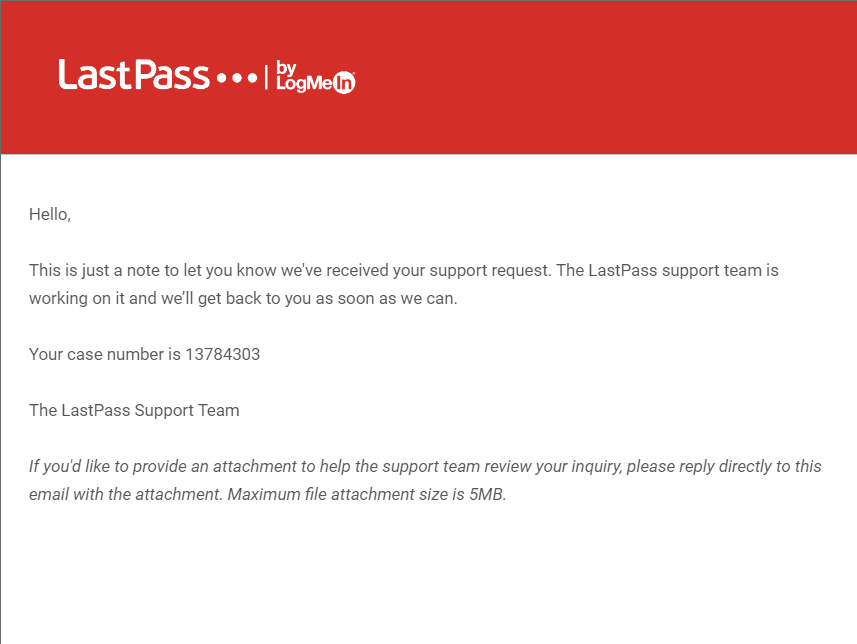
Hi, @vesta0 please note that I submitted a ticket regarding our issue on the LastPass support where I described the issue, added a screenshot with it and I also added a link to this bug.
The case number is 13784303.
abodea
on 5 Aug 2020
I recently began using Firefox on my Android devices and ran into this issue. Has LastPass provided any official response to this? I will open a ticket with them as well just to create added visibility for them.
 sean-m-sweeney
on 18 Dec 2020
sean-m-sweeney
on 18 Dec 2020
Related issues
 robsmith11
·
3Comments
robsmith11
·
3Comments
 thelazyoxymoron
·
3Comments
thelazyoxymoron
·
3Comments
 csadilek
·
3Comments
csadilek
·
3Comments
 Chris01277
·
3Comments
Chris01277
·
3Comments
 softvision-miralobontiu
·
3Comments
softvision-miralobontiu
·
3Comments