Fenix: Create a save button for bookmark editing
Why/User Benefit/User Problem
Currently, there's no way to dismiss the changes without saving.
The back button is saving changes, which is counter-intuitive.
What/Requirements
Add a Save button for editing bookmarks.
The back button should cancel the changes.
Acceptance Criteria (how do I know when I’m done?)
Users can save or dismiss editing their bookmark.
 sv-ohorvath
All 11 comments
@topotropic FYI
 vesta0
on 9 Jul 2019
vesta0
on 9 Jul 2019
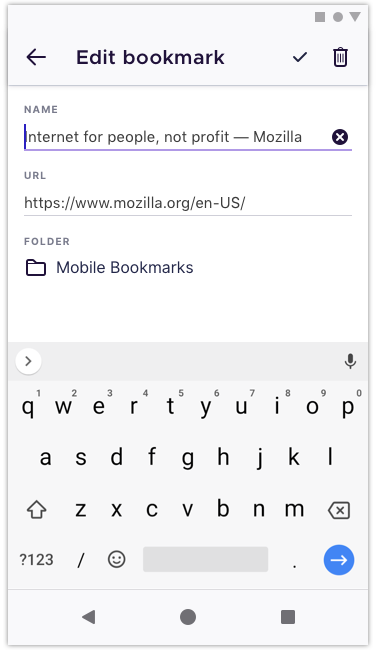
@topotropic could we just add a checkmark next to the delete icon here?
 ekager
on 14 Nov 2019
ekager
on 14 Nov 2019
@topotropic could we just add a checkmark next to the delete icon here?
Yes, works for me. Thanks!
And please add this also to the "Edit folder" option.
 topotropic
on 8 Jan 2020
topotropic
on 8 Jan 2020
I want to work on this issue, please assign it to me @ekager
 KaairaGupta
on 10 Jan 2020
KaairaGupta
on 10 Jan 2020
Okay @KaairaGupta you are assigned
ekager
on 10 Jan 2020
@ekager currently, if i press the soft back key as soon as i edit my bookmark's name, the changes aren't saved. while if i wait for say like a second or two before pressing the back key, the changes are saved. This delay is for the time it takes for the changes to be saved.
Hence, on clicking the tick mark, i'll need to add a progress bar too to show the changes being saved. How should the progress bar look??
KaairaGupta
on 11 Jan 2020
@KaairaGupta I think we can model this after the progress bar/behavior in fragment_delete_browsing_data (but update here instead of delete) with similar methods to startDeletion and finishDeletion.
Instead of continuously updating the bookmark changes in updateBookmarkFromTextChanges let's only update when the user presses the new checkmark, finish updating, and then navigate. Pressing back in the toolbar or soft button should not make any changes.
ekager
on 11 Jan 2020
@ekager the dialog box will need strings, for the time being, i am hardcoding the "save" string. Also, I have added the dialog box title string to the static strings( just the way the title string of delete dialog box is mentioned in the code). Is this okay or should i do something else?
KaairaGupta
on 12 Jan 2020
@ekager i have implemented the functionality of the tick mark, but when a user clicks on the save option of the confirmation dialog box, the app should navigate back to the bookmarks fragment, which i am unable to implement.
i added
FenixSnackbar.makeWithToolbarPadding(requireView(), FenixSnackbar.LENGTH_SHORT)
            .setText("changes saved successfully")
            .show()
           findNavController().popBackStack()
in the finishEdit() function
due to which when i select the edit option from the three-dots menu on the bookmark fragment, the edit bookmarks screen opens for a moment, and navigates back to the bookmark screen.
KaairaGupta
on 12 Jan 2020
I was using someone else's system, as my laptop had crashed, and I forgot to change the global git user before committing, so please ignore cb104102460c27b004ccad84f75ffa66f2d0b3c8.
Changes have now been made in author.
I have made the PR (#7683) so please review it @ekager
KaairaGupta
on 14 Jan 2020
- Verified on Beta 3.2-beta1.
- Verified with TalkBack and A11y scanner.
- Devices: Galaxy Note 8 (Android 9), Xiaomi Mi Pad 2 (Android 5.1)
sv-ohorvath
on 22 Jan 2020
Related issues
topotropic
·
3Comments
 AndiAJ
·
3Comments
AndiAJ
·
3Comments
 abodea
·
3Comments
vesta0
·
3Comments
abodea
·
3Comments
vesta0
·
3Comments
 robsmith11
·
3Comments
robsmith11
·
3Comments