Fenix: FNX-518 ⁃ [Bug] Samsung devices: Using a large font size, the text in the URL bar is not visible anymore
Steps to reproduce
- Set the device font size to the largest setting.
- Open Fenix and type in the search bar.
- Examine the URL bar when a webpage is loaded.
- Expected behavior
The URL bar shows the main domain of the site when it's not entirely visible. The url bar is the same size as the text, so it doesn't go over the margins. - Actual behavior
When typing text in the search bar, the characters aren't entirely visible.
The URL doesn't focus on the main domain.
The URL text spills over the URL bar. - Device information
- Expected behavior
- Android device: Galaxy Note 8 (Android 9), Galaxy S8.
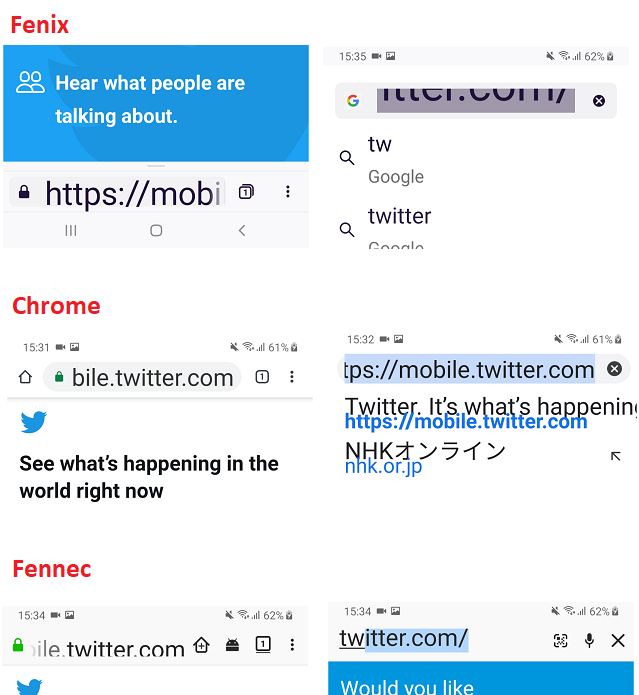
This seems specific to Samsung devices, not an issue on a Pixel (smaller font options and smaller screen) or,
on HTC Desire 820 (large screen):

- Fenix version: 5/6
 sv-ohorvath
All 10 comments
@eeejay we currently have 3 bugs related to larger font size (will be tagging you in all of them). Let us know what your recommended approach would be and what would be the minimum requirement for MVP from an accessibility standpoint.
 vesta0
on 14 May 2019
vesta0
on 14 May 2019
@eeejay see ^^ :)
vesta0
on 23 May 2019
Like I said in another text size bug, I don't have too much insight into this. It obviously is a bug and it should be mitigated as much as possible. UX folks might have a better resolution.
 eeejay
on 23 May 2019
eeejay
on 23 May 2019
I have a pending patch in a-c: https://github.com/mozilla-mobile/android-components/pull/3214
 sblatz
on 31 May 2019
sblatz
on 31 May 2019
This should be fixed by tomorrow's nightly.
sblatz
on 4 Jun 2019
Verified as fixed on the latest build 1.0.1923 (#11560607), with Samsung Galaxy Note 8 (Android 9), and Samsung Galaxy S8 (Android 9).
 softvision-miralobontiu
on 5 Jun 2019
softvision-miralobontiu
on 5 Jun 2019
@vesta0 per our meeting, this issue will be coming back when I revert my a-c change. As discussed, we will move this from MVP Blocker -> P1
sblatz
on 7 Jun 2019
This is blocked on https://github.com/mozilla-mobile/android-components/issues/3213
sblatz
on 12 Jun 2019
This should've been fixed by the AC patch https://github.com/rocketsroger/android-components/commit/f305b727df5b734198cd907b5e57888885c90fdb
sblatz
on 25 Nov 2019
Verified as fixed on the latest Nightly build 11/26 (#13300629), with Samsung Galaxy Note 8 (Android 9), and Samsung Galaxy S8 (Android (9).
softvision-miralobontiu
on 26 Nov 2019
Related issues
 AndiAJ
·
3Comments
vesta0
·
3Comments
AndiAJ
·
3Comments
vesta0
·
3Comments
 bbinto
·
3Comments
softvision-miralobontiu
·
3Comments
bbinto
·
3Comments
softvision-miralobontiu
·
3Comments
 abodea
·
3Comments
abodea
·
3Comments