Fenix: White flash when starting directly into Private Browsing mode
Steps to reproduce
- Open Fenix
- Tap on the private browsing icon
- Kill Fenix
- Start Fenix
Expected behavior
No white flash when launching into private browsing
Actual behavior
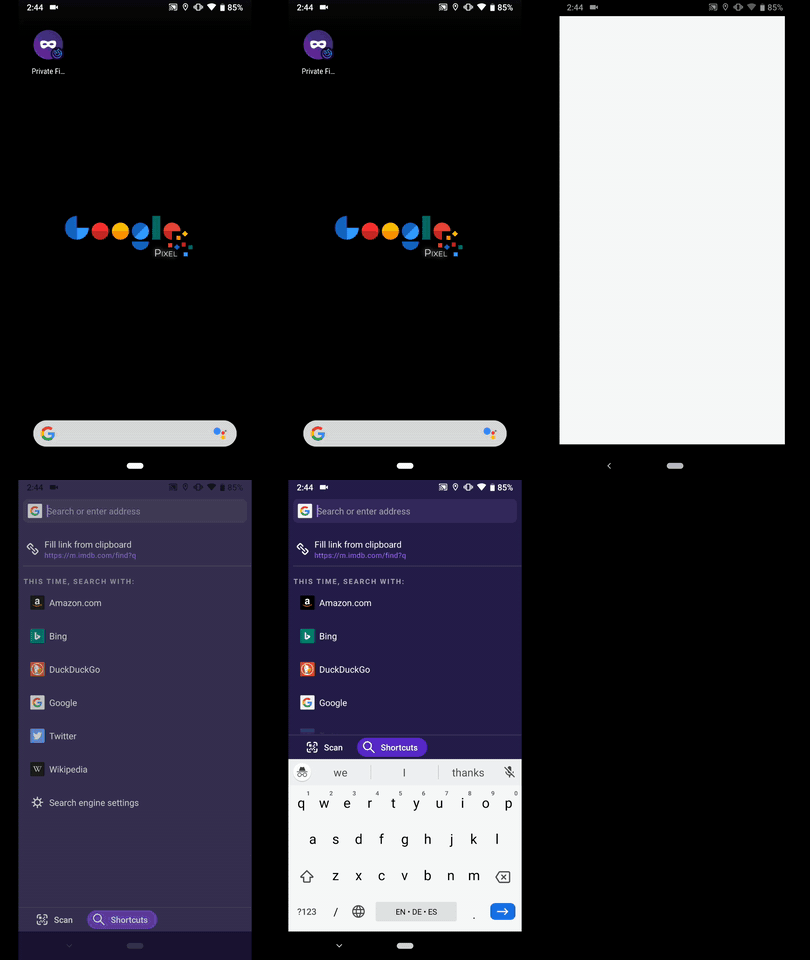
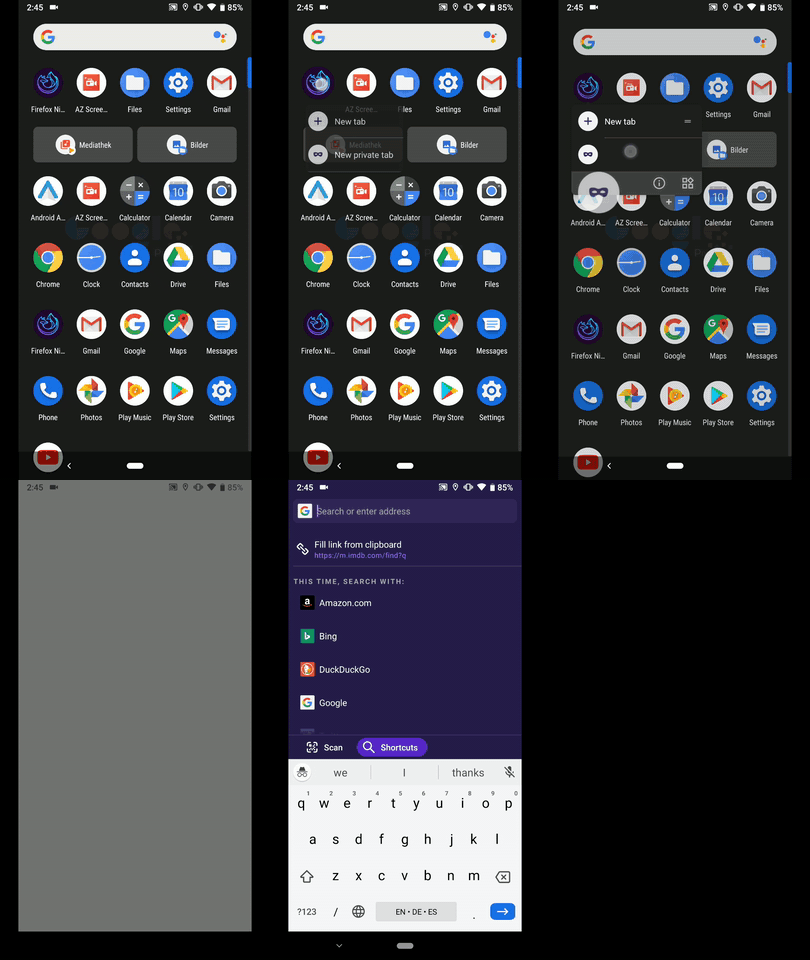
White flash before private browsing is started
Device information
Android device: Samsung Galaxy S5
- Fenix version: build #10521210
UX
Design Work
- [x] Request for Comments from UX team
- [x] ~Usability testing if a new pattern or potentially confusing UI~ Not required – minor splash screen tweak
- [x] Request for Comments from Fenix team and/or A/C, GV, Sync, etc as needed
- [x] Interaction details included
- [x] Accessibility ~- is this a review by someone,~ just keeping it in mind? Splash screen modification won’t impact accessibility.
- [x] ~For existing UI changes, deltas are highlighted~ No delta required for this splash screen.
- [x] ~Strings/content reviewed and approved~ No string required
- [x] ~Are they too long for the component in other locales~
Deliverable
- [x] ~Assets uploaded to Google Drive~
- [x] ~Links to deliverables (spec, assets) posted in comment 0~
Deliverable Links
- ~User flow:~
- Spec: see below
- ~Assets:~
Spec
The white flash seem to happen due to discrepancy between the splash screen (white background) and the private browsing search screen (dark ink background).
To solve this problem, create a blank splash screen with the same colour value as the search screen background.
 kbrosnan
All 11 comments
Video showing the white flash https://www.youtube.com/watch?v=wu7t_Q17pPg
kbrosnan
on 21 Feb 2019
When the activity is recreated, the loading/splash screen will briefly appear. If you test using other Android apps, they usually have a branded splash screen that appears, we just don't have anything set so it's just a blank white screen and it is pretty jarring when entering private mode.
 ekager
on 21 Feb 2019
ekager
on 21 Feb 2019
I wonder if this changes if the private theme stops extending the light appcompat theme:
https://github.com/mozilla-mobile/fenix/blob/master/app/src/main/res/values/styles.xml#L47
 pocmo
on 22 Feb 2019
pocmo
on 22 Feb 2019
Unfortunately it doesn't seem that inheriting from the dark theme fixed this. We will need to create a splash screen in order to avoid it.
 sblatz
on 26 Feb 2019
sblatz
on 26 Feb 2019
For QA: I cannot seem to reproduce this anymore. Can you please also check this?
Note: The STR is not applicable anymore, private browsing is not persisted when you kill the app. So try opening Fenic from the private browsing screen shortcut. TY!
 mcarare
on 4 Dec 2019
mcarare
on 4 Dec 2019
Hi, this is still reproducible on the latest Nightly Build #13440604 from 12/10 using the following devices:
• Google Pixel 3a XL (Android 9)
• Huawei Mate 20 Lite (Android 8.1.0)
As @kbrosnan 's STR isn't applicable anymore, I've checked this matter using 2 alternative Steps to reproduce.
1st
- Add private browsing shortcut
- Open Fenix using the previously added shortcut
► Video (Time lapsed)
2nd
- Long tap on Fenix Nightly app icon
- Tap New private tab from the context menu
► Video (Time lapsed)
I'll remove the QA needed label until further notice.
 AndiAJ
on 10 Dec 2019
AndiAJ
on 10 Dec 2019
UX please review this as part of the UX Implementation/Polish review and advise.
 vesta0
on 16 Dec 2019
vesta0
on 16 Dec 2019
I recommend creating a blank splash screen with the same colour value as the search screen background.
Our spec says that this background colour is ink-90 #1d1133. However, the colour used in your video looks to be #261e4b. Can we use that value?
 brampitoyo
on 18 Dec 2019
brampitoyo
on 18 Dec 2019
@kbrosnan Can you put check mark for fully crossed out items in the checklist. It currently says 4 out of 10 completed on the github issues list.
 Anutrix
on 28 Aug 2020
Anutrix
on 28 Aug 2020
@brampitoyo created that list.
kbrosnan
on 2 Sep 2020
@Anutrix I’ve check-marked all the items in the list. This should complete 10 out of 10 items.
brampitoyo
on 9 Sep 2020
Related issues
 thelazyoxymoron
·
3Comments
thelazyoxymoron
·
3Comments
 andreicristianpetcu
·
3Comments
andreicristianpetcu
·
3Comments
 csadilek
·
3Comments
andreicristianpetcu
·
3Comments
csadilek
·
3Comments
andreicristianpetcu
·
3Comments
 topotropic
·
3Comments
topotropic
·
3Comments