Fenix: Duplicate awesomebar suggestions (open tab, history)
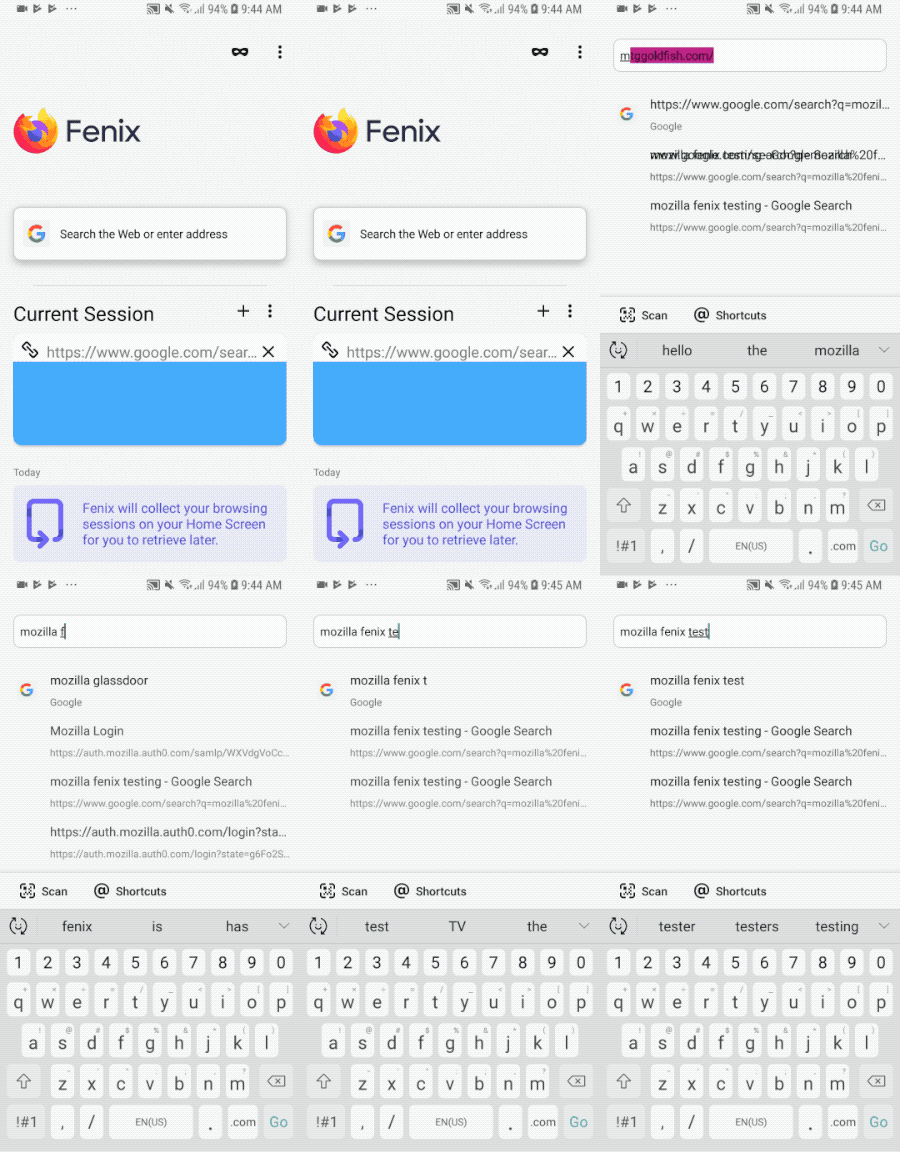
Currently if begin searching for something that is already in an open tab (e.g. "mozilla fenix testing") the suggestion will populate twice in my awesomebar. Once for the history and once for the open tab. This seems redundant to me and may confuse users. We should consider changing this behavior.
 sblatz
All 17 comments
Note that both perform different actions: One switches to that tab (from sessions provider) and the other one opens a new tab (from history provider). They currently just look the same.
This is related to those two A-C issues:
- https://github.com/mozilla-mobile/android-components/issues/1368 - Something we want to do in the AwesomeBar component is to merge duplicates if applicable.
- https://github.com/mozilla-mobile/android-components/issues/1367 - Differentiate between suggestions from different providers. Technically that's something you can do already. But we do not do that by default.
 pocmo
on 13 Feb 2019
pocmo
on 13 Feb 2019
I like having both behavior. I do think maybe we should change the description on the one that opens the tab to be more explicit.
 boek
on 26 Mar 2019
boek
on 26 Mar 2019
would love UX to weigh in :)
boek
on 26 Mar 2019
@Verdi to weigh in.
The current tab and the history suggestion are both being shown in the search results. They both look the same but one goes to the new tab the other opens the history item. There are two question I'm seeing here:
- Should we display both as they do different things?
- How do we make it more clear what will happen when you tap on it?
 lime124
on 9 Apr 2019
lime124
on 9 Apr 2019
Note that both perform different actions: One switches to that tab (from sessions provider) and the other one opens a new tab (from history provider).
FWIW, in the latest build that I have, tapping on the history item does nothing, so that may be a bug/regression if it used to open a new tab.
 yoasif
on 9 Apr 2019
yoasif
on 9 Apr 2019
We should dedupe exactly matching URLs and prefer the open tab one.
- So, if I have https://mozilla.org open and I start searching for "mozilla" I should only see the entry from the sessions provider. Tapping it will switch me to that tab.
- If I do not have https://mozilla.org open and I start searching for "mozilla" I should only see the entry from the history provider. Tapping it will open a new tab with this URL.
It looks like we don't have a design to distinguish these two entries from each other. I'll file an issue for that.
 Verdi
on 9 Apr 2019
Verdi
on 9 Apr 2019
@Verdi can this issue be closed based on your comment above?
 vesta0
on 30 Apr 2019
vesta0
on 30 Apr 2019
@vesta0 no - verdi is agreeing with sawyer that we should de-dup exact matches and only show the open tab option.
a separate issue is to have a visual design to indicate which is which.
lime124
on 1 May 2019
This is blocked by A-C but it is also a P2.
vesta0
on 8 May 2019
CC @Verdi @topotropic @lime124
Deduplicating those results is technically challenging:
- Providers are queried asynchronously and independently. We can only dedupe if we have results from both providers back, which means that there can be brief moments where we show a suggestion and then replace it again - which may cause flicker.
Because of that I wonder if there are possibly other solutions to that problem?
In addition to that I wonder:
- Should we still make them visually different because they still both can show up individually and the user would have no idea whether we switch to that tab or load the URL.
- Desktop seems to show both actions too - annotated with "Visit" or "Switch to Tab" (Similar in Fennec)
- Also see #2037 - a similar issue about bookmarks vs. history.
pocmo
on 3 Sep 2019
@vesta0 I think it's going to make sense for us to iterate on the search experience while we look at the enhanced search issue in Q4. i think there are a bunch of little things floating around that we can collect and tackle at one time.
lime124
on 20 Sep 2019
I second that @lime124 👍
vesta0
on 25 Sep 2019
This issue has been filed as part of the larger search experience work (#5457), so I will remove the UX-feedback label.
 brampitoyo
on 2 Oct 2019
brampitoyo
on 2 Oct 2019
So it looks like session suggestions now say "Switch to tab" which definitely helps, but if you have a lot of history, this suggestion always seems to get buried at the bottom. Would it make sense from a UX perspective to also prioritize these suggestions to sit at the top? Seems like I would rather switch to an open tab if available?
 ekager
on 15 Apr 2020
ekager
on 15 Apr 2020
So it looks like session suggestions now say "Switch to tab" which definitely helps, but if you have a lot of history, this suggestion always seems to get buried at the bottom. Would it make sense from a UX perspective to also prioritize these suggestions to sit at the top? Seems like I would rather switch to an open tab if available?
& a colour gradient applied to the message.
 mikeGolf08
on 15 Apr 2020
mikeGolf08
on 15 Apr 2020
@ekager Agreed. I would prioritise switching to tab if it’s already open. Suggestion for open tabs should appear closer to the top of the list, under exact keyword search.
So perhaps the default order would go like this:
- Exact keyword search (in case URL autocomplete takes over address bar)
- Open tabs
- Bookmarks
- Browsing history
- Search suggestions
This mirrors the default ordering on Firefox desktop, demonstrated below:

However, we know from our user research studies that mobile users are more likely to utilise their phones for quick informational searches. Based on this behaviour, should search suggestions be bumped up higher than browsing history, by default?
So the default ordering on Fenix could be something like this:
- Exact keyword search
- Open tabs
- Bookmarks
- Search suggestions ← Optimise for quick, informational searches
- Browsing history
Would be interested to hear @Verdi’s opinion!
brampitoyo
on 20 Apr 2020
@brampitoyo Doesn't it make sense to give the user an option to make it a custom order or at least maybe to have an additional setting at the search setting for having search suggestions under open tabs or on the bottom of the list?
mikeGolf08
on 20 Apr 2020
Related issues
 Chris01277
·
3Comments
Chris01277
·
3Comments
 softvision-miralobontiu
·
3Comments
softvision-miralobontiu
·
3Comments
 andreicristianpetcu
·
3Comments
andreicristianpetcu
·
3Comments
 thelazyoxymoron
·
3Comments
thelazyoxymoron
·
3Comments
 phileastv
·
3Comments
phileastv
·
3Comments
Most helpful comment
So it looks like session suggestions now say "Switch to tab" which definitely helps, but if you have a lot of history, this suggestion always seems to get buried at the bottom. Would it make sense from a UX perspective to also prioritize these suggestions to sit at the top? Seems like I would rather switch to an open tab if available?