Fenix: FNX-511 ⁃ Add ability to change Firefox Preview (browser UI) language
Why/User Benefit/User Problem
As a user, I want to experience the app in a language other than the system / phone language
Deps
- [x] AC API for switching languages
Acceptance Criteria (how do I know when I’m done?)
- [ ] I have the ability to change browser UI language separate from the system language
- [ ] Browser language will follow the system language by default
Mocks: https://miro.com/app/board/o9J_kwN9u-I=/
SVG asset for Language icon: https://dzwonsemrish7.cloudfront.net/items/1j0I1L1E282t24241N0l/language.svg
NOT in this issue
- #6502 Allow webpage content language selection
- expanding the locales we currently support #5496
This is just scoped to making the picker inside of Fenix, NOT inside AC
 bbinto
All 46 comments
Issue #940 confirmed that Fenix's app UI language changes correctly when the user changes the Android system language.
AFAICT, Chrome's Language settings only configure the user's preferred language for web content (i.e. the Accept-Language HTTP header sent to web servers), not Chrome's app UI language.
GV bug https://bugzilla.mozilla.org/show_bug.cgi?id=1543823 is about letting the browser customize Gecko's Accept-Language HTTP header and/or making Gecko use the Android system language.
UX question to consider:
- Assume Android system language is en-US.
- User changes Fenix's language setting to en-CA.
- User then changes the Android system language to en-GB.
- Should Fenix's language setting preserve its non-default setting (en-CA) or switch to new system language (en-GB)?
 cpeterso
on 18 Apr 2019
cpeterso
on 18 Apr 2019
- Assume Android system language is en-US.
- User changes Fenix's language setting to en-CA.
- User then changes the Android system language to en-GB.
- Should Fenix's language setting preserve its non-default setting (en-CA) or switch to new system language (en-GB)?
It feels to me like Fenix should be en-GB and and websites should be en-CA unless Fenix implements separate website and browser UI preferences for language.
Also, FWIW, Chrome also allows users to set up several languages based on priority, while Fennec only allows users to select a single one (likely because the preference applies to both UI and websites).
 yoasif
on 18 Apr 2019
yoasif
on 18 Apr 2019
@vesta0 are we able to get a UX/product decision on this:
(From @cpeterso):
This issue is about "browser language", but does that just affect the app UI's language? Or should it also change the user's web content language preference (i.e. Gecko's
Accept-LanguageHTTP header sent to servers)?
There's also a product question of whether the device's language should affect the app UI language and/or the Accept-Language HTTP header
 sblatz
on 7 Jun 2019
sblatz
on 7 Jun 2019
There's also a product question of whether the device's language should affect the app UI language and/or the Accept-Language HTTP header.
GeckoView's default Accept-Language HTTP header is: language _set_ by app (not necessarily the same as the app's UI language!) > OS language > "en-us,en".
cpeterso
on 7 Jun 2019
@sblatz I believe this is not blocked on anything. Does this need to be implemented in A-C or Fenix?
 vesta0
on 8 Jun 2019
vesta0
on 8 Jun 2019
@pocmo would this be useful for others or should we implement on the Fenix side?
sblatz
on 11 Jun 2019
Since we want that for every app we ship (e.g. Fennec, Focus and Firefox Lite have it, Fenix wants it) and since there's quite some complexity I think that should live in AC. Delphine filed that a while ago and I'll add the [Fenix] label to it: https://github.com/mozilla-mobile/android-components/issues/1557
 pocmo
on 12 Jun 2019
pocmo
on 12 Jun 2019
removing the ux label - this is on our radar already as it's part of Q3 plans.
 lime124
on 23 Jul 2019
sblatz
on 5 Sep 2019
lime124
on 23 Jul 2019
sblatz
on 5 Sep 2019
This is dependent on AC in the sense that we are going to use https://github.com/mozilla-mobile/android-components/issues/3584, but we are not dependent on their UI element :)
sblatz
on 23 Sep 2019
Removing the AC label because the above linked ticket has been closed
 ekager
on 3 Oct 2019
ekager
on 3 Oct 2019
@lime124 can we reference Focus designs for this feature and iterate on improvements afterwards?
vesta0
on 3 Oct 2019
Progress report:
See the board here: https://miro.com/app/board/o9J_kwN9u-I=/
I’ve started the work on this project today. Although not all the screens in this feature have been mocked up, the user flow is fairly complete.
In this user flow and mockups, users have the maximum flexibility to:
- Choose one “Menus and dialogs” language
- Order “Web content” language(s)
Both may be set independently from the Android System language. As you’ll see on the board below, this feature isn’t as simple as designing a single menu.
I haven’t had the time to tackle this specific corner case: “What happens to the language(s) set under this menu, when the Android system language changes? Does it propagate? If so, what are the logic/rules?”
 brampitoyo
on 31 Oct 2019
brampitoyo
on 31 Oct 2019
Progress report:
See the board here: https://miro.com/app/board/o9J_kwN9u-I=/
I’ve spent today designing policies around how OS vs. Firefox vs. web content languages interact.
I know that we want a separate language options for menus/dialogs and web content. This will solve some of our problems.
I also set out to solve the problem @cpeterso wrote in https://github.com/mozilla-mobile/fenix/issues/220#issuecomment-484572922:
- Assume Android system language is en-US.
- User changes Fenix's language setting to en-CA.
- User then changes the Android system language to en-GB.
- Should Fenix's language setting preserve its non-default setting (en-CA) or switch to new system language (en-GB)?
As a solution, I recommend:
- Under “Menus and dialogs language”, have an option called “Follow device language”. This option should be default policy, unless changed manually by the users
- Under “Web content language”, also have an option called “Follow device language”. This option should be on top of the list, unless changed manually by the users.
My reasoning are as follows:
- If users change the system language, they probably expect the browser and web content language to also follow. So we set the default policy to “Follow device language”.
- A portion of users will want to override this “follow” behaviour. To do that, they can go to Firefox Language Settings.
- There are 2 separate items within Firefox Language Settings: “Menus and dialogs language” and “Web content language”. This separation helps users realise that changing one item doesn’t necessarily change the other item.
Thanks to “Follow device language”, our default policy will work for the large majority of users, most of the time.
My concern is this: while it’s possible to set “Menus and dialogs” to “Follow device language”, there is no way for us to say “For all web content, follow device language”.
Either way, this project is now ready for walkthrough, so I will schedule a time to sit down with @vesta0 and Engineering.
brampitoyo
on 4 Nov 2019
@cpeterso do we have hooks in GV to change language for webpage content?
sblatz
on 7 Nov 2019
After walk through with Product and Engineering teams, this project is now ready to hand off to Engineering.
See the board: https://miro.com/app/board/o9J_kwN9u-I=/
SVG asset for Language icon: https://dzwonsemrish7.cloudfront.net/items/1j0I1L1E282t24241N0l/language.svg
- For MVP, we will only have the ability to change Browser language.
- There’s a new policy to handle Webpage Content language when a new Browser language has been selected. User-selected language goes on top. A sensible fallback like English goes under it.
- For post-MVP, we will split the Webpage Content language work in two: the page itself, and its edit mode
- The design specified having two names for each language: endonym and exonym. If L10N doesn’t have these values, then this feature can still ship with only one name per language.
brampitoyo
on 7 Nov 2019
@cpeterso do we have hooks in GV to change language for webpage content?
GV honors the system language by default (i.e. Gecko's HTTP requests set the Accept-Language HTTP header to match the system language, issue #940). Fenix can override Gecko's list of preferred languages using the GeckoRuntimeSettings#setLocales API:
https://mozilla.github.io/geckoview/javadoc/mozilla-central/org/mozilla/geckoview/GeckoRuntimeSettings.html#setLocales-java.lang.String:A-
cpeterso
on 7 Nov 2019
@liuche Do we have the translations for the language names (endonym and exonym) available somewhere?
Also, I saw that some of our translation files are not complete (for example, the Catalan one), so I'm thinking we should not include these ones in our list since it will be a bit weird for the user to have only 2-3 strings translated.
 BranescuMihai
on 28 Nov 2019
BranescuMihai
on 28 Nov 2019
@BranescuMihai @liuche As far as I’m aware, Firefox Desktop has endonym, but the exonyms are only in English. Click “Select your preferred language” on this page: https://www.mozilla.org/en-US/firefox/all/#product-desktop-release
If exonyms aren’t available in any other language, it’s fine to only use the English exonyms.
brampitoyo
on 2 Dec 2019
https://developer.android.com/reference/android/icu/text/LocaleDisplayNames might be worth trying, if that has all the data you need.
Otherwise we've done this a few times, and we can provide a dataset.
Side note, we should handle release-ready localizations independently of the language chooser. In particular on Nightly, it's important that localizers can start testing their strings, even if they've only done 5 of them by now.
 Pike
on 6 Dec 2019
Pike
on 6 Dec 2019
@BranescuMihai ^ we should definitely try to avoid adding locale names as new strings.
 liuche
on 6 Dec 2019
liuche
on 6 Dec 2019
@liuche @Pike @brampitoyo Turns out Android provides the exonym and endonym by itself, so all good now, thanks!
Pull request is opened:
Video with the feature
BranescuMihai
on 10 Dec 2019
@BranescuMihai Just want to say that your video demo looks amazing. Thanks heaps for implementing these changes!
brampitoyo
on 11 Dec 2019
Hi, I've just check this issues on the latest Nightly Build #20070606 from 01/07 using a Google Pixel 3a (Android 9) and noticed a couple of inconsistencies:
- The language isn't actually changed from Fenix's language setting.
- After closing and re-opening Fenix noticed that:
• Only some settings subsections seem to be translated (Theme, Toolbar), but after opening them, the language isn't changed.
• If you re-open the Language section, the previously selected pref isn't checked. - Supposedly, while still having the desired language selected in Fenix's setting ("Follow device language" isn't enabled) if you change the device's Language and input setting it actually changes Fenix's language.
► Video
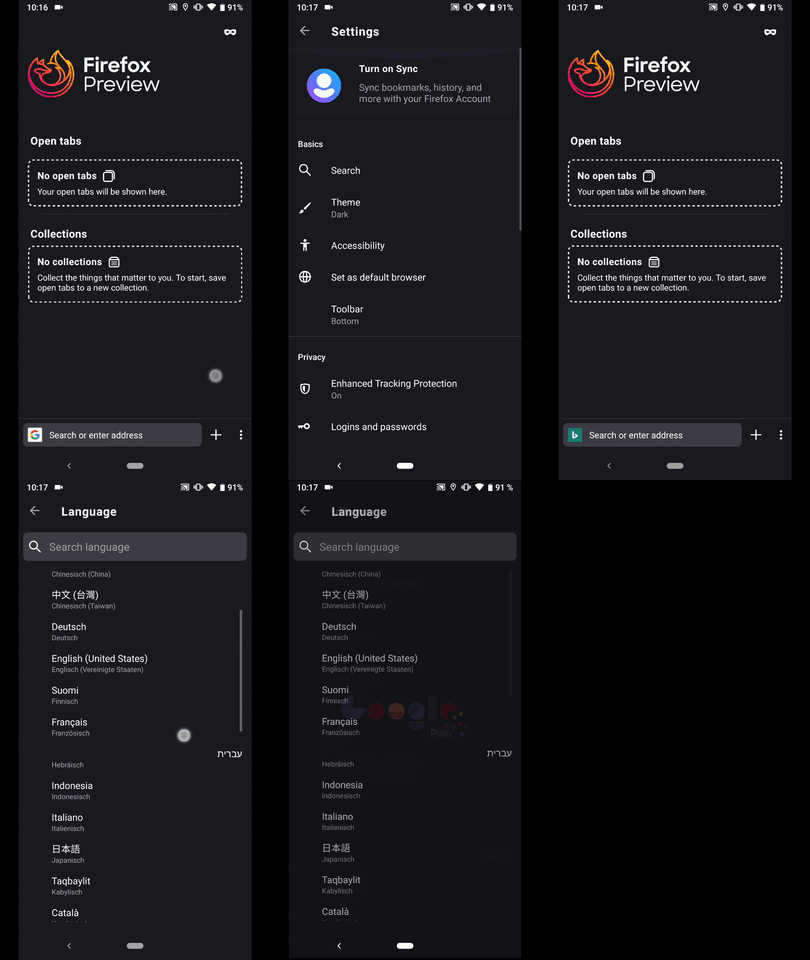
@BranescuMihai & @Baron-Severin - Please review the above.
I'll remove the QA needed label until further notice.
 AndiAJ
on 7 Jan 2020
AndiAJ
on 7 Jan 2020
I smoke tested this and it worked as expected.... Not sure, possible that I messed something up when rebasing. I'll try to find some time to investigate this.
 severinrudie
on 7 Jan 2020
severinrudie
on 7 Jan 2020
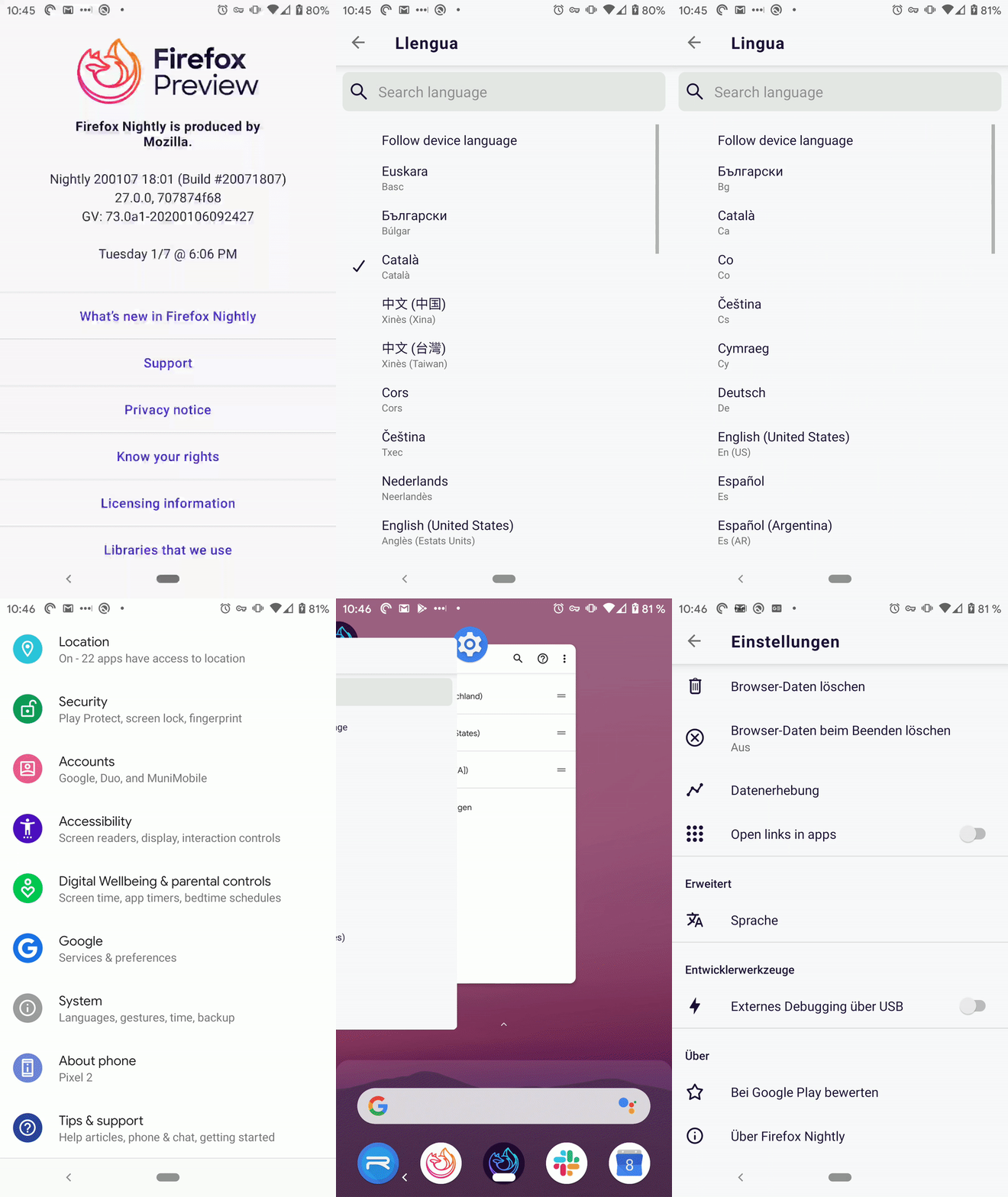
Hm, very strange. I'm on Nightly Build #20071807 from 1/7, and mine is behaving very differently, no idea why.
If you re-open the Language section, the previously selected pref isn't checked.
Oof, good catch. @BranescuMihai I heard you were back from PTO, are you able to take a look at this? If not I'll try to fix it tomorrow.
The language isn't actually changed from Fenix's language setting.
Supposedly, while still having the desired language selected in Fenix's setting ("Follow device language" isn't enabled) if you change the device's Language and input setting it actually changes Fenix's language.
These two aren't reproducible for me (video attached).
Only some settings subsections seem to be translated (Theme, Toolbar), but after opening them, the language isn't changed.
I know a lot of our translations are only partial, so this might be expected on certain languages. When I tested, theme and toolbar were translated in German, Chinese, Italian, French, and Spanish, but theme was untranslated in Japanese, for example.
severinrudie
on 8 Jan 2020
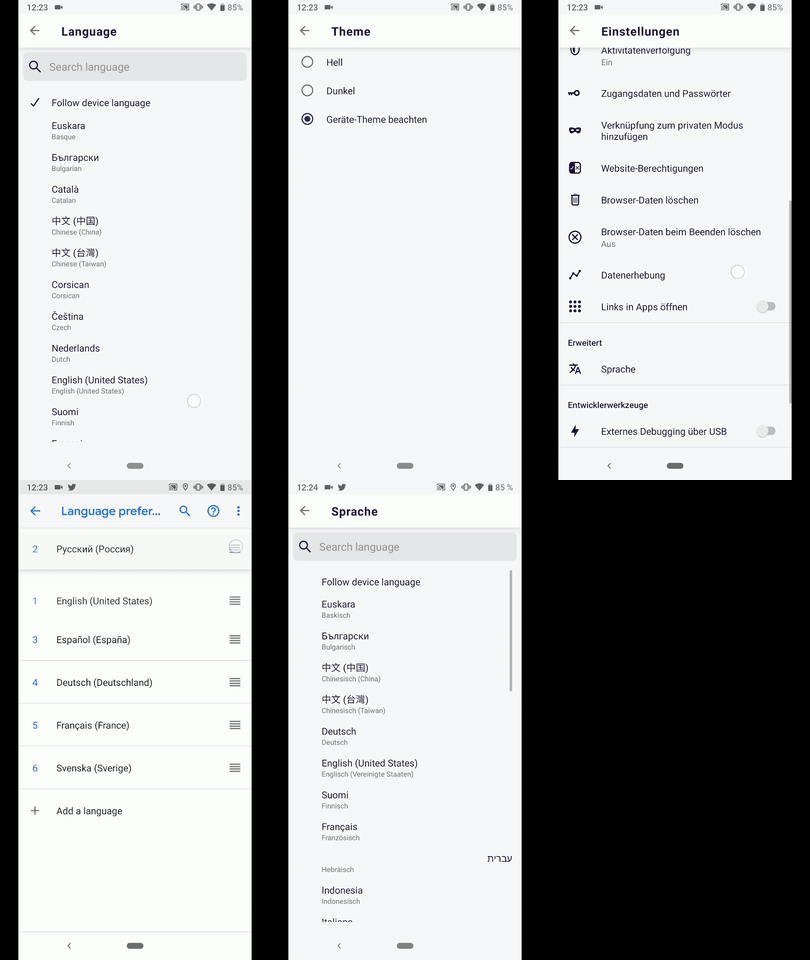
Hi, I've re-checked this matter on the latest Nightly Build #20100616 from 01/10.
I've noticed that the problem is caused by the theme selection, namely if the user is using the dark theme, it will not work at all.
✔️ Using the "Light" or "Follow device theme" It worked with a couple of inconsistencies on:
• Google Pixel 3a (Android 9)
• Huawei Mate 20 Lite (Android 8.1.0)
Inconsistencies:
- If you re-open the Language section, the previously selected pref isn't checked. (already mentioned it)
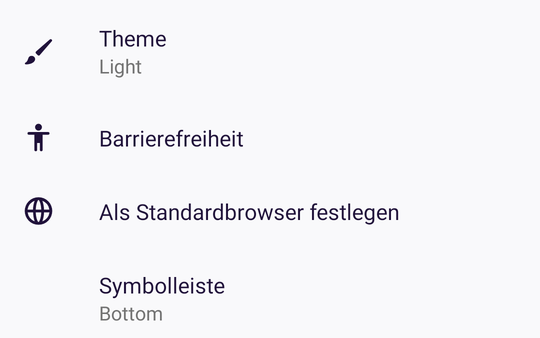
- The subsections from "Theme" & "Toolbar" aren't changed as per the language from Fenix.( are displayed as per the devices language & input setting)
► Video full run
► Screenshot "Theme" & "Toolbar" inconsistency
❌ Didn't work at all on the following devices:
• Samsung Galaxy S7 (Android 7)
• OnePlus A3 (Android 6.0.1)
• LG Nexus 4 (Android 5.1.1)
@Baron-Severin - Please review ☺️
AndiAJ
on 10 Jan 2020
The subsections from "Theme" & "Toolbar" aren't changed as per the language from Fenix.( are displayed as per the devices language & input setting)
On my device the exact opposite is true: These strings are (almost) the only strings using the Fenix and not the device language, see https://github.com/mozilla-mobile/fenix/issues/7559#issuecomment-572774124. Interesting. 🤔
the problem is caused by the theme selection, namely if the user is using the dark theme, it will not work at all.
Oh, that's a good hint. There is also the opposite true for me: it only works with the dark and not with the light theme for me. 😅 I will test a bit more and update #7559 with my observations.
 cadeyrn
on 10 Jan 2020
cadeyrn
on 10 Jan 2020
I checked in and it looks like @BranescuMihai will be back on Monday, so I'm going to leave this one to him.
severinrudie
on 10 Jan 2020
@Baron-Severin @BranescuMihai this landed on Beta 3.1.0 but it still has the issues mentioned above, not in a very good condition. Should we hide it until the bugs are fixed?
 sv-ohorvath
on 14 Jan 2020
sv-ohorvath
on 14 Jan 2020
Yes, is it easy to hide that language picker setting, or make it Nightly only? @BranescuMihai could you open a PR for that, to make this Language Picker Nightly-only until these bugs and #7559 are fixed? That we can also uplift it into the Beta.
liuche
on 14 Jan 2020
@BranescuMihai when you have fixed the issues here, could you also remove the feature flag hiding the language picker?
liuche
on 22 Jan 2020
Putting this back into the sprint bc @BranescuMihai isn't available to work on this right now!
liuche
on 24 Jan 2020
@liuche I'm back from medical leave, so I'll finish up those bugs
BranescuMihai
on 27 Jan 2020
I just tried the locale switcher on today's Nightly and it seems to work as expected :)
Maybe QA can do a thorough check and confirm?
 Delphine
on 28 Jan 2020
Delphine
on 28 Jan 2020
Since this seems to be working on Nightly, and #7677 is already filed, sending this to QA. Let's file others as follow-ups if the main feature works.
liuche
on 31 Jan 2020
Hi all,
I've tested on the latest Nightly build from 03/02 with Samsung Galaxy Note 8 (Android 9), and Google Pixel (Android 10), and this is not fixed yet.
On both devices I had dark themes applied.
The newly selected language was switched back to the system's language when the user selected the "Light" theme, instead of the "Dark" theme. Changing back to the "Dark" theme, the newly selected language was enabled again.

I will remove the eng:qa:needed label. Please let me know if I should file a new issue.
Thanks!
 softvision-miralobontiu
on 3 Feb 2020
softvision-miralobontiu
on 3 Feb 2020
Is your device theme dark? If yes, it's #7596 (it only works if system and Fenix theme are either both light or both dark).
edit: It has been fixed in latest build from master, should be in Nightly tomorrow.
cadeyrn
on 3 Feb 2020
Hi!
Verified as fixed on the latest Nightly build 200204 from 2/4, with Sony Xperia Z5 Premium (Android 7.1.1), and Google Pixel (Android 10).
I will set the proper label. Cannot close the issue, since it's blocked by #7677.
softvision-miralobontiu
on 4 Feb 2020
@boek could you remove the feature flag for language picker now, and we'll get it out in 4.2? (And anything else you want to get out in 4.2 :) )
liuche
on 17 Mar 2020
@liuche @boek Please note that the feature is still completely broken for some users since more than three weeks, see #7559...
cadeyrn
on 17 Mar 2020
Probably need a fix for #9413 before we turn this on. Could be an activity restart, maybe?
liuche
on 27 Mar 2020
@boek will we have to wait for the new AC nightly version to be merged into Fenix? Not sure how to track, I'll add a comment to #9413
liuche
on 7 Apr 2020
@liuche I updated a-c with this PR :)
 boek
on 7 Apr 2020
boek
on 7 Apr 2020
Verified that the user can:
- change the language in Fenix to be different than the system's language,
- follow the system's language,
- change the language in Fenix with dark or light theme applied.
Tested with Google Pixel (Android 10), OnePlus 5T (Android 9), Sony Xperia Z5 Premium (Android 7.1.1), Samsung Galaxy Tab A6 (Android 5.1.1), and HTC 10 (Android 8) on the latest Nightly build from 4/8.
I'll remove the qa:needed label.
@liuche #9413 is not entirely fixed, should I leave this issue opened as well?
softvision-miralobontiu
on 8 Apr 2020
Took a look at that other bug - thanks for filing and following up! For adding the language-switcher, I think we can fix that in release - it affects not all devices, but RTL support is important to get right. So I'll close this, and we can follow up in the other bug.
liuche
on 10 Apr 2020
Related issues
 abodea
·
3Comments
bbinto
·
3Comments
AndiAJ
·
3Comments
abodea
·
3Comments
bbinto
·
3Comments
AndiAJ
·
3Comments
 robsmith11
·
3Comments
robsmith11
·
3Comments
 thelazyoxymoron
·
3Comments
thelazyoxymoron
·
3Comments
Most helpful comment
@liuche @Pike @brampitoyo Turns out Android provides the exonym and endonym by itself, so all good now, thanks!
Pull request is opened:
Video with the feature