Fenix: FNX-5322 ⁃ [UX] Reader Mode
User story:
As a user, I want to have a clean and distraction free reading experience for longform content.
Acceptance Criteria
-As a user I want to know when reader mode is available (Reader mode indicator)
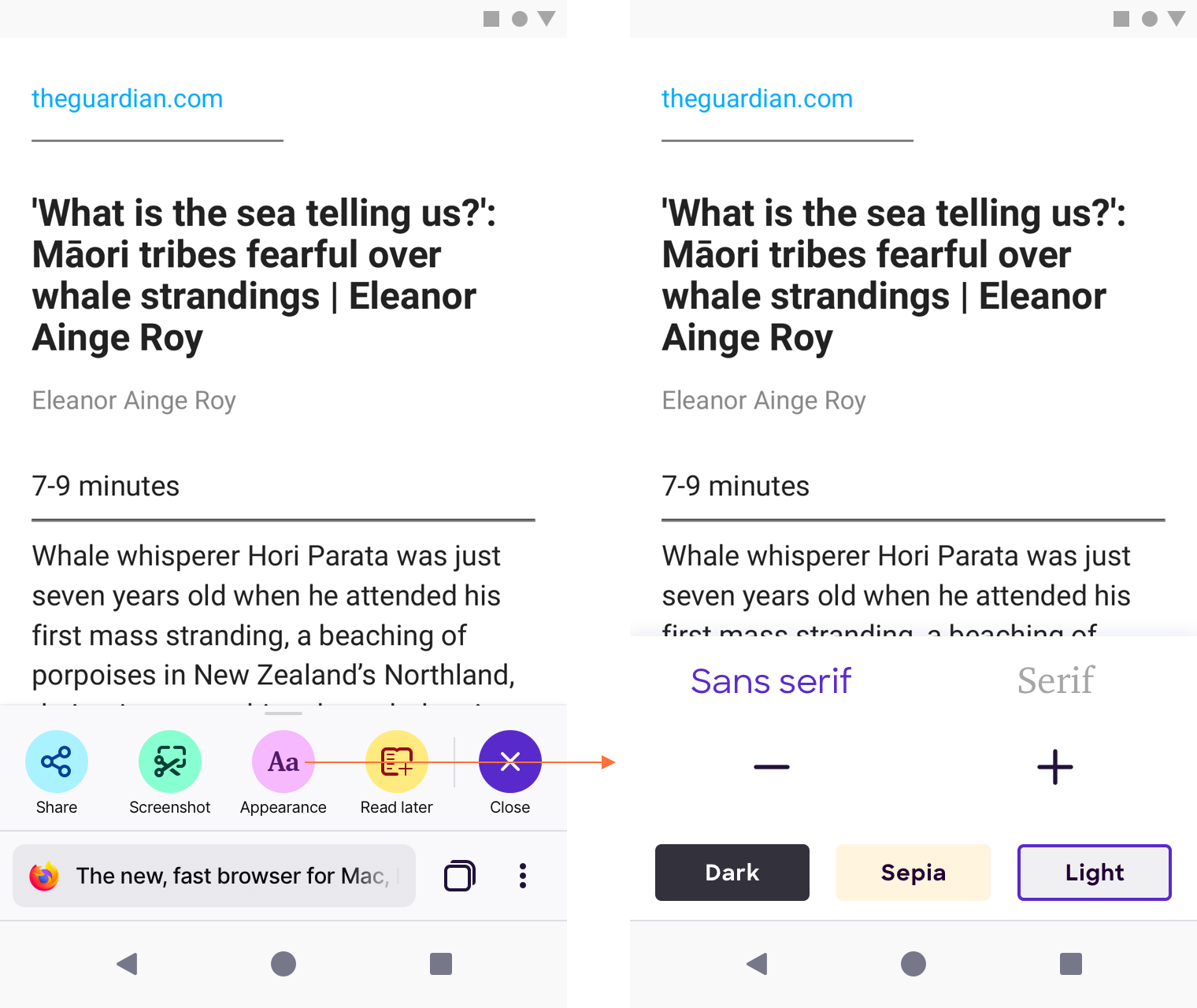
-As a user I want to be able to view a site in reader mode, have be able to change font, text size, and background)
-As a user I want to be able to go back to the browser mode when I am done reading
 lime124
All 32 comments
@colintheshots to identify dependencies on other teams?
 bbinto
on 23 Jan 2019
bbinto
on 23 Jan 2019
Can we consider delegating this to Pocket?
 st3fan
on 23 Jan 2019
st3fan
on 23 Jan 2019
Blocked by PM to write up feature brief / user stories
bbinto
on 1 Feb 2019
@bbinto it seems like this is still blocked? should we move it out of milestone 2?
lime124
on 12 Feb 2019
@vesta0 will be working on this. Let's see what Vesta says when she might have some user stories for it, depending on that we can move it.
bbinto
on 12 Feb 2019
Draft feature brief (includes designs from @bram)
 vesta0
on 15 Feb 2019
vesta0
on 15 Feb 2019
@brampitoyo can you please size this?
bbinto
on 15 Feb 2019
@bbinto If we choose to go with approach 1 (integration with Pocket), then the design on my end will be quite simple: an app bar icon. The actual reader view will be handled by Pocket.
For approach 2: in addition to the app bar icon, I will also need to design the reader view itself. This can still be simple. There is prior work in Fennec that I can adapt from. However, this approach may be harder to implement, engineering-wise.
Speaking as a Fenix user, Pocket offers me a lot of super-powers (on top of the reading mode itself) like reading list, related articles, and maybe even article narration.
Speaking as Mozilla, shipping a Pocket web service in every Fenix APK isn’t only going to increase Pocket MAU. It also means that Pocket’s content recommendation will get even better from having more inputs from Fenix users. It’s like having a more accurate “Forward button” for reader view.
For those reasons, I do prefer approach 1, even though it will require cross-team coordination (we’ll need to talk to Pocket).
 brampitoyo
on 18 Feb 2019
brampitoyo
on 18 Feb 2019
I like Pocket and have it installed on my device.
However, given the bug around CFR on Firefox desktop where Firefox connected to Mozilla upon presenting an add-on recommendation, I think it would be pretty concerning to privacy aware Fenix users to contact an external service to provide something as basic as a reader view - unless you are simply proposing using Pocket's reader view code locally without any connection to the Pocket web service.
I don't know enough about how Pocket works to know whether all of the reader view stuff that Pocket does is local to the device, or whether it has help from the Pocket web service; I think it would be concerning if enabling reader view on a page caused Fenix to hit a pocket.com domain.
 yoasif
on 18 Feb 2019
yoasif
on 18 Feb 2019
Since getting into web novels, I access reader view about 50 times a day, if not more. To be punted over to Pocket for each chapter and lose the integration with my Firefox (Global) session (History) would be a disaster.
 pwd-github
on 18 Feb 2019
pwd-github
on 18 Feb 2019
Maybe we could integrate the Pocket Instant App component into the APK? That would solve two problems. We'd get Pocket for under 4MB and without requiring an external app. It would also include links to get the full app experience. It's a thought. I haven't done any analysis of this option yet, but it would be interesting to test. If the device isn't compatible with Instant Apps, such as an Amazon Fire device, we can fall back to offering to install the < 4MB instant app as its own app.
Alternatively, we could modify the Instant App for our needs and include it directly as a module in the project.
 colintheshots
on 21 Feb 2019
colintheshots
on 21 Feb 2019
@brampitoyo I know you are already working on this. Please also add a S/M/L size to it based on your efforts.
vesta0
on 22 Feb 2019
So here's a test case for this feature: https://www.wuxiaworld.com/novel/trash-of-the-counts-family/tcf-chapter-1
While Pocket does a wonderful job of paginating the text. There's no way to keep your place as is the default behaviour on desktop. Also for some reason, narration isn't available via Pocket. As things stand, the user experience is better in Fennec and on desktop.
pwd-github
on 24 Feb 2019
@vesta0 If we’re building our own solution – and thanks @pwd-github @yoasif for providing really good reasons for it – then I think that this would be a size S.
If we’re using Pocket’s technology, it might be a size M.
brampitoyo
on 24 Feb 2019
Last updated: 28 March 2019
Mocks
https://mozilla.invisionapp.com/share/WCR8VXQ6ASG
Entering and Exiting Reader View
- Reader View is accessed by swiping up on the Quick Action Bar
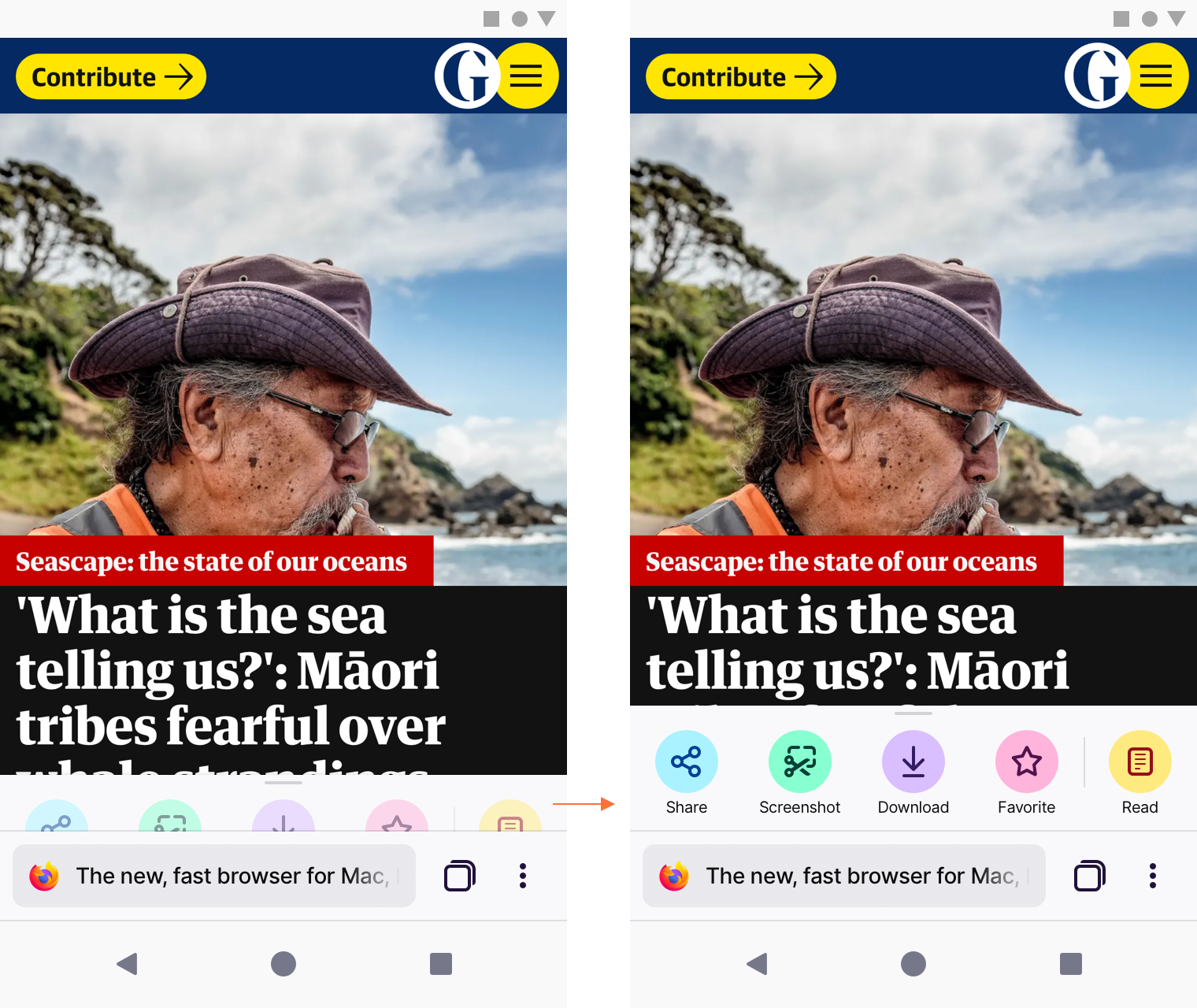
- When the “Read” action is tapped, the icon turns blue and change label to “Close”, to indicate that it’s been selected.
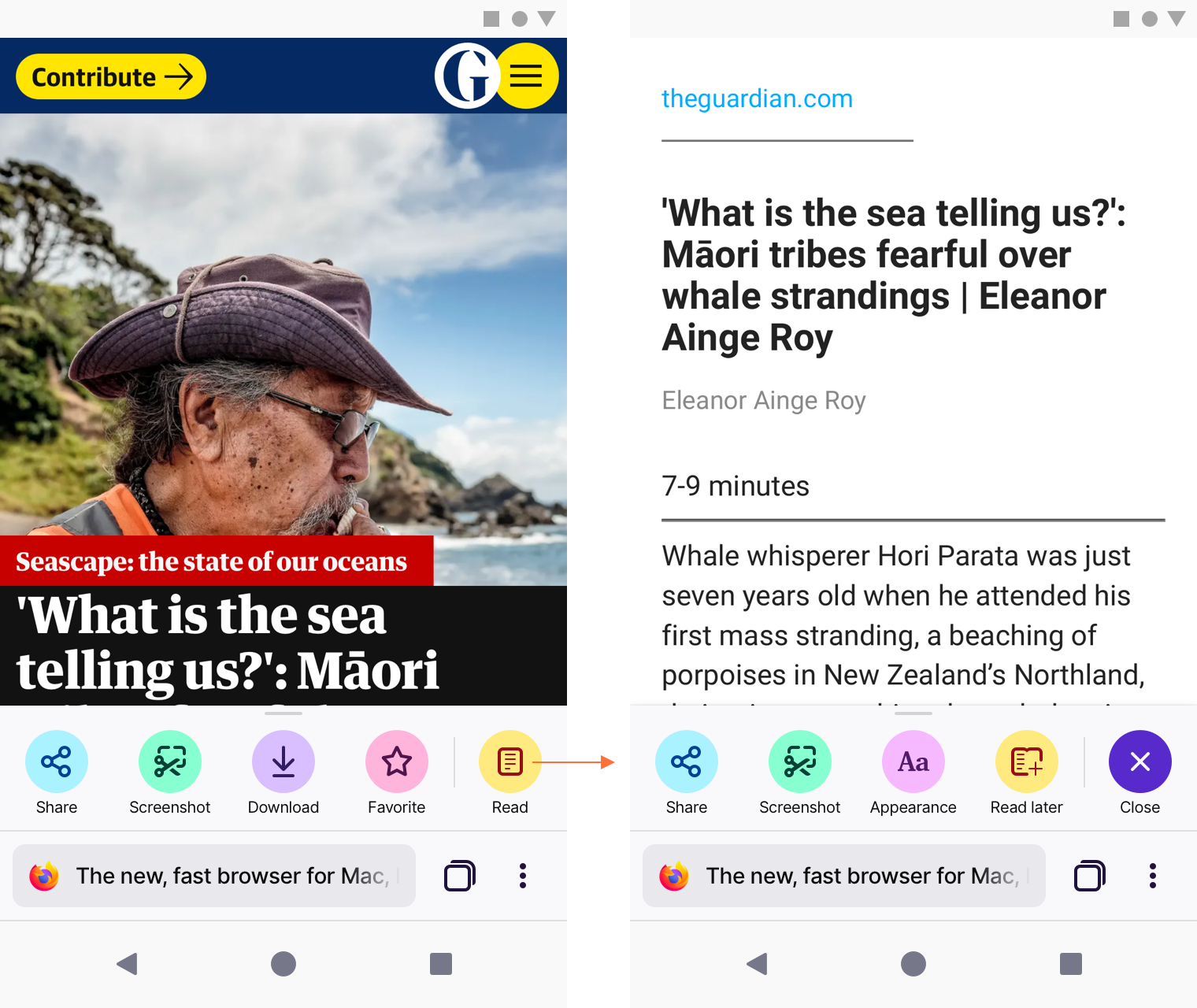
- To exit Reader View, tap the blue “Close” icon.
~Top app bar~
No longer relevant. Reader View controls are now located inside the Quick Action Bar.
Quick Action Bar
Reader View controls replace two actions in the Quick Action Bar.
- “Download” is replaced by “Appearance”: font selection, text size and colour scheme.
- “Favorite” is replaced by “Read later” (which is another word for “Add to Reading List”).
Important note: Reading List is out of scope for MVP. We will remove it from both the Library UI and the Quick Action Bar. I put the icon here so we know its eventual position once it ships.
Scroll down behaviour
Both the bottom app bar and Quick Action Bar disappear as you scroll down the page, and reappears as you scroll up. This behaviour is pretty standard. I’m reiterating it here just to make sure that we have it covered.
brampitoyo
on 28 Feb 2019
That looks really good. Though, personally I'd prefer it to have a more intuitive back button in the top left corner to allow for exiting as well. Also, the narrate feature, which is the real MVP of reader view is missing.
pwd-github
on 28 Feb 2019
@csadilek to review before closing.
vesta0
on 1 Mar 2019
@brampitoyo please remove the hyphen in sans serif - otherwise has my sign off.
 mheubusch
on 1 Mar 2019
mheubusch
on 1 Mar 2019
Looks great! With the planned enhancements/APIs for WebExtensions in GeckoView and Android Components, covering all this functionality should be possible soon.
 csadilek
on 1 Mar 2019
csadilek
on 1 Mar 2019
@mheubusch I’ve removed the hyphen in the word sans serif. @vesta0 @csadilek We’re now good to go.
brampitoyo
on 5 Mar 2019
The narrate feature hasn't been included in the mockups. I can understand that it's outside of the scope of what Mozilla is able to deliver right now, however it would be nice to have some UX direction for a volunteer patch.
pwd-github
on 5 Mar 2019
Thanks @csadilek and @brampitoyo
vesta0
on 5 Mar 2019
Does #911 have any UX? Do we want to, say, peek the bottom sheet and animate the Reader Mode button to indicate that the Reader Mode is available? @brampitoyo
colintheshots
on 8 Mar 2019
@colintheshots Good catch.
When a page detects reader mode, we definitely want to peek the Quick Access Bar halfway up, 1) to indicate that something is different with this page, and 2) to subtly bring up the Reader Mode icon.
Since Reader Mode availability is meant to be unobstrusive, no animation will be necessary.
So from this halfway point, it’s up to the user. Want to access Reader Mode? Pull up the Quick Access Bar and then tap “Read”.
brampitoyo
on 11 Mar 2019
@brampitoyo Do you think all of the items left in the Quick Action bar apply to pages in Reader mode? E.g. What happens if you bookmark a page in Reader mode?
 shorlander
on 14 Mar 2019
shorlander
on 14 Mar 2019
@shorlander Reader View controls are now located inside the Quick Action Bar, replacing two actions there – Download and Favorite – that would do nothing in Reader View.
Share and Screenshot still works as they should on Reader View:
- Share: the URL itself is shared
- Screenshot: a screenshot of the reader view (not of the webpage) is taken
@colintheshots @csadilek @vesta0 @lime124 I’ve updated my specs above to account for the new reader view navigation pattern: appearance and reading list actions are now located inside the Quick Action Bar).
I try not to put up a fresh new spec every time it’s updated, so we have only one source of truth.
See the new specs here: https://github.com/mozilla-mobile/fenix/issues/190#issuecomment-468141227
brampitoyo
on 28 Mar 2019
The narrate feature still seems to be missing?
pwd-github
on 28 Mar 2019
Screenshot: a screenshot of the reader view (not of the webpage) is taken
I thought screenshots are no longer part of the MVP?
 cadeyrn
on 28 Mar 2019
cadeyrn
on 28 Mar 2019
@pwd-github we would love help, but at this time our UX team is at capacity trying to provide everything we need for the MVP. Feel free to open a new ticket with the requested feature and we can prioritize it once we ship the first version :raised_hands:
 boek
on 29 Mar 2019
boek
on 29 Mar 2019
@shorlander This should have gone thru you but I don't see your approval label - can you review and confirm?
mheubusch
on 11 Apr 2019
@mheubusch can we close this issue?
vesta0
on 31 May 2019
Closing . . .
mheubusch
on 1 Jun 2019
Related issues
 phileastv
·
3Comments
phileastv
·
3Comments
 lindongbin
·
3Comments
lindongbin
·
3Comments
 abodea
·
3Comments
abodea
·
3Comments
 Chris01277
·
3Comments
Chris01277
·
3Comments
 softvision-miralobontiu
·
3Comments
softvision-miralobontiu
·
3Comments