Fenix: FNX-5254 ⁃ [UX] Private Browsing
GH issue to track design work. Nicole is the designer
Fenix Flows WIP
https://docs.google.com/drawings/d/11Kj7OAvit6bE6QQt_ven0xnHGhmwu4Jc_N_oazdryAo/edit
 lime124
All 16 comments
- Design private browsing to be visually distinct
- TP on by default
 bbinto
on 18 Jan 2019
bbinto
on 18 Jan 2019
@topotropic - this would have to be done before milestone 2 for engineering start (Feb 8).
Please comment add mock-ups as they are ready. Please also connect with @colintheshots on feasibility.
bbinto
on 23 Jan 2019
 topotropic
on 24 Jan 2019
topotropic
on 24 Jan 2019
From Eng meeting to review stories [1] @topotropic
- What is the user flow after hitting the private mode, this is blocking eng to proper estimate.
- Notifications - reminder to clean up private session?
- How do you get out of private mode?
- Moving back and forth in between modes
Please let us know when this will be finalized?
bbinto
on 24 Jan 2019
Just FYI - I edited Barbara's comment just now to @ nicole and add in the notification comment from that eng meeting.
lime124
on 25 Jan 2019
User Flow
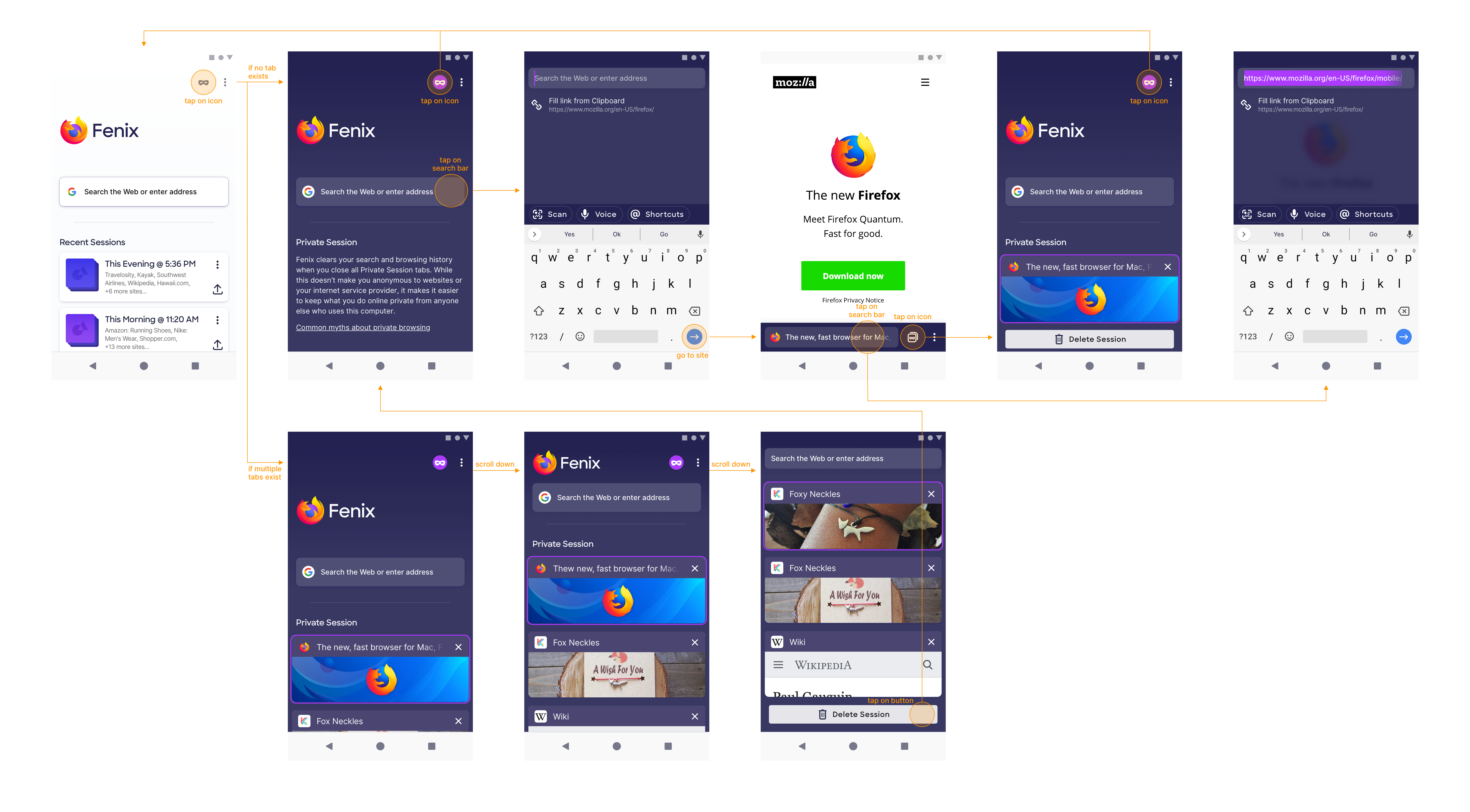
Walkthrough
1. Accessing (going in and out)
Private Browsing is a mode that you can go back and forth from. To go in or get out of Private Browsing, tap the mask icon on the home screen.

2. Home screen
When you go into then Private Browsing home screen:
a. IF no private tab exists, THEN Fenix will show an empty home screen with informational text
b. IF private tab(s) exists, THEN Fenix will show a home screen with tab preview underneath

3. Searching and browsing
Tapping on the Private Browsing search bar will bring it up to the top and open the keyboard, allowing you to search and/or go to websites.
Tapping on the search bar while you’re browsing will also open it up for editing.
This behaviour is identical to normal browsing, except in Private Browsing, Fenix uses a dark colour scheme.

4. Viewing list of tabs
To view the tab list, tap the Tab icon on the search bar. Note how the Tab icon has a mask inside it. This mask and the dark colour scheme are visual indicators that you’re browsing privately.
To get out of Private Browsing, you can always tap the mask icon.
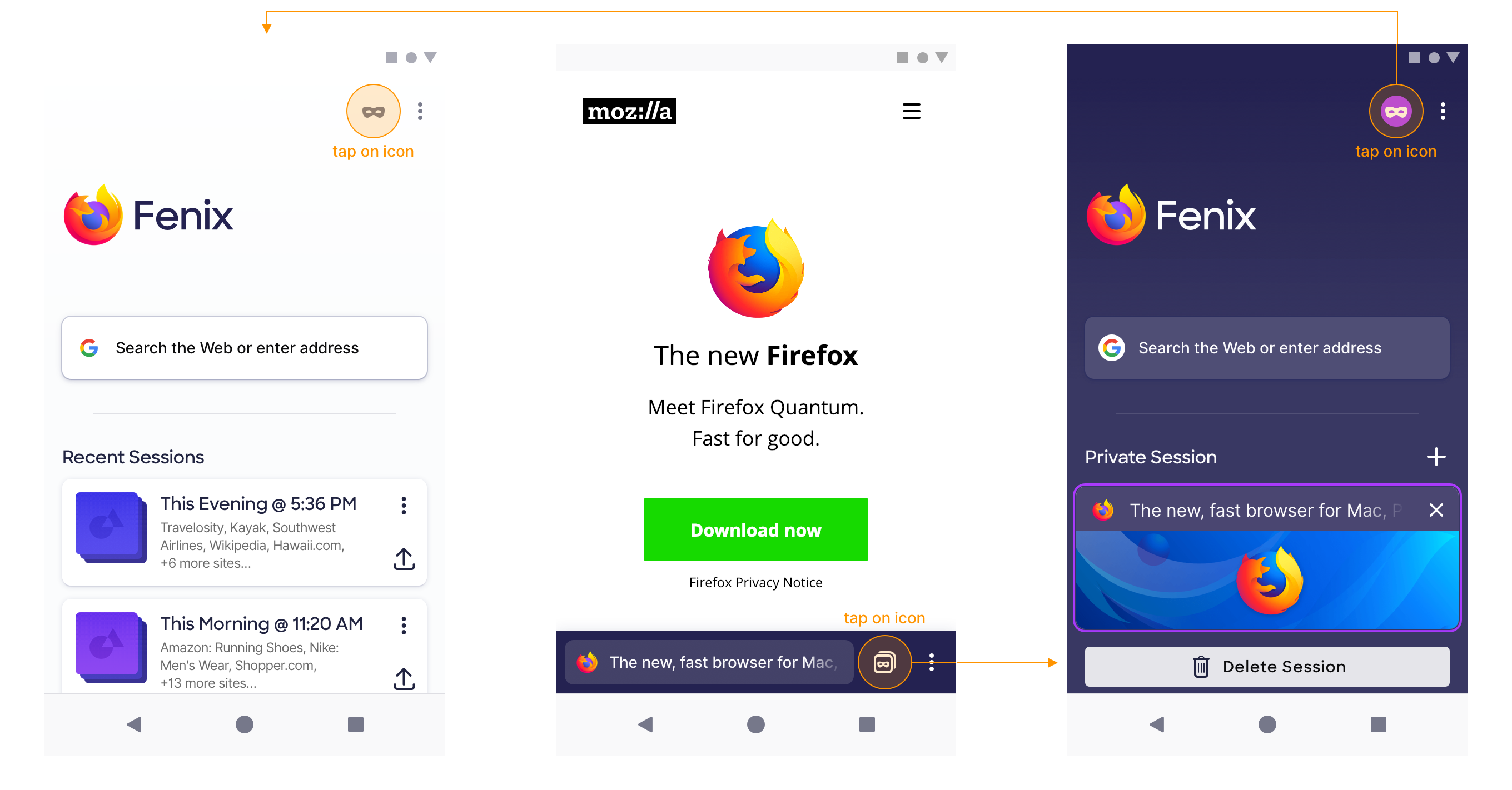
5. Deleting session
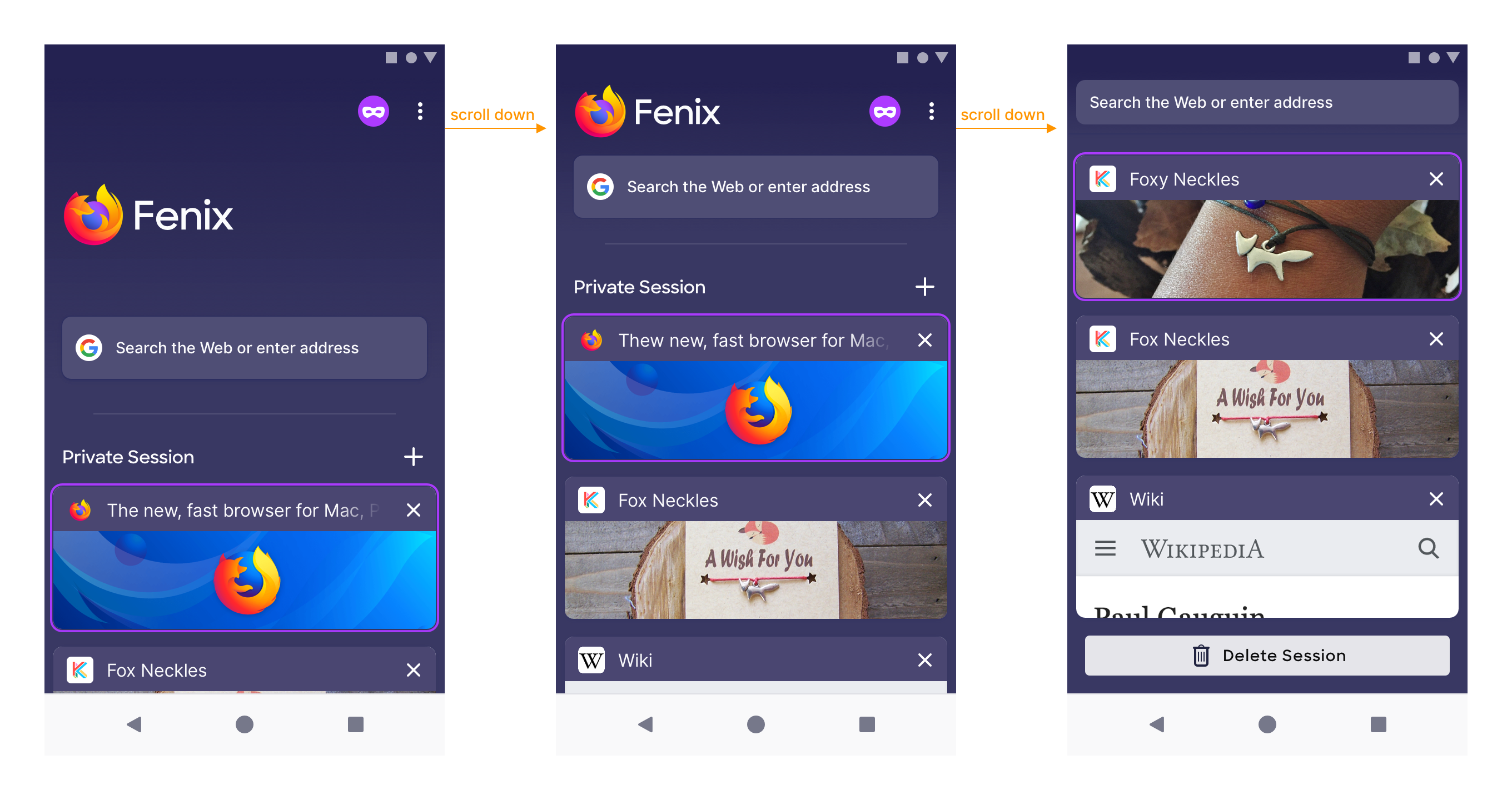
To delete all Private Browsing tabs, tap the “Delete Session” button underneath the tab list. When tabs are deleted, we show the empty Private Browsing start page, so it’s ready to go.

When there are multiple tabs, you need to scroll down a bit to access the “Delete Session” button. It’s a bit cumbersome with all the scrolling, but the UI is consistent. We’ll design a more accessible way to delete session in subsequent versions.
6. Adding new tab
To add a new private tab, go to the tab list view and tap on the search bar. All searching and browsing performed from here will open the link in a new tab.
Tapping on the “+” icon next to the “Private Session” heading will also activate the search bar! (Credit to @topotropic).
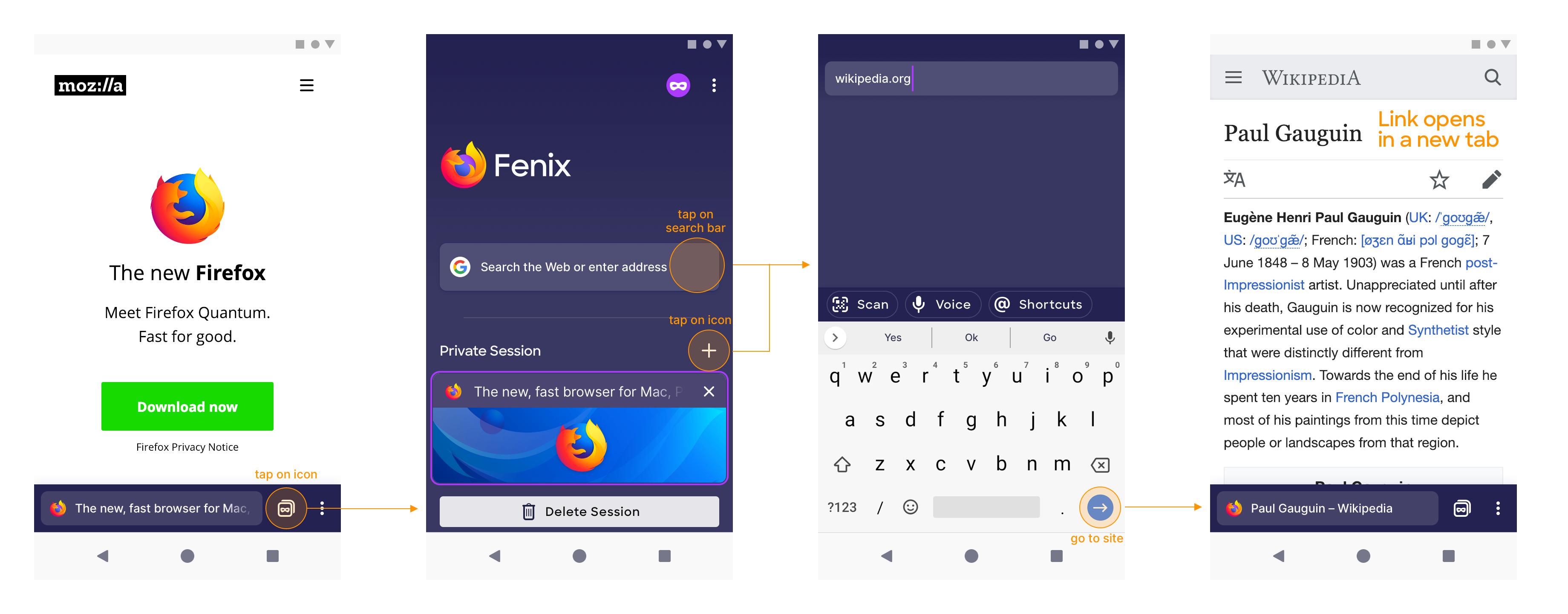
While browsing normally, you can also add a new private tab. Open the main menu, then tap “Private Tab”.

Behaviour
Private Browsing is a persistent mode
Once you tap on the mask icon and enter Private Browsing, Fenix will stay there (even if it has been quit and reopened), unless you manually tap the mask again to exit Private Browsing.
Translation: you can make Fenix always start in Private Browsing using just one tap.
 brampitoyo
on 30 Jan 2019
brampitoyo
on 30 Jan 2019
Those screens looks great! Tbh I wish Fenix would always look like in those private mode screens. :)
I wonder how using light/dark themes to distinguish between normal/private browsing affects our battery meta (#240) and generic dark mode (#252)? If battery live is something we really want to have an impact on then it seems counter-productive to have a bright white app by default? (CC @colintheshots)
 pocmo
on 30 Jan 2019
pocmo
on 30 Jan 2019
@pocmo
I wonder how using light/dark themes to distinguish between normal/private browsing affects our battery meta and generic dark mode?
With the next version of Android rumored to support dark mode, it seems smart to decouple light/dark themes with normal/private browsing modes.
What we may want to consider instead is to have theme selection under Settings (which can be either “Light”, “Dark” or “Follow system settings”).
To mark private browsing, we colour it differently from other icons – neither light grey or dark blue, but purple.
Finding something that looks distinct from every other icons, but equally at home in both dark and light themes, is hard. Take the mockup below with a grain of salt.

Maybe something to consider in future versions?
brampitoyo
on 31 Jan 2019
One question I’d like to pose to the team is whether we’d like Private Browsing history and tabs to persist or be erased/closed when the app is quit.
Scenario
- Open Fenix
- Enter Private Browsing
- Open 4 tabs
- Force quit Fenix on app switcher
Question
Should Private Browsing reopen its last state, or should it erase itself and start from scratch?
On iOS Safari, Firefox and Chrome
- Private Browsing history is not erased
- When reopened, the app remembers that you were last on Private Browsing mode
- The app opens the Private Tab that was last viewed before the app was force quit
On Android Chrome and Firefox
- Private Browsing history is erased
- When reopened, the app forgot that you were last on Private Browsing mode
- The app opens the normal tab that was last viewed before the app was forced to quit
Proposed Fenix behaviour
- Private browsing history is erased (like Android)
- When reopened, the app remembers that you were last on Private Browsing mode (like iOS)
- The app opens an empty Private Browsing Home Screen
In summary, when Fenix is force quit while in Private Browsing, it will erase your Private Browsing history, but will remember that you still want Private Mode to open first.
brampitoyo
on 31 Jan 2019
Do we need further input from @colintheshots on this one before closing? Or can I close this out and eng can file follow up tickets?
lime124
on 1 Feb 2019
When there are multiple tabs, you need to scroll down a bit to access the “Delete Session” button. It’s a bit cumbersome with all the scrolling, but the UI is consistent. We’ll design a more accessible way to delete session in subsequent versions.
@brampitoyo is there a reason we can't just have the "delete session" button just pinned to the bottom of the screen and the tabs just appear from beneath it as you scroll up? That way the button is always visible and you can still see lots of tabs at once.
 sblatz
on 1 Feb 2019
sblatz
on 1 Feb 2019
@sblatz wrote:
@brampitoyo is there a reason we can't just have the "delete session" button just pinned to the bottom of the screen and the tabs just appear from beneath it as you scroll up?
Yes, we can – and thanks for pointing it out!
In fact, the first set of concepts that I’ve explored has an “Erase” FAB on the tab list view (you can ignore the rest of the UI):

We can return to this UI again after v1 has released.
brampitoyo
on 3 Feb 2019
@brampitoyo one more question for you: do you have a specific transition animation in mind for switching the home view from normal to private mode (namely the background gradient)
sblatz
on 4 Feb 2019
@brampitoyo if not - we can have amy take a look when she's able to. i'm going to have her look at other animations as well . /cc @sblatz
lime124
on 4 Feb 2019
@brampitoyo love the design and flow!
One question I’d like to pose to the team is whether we’d like Private Browsing history and tabs to persist or be erased/closed when the app is quit.
I echo your suggestion for Fenix: "In summary, when Fenix is force quit while in Private Browsing, it will erase your Private Browsing history, but will remember that you still want Private Mode to open first."
bbinto
on 6 Feb 2019
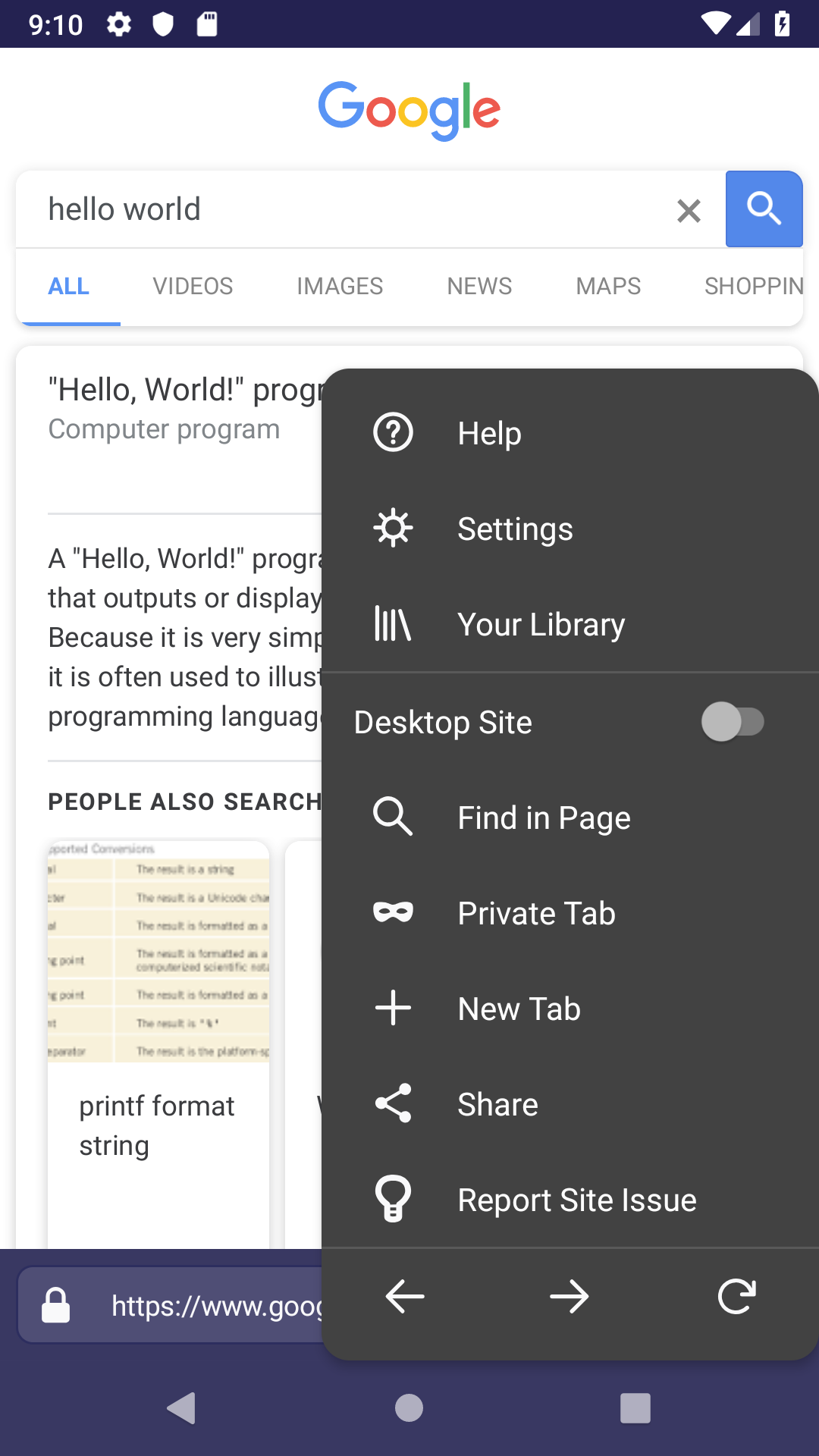
@brampitoyo how do we want the browser menu to look in private mode? This is how it is by default:
sblatz
on 8 Feb 2019
Related issues
 csadilek
·
3Comments
csadilek
·
3Comments
 ekager
·
3Comments
ekager
·
3Comments
 Chris01277
·
3Comments
Chris01277
·
3Comments
 phileastv
·
3Comments
phileastv
·
3Comments
 thelazyoxymoron
·
3Comments
thelazyoxymoron
·
3Comments
Most helpful comment
@sblatz wrote:
Yes, we can – and thanks for pointing it out!
In fact, the first set of concepts that I’ve explored has an “Erase” FAB on the tab list view (you can ignore the rest of the UI):
We can return to this UI again after v1 has released.