Feedback: Azure REST API - PIM privilegedOperationEvents error - Status Code 500
Describe the bug
I am using REST API to get list of all privileged operations for all the users. I followed following documentation:
https://developer.microsoft.com/en-us/graph/docs/api-reference/beta/api/privilegedoperationevent_list
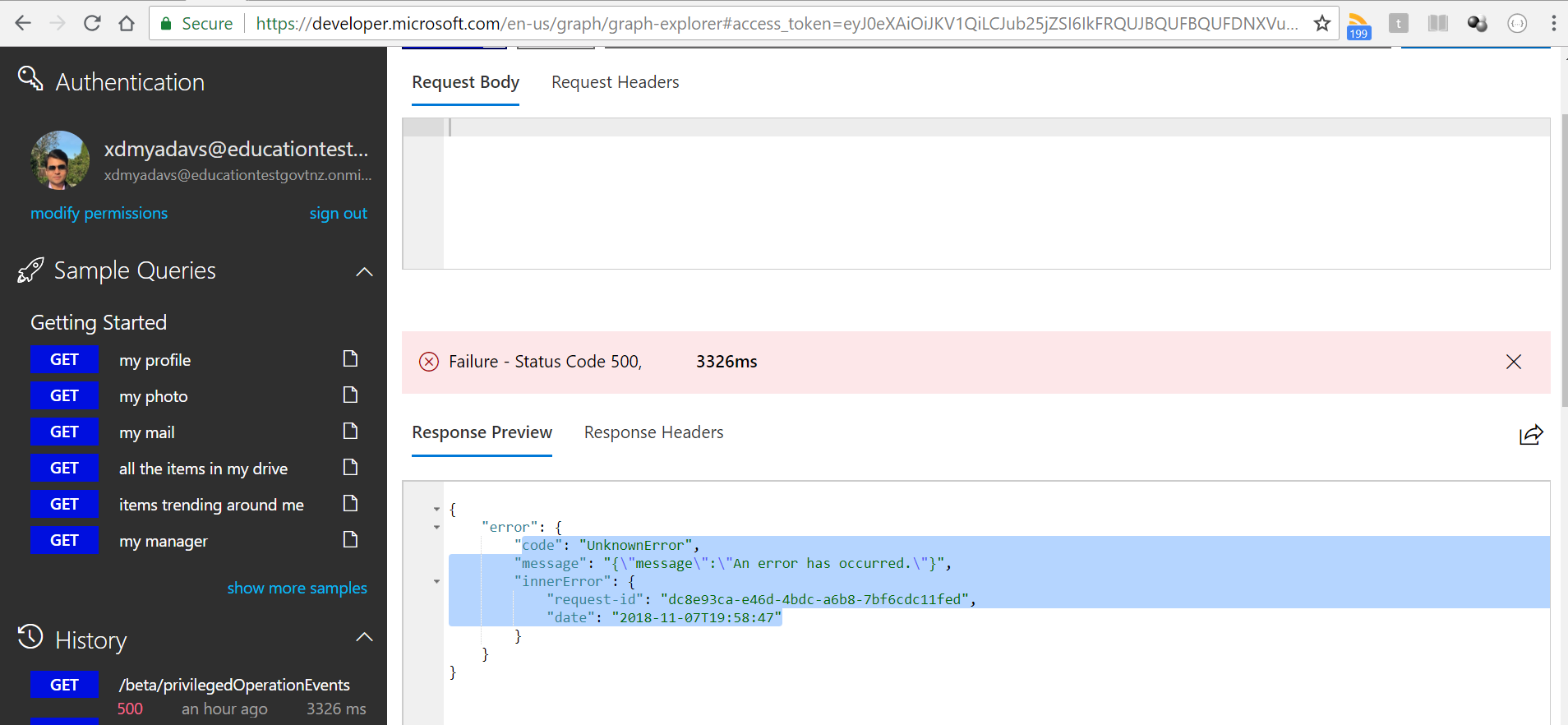
Everything was fine until 6 Nov 2018 10 PM NZST, but now it's giving me following error in Response body:
{
"error": {
"code": "UnknownError",
"message": "{\"message\":\"An error has occurred.\"}",
"innerError": {
"request-id": "dc8e93ca-e46d-4bdc-a6b8-7bf6cdc11fed",
"date": "2018-11-07T19:58:47"
}
}
}
I also checked it in Graph Explorer to verify, but same error there too
My access token generated is fine, because it works with the other endpoints of v1
To Reproduce
Steps to reproduce the behavior:
- Go to Graph Explorer - https://developer.microsoft.com/en-us/graph/graph-explorer
- Login using a user which is registered for PIM.
- Make a new request to Graph API by choosing "GET" in request type and selecting "beta" in version.
- Paste this in the request URL "https://graph.microsoft.com/beta/privilegedOperationEvents", and click "Run Query"
- See error in the "Response Preview" in the bottom with Error Code = "Failure - Status Code 500
Expected behavior
I Expect JSON like following:
HTTP/1.1 200 OK
Content-type: application/json
Content-length: 547
{
"value": [
{
"id": "201707240003469369",
"userId": "2cf9eef8-bc67-4aa4-bb65-75cc9e5c3f80",
"userName": "admin1",
"userMail": "[email protected]",
"roleId": "9360feb5-f418-4baa-8175-e2a00bac4301",
"roleName": "Directory Writers",
"expirationDateTime": "0001-01-01T00:00:00Z",
"creationDateTime": "2017-07-24T18:32:38.7589078Z",
"requestorId": "0f693614-c255-4cf5-92fa-74e770c656d8",
"requestorName": "admin",
"tenantId": "ef73ae8b-cc96-4325-9bd1-dc82594b0b40",
"requestType": "Assign",
"additionalInformation": null,
"referenceKey": null,
"referenceSystem": null
},
{
"id": "201707240003469372",
"userId": "2cf9eef8-bc67-4aa4-bb65-75cc9e5c3f80",
"userName": "admin",
"userMail": "[email protected]",
"roleId": "95e79109-95c0-4d8e-aee3-d01accf2d47b",
"roleName": "Guest Inviter",
"expirationDateTime": "0001-01-01T00:00:00Z",
"creationDateTime": "2017-07-24T18:33:00.7607701Z",
"requestorId": "0f693614-c255-4cf5-92fa-74e770c656d8",
"requestorName": "admin",
"tenantId": "ef73ae8b-cc96-4325-9bd1-dc82594b0b40",
"requestType": "Assign",
"additionalInformation": null,
"referenceKey": null,
"referenceSystem": null
}
]
}
Screenshots
Desktop (please complete the following information):
- OS: Linux Centos7
- Language: Go
- oauth2: golang.org/x/oauth2
- Browser: Chrome, IE, Firefox
- Version: Chrome version Version 68.0.3440.84 (Official Build) (64-bit)

 shailesh-yadav-moe
All 6 comments
Thank you for creating the issue! One of our team members will get back to you shortly with additional information.
![welcome[bot] picture](https://avatars.githubusercontent.com/in/4141?v=4&s=40) welcome[bot]
on 7 Nov 2018
welcome[bot]
on 7 Nov 2018
@dend Can you take a look at this issue?
 Powerhelmsman
on 7 Nov 2018
Powerhelmsman
on 7 Nov 2018
I'm facing exactly the same issue using the API with PowerShell getting token with Username/Password by ADAL:
Also with the following endpoint:
https://graph.microsoft.com/beta/privilegedRoles
https://graph.microsoft.com/beta/privilegedRoleAssignments
PIM is enabled (it worked before) user is PIM Admin and has a AADP2 license applied.
Also a customer of mine is affected where I use the same script.
Error message from Graph Explorer:
{
"error": {
"code": "UnknownError",
"message": "{\"message\":\"An error has occurred.\"}",
"innerError": {
"request-id": "16e184f8-86cb-4424-abff-4fd3ac4a010e",
"date": "2018-11-12T12:40:15"
}
}
}
Error message from PowerShell:
Invoke-RestMethod : The remote server returned an error: (500) Internal Server Error.
At line:1 char:21
- $allRoleEvents=(Invoke-RestMethod -Method GET -Uri "https://graph.microsoft. ...
~~~~~~~~~~~~~~~~
- CategoryInfo : InvalidOperation: (System.Net.HttpWebRequest:HttpWebRequest) [Invoke-RestMethod], WebException
- FullyQualifiedErrorId : WebCmdletWebResponseException,Microsoft.PowerShell.Commands.InvokeRestMethodCommand
/Peter
 pstapf
on 12 Nov 2018
pstapf
on 12 Nov 2018
Talked to the PM through a different channel an they added a scope check against the token.
I was using a generic client_id in my PowerShell Script and using an User/Password Auth Flow
To solve the issue:
Create an native app in Azure AD
Set the following permissions for Graph API:
Directory.AccessAsUser.All
Directory.Read.All
Directory.ReadWrite.All
PrivilegedAccess.ReadWrite.AzureAD
Used that appID (client_id) in my PowerShell script instead of the generic one and script is working now again.
pstapf
on 13 Nov 2018
@pstapf Thanks you provide the solution. @shailesh-yadav-moe Is this solution helpful?
Powerhelmsman
on 13 Nov 2018
@pstapf Thanks you provide the solution. @shailesh-yadav-moe Is this solution helpful?
As described by @pstapf above, I just added new permissions to my web app and it's working now. Looks like it was a permission issue. I have given following permissions in the scope, and everything remains unchanged:
Directory.AccessAsUser.All
Directory.Read.All
Directory.ReadWrite.All
PrivilegedAccess.ReadWrite.AzureAD
thanks @Powerhelmsman @pstapf
it's working again !!!
shailesh-yadav-moe
on 13 Nov 2018
Related issues
 v-kydela
·
5Comments
v-kydela
·
5Comments
 supernova-eng
·
5Comments
supernova-eng
·
5Comments
 jayendranarumugam
·
3Comments
jayendranarumugam
·
3Comments
 danielestevez
·
5Comments
danielestevez
·
5Comments
 jgprogram
·
4Comments
jgprogram
·
4Comments