Feedback: Microsoft Learning / Techprofile login is broken
I have been attempting to complete training on Microsoft Learning for Azure learning paths but have been unable to login to the application for the past 4-5 days. When navigate to the learning path and attempt to sign-in it takes me to the techprofile page and not to a login dialog.
I already have a techprofile with my account which I have completed sessions on but I have no way to login and continue the courses. Its disappointing that something as simple as a login can be so messed up.
No error codes, etc. You need to get your DevOps team onto this and determine why logins are failing, I'm certain I'm not the only individual who is having the problem and others may simply give up and go to something that works like AWS or Google Cloud.
Thanks,
James
 JEPauley
All 30 comments
Thank you for creating the issue! One of our team members will get back to you shortly with additional information.
![welcome[bot] picture](https://avatars.githubusercontent.com/in/4141?v=4&s=40) welcome[bot]
on 2 Nov 2018
welcome[bot]
on 2 Nov 2018
Any update on this bug? I'm 100% blocked on any Microsoft Learning courses for Azure. I've tried different browsers, clearing cache data but the process to signing to Microsoft learning continues to lead me to the create a profile page for TechProfile. My account is James.[email protected]
 JamesPauleyJr
on 5 Nov 2018
JamesPauleyJr
on 5 Nov 2018
@JEPauley, sorry to hear about the issue. Could you please help clarify a few things:
- You are signing using Azure Active Directory organization account. not Microsoft Account, correct?
- What's your profile url, for example: https://techprofile.microsoft.com/en-US/mliang
- When did you create your tech profile, after creating the profile, were you able to sign in at least once?
Thanks
Mei
 Mei-Liang
on 5 Nov 2018
Mei-Liang
on 5 Nov 2018
1] I believe I'm signing in using AAD, ([email protected]) provisioned @ godaddy.com
2] https://techprofile.microsoft.com/en-us/jamespauleyjr
3] Yes, I created a tech profile and completed several learning modules before it started to have this bug/behavior.
JEPauley
on 5 Nov 2018
When you go to sign in with an In Private/Incognito browser, is this the flow that you see?
- Click Sign In on a Learn page
- Navigate to a login.live.com URL where you enter your email ([email protected])
- You are then sent to a login.microsoftonline.com URL to enter your password
- After you do, you are redirected to the TechProfile registration screen and asked to select a user name and display name.
Does that match up with what is happening when you try to login?
 Sampy
on 6 Nov 2018
Sampy
on 6 Nov 2018
- Click Sign In on a Learn page
- Navigate to a login.live.com URL where you enter your email ([email protected]james.pauley@sojournis.com)
- yes
- You are then sent to a login.microsoftonline.com URL to enter your password
- No
- Re-directed to GoDaddy Office 365 sign-in. – enter password
- Directed to learn page of lesson plan I had URL for & logged in with my profile.
- After you do, you are redirected to the TechProfile registration screen and asked to select a user name and display name.
Something seems to have changed to make it function?
From: Mike sampson notifications@github.com
Sent: Tuesday, November 6, 2018 2:56 PM
To: MicrosoftDocs/feedback feedback@noreply.github.com
Cc: JEPauley jimpauley@hotmail.com; Mention mention@noreply.github.com
Subject: Re: [MicrosoftDocs/feedback] Microsoft Learning / Techprofile login is broken (#828)
When you go to sign in with an In Private/Incognito browser, is this the flow that you see?
- Click Sign In on a Learn page
- Navigate to a login.live.com URL where you enter your email ([email protected]james.pauley@sojournis.com)
- You are then sent to a login.microsoftonline.com URL to enter your password
- After you do, you are redirected to the TechProfile registration screen and asked to select a user name and display name.
Does that match up with what is happening when you try to login?
—
You are receiving this because you were mentioned.
Reply to this email directly, view it on GitHubhttps://eur03.safelinks.protection.outlook.com/?url=https%3A%2F%2Fgithub.com%2FMicrosoftDocs%2Ffeedback%2Fissues%2F828%23issuecomment-436439508&data=02%7C01%7C%7Cdc251fee78844c2e0fdb08d6443af4d5%7C84df9e7fe9f640afb435aaaaaaaaaaaa%7C1%7C0%7C636771417331969749&sdata=GjV21gviEEBDmlwrTtcqibEBrIfotKKmEE5f8WM%2FqCM%3D&reserved=0, or mute the threadhttps://eur03.safelinks.protection.outlook.com/?url=https%3A%2F%2Fgithub.com%2Fnotifications%2Funsubscribe-auth%2FAIOCwGSVrj5Rp-v9x4Adnc8qxQ-a7URsks5ushNjgaJpZM4YMK42&data=02%7C01%7C%7Cdc251fee78844c2e0fdb08d6443af4d5%7C84df9e7fe9f640afb435aaaaaaaaaaaa%7C1%7C0%7C636771417331969749&sdata=KTUKBfi3DhPifDcdcm0yFfEsBi80LRwlV3JIyYnY3hc%3D&reserved=0.
JEPauley
on 8 Nov 2018
I was able to login and access the training modules under my tech profile “jamespauleyjr”.
However, once into the module and working on exercises, I receive an “Unable to provision Azure resources.” This is an issue different from logging it but can it be related somehow?
Best Regards,
James
From: JEPauley notifications@github.com
Sent: Wednesday, November 7, 2018 8:34 PM
To: MicrosoftDocs/feedback feedback@noreply.github.com
Cc: James Pauley James.Pauley@sojournis.com; Comment comment@noreply.github.com
Subject: Re: [MicrosoftDocs/feedback] Microsoft Learning / Techprofile login is broken (#828)
- Click Sign In on a Learn page
- Navigate to a login.live.com URL where you enter your email ([email protected]
- yes
- You are then sent to a login.microsoftonline.com URL to enter your password
- No
- Re-directed to GoDaddy Office 365 sign-in. – enter password
- Directed to learn page of lesson plan I had URL for & logged in with my profile.
- After you do, you are redirected to the TechProfile registration screen and asked to select a user name and display name.
Something seems to have changed to make it function?
From: Mike sampson <[email protected]notifications@github.com>
Sent: Tuesday, November 6, 2018 2:56 PM
To: MicrosoftDocs/feedback <[email protected]feedback@noreply.github.com>
Cc: JEPauley <[email protected]jimpauley@hotmail.com>; Mention <[email protected]mention@noreply.github.com>
Subject: Re: [MicrosoftDocs/feedback] Microsoft Learning / Techprofile login is broken (#828)
When you go to sign in with an In Private/Incognito browser, is this the flow that you see?
- Click Sign In on a Learn page
- Navigate to a login.live.com URL where you enter your email ([email protected]
- You are then sent to a login.microsoftonline.com URL to enter your password
- After you do, you are redirected to the TechProfile registration screen and asked to select a user name and display name.
Does that match up with what is happening when you try to login?
—
You are receiving this because you were mentioned.
Reply to this email directly, view it on GitHubhttps://eur03.safelinks.protection.outlook.com/?url=https%3A%2F%2Fgithub.com%2FMicrosoftDocs%2Ffeedback%2Fissues%2F828%23issuecomment-436439508&data=02%7C01%7C%7Cdc251fee78844c2e0fdb08d6443af4d5%7C84df9e7fe9f640afb435aaaaaaaaaaaa%7C1%7C0%7C636771417331969749&sdata=GjV21gviEEBDmlwrTtcqibEBrIfotKKmEE5f8WM%2FqCM%3D&reserved=0, or mute the threadhttps://eur03.safelinks.protection.outlook.com/?url=https%3A%2F%2Fgithub.com%2Fnotifications%2Funsubscribe-auth%2FAIOCwGSVrj5Rp-v9x4Adnc8qxQ-a7URsks5ushNjgaJpZM4YMK42&data=02%7C01%7C%7Cdc251fee78844c2e0fdb08d6443af4d5%7C84df9e7fe9f640afb435aaaaaaaaaaaa%7C1%7C0%7C636771417331969749&sdata=KTUKBfi3DhPifDcdcm0yFfEsBi80LRwlV3JIyYnY3hc%3D&reserved=0.
—
You are receiving this because you commented.
Reply to this email directly, view it on GitHubhttps://github.com/MicrosoftDocs/feedback/issues/828#issuecomment-436870461, or mute the threadhttps://github.com/notifications/unsubscribe-auth/ASTqmo0fb9zVjK5i44oSTh37YKEroXn1ks5us7RCgaJpZM4YMK42.
JamesPauleyJr
on 8 Nov 2018
When I tried to login with a “normal” browser session, I end up with the create techprofile page when I try to login to the learning site.
From: Japes notifications@github.com
Sent: Wednesday, November 7, 2018 8:50 PM
To: MicrosoftDocs/feedback feedback@noreply.github.com
Cc: JEPauley jimpauley@hotmail.com; Mention mention@noreply.github.com
Subject: Re: [MicrosoftDocs/feedback] Microsoft Learning / Techprofile login is broken (#828)
I was able to login and access the training modules under my tech profile “jamespauleyjr”.
However, once into the module and working on exercises, I receive an “Unable to provision Azure resources.” This is an issue different from logging it but can it be related somehow?
Best Regards,
James
From: JEPauley <[email protected]notifications@github.com>
Sent: Wednesday, November 7, 2018 8:34 PM
To: MicrosoftDocs/feedback <[email protected]feedback@noreply.github.com>
Cc: James Pauley
Subject: Re: [MicrosoftDocs/feedback] Microsoft Learning / Techprofile login is broken (#828)
- Click Sign In on a Learn page
- Navigate to a login.live.com URL where you enter your email ([email protected]
- yes
- You are then sent to a login.microsoftonline.com URL to enter your password
- No
- Re-directed to GoDaddy Office 365 sign-in. – enter password
- Directed to learn page of lesson plan I had URL for & logged in with my profile.
- After you do, you are redirected to the TechProfile registration screen and asked to select a user name and display name.
Something seems to have changed to make it function?
From: Mike sampson <[email protected]<mailto:[email protected]
Sent: Tuesday, November 6, 2018 2:56 PM
To: MicrosoftDocs/feedback <[email protected]<mailto:[email protected]
Cc: JEPauley <[email protected]<mailto:[email protected]
Subject: Re: [MicrosoftDocs/feedback] Microsoft Learning / Techprofile login is broken (#828)
When you go to sign in with an In Private/Incognito browser, is this the flow that you see?
- Click Sign In on a Learn page
- Navigate to a login.live.com URL where you enter your email ([email protected]
- You are then sent to a login.microsoftonline.com URL to enter your password
- After you do, you are redirected to the TechProfile registration screen and asked to select a user name and display name.
Does that match up with what is happening when you try to login?
—
You are receiving this because you were mentioned.
Reply to this email directly, view it on GitHubhttps://eur03.safelinks.protection.outlook.com/?url=https%3A%2F%2Fgithub.com%2FMicrosoftDocs%2Ffeedback%2Fissues%2F828%23issuecomment-436439508&data=02%7C01%7C%7Cdc251fee78844c2e0fdb08d6443af4d5%7C84df9e7fe9f640afb435aaaaaaaaaaaa%7C1%7C0%7C636771417331969749&sdata=GjV21gviEEBDmlwrTtcqibEBrIfotKKmEE5f8WM%2FqCM%3D&reserved=0, or mute the threadhttps://eur03.safelinks.protection.outlook.com/?url=https%3A%2F%2Fgithub.com%2Fnotifications%2Funsubscribe-auth%2FAIOCwGSVrj5Rp-v9x4Adnc8qxQ-a7URsks5ushNjgaJpZM4YMK42&data=02%7C01%7C%7Cdc251fee78844c2e0fdb08d6443af4d5%7C84df9e7fe9f640afb435aaaaaaaaaaaa%7C1%7C0%7C636771417331969749&sdata=KTUKBfi3DhPifDcdcm0yFfEsBi80LRwlV3JIyYnY3hc%3D&reserved=0.
—
You are receiving this because you commented.
Reply to this email directly, view it on GitHubhttps://github.com/MicrosoftDocs/feedback/issues/828#issuecomment-436870461, or mute the threadhttps://github.com/notifications/unsubscribe-auth/ASTqmo0fb9zVjK5i44oSTh37YKEroXn1ks5us7RCgaJpZM4YMK42.
—
You are receiving this because you were mentioned.
Reply to this email directly, view it on GitHubhttps://eur01.safelinks.protection.outlook.com/?url=https%3A%2F%2Fgithub.com%2FMicrosoftDocs%2Ffeedback%2Fissues%2F828%23issuecomment-436872627&data=02%7C01%7C%7C8836d3b4a8c94fc6aac708d64535ab8b%7C84df9e7fe9f640afb435aaaaaaaaaaaa%7C1%7C0%7C636772494138901764&sdata=aPju1kX0R4HM0cWPHB1G9c6nIEeTRSybuSLzXzS%2BkFs%3D&reserved=0, or mute the threadhttps://eur01.safelinks.protection.outlook.com/?url=https%3A%2F%2Fgithub.com%2Fnotifications%2Funsubscribe-auth%2FAIOCwA-RhyfQvjB_rVzvZHk7ZE1db-LWks5us7gEgaJpZM4YMK42&data=02%7C01%7C%7C8836d3b4a8c94fc6aac708d64535ab8b%7C84df9e7fe9f640afb435aaaaaaaaaaaa%7C1%7C0%7C636772494138901764&sdata=l2VVPfj7kyZ%2Fe%2BAo6%2FVYNmF02uv94l%2BeWuiMXpgZRMQ%3D&reserved=0.
JEPauley
on 8 Nov 2018
@JEPauley you are not alone with _“Unable to provision Azure resources"_ The same here in #846 :(
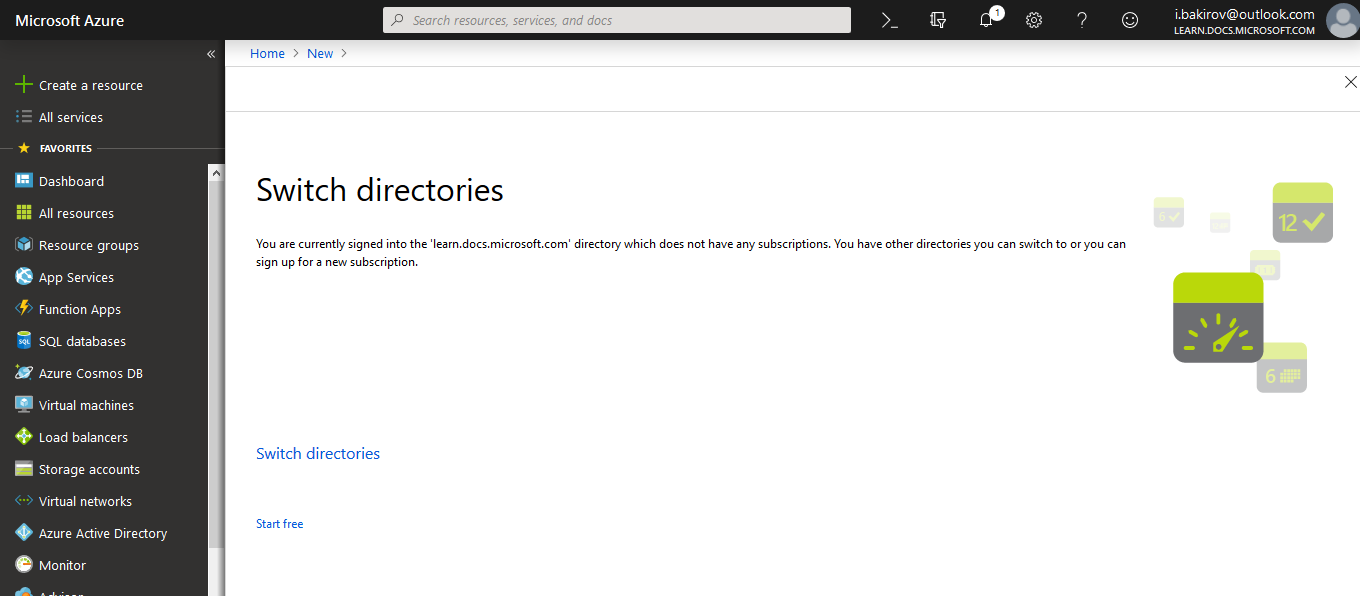
Whenever you login into @learn.docs.microsoft.com directory in Azure Portal (https://portal.azure.com/#@learn.docs.microsoft.com) and try to create manually any vm for example, do you see any error?
I got this:
 ibakirov
on 13 Nov 2018
ibakirov
on 13 Nov 2018
My issues is slightly different now. I am able to login to the Microsoft learning (docs.microsoft.com) however, when I try to start a module I am receiving an “unable to provision Azure resources” error. Previously I had two directories, my personal and a learning directory on Azure, but now I don’t’ see the learning based directory.
It appears I may have somehow corrupted the sandbox/tenant invite for my james.[email protected]james.pauley@sojournis.com account as I am able to use an alternative Microsoft account and initiate a sandbox.
From: Ilyas Bakirov (aka eRIC) notifications@github.com
Sent: Tuesday, November 13, 2018 11:09 AM
To: MicrosoftDocs/feedback feedback@noreply.github.com
Cc: JEPauley jimpauley@hotmail.com; Mention mention@noreply.github.com
Subject: Re: [MicrosoftDocs/feedback] Microsoft Learning / Techprofile login is broken (#828)
@JEPauleyhttps://eur03.safelinks.protection.outlook.com/?url=https%3A%2F%2Fgithub.com%2FJEPauley&data=02%7C01%7C%7Cf0459027d2fb4654c7d108d6499b8132%7C84df9e7fe9f640afb435aaaaaaaaaaaa%7C1%7C0%7C636777329563188858&sdata=nzJRDvrFUzyohjien3RgYBpVdYG29U9PWFWArF7kM6g%3D&reserved=0 you are not alone with “Unable to provision Azure resources" The same here in #846https://eur03.safelinks.protection.outlook.com/?url=https%3A%2F%2Fgithub.com%2FMicrosoftDocs%2Ffeedback%2Fissues%2F846&data=02%7C01%7C%7Cf0459027d2fb4654c7d108d6499b8132%7C84df9e7fe9f640afb435aaaaaaaaaaaa%7C1%7C0%7C636777329563188858&sdata=Xd0Qdaic2GB63yrayCPx5OcT5%2BMnRDz4O2ynY3QF%2FTc%3D&reserved=0 :(
Whenever you login into @learn.docs.microsoft.com directory in Azure Portal (https://portal.azure.com/#@learn.docs.microsoft.comhttps://eur03.safelinks.protection.outlook.com/?url=https%3A%2F%2Fportal.azure.com%2F%23%40learn.docs.microsoft.com&data=02%7C01%7C%7Cf0459027d2fb4654c7d108d6499b8132%7C84df9e7fe9f640afb435aaaaaaaaaaaa%7C1%7C0%7C636777329563188858&sdata=E4p2arwuH45x0DAcFk2TKx65MrUZM0NM30ywNiSYK48%3D&reserved=0) and try to create manually any vm for example, do you see any error?
I got this:
[screenshot_2018-11-13 microsoft azure]https://eur03.safelinks.protection.outlook.com/?url=https%3A%2F%2Fuser-images.githubusercontent.com%2F7983476%2F48436801-dee77480-e7a9-11e8-82ce-218b14e9761f.png&data=02%7C01%7C%7Cf0459027d2fb4654c7d108d6499b8132%7C84df9e7fe9f640afb435aaaaaaaaaaaa%7C1%7C0%7C636777329563188858&sdata=pK1RxF%2BJtv5%2F049x4%2BexNoDL7qGvdyy%2Bv1wBcojSW%2BQ%3D&reserved=0
—
You are receiving this because you were mentioned.
Reply to this email directly, view it on GitHubhttps://eur03.safelinks.protection.outlook.com/?url=https%3A%2F%2Fgithub.com%2FMicrosoftDocs%2Ffeedback%2Fissues%2F828%23issuecomment-438398015&data=02%7C01%7C%7Cf0459027d2fb4654c7d108d6499b8132%7C84df9e7fe9f640afb435aaaaaaaaaaaa%7C1%7C0%7C636777329563188858&sdata=0wvv5Iaie2uDUGgHHQQs9tJmlo%2BjcofnjA%2FNJe0eGLw%3D&reserved=0, or mute the threadhttps://eur03.safelinks.protection.outlook.com/?url=https%3A%2F%2Fgithub.com%2Fnotifications%2Funsubscribe-auth%2FAIOCwEzrOMPMr3T0J7xdnseegAkepIIZks5uuxjagaJpZM4YMK42&data=02%7C01%7C%7Cf0459027d2fb4654c7d108d6499b8132%7C84df9e7fe9f640afb435aaaaaaaaaaaa%7C1%7C0%7C636777329563188858&sdata=3oGJHhWaIWcrezUePY%2FDfmYa79i9Wmbh8qDIJIyFjbY%3D&reserved=0.
JEPauley
on 14 Nov 2018
My issues is slightly different now. I am able to login to the Microsoft learning (docs.microsoft.com) however, when I try to start a module I am receiving an “unable to provision Azure resources” error. Previously I had two directories, my personal and a learning directory on Azure, but now I don’t’ see the learning based directory.
My problem is the same, I can't start sandbox and get the same error "unable to provision Azure resources"
ibakirov
on 14 Nov 2018
@yunyunyunyun could you please look at the issue now, @JEPauley is able to login but got "unable to provision Azure resources” error. @ibakirov has same issue.
Mei-Liang
on 20 Nov 2018
My issue is I don't see Concierge Subscription when trying to create new Cosmos DB account getting below message,
You are currently signed into the 'learn.docs.microsoft.com' directory which does not have any subscriptions. You have other directories you can switch to or you can sign up for a new subscription.
 njenekar
on 28 Nov 2018
njenekar
on 28 Nov 2018
My issue is I don't see Concierge Subscription when trying to create new Cosmos DB account getting below message,
You are currently signed into the 'learn.docs.microsoft.com' directory which does not have any subscriptions. You have other directories you can switch to or you can sign up for a new subscription.
I tried with New Incognito Window, it solves my issue, getting Concierge Subscription for Sandbox.
njenekar
on 28 Nov 2018
@njenekar I was already working in Incognito mode from the beginning. Really it does not matter and does not resolve the issue.
Sandbox reset itself and today after my try I successfully activated sandbox with re-accepting sandbox invitation. I really didn't try on two week holidays, that's magic :) Boguslaw Buczek confirms that sandbox reset by itself and got working too: https://social.microsoft.com/Forums/en-US/68f262b3-86d5-4be5-a343-711cfea1b446/solved-sandbox-does-not-activate-on-microsoft-learn-units?forum=CertGeneral
Thanks for assistance!
@JEPauley if you don't mind issue may be closed.
ibakirov
on 4 Dec 2018
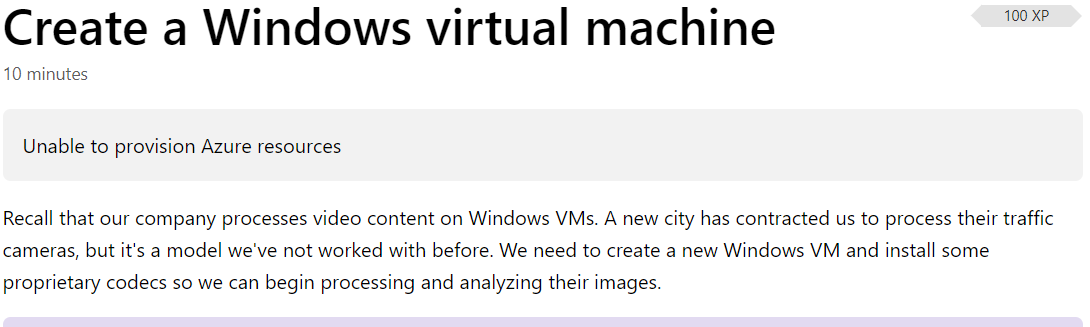
Hey, is there a fix for this
whenever i try to create a sandbox i get this error "Unable to provision Azure resources"
 rpentyBI
on 6 Feb 2019
rpentyBI
on 6 Feb 2019
@rpentyBI there might some problems on Azure site, please try to check again. Last night got some problems too and they gone themselves.
ibakirov
on 6 Feb 2019
i get exactly the same problem as @rpentyBI when i sign in with my work account. when i sign in with my personal account everything is fine, i can create a sandbox and a vm.
 nickparlow
on 11 Feb 2019
nickparlow
on 11 Feb 2019
In some cases, Azure Active Directory accounts (what our sites sometimes call "Work/School Accounts") may have problems using the Azure Sandbox. There are a variety of reasons related to security and directory configuration. A personal Microsoft Account should always work.
Sampy
on 11 Feb 2019
Am having the same issue when logging in to complete a course, I get the create profile screen (Create profile to save progress) but when entering my details there are a number of errors in the background when hitting the register button. The main one is a 400 response from
404 error from https://docs.microsoft.com/api/profiles/me
400 error from https://docs.microsoft.com/api/profiles stating:
{errorCode: "CpmContentException", message: "Invalid contact point"}
errorCode: "CpmContentException"
message: "Invalid contact point"
I have tried with multiple email addresses and other combinations with the same result each time.
 TNDStudios
on 13 Mar 2019
TNDStudios
on 13 Mar 2019
Note, I just found out if you don't agree to the terms it lets you in, if you do agree to the terms it does not .. Seems weird, no?
TNDStudios
on 13 Mar 2019
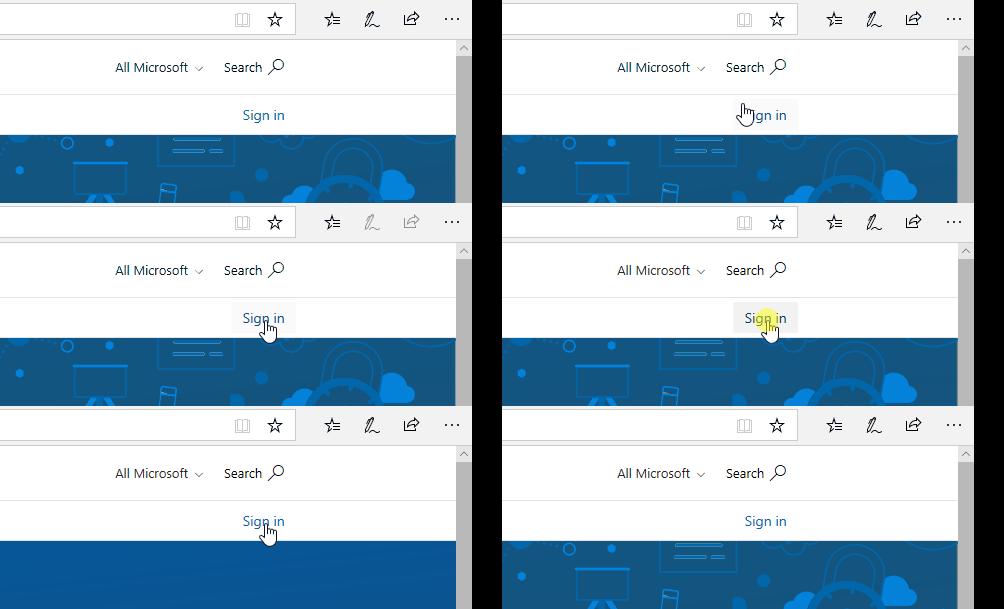
Been having similar issues. When I click on "sign in", I am automatically redirected to the registration page, although I already have an account. Tried multiple browsers in incognito mode and not, and nothing works so far.
It only worked on Edge. Failed on Opera, Firefox, and Chrome
 ValentinCalomme
on 21 Mar 2019
ValentinCalomme
on 21 Mar 2019
This is my experience, tried Edge and Chrome:
 MortenMeisler
on 16 Apr 2019
MortenMeisler
on 16 Apr 2019
What fixed it for me was to use InCognito on Chrome, but then I had to ensure the docs email matched my Azure email which _also_ needed updating (my company uses jwhaley OR jay.whaley).
In Azure
Followed this here: https://docs.microsoft.com/en-us/azure/billing/billing-how-to-change-azure-account-profile to make sure it matches the same email I put in the docs field below.
Inside Learn
I went to here on the top-right
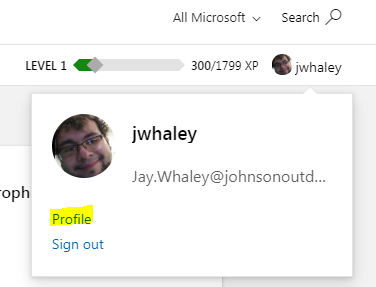
then to here on the left-hand side of the screen
then entered my full name email here

Results
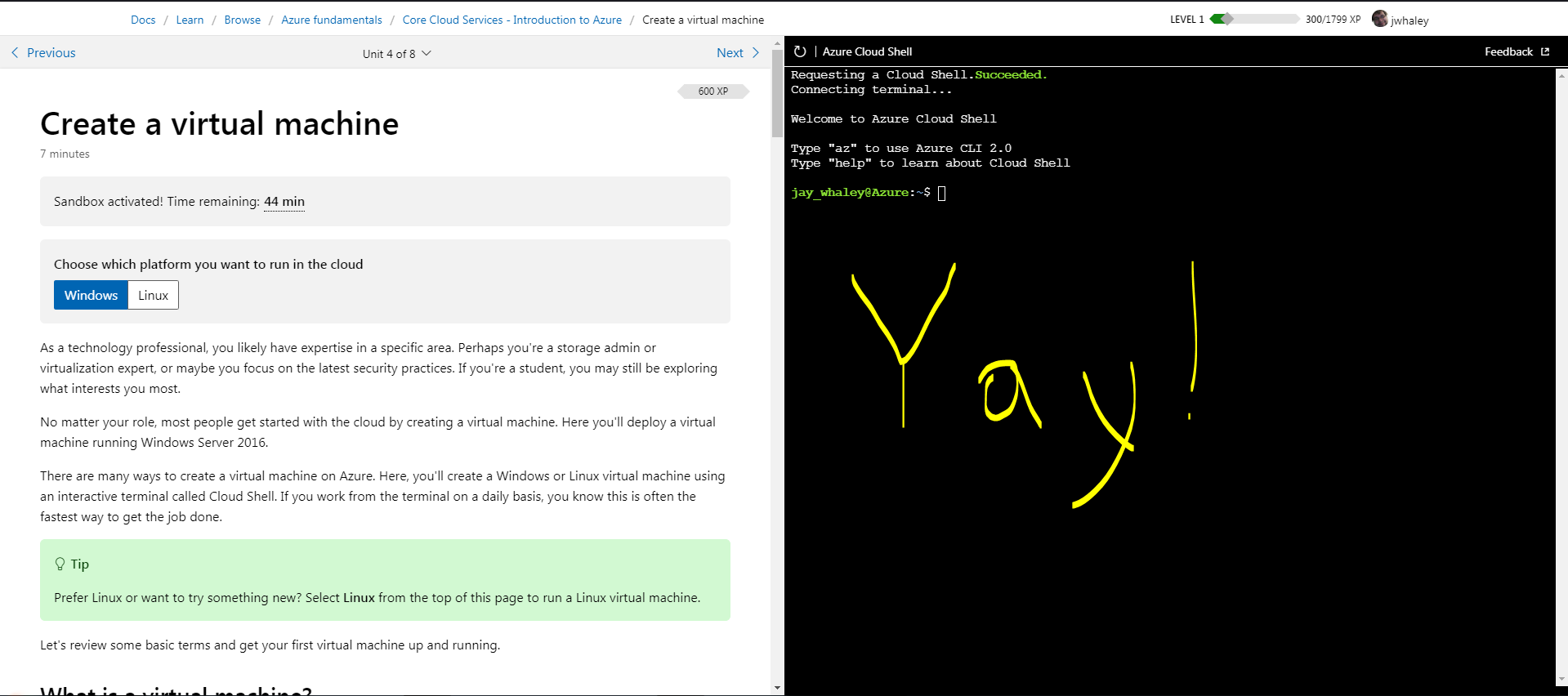
 jaywha
on 16 Apr 2019
jaywha
on 16 Apr 2019
I found that changing the Url from en-gb to en-us makes it work as a temporary workaround, definitely a culture issue
 bergmeister
on 25 Jun 2019
bergmeister
on 25 Jun 2019
@bergmeister, I don't think so, I also tried before switching from en-us to ru-ru and vice-versa.
Now I do not face this problem anymore
ibakirov
on 25 Jun 2019
I had to use InPrivate for this to work as well. I already had an Azure Free subscription, but the Microsoft Learning does create a new Learning Sandbox that I can switch to. However, I don't seem to have enough permissions to create resources. The only way I could get around this was using InPrivate, and this seems to happen for each new lesson Sandbox.
 chrisrharris
on 12 Jul 2019
chrisrharris
on 12 Jul 2019
I noticed that if I switch back to my default directory, then switch back into the learning directory, the resources appear and permissions are fixed. No InPrivate/InCognito required.
chrisrharris
on 13 Jul 2019
Facing the same issue on this page: https://docs.microsoft.com/en-us/learn/modules/store-app-data-with-azure-blob-storage/4-create-storage-resources
- Using incognito in Chrome does not solve the issue.
- Changing locale does not solve the issue.
- Changing directory in the Azure Portal does not solve the issue (the "Learn" directory does not exist since the Learning Path is unable to provision it).
- I am using my personal Microsoft account and not a work/school account.
 Sharparam
on 31 Jul 2019
Sharparam
on 31 Jul 2019
We have deployed. We changes to the authentication system on Docs which should address your issues. If not, let us know.
Sampy
on 19 Sep 2019
Related issues
 Makopo
·
5Comments
Makopo
·
5Comments
 v-kydela
·
5Comments
v-kydela
·
5Comments
 takatkyu
·
5Comments
takatkyu
·
5Comments
 supernova-eng
·
5Comments
supernova-eng
·
5Comments
 ezfepo
·
4Comments
ezfepo
·
4Comments
Most helpful comment
I noticed that if I switch back to my default directory, then switch back into the learning directory, the resources appear and permissions are fixed. No InPrivate/InCognito required.