Feedback: Enable permanent selection for preferred language
Permanent language selection
Currently it doesn't seem to be possible to select a certain language as the default language for the Microsoft Docs.
Every time I change the language using the language option at the bottom left of the page, it switches back to the language based on my location after accessing the page again, which annoying as hell.
I even tried logging in, in hopes of being able to save the default language, but didn't help.
It's really frustrating to always have to switch the language every time you access the site or to toggle the "Read this in English" button...
 boehle
All 42 comments
Agree, this is absolutely unacceptable.
As temporary workaround you can install one of redirector plugins into your browser to automatically replace "national identificator" ("ru-ru" in my case) to "en-us" in URLs.
 BugsDigger
on 26 Jun 2018
BugsDigger
on 26 Jun 2018
@BugsDigger ugh, that's a nice workaround :D thanks for the tip man!
Yeah and I really hope there's gonna be a real solution some time near...
boehle
on 26 Jun 2018
Please please please do implement this request.
More over, because sometimes (very often, to be honest) it's faster and easier to go to the desired MS Doc page searching from Google (or Bing if you like), every time I got a localized URL (in my case it-it) so I really would like a redirection based on my language preference.
As an example:
- I search for "Xamarin forms build release app"
- Google first suggestion is the one I like:
Preparazione di un'applicazione per il rilascio - Xamarin | Microsoft Docs
https://docs.microsoft.com/it-it/xamarin/android/deploy-test/release-prep/
please note that Google detected my country and suggested the Italian page (it-it).
- Even if is possible to see the English content from the Italian page thanks to the EN switch (see image below), I really don't like it and I'd prefer to be automagically redirected to the en-us page.
So I do think you need to implement some sort of user settings were we can choose the preferred language.
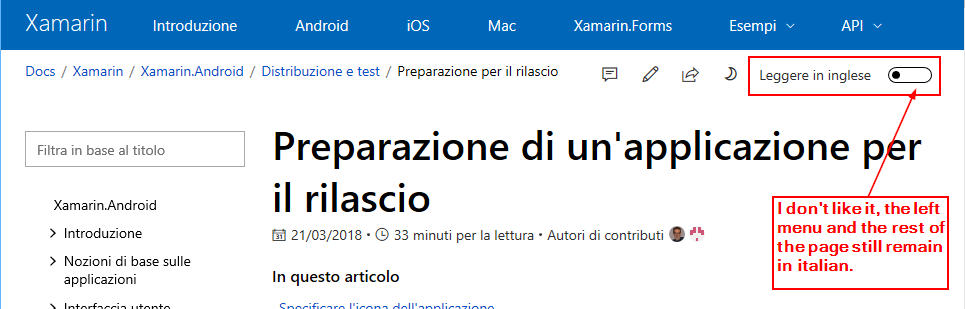
Actually my workaround is very tedious, manually changing it-it to en-us in the URL...
 ncarandini
on 19 Jul 2018
ncarandini
on 19 Jul 2018
An alternative way to quickly solve it is to add, next to the "Read it in English" switch, a link to the native page, like "go to English page". This is something very easy to implement.
ncarandini
on 19 Jul 2018
@ncarandini
easy to implement
but every time I have to reload a page (10-15-20... sec)... It's VERY annoying.
my workaround is very tedious, manually changing it-it to en-us in the URL
See my comment "23 days ago".
For example, Redirector
https://addons.opera.com/en/extensions/details/redirector-2/
BugsDigger
on 19 Jul 2018
@SonjaSaltzman Can you follow up the feedback?
 Powerhelmsman
on 19 Jul 2018
Powerhelmsman
on 19 Jul 2018
Looping in @bodhigautam and @Sara-Nicolini to follow up. We really appreciate the feedback. For now, we do not have a good solution, but we are considering various approaches that may address this problem.
 SonjaSaltzman
on 19 Jul 2018
SonjaSaltzman
on 19 Jul 2018
Hi,
Thanks a lot for your feedback. We are working on a permanent solution to fix this issue. Till it is resolved you can follow these steps as a temporary solution.
Select the language from the language picker (one time settings)
- Go to docs.microsoft.com
- Scroll down to the end of the page and click on the language picker. Screenshot attached.
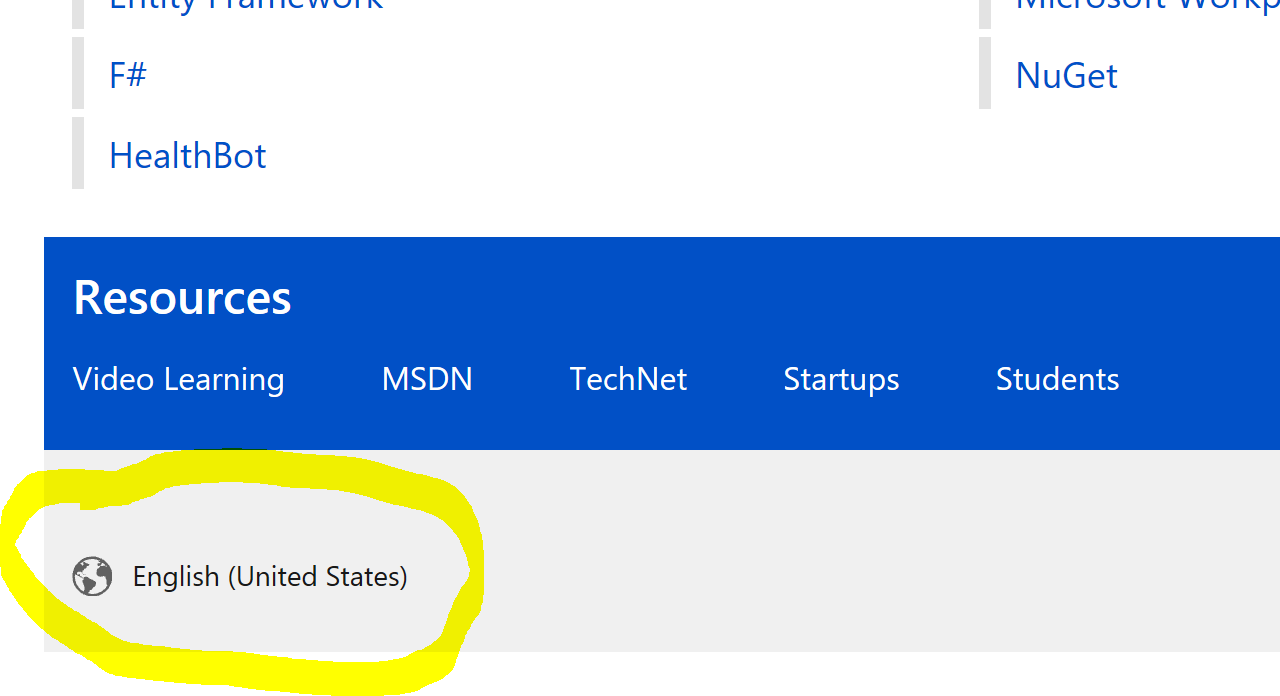
- Click on the language in which you want to see the contents in future. You can always change your preference in future.
- Close the window.
On the bing/google search:
- If you see links which show contents other than your preferred language because of your localtion then remove the language field from the url. For eg if you see https://docs.microsoft.com/it-it/xamarin/android/deploy-test/release-prep/?tabs=vswin remove the language (for eg /it-it or /de-de) so the new link will become https://docs.microsoft.com/xamarin/android/deploy-test/release-prep/?tabs=vswin. Screenshot attached.

- Go to this url and you will see the content in your preferred language (from the picker).
Note : If you open the links (without language) in a private/incognito window then you will not see the content in your preferred language as your settings are not applied there. By default it will redirect you to English page.
Hope this helps. Let us know if you face any issues. We always value your feedback.
 bodhigautam
on 24 Jul 2018
bodhigautam
on 24 Jul 2018
@boehle Can you verify if this resolve your issue?
Powerhelmsman
on 24 Jul 2018
@Powerhelmsman yeah, if I remove the lang tag it takes me to the language I specify on docs.microsoft.com.
But from google I'm still being sent to the language of my country. So it doesn't work as a global override/default.
boehle
on 24 Jul 2018
@bodhigautam Can you follow up boehle's issue?
Powerhelmsman
on 24 Jul 2018
We are working on a permanent solution. Will update once its in place.
Thanks.
bodhigautam
on 24 Jul 2018
@Powerhelmsman just to clarify: coming from Google, Google gives me a language encoded url with language tag e.g. "de-de" which then in return takes me back to the default language of my country and also resets the language in the lower left corner.
@bodhigautam thanks!
boehle
on 24 Jul 2018
@bodhigautam: thanks for your reply but the problem with the footer page language selection is that is a preference only for URLs that not declare the language. As I said, I can click on the URL and then replace the it-it (in my case) with "en-us" but it's a tedious workaround. To just remove the "it-it" from the URLs found by Bing/Google, as you suggested, it's more painful, because I need to copy the URL, paste it somewhere, remove the language from the URL, copy and paste again on the browser (argh! :-) ).
And as described by @boehle, when clicking on a local language defined URL, the footer reset to that language…
So at the moment I totally disregard the footer language selector (as is useless), sometime I use the "See it in English" switch and most of the time I get the Italian page, then change the language in the url and reload the page, to finally get it in English.
And I feel guilty for all the effort made to translate the English page in so many other languages!
More seriously I do think translation is important, as many developers love to read on their own language, but still we need to have a better way to set our language preferences.
I'd love to login on MS Docs as a requisite to have language preference working. I need to be signed also to comment, so it doesn't seems a big issue to me, but you have a broader picture on Docs usage, so I'm confident you're going to eventually find a good solution for this.
Thanks for your time, passion and work, Docs on GitHub and the ability to contribute really rocks!
ncarandini
on 26 Jul 2018
@martencassel We understand the problem, it is annoying to reset the language after each search. (It might be better to search within docs.microsoft.com). We will definitely look into a solution; we are discussing a user preference settings page and other options, but have not finalized the decision yet - we appreciate your patience while we are trying to find the best solution!
FYI @bodhigautam @Sara-Nicolini
SonjaSaltzman
on 8 Aug 2018
@SonjaSaltzman why have you closed the issue?
ncarandini
on 16 Aug 2018
@ncarandini reopening the issue; we don't have a clear target date for fixing this at the moment, but will try to do so by end of the year, so will keep this issue open until then.
@bodhigautam @Sara-Nicolini
SonjaSaltzman
on 18 Aug 2018
I understand that is no easy to solve and you all need time to choose a good strategy to fix it. But reopening it did assured me that this is something you will address soon or later, so thanks for it.
ncarandini
on 18 Aug 2018
Please don't auto switch to machine translated docs ever. If anyone want to read machine translated docs in their own langauge then let them switch themselves. I don't know anyone who prefer reading the machine translated docs at all. People I know complains about them cause quite often they make no sense and it's infuriating having to switch back to english at the bottom of the page all the time.
 emanuel-lundman
on 18 Jan 2019
emanuel-lundman
on 18 Jan 2019
@martencassel This issue is indeed about permanent selection of preferred language! If you mean something different, please open another issue.
See the title of the issue:
Enable permanent selection for preferred language
Currently it doesn't seem to be possible to select a certain language as the default language for the Microsoft Docs. [...]
ncarandini
on 18 Jan 2019
This feature will be very well welcomed for all non-English people playing with Microsoft technologies. I'm French and I read documentation multiple times by day. I don't count anymore the number of times I should change the language each day! It's a real pain.
Please consider increasing priority of this feature. 😉
 MCKLMT
on 22 Jan 2019
MCKLMT
on 22 Jan 2019
MCKLMT,
I don't count anymore the number of times I should change the language each day!
consider installation of browser plugin like "Redirector". My settings are:
ms docs ru-ru to en-us
Redirect: https://docs.microsoft.com/ru-ru/*
to: https://docs.microsoft.com/en-us/$1
Example: https://docs.microsoft.com/ru-ru/dotnet/ → https://docs.microsoft.com/en-us/dotnet/
Applies to: Main window (address bar)
msdn ru-ru to en-us
Redirect: https://msdn.microsoft.com/ru-ru/*
to: https://msdn.microsoft.com/en-us/$1
Example: https://msdn.microsoft.com/ru-ru/dn308572.aspx → https://msdn.microsoft.com/en-us/dn308572.aspx
Applies to: Main window (address bar)
BugsDigger
on 22 Jan 2019
This is a workaround but it should not be difficult to implement this feature natively.
For Microsoft Edge, one guy has developed an interesting extension: https://www.microsoft.com/store/productId/9PN36R9NBTRM
MCKLMT
on 22 Jan 2019
I agree completely but if current PITA is so big I prefer to use any workaround. :-)
BugsDigger
on 22 Jan 2019
@BugsDigger thanks for the workaround!
ncarandini
on 22 Jan 2019
Since issue #933 was set as a dup of this, I wanted to bring what I believe is the essence of that.
- If the original language (English) is among the list of accepted languages, never present a machine translated version.
Do this regardless of what is in the URL (or rather, fix it so that Google doesn’t take you to machine translated versions).
Machine translation is only useful as a last resort for people that can’t speak the original language.
 rickardp
on 16 Nov 2019
rickardp
on 16 Nov 2019
@rickardp Thanks a lot for the suggestion. We will add it in our backlog. Unfortunately its not in our plan right now. We will keep you updated once its picked up for development.
bodhigautam
on 19 Nov 2019
Hello, @boehle
Thank you for your feedback.
We are actively reviewing your comments and will get back to you soon.
Kind regards,
Microsoft DOCS International Team
 srvbpigh
on 2 Apr 2020
srvbpigh
on 2 Apr 2020
On the new Edge based on Chromium, I use this extension: https://chrome.google.com/webstore/detail/ffs-msdn-in-english/ddaknggefjjgpnlhiejepbiplceedmfl
MCKLMT
on 3 Apr 2020
I'd much prefer a Microsoft solution, I don't trust third part extensions.
ncarandini
on 7 Apr 2020
Hello, @boehle
Thank you for your feedback.
We are actively reviewing your comments and will get back to you soon.
Kind regards,
Microsoft DOCS International Team
srvbpigh
on 7 Apr 2020
@CeciAc Any news on this topic?
MCKLMT
on 7 Apr 2020
@bodhigautam @RyanKing77 Bodhi, could you please update on the status of this feature?
SonjaSaltzman
on 7 Apr 2020
Oh yes, finally found that issue exists for this insane pain in the ass, maybe atleast a basic button to turn off machine translation?
 HoundThe
on 22 Apr 2020
HoundThe
on 22 Apr 2020
@dendeli-msft @RyanKing77 This is for the locale redirection improvement feature we have been discussing. Can we please get it prioritized and delivered ? cc @SonjaSaltzman
bodhigautam
on 22 Apr 2020
Finally I've solved, using Edge Chromium (I'm actually using Beta Version 81.0.416.72 but maybe this works also on previous versions).
Going to Settings | Languages I was able to add the English language and move it to the top of the list. Now Edge use this preference and open the en-US version of Microsoft Docs web pages.
Eureka!
ncarandini
on 10 May 2020
I think every page should always open in English, not some weird stuff like pl-pl despite it being my native language.
Current way causes a lot of pain, which is sad, because docs are great, but having to switch to us-us whenever I want to read something is annoying.
Also button ""solution"" doesn't really work, because site looks like 50% is in Polish meanwhile other 50% is in English. It's more like workaround instead of a real solution.
Also something like this:

Again, English mixed with Polish found here:
https://docs.microsoft.com/pl-pl/aspnet/core/whats-new/2020-05?view=aspnetcore-3.1
Please, English by default, always, and if somebody wants their language, then let him switch to it.
I tend to believe that showing content in other langauge than english actually makes learning for harder, because a lot of stuff is basically impossible to translator or its translation is impossible to Google.
 Xawx
on 2 Jun 2020
Xawx
on 2 Jun 2020
@RyanKing77 could you please update on the feature? Also, @JasonCard there is some feedback about aspnet core documentation.
SonjaSaltzman
on 2 Jun 2020
Hi @Xawx
Thank you for your feedback.
Regarding your comment that English is mixed with Polish in topic below, product names such as "ASP.NET Core", "Blazor", and "SignalR" are not localized and left in English as design:
https://docs.microsoft.com/pl-pl/aspnet/core/whats-new/2020-05?view=aspnetcore-3.1
Please let me know if there was anything else that was left in English, but should have been translated.
Best regards,
Jason
 JasonCard
on 2 Jun 2020
JasonCard
on 2 Jun 2020
Finally I've solved, using Edge Chromium (I'm actually using Beta Version 81.0.416.72 but maybe this works also on previous versions).
Going to Settings | Languages I was able to add the English language and move it to the top of the list. Now Edge use this preference and open the en-US version of Microsoft Docs web pages.
Eureka!
That is unfortunately not a good solution, as this will change all content on all sites to English. I am a Swedish native speaker and doing this would cause the Swedish news sites etc to present the English versions of the pages.
The solution is simple: don’t present a translated version if the original language is anywhere in that list. It’s as simple as that!
rickardp
on 3 Jun 2020
Hi there. I would vote for a language-setting under Microsoft Docs > Profile > Settings. This feature alone would make it worth signing in, and would save me from getting unwanted knock-on effects.
 HansB916
on 23 Jun 2020
HansB916
on 23 Jun 2020
Another fix for "coming from Google" is to set your preferred language for Google itself. You will get search results in English, including Microsoft Docs, without having to change your browsers nor your systems "preferred default language".
If you set the language preference in a special "development" user profile of the browser, you don't even have to bother to explicitly switch back the language setting for "non-development" related searches, because for this you will have your "normal" browser user profile.
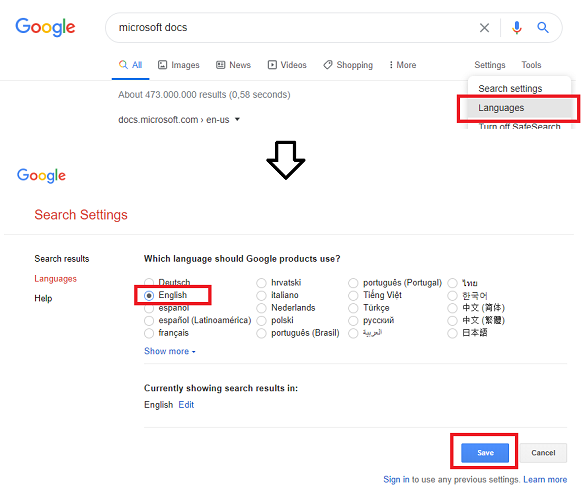
--edit--
BTW: another "quick fix" for getting Google search results for the English documentation is to simply append: inurl:"en-us" to the query.
 chillophil
on 17 Sep 2020
chillophil
on 17 Sep 2020
Related issues
 cln-m4rie
·
4Comments
cln-m4rie
·
4Comments
 spottedmahn
·
4Comments
spottedmahn
·
4Comments
 supernova-eng
·
4Comments
supernova-eng
·
4Comments
 ezfepo
·
4Comments
supernova-eng
·
5Comments
ezfepo
·
4Comments
supernova-eng
·
5Comments
Most helpful comment
Since issue #933 was set as a dup of this, I wanted to bring what I believe is the essence of that.
Do this regardless of what is in the URL (or rather, fix it so that Google doesn’t take you to machine translated versions).
Machine translation is only useful as a last resort for people that can’t speak the original language.