Feedback: searching on nvarchar causes 403
Describe the bug
SQL nvarchar search 403s with oAuth cookies
To Reproduce
Steps to reproduce the behavior:
https://docs.microsoft.com/en-us/search/index?search=nvarchar
with a strange combination of Microsoft Id cookies causes 403
Searching on
https://docs.microsoft.com/en-us/search/index?search=datalength
does not
Result: Access Denied Http 403
On Screen:
'You don't have permission to access "http://docs.microsoft.com/en-us/search/index?" on this server.'
Reference #18.9c464868.1528259318.11d4727
Destination IP: 104.74.35.39:443
Issue replicated on Edge, and Firefox.
Issue is not replicateable in Chrome as I have logged out of my Microsoft Account and cleared all my cookies.
Issue is not replicateable in InPrivate Edge or InPrivate Firefox as the oAuth ID cookies aren't accessible.
Expected behavior
Search results as per after 'Clear Cookies and website data'
Screenshots
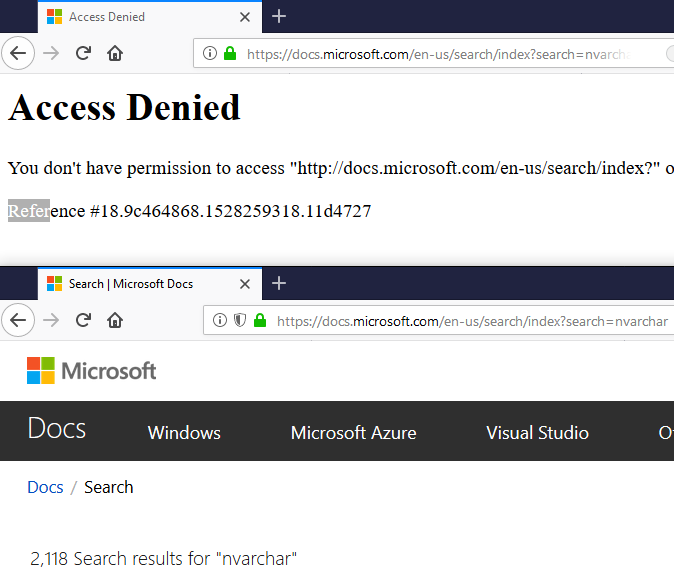
Desktop (please complete the following information):
- OS: Windows 10
- Browser: All uptodate versions: Edge, Firefox, Chrome
- Version 42.17134.1.0, 60.0.1, 66.0.3359.181
Additional context
In the past 24 hours I have logged on Edge and Firefox with 2 private microsoft accounts. Maybe the cookies cached for those IDs are an issue.
Searching on the specific phrase 'nvarchar' and not 'datalength' is very confusing!
 OzBob
OzBob
All 17 comments
I get the same issue on my usual browser (Chrome, with most of my cookies) and Edge (with some of my cookies). I get normal search results with Firefox (with none of my cookies). I encountered this a few times over the past few days, and just assumed that the site was down momentarily; unfortunately I didn't note my search queries at the time.
 spacecadet980
on 6 Jun 2018
spacecadet980
on 6 Jun 2018
@presleyy Can you take a look to see if this is a bug?
 Powerhelmsman
on 6 Jun 2018
Powerhelmsman
on 6 Jun 2018
Seems to be a transient issue, as I can perform the search normally right now. However, we likely need to check what is causing this - @Sampy @DuncanmaMSFT, can you please take a look?
 dend
on 7 Jun 2018
dend
on 7 Jun 2018
It looks like this is an issue with getting the search page which is different than the search service. An error with the service (which doesn't authenticate at all) would still show the page itself but fail to load any results. The page itself is simply another page on Docs like all the others (mostly) so we'd need to look at the docs hosting to see why it wasn't returning the page.
 Sampy
on 7 Jun 2018
Sampy
on 7 Jun 2018
I reproduced the bug at Edge browser at first time when I searched for 'nvarchar'. Created the bug to track it. @Sampy
 presleyy
on 20 Jun 2018
presleyy
on 20 Jun 2018
We've worked on addressing this issue - it can no longer be reproduced.
dend
on 4 Jul 2018
@OzBob The bug is fixed. Please verified it. I will close this issue as resolved.
Powerhelmsman
on 5 Jul 2018
@Powerhelmsman not quite yet.
Edge browser: signed out, and cleared cookies. Signin. Go to : https://docs.microsoft.com/en-us/search/index?search=nvarchar
All OK
BUT ...
on Firefox, with an older session, and never logged out from Microsoft account.
Same error.
If required I can supply (via email) the HAR file from Firefox. No idea how to generate one for EDGE...
OzBob
on 6 Jul 2018
@OzBob Yes, it is not fully resolved yet. So I reopen the issue. Engineer is working on it now. I will let you know when the issue is truly fixed.
Powerhelmsman
on 6 Jul 2018
@presleyy what's the status now?
Powerhelmsman
on 27 Jul 2018
@Powerhelmsman the problem was said caused by some anti SQL injection rules. The issue is being investigated by Akamai team. So, still open
presleyy
on 2 Aug 2018
With a recent fixing applied, I can search out "nvarchar" related articles at the Edge browser that I used to be able reproduce the bug there. @OzBob could you help verify the scenario in your environment? Thank you for reporting this bug and thank you in advance for helping double verify the fixing.
presleyy
on 8 Aug 2018
On Edge and Chrome, OK.
On Private Edge and Private Chrome, OK.
On Private Firefox OK
Sorry
Test1
- Open Firefox
- https://docs.microsoft.com/en-us/search/index
- Sign out (if already signedin)
- https://docs.microsoft.com/en-us/search/index?search=nvarchar
- Signin
- Redirected to: https://docs.microsoft.com/api/auth/signin?replyUrl=https%3A%2F%2Fdocs.microsoft.com%2Fen-us%2Fsearch%2Findex%3Fsearch%3Dnvarchar
- Access Deined Error
Test2
- Open Firefox
- https://docs.microsoft.com/en-us/search/index
- Sign in (if not already signedin)
- https://docs.microsoft.com/en-us/search/index?search=nvarchar
- Signout
- Redirected to: https://docs.microsoft.com/api/auth/signout?replyUrl=https%3A%2F%2Fdocs.microsoft.com%2Fen-us%2Fsearch%2Findex%3Fsearch%3Dnvarchar
- Access Deined Error
OzBob
on 8 Aug 2018
@OzBob thanks for the great details with steps. I have Firefox but somehow I can't reproduce it by the steps. Let me bring it to dev team for further investigation. We may need more help from you later. Thanks again!
presleyy
on 8 Aug 2018
Hey @OzBob we can't reproduce the bug using firebox by your steps here. Would you please clear the cookie and try it again? (from the steps, problem happens after sign-in/sign-out, might be due to the stale cookie). If you would still be able to reproduce the bug after clearing the cookie, could you help attach the screenshot of any error you see via the F12 tool and its network console? Thanks!
presleyy
on 9 Aug 2018
Open Firefox (not firebox as you put it - probably a typo, right?)
Clear cookies etc.
Open https://docs.microsoft.com/en-us/search/index?search=nvarchar
Wait 40!!! seconds to see results.
Signin
All ok.
Now thinking about it, I should have saved my old cookie for you to share withAkami team.
Other users still have old signin cookies and will experience the same issue.
May I suggest that you recommend saving/exporting cookies before asking to clear them. The aim is not to solve my issue but to design Akami to be robust for all users.
OzBob
on 15 Aug 2018
@OzBob, yeah, that's a great suggestion. I should have asked for that. I put this on my notes to make sure to ask for the saved cookie next time. Anyway, many thanks for the help!
presleyy
on 15 Aug 2018
Related issues
 spottedmahn
·
4Comments
spottedmahn
·
4Comments
 keithboesel
·
6Comments
keithboesel
·
6Comments
 supernova-eng
·
5Comments
supernova-eng
·
5Comments
 Makopo
·
5Comments
Makopo
·
5Comments
 gautamhans1
·
5Comments
gautamhans1
·
5Comments