Fec-cms: Download options are not clickable on candidate filings page
Summary
A candidate attempted to view the PDF of their Form 2 but the drop down menu (for CSV, .fec, PDF download) is behind another HTML element and the user cannot click to view the PDF.
It looks like the Div w/ class #results-info overlays the download drop down options.
Expected Behavior
User should be able to click all available options when they expand the drop down for CSV/.fec/PDF.
Actual Behavior
The options are not clickable.
Frequency
- [ ] This is the first time it's happened
- [x] This is an ongoing, predictable issue
- [ ] It seems to be random
- [ ] Other: …
How to Reproduce
URL: https://www.fec.gov/data/candidate/H0FL13125/?tab=filings
- Expand the download options (CSV / .fec / PDF should become visible)
- Attempt to click PDF
Browser
_Which version of which browser are you using? Does this issue occur with other browsers or with other browser sizes?_
- [x] Chrome
- [x] Firefox
- [ ] Safari, (didn't test)
- [ ] Edge (didn't test)
- [x] Internet Explorer
- [ ] Other: …
Device
_Tell us what you can about your device and its operating system._
- [x] Laptop/desktop
- [ ] Tablet
- [ ] Phone
Screenshots
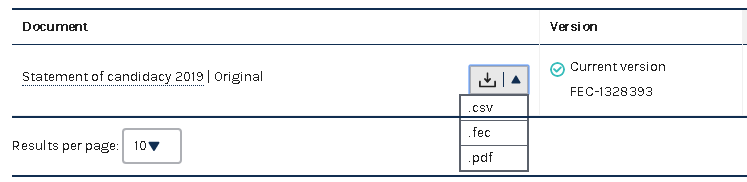
Misc
If you resize the browser window (make it less wide relative to the height) you can expose the PDF option and download the PDF.
 bmathesonFEC
All 2 comments
Doesn't seem to happen on committee profiles pages: https://www.fec.gov/data/committee/C00508416/?cycle=2020&tab=filings
 JonellaCulmer
on 7 Jun 2019
JonellaCulmer
on 7 Jun 2019
While playing with it in Chrome inspector, we could set the z-index of the table (#DataTables_Table_1 {z-index:1}) or address the pointer-events (with something like .results-info {pointer-events:none}, .results-info * {pointer-events:auto}). Both worked.
 rfultz
on 7 Jun 2019
rfultz
on 7 Jun 2019
Related issues
 AmyKort
·
5Comments
AmyKort
·
5Comments
 jenniferthibault
·
5Comments
jenniferthibault
·
4Comments
JonellaCulmer
·
6Comments
jenniferthibault
·
5Comments
jenniferthibault
·
4Comments
JonellaCulmer
·
6Comments
 dorothyyeager
·
5Comments
dorothyyeager
·
5Comments
Most helpful comment
While playing with it in Chrome inspector, we could set the z-index of the table (
#DataTables_Table_1 {z-index:1}) or address the pointer-events (with something like.results-info {pointer-events:none}, .results-info * {pointer-events:auto}). Both worked.