Fec-cms: Mockup "where contributions come from" for raising: by the numbers page
Summary
What we're after:
In an effort to increase the use of data visualizations on our website and improve navigation to our contribution charts on election profile pages, we would like to use these same maps on the raising: by the numbers page and allow our users to see contributions going to candidates.
It still needs to be determined what our MVP state will look like and whether that includes single candidate views, or a candidate comparison. Some questions that we still need to answer:
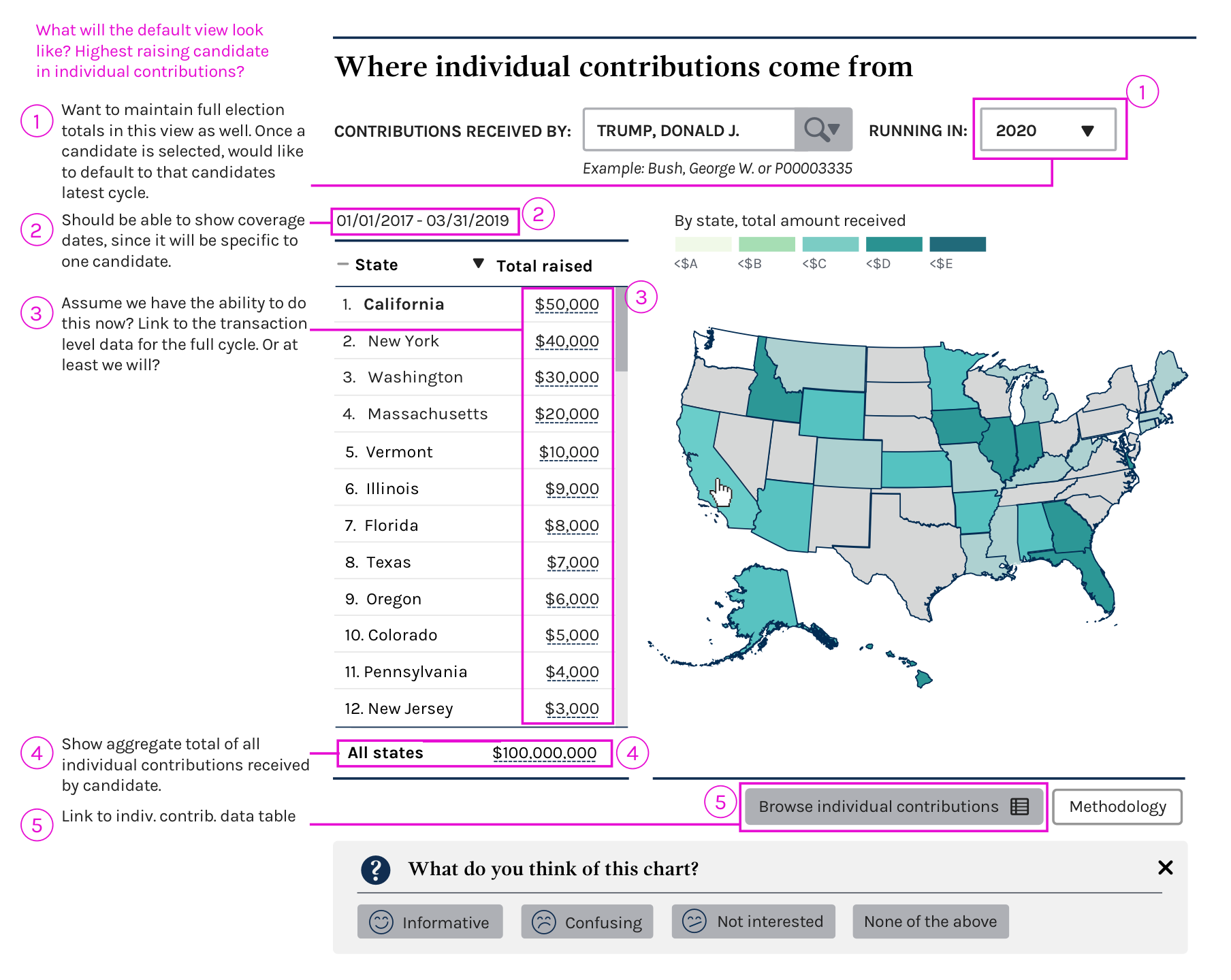
- We need a default state. What does that look like?
- Are we allowing for the comparison of two candidates?
- Are we including all candidates? By office? By party?
Completion criteria
- [x] Schedule a discussion to decide what MVP state should be
- [x] Mockup what that map/chart/visualization will look like and potential options
- [ ] ~Consider changing gradient scale. Is this necessary for an MVP?~
- [x] Discuss preliminary mocks up with the team including PMs
- [x] Discuss front-end and back-end requirements with devs
- [x] Update mock-ups based on discussion with PMs and devs
- [ ] Move to an implementation issue
Future work
_Create implementation issue._
 JonellaCulmer
All 11 comments
Below is a first draft of the where contributions come from chart. I've made some assumptions about what we want to show and think this is a good starting point for a conversation and to make sure we're all on the same page about the MVP we hope to achieve this PI.
cc: @AmyKort @PaulClark2 @patphongs @lbeaufort @dorothyyeager
JonellaCulmer
on 24 May 2019
This looks great @JonellaCulmer . For our first iteration, are we looking at just providing presidential information? Or would users be able to choose House or Senate candidates via the same chart, like on the Who's raising/spending the most chart?
 AmyKort
on 24 May 2019
AmyKort
on 24 May 2019
This is a good start @JonellaCulmer. Leaving some comments here and adding on to what @AmyKort noticed too.
- Are we allowing them to choose from our full list of candidates?
- Is the intention to only allow results for active candidates in a chosen election year? Given that we're keying off
running infor election year, it appears they need to be active? - These filters are dependent on each other. They may need to choose a candidate first in order for us to populate the election year drop down. In addition, some candidates only ran in specific years. But are we keying off all the office election years rather than the candidate's election years? If we're showing all office election years, they may get more no results if the user doesn't know which election year the candidate ran in.
- Can you mock up error and no data states?
 patphongs
on 24 May 2019
patphongs
on 24 May 2019
Based on our conversation from today @patphongs has documented all of the APIs where data needs to come from for this chart to work properly.
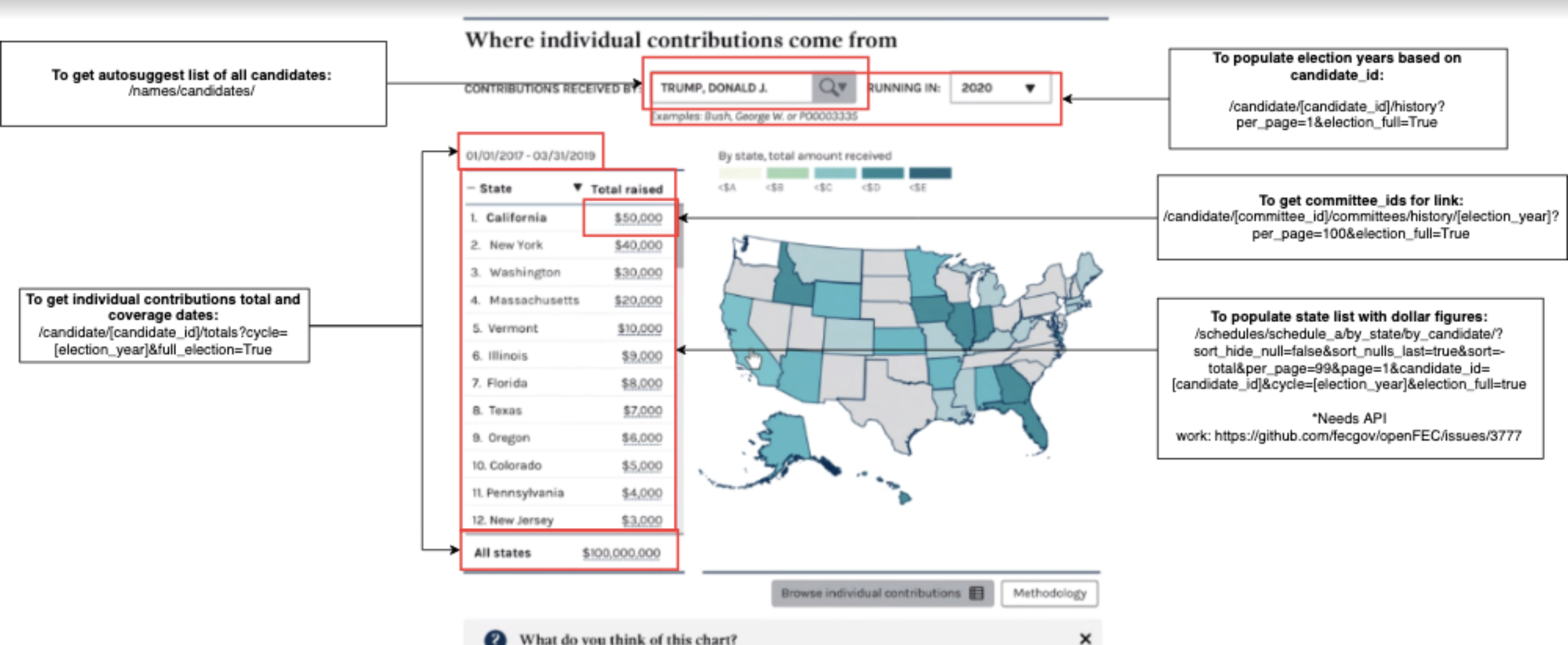
Additionally, some design action items have come out from the discussion:
- [x] Incorporate a way for the user to confirm that they are looking at the candidate they are interested in, in the event that a user has started to look at a candidate, but did not finish typing in the name or hit submit/enter.
- [x] Design for error state: Candidate does not exist
- [x] Design for error state: No data for that candidate
JonellaCulmer
on 28 May 2019
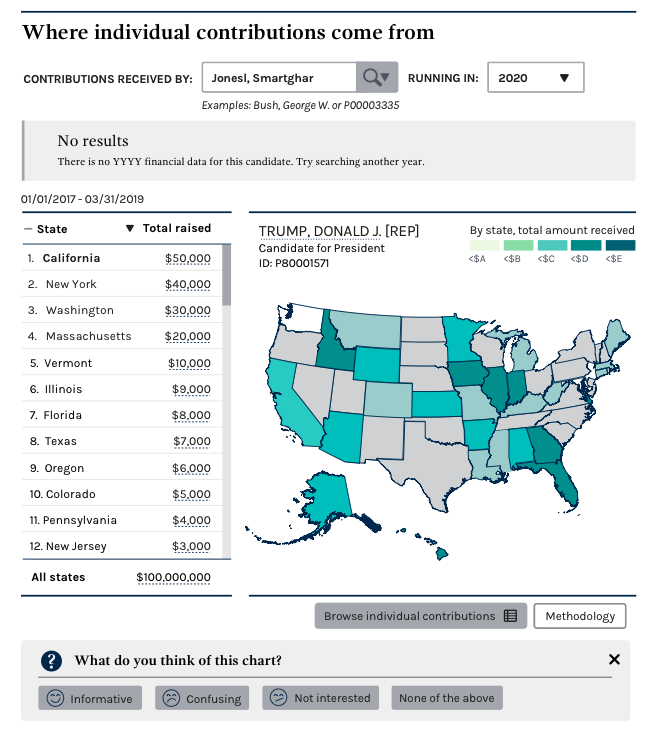
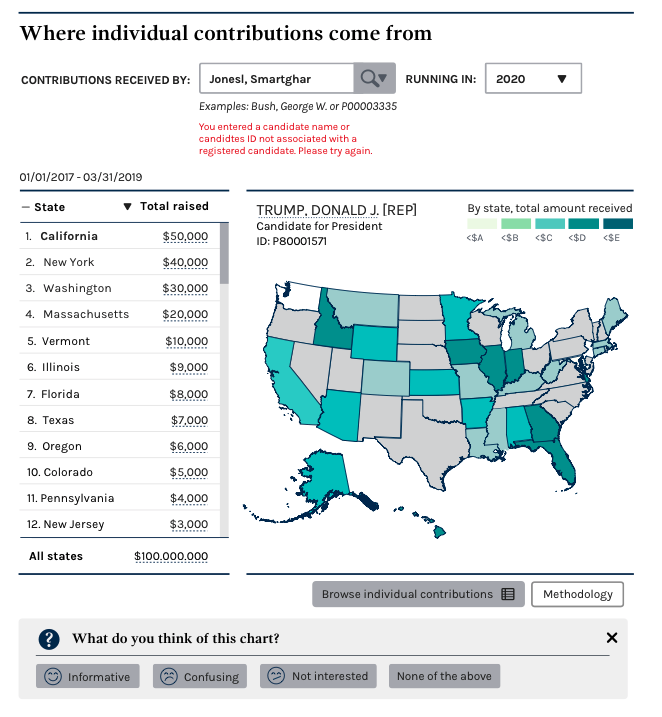
Below are some updated mock-ups that incorporate the above completion criteria:
- Incorporate way for user to confirm they are looking at a specific candidate
- Error state for when candidate does not exist
- Error state for when there is no data for that candidate.
While I still need a content review on the language used for the errors, this is how it could look with them in place. Would also appreciate feedback on the information provided for the candidate (ex. Trump, Donald J., Candidate for President, ID: XXXXXXXX)
Normal/success state
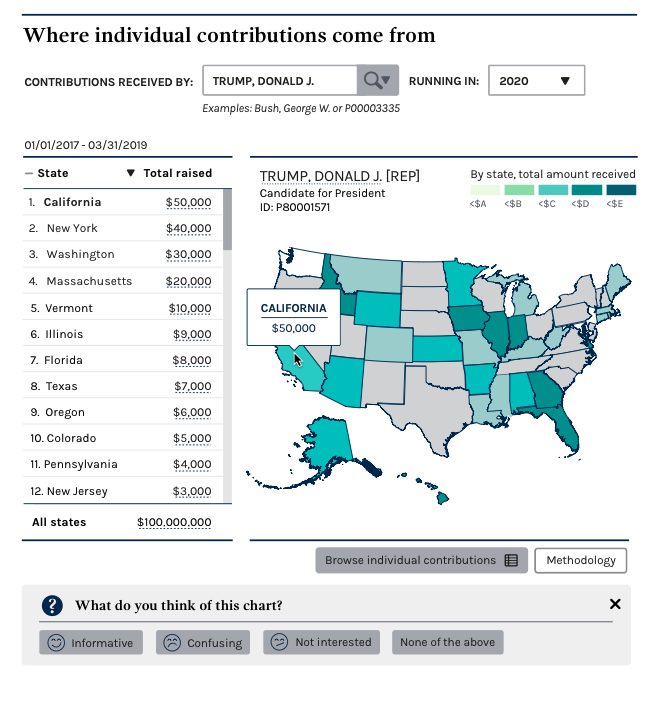
Normal search state
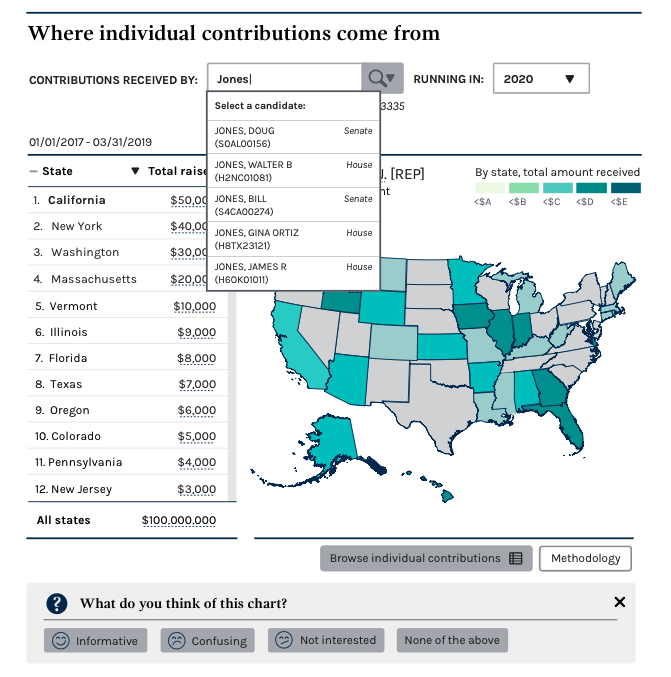
Error state for no data
Error state for missing candidate
cc: @AmyKort @jwchumley @PaulClark2 @lbeaufort @dorothyyeager @patphongs
JonellaCulmer
on 30 May 2019
For the "error state with no data" message, just a small tweak to suggest...
"There is no YYYY financial data for this candidate. Try searching a different election year." (Or election cycle, whatever matches data better.)
For the "Error state for missing candidate" - The message is fine, but there's a typo - should be "candidate ID"
 dorothyyeager
on 30 May 2019
dorothyyeager
on 30 May 2019
Looks great! Do we need to lower-case "President" in "Candidate for President"--in the success state?
AmyKort
on 30 May 2019
@JonellaCulmer Thanks for the new mock ups. I have a question about the error state for missing candidate. Aren't we going to force a candidate pick from the dropdown? So there would never be an instance where they can just type a random name or committee ID to submit. Otherwise, I'm not sure how we would present them with multiple candidate options. See implementation on this IE page under Candidates mentioned expando, CANDIDATE NAME OR ID field. This one also forces to pick a valid candidate. https://www.fec.gov/data/independent-expenditures/?data_type=processed&is_notice=true
patphongs
on 30 May 2019
@patphongs Happy to talk through that today, but I'd argue that the interaction isn't great because it doesn't tell the user what happened or why their search didn't go through. Certainly could be the MVP implementation though and test from there to see how users interpret that interaction.
JonellaCulmer
on 31 May 2019
Happy to talk through that today, but I'd argue that the interaction isn't great because it doesn't tell the user what happened or why their search didn't go through. Certainly could be the MVP implementation though and test from there to see how users interpret that interaction.
Thanks @JonellaCulmer! Just backfilling our convo here. So we'll have the candidate error pop up whenever someone submits something that is not a valid candidate name or candidate ID in the list.
patphongs
on 31 May 2019
Closing in favor of implementation ticket: https://github.com/fecgov/fec-cms/issues/2929
JonellaCulmer
on 31 May 2019
Related issues
patphongs
·
6Comments
 lbeaufort
·
5Comments
lbeaufort
·
5Comments
 johnnyporkchops
·
5Comments
johnnyporkchops
·
5Comments
 kathycarothers
·
3Comments
JonellaCulmer
·
5Comments
kathycarothers
·
3Comments
JonellaCulmer
·
5Comments
Most helpful comment
For the "error state with no data" message, just a small tweak to suggest...
"There is no YYYY financial data for this candidate. Try searching a different election year." (Or election cycle, whatever matches data better.)
For the "Error state for missing candidate" - The message is fine, but there's a typo - should be "candidate ID"