Fec-cms: Govdelivery add watch tagged content in templates
Summary
We needed to suspend govdelivery pagewatches due to excessive emails triggered from a security implementation for csrftoken. We now need to add govdelivery template tags so that pagewatch only monitors only part of a web page.
Completion criteria
Content team (Dorothy): First three tasks are being moved to an issue to be completed before this one.
~- [ ] Identify pages that govdelivery pagewatch will be enabled. See this spreadsheet 🔒~
~- [ ] Update spreadsheet as needed~
~- [ ] Identify user list for who has access to govdelivery to make changes~
- [ ] Identify Wagtail templates that need to be updated to add pagewatch tags
- [ ] Update URLs in govdelivery and set "Watch tagged content field" to yes.
Front end:
- [ ] After page watch tags are added, test on dev by re-enabling 1 pagewatch item to see if it will trigger an email on update
- [ ] When tests are successful, implement on production. (Work in tandem with information and press office who will have to update URLs in govdelivery as well as set
Watch tagged contentfield to yes.)
Implementation guidance
Below information was pulled from the govdelivery manual here: http://content.govdelivery.com/attachments/NICKTEST/2011/12/06/file_attachments/72707/GovDelivery2_Administrator_Manual.pdf#page=64
Watch Tagged Content in action:
After creating an item and setting Watch Tagged Content to “Yes”, navigate back to the
Item Information page. The specific tag that should be placed at the beginning of the
watched section is listed. At the end of the watched section, place the end tag
/PAGEWATCH‐‐>.

When using the Watch Tagged content feature for one item on a page, use the
generic tags to focus the Page Watch mechanism. These tags can be applied
across an entire site if necessary, often around one area of a template:
Content to be watched….
Note that the Watch Tagged Content field on the Item Information page must be
set to ‘Yes’ when using any tags.
 patphongs
All 11 comments
@dorothyyeager will reach out to the Info div to set up a spam folder as a short term workaround. She will also take a look at who is getting the notifications and make sure the list is still current.
 lbeaufort
on 27 Jun 2019
lbeaufort
on 27 Jun 2019
Reviewing the spreadsheet now and have some questions about some of the page watches (and if we really need them at all). Also some of the URLs need updating because the spreadsheet is old. Have reached out to @johnnyporkchops @AmyKort and Information Division management on this.
Also updated the completion criteria to separate out what I can do from the front end tasks of this ticket.
 dorothyyeager
on 17 Jul 2019
dorothyyeager
on 17 Jul 2019
Info division management has given me a more comprehensive spreadsheet that I'll combine with the other one since they each contain some info we'll need. I'll also compare it to the list that's actually on govdelivery to make sure info is up to date. Once I've got it organized, we will be in a better position to make decisions in conjunction with Info management about which templates need updating and which ones need to just be deleted (there are some of those in my opinion).
dorothyyeager
on 18 Jul 2019
We're going to take the organization part of this task to its own ticket in #3061. Once that work is done, we'll be ready to tackle this ticket.
dorothyyeager
on 18 Jul 2019
We've made enough progress in #3061 that it makes sense to add the tag to the template for each topic at the same time we make the other adjustments. This issue is likely to continue to 9.6 as we're still talking to a few other divisions about their lists, but we can get a good headstart now.
dorothyyeager
on 25 Jul 2019
For @patphongs or @johnnyporkchops: That PDF manual is no longer available and it looks like the gov delivery guidance moved to https://support.granicus.com/s/article/Automating-Updates-on-Webpage-or-File-Content-by-Email. When I look at that page, it seems like the code to stick in should now be
I'm getting an error message when I try it though (or the original

Can you spot what I'm doing wrong?
dorothyyeager
on 25 Jul 2019
Are you trying to put this in a Rich Text Box?
 johnnyporkchops
on 25 Jul 2019
johnnyporkchops
on 25 Jul 2019
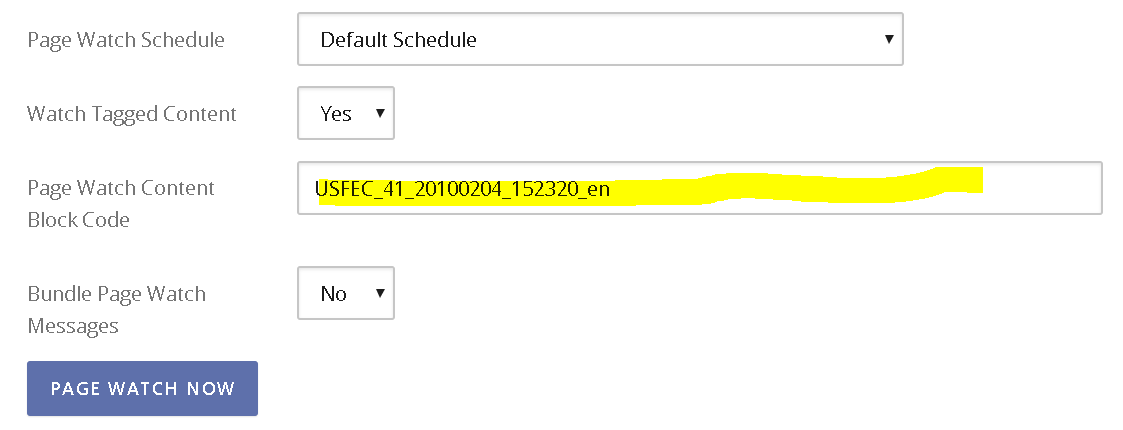
@johnnyporkchops Into the box in govdelivery's interface. Here's the one I was using;
dorothyyeager
on 25 Jul 2019
It looks like govdelivery has changed its interface from the screenshot at the top of this issue.
dorothyyeager
on 25 Jul 2019
Will be looking at this later on Monday. Could move to 9.6 depending if we can get the error resolved.
patphongs
on 26 Jul 2019
Just had a good conversation with @johnnyporkchops and we have figured out my confusion above. Because the support page has changed and we have some new things to figure out, we're going to start fresh with a new issue to get this going, starting with the hard-coded pages.
Closing in favor of #3081
dorothyyeager
on 29 Jul 2019
Related issues
 AmyKort
·
5Comments
AmyKort
·
3Comments
AmyKort
·
5Comments
AmyKort
·
3Comments
 jenniferthibault
·
5Comments
jenniferthibault
·
4Comments
jenniferthibault
·
5Comments
jenniferthibault
·
4Comments
 JonellaCulmer
·
6Comments
JonellaCulmer
·
6Comments