Feathers: Authentication by Facebook oauth with react native
I have been looking for a guide to do something like this, my idea is to authenticate through facebook and (email, password), that is, two authentication methods, but I could not do it.
https://github.com/feathersjs-ecosystem/authentication-oauth2/issues/80
https://github.com/feathersjs-ecosystem/authentication-oauth2/issues/22
System configuration
Tell us about the applicable parts of your setup.
NodeJS version: 10.19.0
Operating System: Ubuntu 20.04
React Version: 16.11.0
React Native Version: 0.62.2
 Shair17
All 15 comments
This is handled with oAuth strategy flow #2. You have to obtain the oAuth access token through React Native (e.g. https://github.com/magus/react-native-facebook-login) and then authenticate with that oAuth token.
 daffl
on 8 Jun 2020
daffl
on 8 Jun 2020
@daffl thanks
Shair17
on 8 Jun 2020
Once you get it working, a cookbook contribution for this would be great. Or even just a markdown file with some notes of what you did.
daffl
on 8 Jun 2020
@daffl I have tried to do it but have had no results.
Shair17
on 9 Jun 2020
@Shair17 what is the issue that you're facing?
 co2nut
on 9 Jun 2020
co2nut
on 9 Jun 2020
@co2nut I want to authenticate by facebook (oauth), actually I am somewhat lost, I have checked the documentation and I have not obtained results, use the library ´react-native-fbsdk´ to get the token from the client side, and from the server configure feathersjs as it says in the documentation and I have not obtained results
Shair17
on 9 Jun 2020
do you mean that you can the access token from react native and try to use the feathers client to authenticate it with facebook strategy but got error?
do you mind share some of your codes or errors here?
co2nut
on 9 Jun 2020
actually i'm confused with feathersjs working on client side, I trying to install the modules @feathersjs/feathers, @feathersjs/rest-client, @feathersjs/authentication-client in my react native project, I created a separate file for feathers handling, followed the guide for client side: https://docs.feathersjs.com/api/client.html#react-native
For authentication I follow this guide: https://docs.feathersjs.com/api/authentication/client.html#configuration
One thing, how is exactly the @feathersjs/authentication-client module know the URL endpoint? I never see a configuration for that, only on the rest-client module.
I going to put here tomorrow the code that I've been using.
Shair17
on 9 Jun 2020
this is how I normally defined my feathers.js for my react native project
import io from 'socket.io-client';
import feathers from '@feathersjs/feathers';
import socketio from '@feathersjs/socketio-client';
import authentication from '@feathersjs/authentication-client';
const socket = io('http://10.0.2.2:3030/');//local
const client = feathers();
client.configure(socketio(socket, {
timeout: 5000
}));
client.configure(authentication({
storage: window.localStorage
}));
export default client;
I am not using socketio, so... How does feathers know the API url? Another thing is, React Native doesn't support window.localStorage, I use AsyncStorage, did u try oauth authentication? With facebook or another else
Shair17
on 9 Jun 2020
@daffl I was thinking of opening another issue, but better not, I decided to continue with this one, yesterday I tried feathers with oauth authentication and in the client (React Native), next I will show screenshots of the code, and what comes out when I press to start session.
This is the result when I press on login with facebook

This is the code on client side (React Native), the login button

This is my feathers.js where I declare the feathers, feathers-client & feathers auth modules
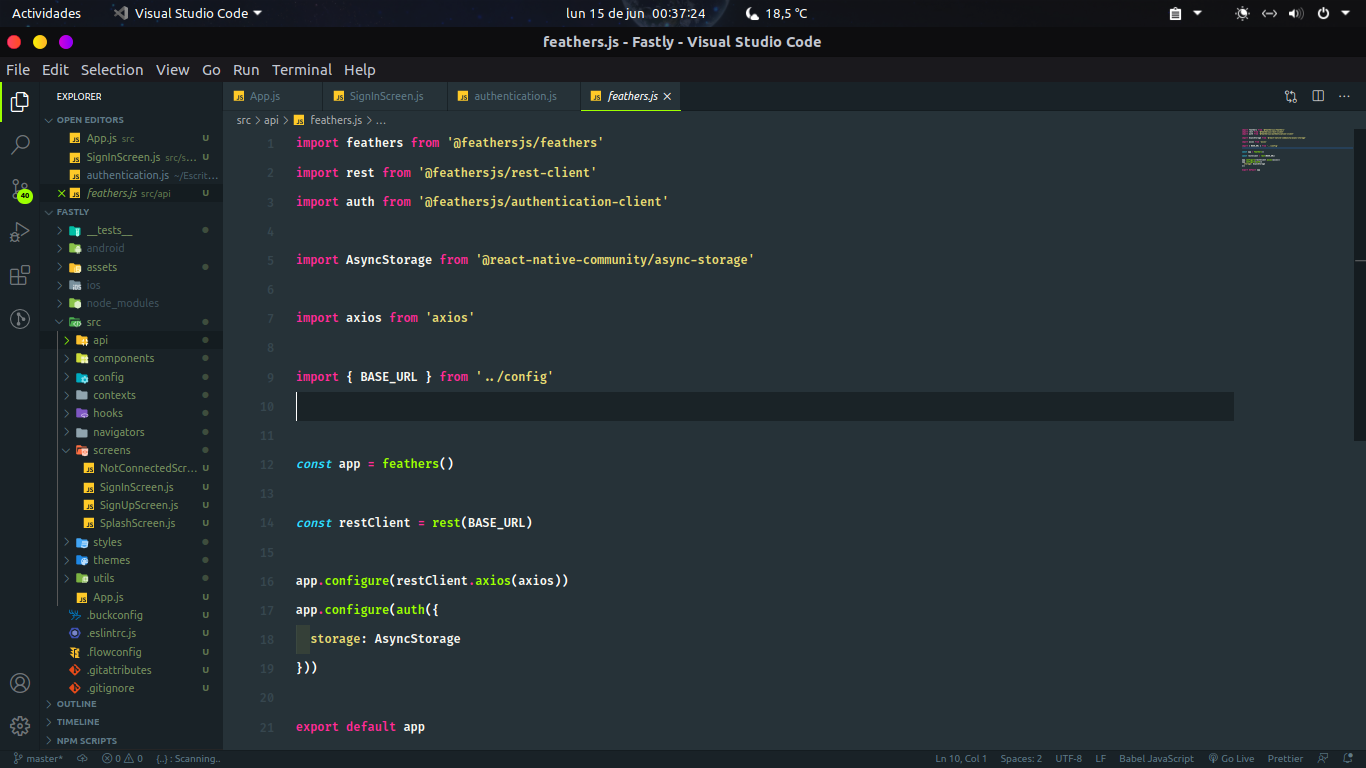
And finally here is my backend (authentication.js)
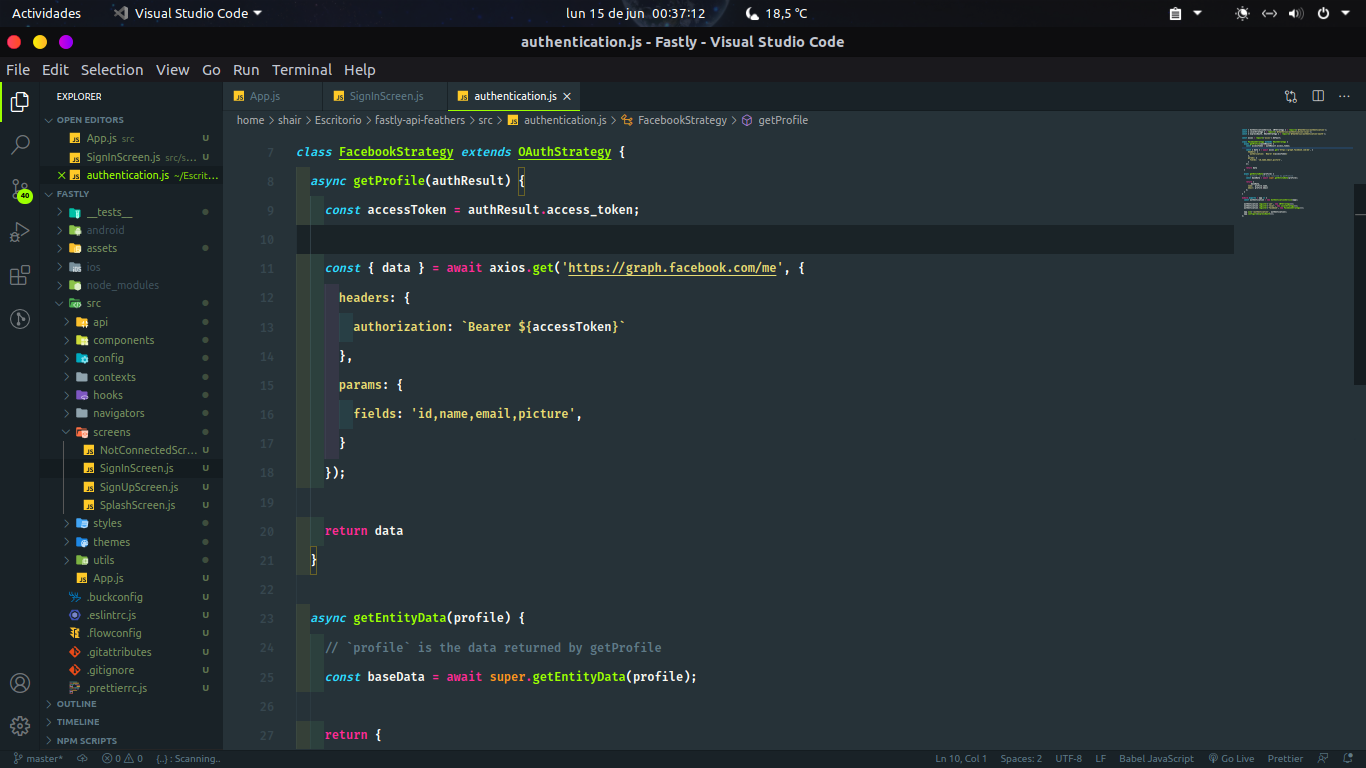
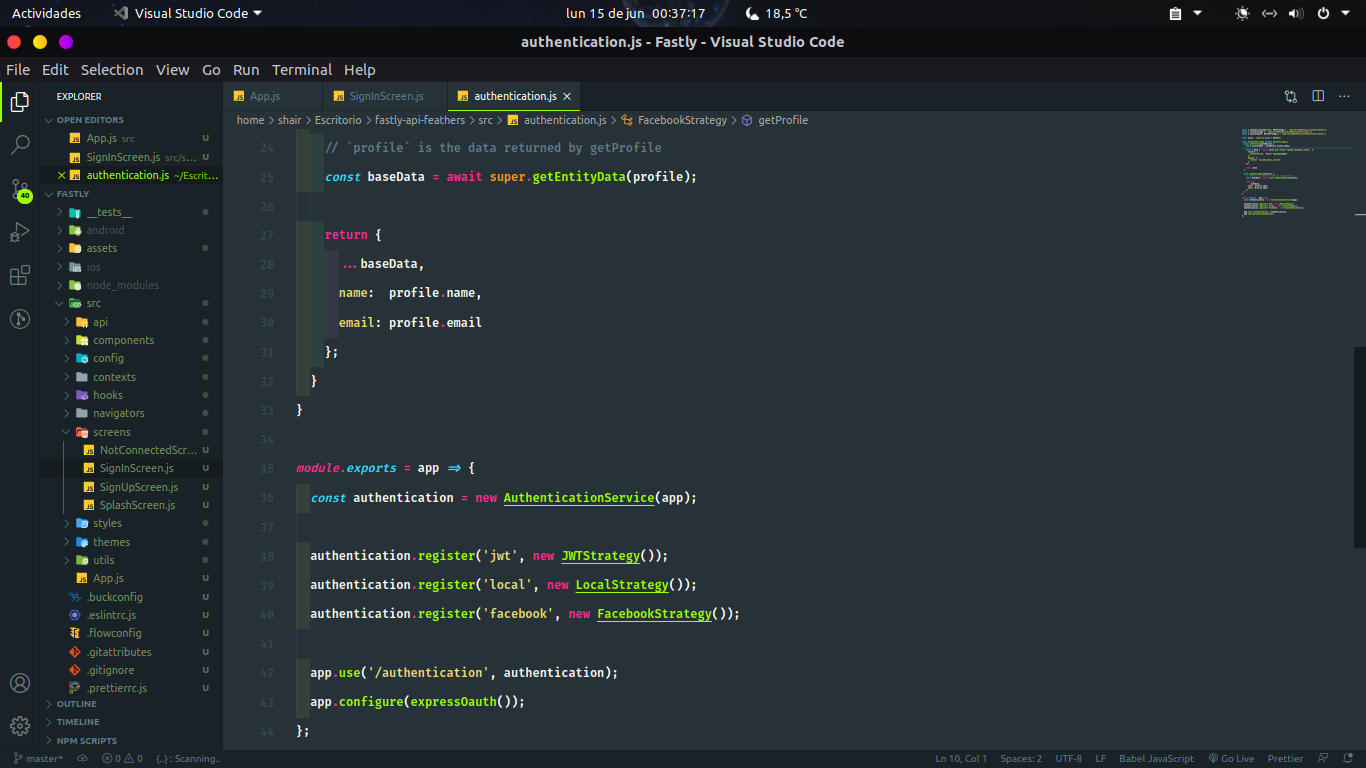
I don't understand very well why the react native console out is "error [Not Authenticated: Invalid authentication information (strategy now allowed in authStrategies)]" if I declare a facebook strategy :/
Shair17
on 15 Jun 2020
@daffl Apparently the error is in feathers.js, I have tried express and passport and everything works very well.
Shair17
on 2 Sep 2020
See this __Note__ in the documentation:
Note: If you are attempting to authenticate using an obtained access token, ensure that you have added the strategy (e.g. 'facebook') to your authStrategies.
daffl
on 2 Sep 2020
@Shair17 add "facebook" to "authStrategies"
"authentication": {
    "entity": "user",
    "service": "users",
    "secret": "....",
    "authStrategies": [
      "jwt",
      "local",
      "apiKey", "otp", "facebook"
    ],
 yohane55
on 3 Sep 2020
yohane55
on 3 Sep 2020
I just got this working, following this guide. Thanks a million!
A quick summary for others, using Google sign in as an example:
- The goal: get a JWT signed by your server. In normal oauth login for web, the feather's auth libraries will set up various routes on your server (i.e.
/oauth/google/callback, etc), which handle the entire auth handshake with Google. After the flow is completed, you a JWT that is signed by your server. That JWT authenticates all future requests to your feathers server. - However, on Expo, you are only given a way to get an access token from Google (I followed this guide: https://docs.expo.io/versions/v40.0.0/sdk/google/ -- you gotta get a new client id, but it's really easy after that)
import * as Google from 'expo-google-app-auth';

const expoGoogleConfig = {
  iosClientId: '<your-expo-google-client-id>',
  scopes: ['profile', 'email'],
}
const signInWithGoogleAsync = async (config) => {
  try {
    const result = await Google.logInAsync(config);

    if (result.type === 'success') {
      return result;
    } else {
      return { cancelled: true };
    }
  } catch (e) {
    return { error: true };
  }
}
const result = await signInWithGoogleAsync(expoGoogleConfig)
// result.accessToken holds google's access token
- So, how to get a JWT from your own server? Following this thread, you can create a new authentication strategy that uses Google's accessToken to obtain a JWT from your server! The typical strategies (jwt, local), don't accept Google's tokens for auth, so you need to make a new strategy.
- The way to do it, is to add
"google"as an auth strategy, and then use the new auth strategy to get your feathers server JWT. (It turns out thegoogleandfacebookauth strategies are built in... I'm guessing it's supported through thepassportorgrantlibrary.)
"authentication": {
    "entity": "user",
    "service": "users",
    "secret": "....",
    "authStrategies": [
      "jwt",
      "local",
      "google"
    ],
    ...
}
app.authenticate({
  strategy: 'google',
  access_token: result.accessToken  // google access token from above
}).then((authResult) => {
  console.log('logged in to our feathers server', authResult) // hooray!
}).catch(e => {
  console.error('Authentication error', e);
});
Voila!
 jiangts
on 21 Jan 2021
jiangts
on 21 Jan 2021
Related issues
 arve0
·
4Comments
arve0
·
4Comments
 NetOperatorWibby
·
4Comments
NetOperatorWibby
·
4Comments
 Vincz
·
4Comments
Vincz
·
4Comments
 harrytang
·
3Comments
harrytang
·
3Comments
 eric-burel
·
3Comments
eric-burel
·
3Comments
Most helpful comment
@Shair17 add "facebook" to "authStrategies"