Feathers: error TS2468: Cannot find global value 'Promise'
Steps to reproduce
Follow directions for feathers-basic on Windows 10 from here: https://docs.feathersjs.com/guides/basics/starting.html#installing-feathers
- [x] Tell us what broke. The more detailed the better.
Lots of breakage. Maybe the instructions are written using a Mac?
C:\ae\adaept.com\aefea>ts-node app.ts
'ts-node' is not recognized as an internal or external command,
operable program or batch file.
Setup using nodemon then this:
C:\ae\adaept.com\aefea>npm start

> [email protected] start C:\ae\adaept.com\aefea
> nodemon src/index.ts

'nodemon' is not recognized as an internal or external command,
operable program or batch file.
npm ERR! code ELIFECYCLE
npm ERR! errno 1
npm ERR! [email protected] start: `nodemon src/index.ts`
npm ERR! Exit status 1
npm ERR!
npm ERR! Failed at the [email protected] start script.
npm ERR! This is probably not a problem with npm. There is likely additional logging output above.

npm ERR! A complete log of this run can be found in:
npm ERR!     C:\Users\peter\AppData\Roaming\npm-cache\_logs\2019-12-21T04_13_25_726Z-debug.log
Configure start and get this:
C:\ae\adaept.com\aefea>npm start

> [email protected] start C:\ae\adaept.com\aefea
> nodemon src/index.ts

[nodemon] 2.0.2
[nodemon] to restart at any time, enter `rs`
[nodemon] watching dir(s): src\**\*.ts
[nodemon] watching extensions: js,mjs,json
[nodemon] starting `node src/index.ts index.js`
internal/modules/cjs/loader.js:797
    throw err;
    ^

Error: Cannot find module 'C:\ae\adaept.com\aefea\index.js'
    at Function.Module._resolveFilename (internal/modules/cjs/loader.js:794:15)
    at Function.Module._load (internal/modules/cjs/loader.js:687:27)
    at Function.Module.runMain (internal/modules/cjs/loader.js:1025:10)
    at internal/main/run_main_module.js:17:11 {
  code: 'MODULE_NOT_FOUND',
  requireStack: []
}
[nodemon] app crashed - waiting for file changes before starting...
Terminate batch job (Y/N)?
So it is not really a quick start so far.
- [x] If you can, please create a simple example that reproduces the issue and link to a gist, jsbin, repo, etc. This makes it much easier for us to debug and issues that have a reproducable example will get higher priority.
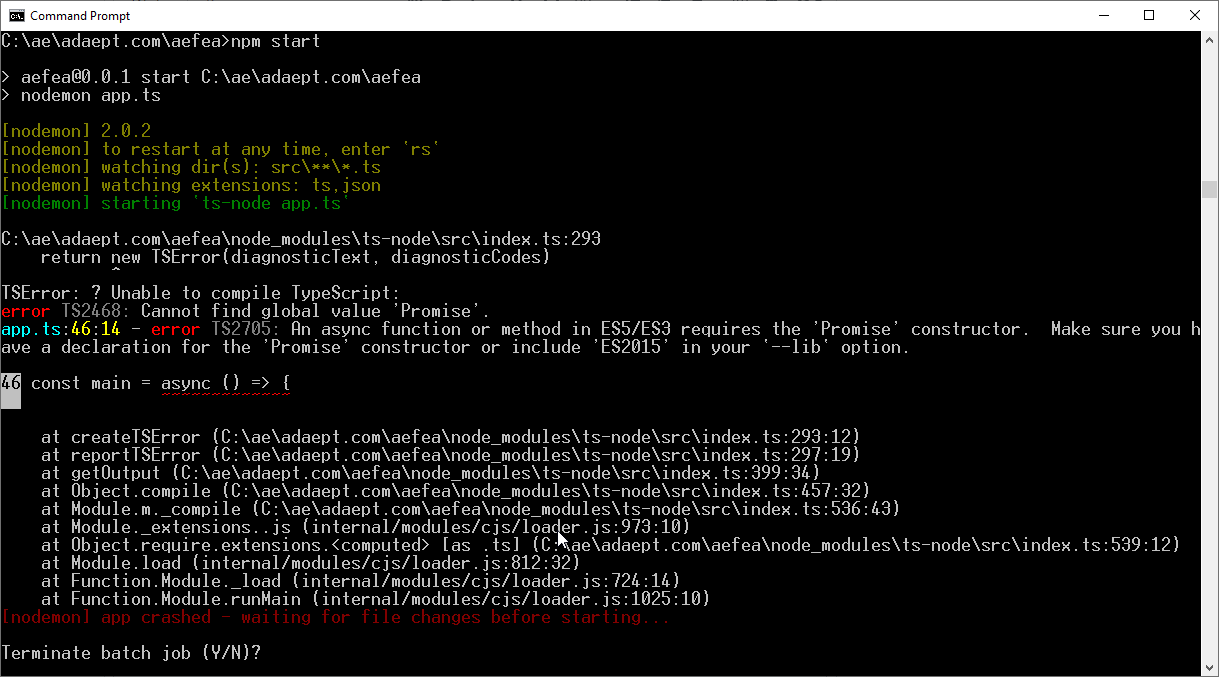
This error is where I stopped:
Repo: https://github.com/peterennis/aefea/commits/master
Expected behavior
Tell us what should happen
Instructions should work on Windows 10
Actual behavior
Tell us what happens instead
Does not work
System configuration
Tell us about the applicable parts of your setup.
Module versions (especially the part that's not working):
NodeJS version:
12.13.0
Operating System:
Windows 10
Browser Version:
Chrome latest
React Native Version:
Module Loader:
 peterennis
All 4 comments
The instructions have been confirmed to work on Windows. If you are already getting an error for ts-node not being available, it is probably an issue with your NodeJS setup. Normally it is related to permissions.
 daffl
on 21 Dec 2019
daffl
on 21 Dec 2019
@daffl
I got it started with Windows but then the error is Cannot find global value 'Promise'
Looks like it is trying to run the code.
Repo: https://github.com/peterennis/aefea/commits/master
Is there a requirement for global install of some packages?
peterennis
on 22 Dec 2019
I have a feeling you may not have run the TypeScript tab version of the initialization commands in the Quick start guide. With:
# Install TypeScript and its NodeJS wrapper globally
npm i typescript ts-node -g

npm init --yes
# Also initialize a TS configuration file that uses modern JavaScript
tsc --init --target es2018
Everything will work as expected (the tsc --init --target es2018 is the secret here).
daffl
on 23 Dec 2019
@daffl
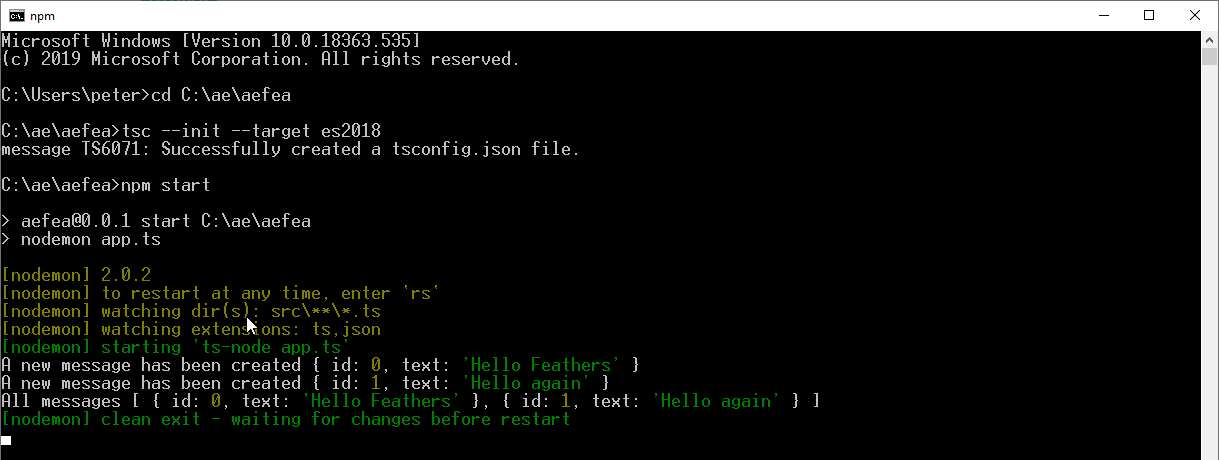
tsc --init --target es2018 was the fix
https://github.com/peterennis/aefea/commit/e49d1eac8ad86b17a8284fa3115f776ec034b36e
Thanks 👍
peterennis
on 23 Dec 2019
Related issues
 davigmacode
·
3Comments
davigmacode
·
3Comments
 stephane303
·
3Comments
stephane303
·
3Comments
 eric-burel
·
3Comments
eric-burel
·
3Comments
 arve0
·
4Comments
arve0
·
4Comments
 arkenstan
·
3Comments
arkenstan
·
3Comments
Most helpful comment
I have a feeling you may not have run the
TypeScripttab version of the initialization commands in the Quick start guide. With:Everything will work as expected (the
tsc --init --target es2018is the secret here).