Feathers: Unble to download csv file with custom middleware
I'm sure it's something that I'm not doing it correct, but, for the life of me can't figure out why CSV file doesn't get downloaded. I have tried many things but even the basic code such as below doesn't download the file. Browser can receive the file content in axios response.
feathers -V
3.9.0
download.service.js
// Initializes the `export` service on path `/export`
const cors = require('cors')
const createService = require('./download.class');
const hooks = require('./download.hooks');
const download = require('../../middleware/download');

module.exports = function (app) {

    const paginate = app.get('paginate');

    const options = {
        paginate,
        multi: false
    };

    const corsOptions = {
        origin: 'http://localhost:8000',
        optionsSuccessStatus: 200 // some legacy browsers (IE11, various SmartTVs) choke on 204
    }

    // Initialize our service with any options it requires
    app.use('/export',
        cors(corsOptions),
        createService(),
        download()
    );

    // Get our initialized service so that we can register hooks
    const service = app.service('export');

    // service.hooks(hooks);
};
download.js
const { Parser } = require('json2csv');
const fields = ['id', 'email'];
const opts = { fields };
const parser = new Parser(opts);

module.exports = function (options = {}) {
    return function download(req, res) {

        const app = req.app;
        // res.status = 200;
        // res.set('Content-Type', 'text/csv');
        // res.set('Content-disposition', `attachment; filename=download.csv`);
        // res.type('csv');
        // res.attachment(filename);

        const data = parser.parse({
            id: '13434',
            email: '[email protected]'
        });
        // console.log(data);
        res.type('csv');
        res.status(200)
        res.write(data)
        res.end(data);
    };
};
client.js
      this.$axios
        .get(`/export?listId=${listId}`)
        .then(response => {
          debug(response);
        })
        .catch(err => {
          this.showError(err);
        });
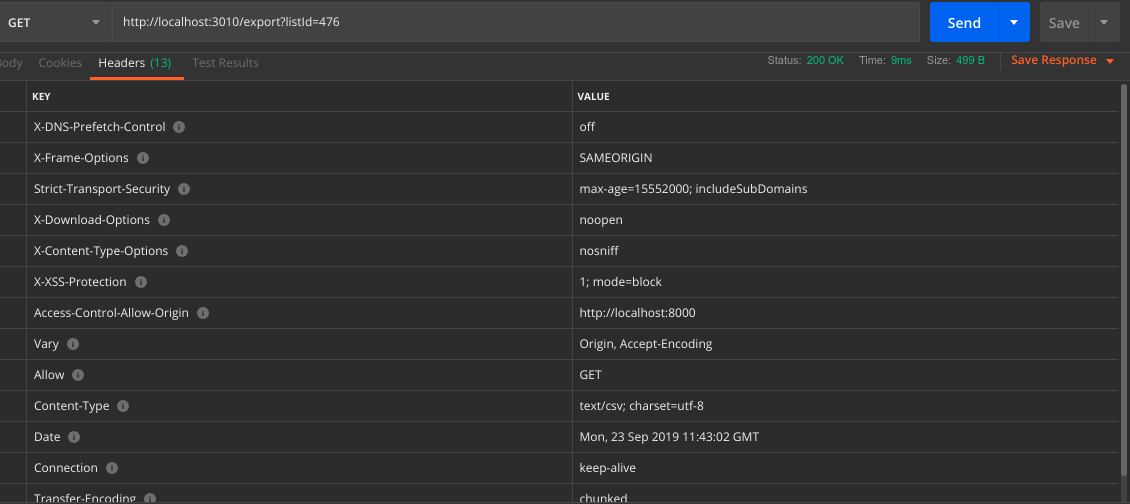
Can sonemone help me find why the CSV file doesn't get downloaded.
 apmcodes
All 5 comments
In order to download the file the browser needs a link which would either be via <a href="/export?listId=${listId}" target="_blank">Download CSV</a> or when using Axios by creating a hidden download element:
this.$axios
  .get(`/export?listId=${listId}`)
  .then(response => {
    var blob = new Blob(["\ufeff", response]);
    var url = URL.createObjectURL(blob);
    downloadLink.href = url;
    downloadLink.download = "data.csv";

    document.body.appendChild(downloadLink);
    downloadLink.click();
    document.body.removeChild(downloadLink);
  })
  .catch(err => {
    this.showError(err);
  });
 daffl
on 24 Sep 2019
daffl
on 24 Sep 2019
Thank you very much for taking the time to answer and the useful link. Alas, could download the csv.
Now, will find out if the Blob method is suitable for very large streaming response from the feathers app.
apmcodes
on 24 Sep 2019
Okay, so Blob method buffers the response data and download starts once all the data is received.
Solution: StreamSaver.js can write to disk from readable stream. Also, Axios do not support stream on browser side, so using Fetch to stream the express response.
So combining Fetch and StreamSaver.js can download CDV to disk as a stream as below.
      this.$fetch(exportURL, {
        method: "GET",
        headers: getHeaders
      })
        .then(res => {
          //   debug(response.data);
          if (!res.ok) {
            throw new Error("Failed export");
          }
          const readableStream = res.body;
          const fileStream = this.$streamSaver.createWriteStream(
            `result-${listId}.csv`
          );
          window.writer = fileStream.getWriter();
          window.writer.releaseLock();

          // more optimized
          if (window.WritableStream && readableStream.pipeTo) {
            return readableStream
              .pipeTo(fileStream)
              .then(() => {
                // console.log("done writing");
                this.$q.notify({
                  color: "positive",
                  message: `Export completed [${listId}]`,
                  icon: "done"
                });
              })
              .catch(err => {
                this.showError(err);
              });
          }

          const reader = res.body.getReader();
          const pump = () =>
            reader.read().then(res => {
              if (res.done) {
                window.writer.close();
                this.$q.notify({
                  color: "positive",
                  message: `Export completed [${listId}]`,
                  icon: "done"
                });
              } else {
                window.writer.write(res.value).then(pump);
              }
            });

          pump();
        })
        .catch(err => {
          this.showError(err);
        });
Thanks @daffl for get me going in the right direction
apmcodes
on 25 Sep 2019
Hi, owner of StreamSaver.js here.
I would still recommend you to use this, if the file is coming from the server.
res.set('Content-disposition', `attachment; filename=download.csv`);
but for it to work you can't use ajax, you have to either
- navigate to it
- create a hidden iframe to it.
- or submit a (hidden)
<form>incase you need to post some data that can't be resolved with searchParams
FileSaver & StreamSaver are best suited for client side generated content.
StreamSaver pretty much emulate what a server dose in order for it to save a file
 jimmywarting
on 10 Oct 2019
jimmywarting
on 10 Oct 2019
This looks interesting, maybe we can add it to the Cookbook.
daffl
on 10 Oct 2019
Related issues
 stephane303
·
3Comments
stephane303
·
3Comments
 jordanbtucker
·
4Comments
jordanbtucker
·
4Comments
 rstegg
·
3Comments
rstegg
·
3Comments
 arve0
·
4Comments
arve0
·
4Comments
 davigmacode
·
3Comments
davigmacode
·
3Comments
Most helpful comment
This looks interesting, maybe we can add it to the Cookbook.