Feathers-vuex: Weired! data is getting mixed between models
Steps to reproduce
On client side, Vuex store clone creates objects of other model/ plugin (with the same id) randomly and thus saves other model instead of currently edited object. Have reviewed both the front end (quasar) and backend (feathers) codes and it all looks neat (no model/ service mixup).

While editing say a Tax object, it clones the tax object as say Promo model object with data from both. If saved it saves promo object.
Tax.vue
    btnEdit(props) {
      if (!props || !props.row) {
        return;
      }
      this.thisTax = props.row.clone();
      debug("thisTax", this.thisTax);
      this.taxDialog = true;
    },
    btnSave() {
      this.$v.thisTax.$touch();
      if (this.$v.thisTax.$invalid) return;
      this.loading = true;
      this.thisTax
        .save()
        .then(response => {
          this.$q.notify({
            color: "positive",
            message: `Tax saved ${response.id} - ${response.name}`
          });
          this.$v.$reset();
          this.taxDialog = false;
          this.thisTax = {};
          this.loading = false;
        })
        .catch(e => {
          this.loading = false;
          this.$q.notify({
            color: "negative",
            message: `Error ${e}`
          });
        });
    },
Sample plugin in store/index.js. All plugins are delcared like this
class Tax extends BaseModel {
    // required
    constructor(data, options) {
        super(data, options)
    }
    // required
    static modelName = 'Tax'
}

const taxPlugin = makeServicePlugin({
    Model: Tax,
    service: client.service('tax'),
    enableEvents: false, // turn off socket event listeners. It's true by default
    idField: 'id'
})
Expected behavior
clone Tax object and save the edited Tax item
Actual behavior
Instead of creating Tax object it creats another model object randomly say Promo with clubbed object properpties.

System configuration
        "@feathersjs/authentication-client": "^4.3.11",
        "@feathersjs/feathers": "^4.3.11",
        "@feathersjs/socketio-client": "^4.3.11",
        "feathers-vuex": "^2.2.5",
 apmcodes
All 12 comments
Observation
After login, if edit a Promo item (with id = 1) of say Promo model and then if edit a Tax item (id = 1) of Tax model then instead of cloning Tax model object it clones Promo model object (id = 1) with properties of the Tax object (id = 1). Seems cloned object are being mixed. May be I'm doing it wrong.
apmcodes
on 19 Dec 2019
Tax.copiesById has Plan model objects.
debug('copies', Tax.copiesById);

Tried creating a temp object from the Model and then clone it.
const { Tax } = this.$FeathersVuex.api;
      const tmpTax = new Tax(Object.assign({}, props.row));
      this.thisTax = tmpTax.clone();
      debug("thisTax", this.thisTax);
      debug('copies', Tax.copiesById);
Definetley the models here are getting mixed on clone(). Can someone guide me what am I doing wrong here.
apmcodes
on 19 Dec 2019
Please paste in your service/model definition files Promo and Tax
 marshallswain
on 20 Dec 2019
marshallswain
on 20 Dec 2019
- [ ] If you have relationships setup in
setupInstancein another model, make sure you are creating instances with the correct Model references. - [ ] Make sure the servicePath is correct for each service.
- [ ] Make sure the modelName and the class name are correct for each service.
- [ ] Make sure the modules are named properly when you register them in the Vuex store.
- [ ] Make sure you don't have an explicit conflicting
namespacesetup on any of the service plugins. (if you use them at all)
marshallswain
on 20 Dec 2019
Thanks for the check list.
Service/ model is declared in the API app (Feathers backend) and not in front end (Quasar) app.
Not using setupInstance and no relationship among these models. No namespace setup. modelName are correct and double checked.
Related to Tax and Promo, the below is declared in the src/storage/index.js file
class Tax extends BaseModel {
    // required
    constructor(data, options) {
        super(data, options)
    }
    // required
    static modelName = 'Tax'
}

const taxPlugin = makeServicePlugin({
    Model: Tax,
    service: client.service('tax'),
    enableEvents: false, // turn off socket event listeners. It's true by default
    idField: 'id'
})

class Promo extends BaseModel {
    constructor(data, options) {
        super(data, options)
    }
    static modelName = 'Promo'
    static instanceDefaults() {
        return {
        }
    }
}

const promoPlugin = makeServicePlugin({
    Model: Promo,
    service: client.service('promo'),
    enableEvents: true, // turn off socket event listeners. It's true by default
    idField: 'id',
})
When I clone any of the models Plan, Promo, Tax they are added to a .copiesById based on their id and can be seen via debug('copies', Tax.copiesById); So they overwrite each other based on the object id. Not sure why all the 3 models object are saved under Tax.copiesById and may this is this the intented way?.
What I did now is, For editing create a new object and then before saving create a Model object out of the new object and then save it without the need to clone it.
in btnEdit()
this.thisTax = Object.assign({}, props.row);
In btnSave()
      const { Tax } = this.$FeathersVuex.api;
      this.thisTax = new Tax(this.thisTax);
      this.thisTax
        .save()
        .then()
        ...
In btnAdd()
      const { Tax } = this.$FeathersVuex.api;
      this.thisTax = new Tax();
Is this the correct way to use feathers-vuex?
apmcodes
on 20 Dec 2019
I had the same weird behavior I cannot understand or explain. What helped for me was to set keepCopiesInStore: true which as of v3 is now deprecated.
With this option enabled everything works as expected.
Hopefully Marshall can help with this.
 fratzinger
on 20 Dec 2019
fratzinger
on 20 Dec 2019
I've figured out the cause. copiesById is on the BaseModel, not on the extended Model. This means every Model shares the same copiesById. I just haven't noticed it because MongoDB's ObjectID is unique. I'm working on the fix, now.
marshallswain
on 20 Dec 2019
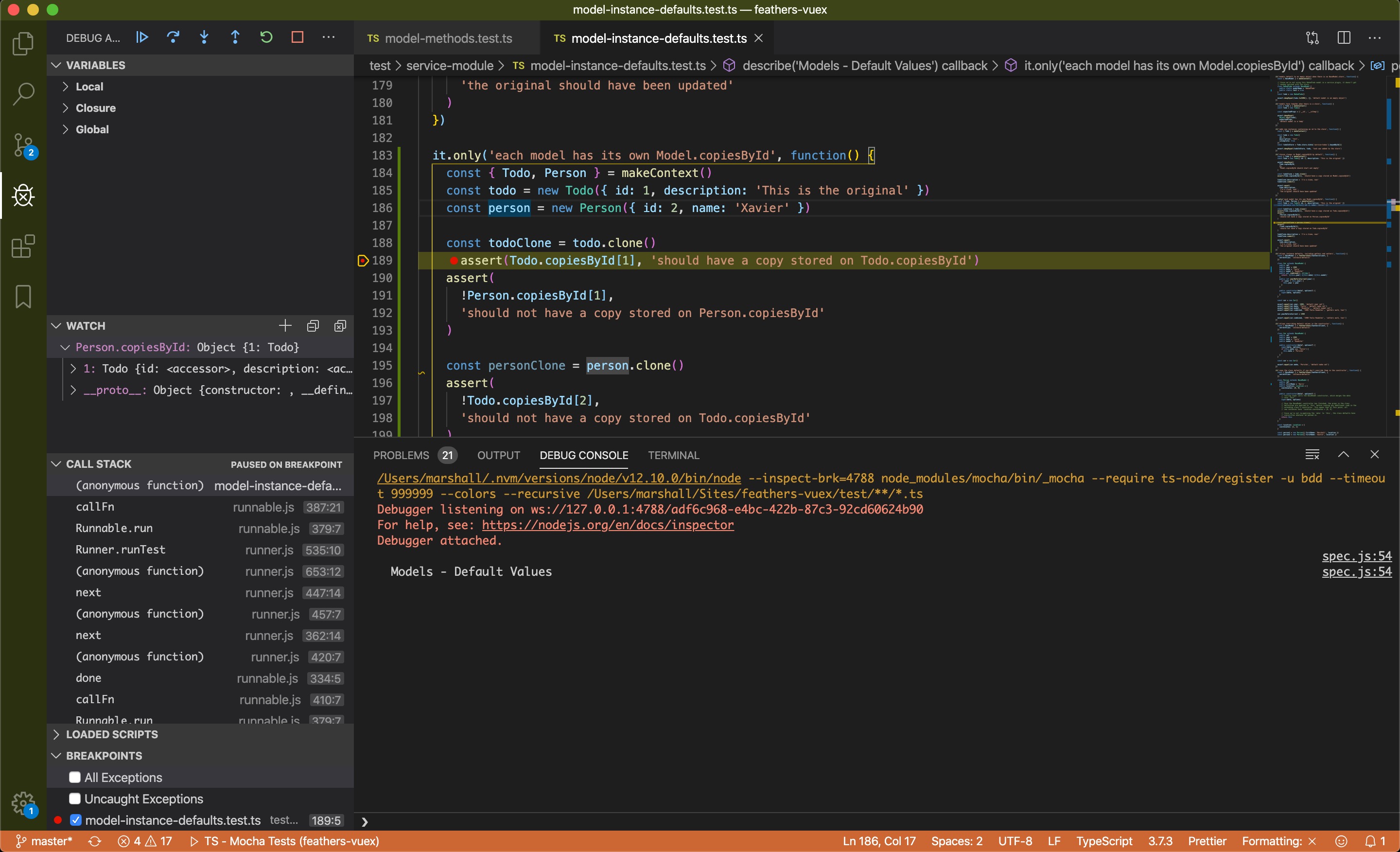
Here's an screenshot of the problem. I cloned a todo and it ended up in Person.copiesById.
marshallswain
on 20 Dec 2019
Fixed in [email protected]
marshallswain
on 20 Dec 2019
Thank you for providing the fix so quick.
Currently using "feathers-vuex": "^2.2.5". Does upgaring to [email protected] need any code changes? Or just an npm update would suffice?
apmcodes
on 20 Dec 2019
Only one change that you might not even have to do:
https://vuex.feathersjs.com/3.0-major-release.html#a-single-breaking-change
marshallswain
on 20 Dec 2019
Okay got it. Thanks
apmcodes
on 20 Dec 2019
Related issues
 coderinblack08
·
7Comments
apmcodes
·
6Comments
coderinblack08
·
7Comments
apmcodes
·
6Comments
 daenuprobst
·
5Comments
daenuprobst
·
5Comments
 Heartnett
·
4Comments
Heartnett
·
4Comments
 RubyRubenstahl
·
3Comments
RubyRubenstahl
·
3Comments
Most helpful comment
Fixed in
[email protected]