Feather: Icons not showing in datatables on pagination
Prerequisites
- Version: 2.5.6
- Are you running from source/master: source
- Are you using a released build: yes
- Operating system: windows 10, chrome browser 74
- Bits: 64
Step to reproduce
Add feather icon into datatable row.
Datatable should have rows more than pagination limit i.e. at least 20 or more rows.
Actual behavior
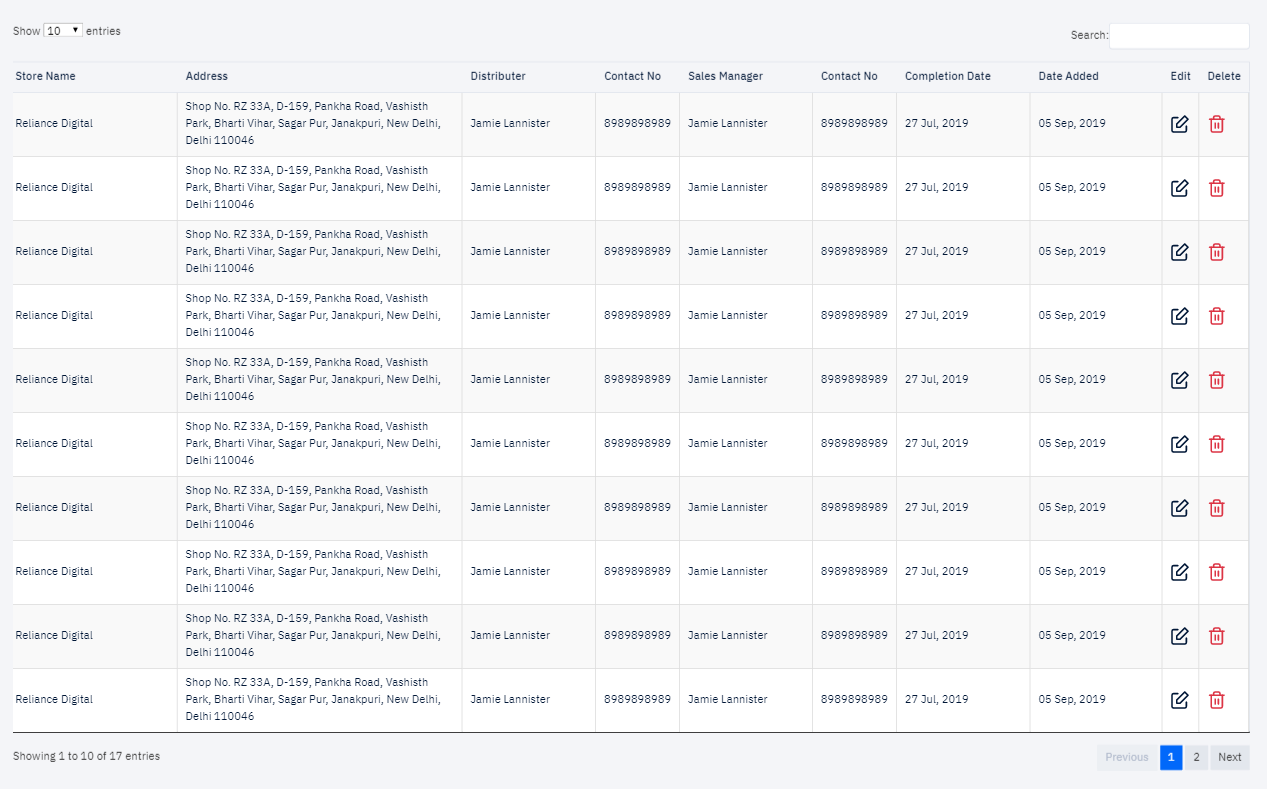
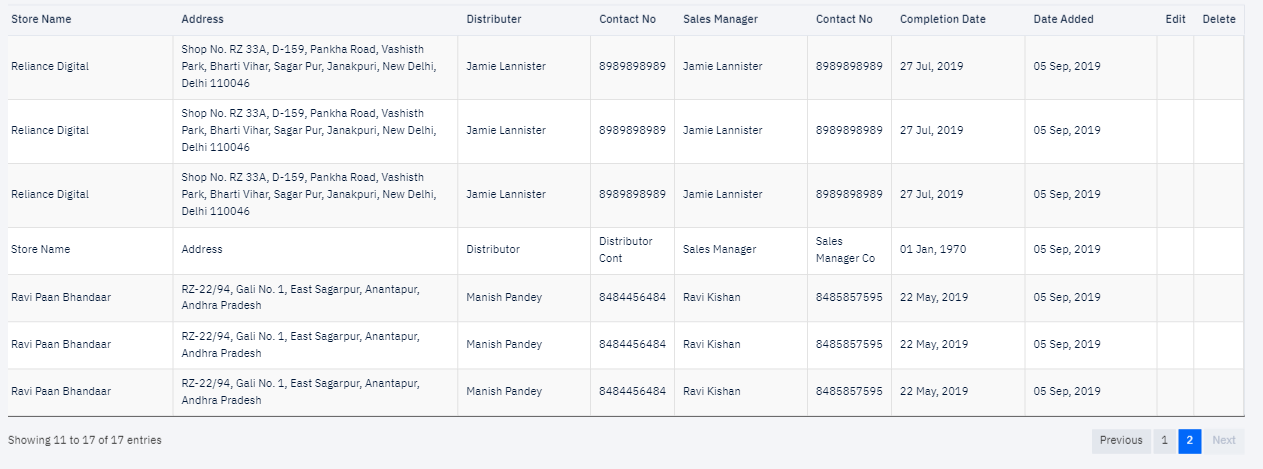
Feather icon showing on first page and not remaining pages.
Any message or error
No error message thrown
Resources
Screenshot attached below
 anoop-sharma
All 6 comments
I think I know why. Please precise that you're using the JS library.
I guess it depends on how your pagination work. Since <i data-feather> tags are replaced by JS with svg files when you call feather.replace(). But if your pagination system doesn't have the elements (rows) into code whatever they are shown or hidden, the feather library didn't render the icons, since, well they didn't exist when you called feather.replace() (typically at page load). That seems to be the case. You could call feather.replace() when you change "pages" as a workaround.
Where does your pagination/table system come from though ?
 locness3
on 5 Sep 2019
locness3
on 5 Sep 2019
I think I know why. Please precise that you're using the JS library.
I guess it depends on how your pagination work. Since
<i data-feather>tags are replaced by JS with svg files when you callfeather.replace(). But if your pagination system doesn't have the elements (rows) into code whatever they are shown or hidden, the feather library didn't render the icons, since, well they didn't exist when you calledfeather.replace()(typically at page load). That seems to be the case. You could callfeather.replace()when you change "pages" as a workaround.Where does your pagination/table system come from though ?
It is default pagination of datatable javascript library. And yes you are correct, I understood this as the elements does not exists hence they will not get render.
But I thought may be there some integration with datatable so that I can display the feather icons without using feather.replace() being called in pagination.
anoop-sharma
on 5 Sep 2019
I think it's on your side to do this. Feather can not really do anything about this.
locness3
on 7 Sep 2019
Alright thanks will try to implement it myself and come up with some solutions.
anoop-sharma
on 8 Sep 2019
Leaving this here to help anyone who comes across this problem while using Feather with Datatables.
The Datatables drawCallback option is called whenever the table is re-drawn. It triggers when new data is rendered into the table (but not when table is resized). Works well with AJAX and allows you to call feather.replace() whenever new data is loaded into the table/page.
$('#example').dataTable( {
    "drawCallback": function( settings ) {
        feather.replace();
    }
} );
I don't know if this is the most efficient or "best practice" way to overcome the issue, but it works and doesn't seem to trigger too unnecessarily. Also works when the page record count is changed :)
 damianduffy
on 13 Nov 2020
damianduffy
on 13 Nov 2020
Leaving this here to help anyone who comes across this problem while using Feather with Datatables.
The Datatables
drawCallbackoption is called whenever the table is re-drawn. It triggers when new data is rendered into the table (but not when table is resized). Works well with AJAX and allows you to callfeather.replace()whenever new data is loaded into the table/page.$('#example').dataTable( { "drawCallback": function( settings ) { feather.replace(); } } );I don't know if this is the most efficient or "best practice" way to overcome the issue, but it works and doesn't seem to trigger too unnecessarily. Also works when the page record count is changed :)
This is works! you save my day.. thanks man... 👍 😄
 dlintin
on 15 Nov 2020
dlintin
on 15 Nov 2020
Related issues
 ericfennis
·
4Comments
ericfennis
·
4Comments
 JoelEllis
·
3Comments
JoelEllis
·
3Comments
 kurisubrooks
·
4Comments
kurisubrooks
·
4Comments
 jamesponddotco
·
5Comments
jamesponddotco
·
5Comments
 mittalyashu
·
4Comments
mittalyashu
·
4Comments
Most helpful comment
Leaving this here to help anyone who comes across this problem while using Feather with Datatables.
The Datatables
drawCallbackoption is called whenever the table is re-drawn. It triggers when new data is rendered into the table (but not when table is resized). Works well with AJAX and allows you to callfeather.replace()whenever new data is loaded into the table/page.I don't know if this is the most efficient or "best practice" way to overcome the issue, but it works and doesn't seem to trigger too unnecessarily. Also works when the page record count is changed :)