Feather: Add default fill/stroke color
This is how icon folder looks in my OS explorer (Ubuntu)
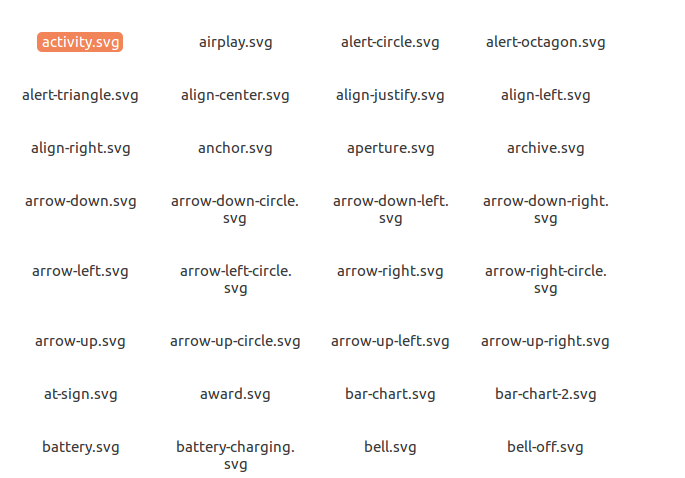
Why not to add default fill/stroke color, so humans can preview icons before choosing?
 bdrtsky
All 10 comments
This is how all other icons packs looks like in Exporer

Please consider adding fill or stroke color. Or tell how to add it in bulk?
bdrtsky
on 12 Jul 2019
Why not to add default fill/stroke color, so humans can preview icons before choosing?
I'm confused @bdrtsky ... the guidelines (#171) explicitly say that all icons (if they are to be accepted) have to have a 2px black stroke. So I'm not exactly quite sure what you mean by adding a fill or stroke color, as there is one! Any thoughts @locness3?
 jletey
on 12 Jul 2019
jletey
on 12 Jul 2019
@johnletey, the stroke color is currentColor, which automatically uses the current CSS color, in the svg files. @bdrtsky asks to replace this color with a "real" color (like black), because its file viewer doesn't show the icons with this.
But, @bdrtsky, the icons are using currentColor to be simpler to set the color via CSS.
Also your issue might be related to the absence of width and height, and not to the color.
 locness3
on 12 Jul 2019
locness3
on 12 Jul 2019
What icon pack is the second one BTW @bdrtsky ?
locness3
on 12 Jul 2019
@locness3 nope, it's not width and height, it's stroke/fill.
Screenshot is zwicon pack, if I am not mistaken...
But, @bdrtsky, the icons are using currentColor to be simpler to set the color via CSS.
Anybody can easily change fill to anything in chosen icon in his app. But having no preview for 200 icons makes impossible to even choose the icon.
bdrtsky
on 12 Jul 2019
But having no preview for 200 icons makes impossible to even choose the icon.
You can use the website (feathericons.com), and then search in the folder to select the corresponding icon.
locness3
on 13 Jul 2019
@locness3 yep, this is the only way right now. Maybe you could make a separate variation folder with fills/strokes, along with currentColor?
bdrtsky
on 13 Jul 2019
If anyone interested, I fixed it by replacing string with single bash command.
You need to navigate to folder with icons and then run:
find * -exec sed -i -e 's/stroke="currentColor"/stroke="black"/g' {} \;
Dn't forget to navigate to your feather folder before running it though.
locness3
on 13 Jul 2019
Good point, I edited comment for future reader.
bdrtsky
on 13 Jul 2019
Related issues
 rehatkathuria
·
5Comments
rehatkathuria
·
5Comments
 jamesponddotco
·
5Comments
jamesponddotco
·
5Comments
 ericfennis
·
4Comments
ericfennis
·
4Comments
 Tinendo
·
5Comments
Tinendo
·
5Comments
 kurisubrooks
·
3Comments
kurisubrooks
·
3Comments
Most helpful comment
If anyone interested, I fixed it by replacing string with single bash command.
You need to navigate to folder with icons and then run: