Icon Request
- Icon name: Save as
- Use case: For text editor applications or other apps that distinguish between save and save as.
- Screenshots of similar icons:

That icon is from a text editor app I've been working on that uses the icons from this repo. However, I couldn't find a save-as one, so I had to make this myself by modifying save.svg. I don't have much experience creating aesthetically pleasing SVG icons, though, so I just whipped it up in GIMP as a bmp file.
Suggesting this in case others find it a useful addition :) Though I'm not sure if it will turn out well if it's black and white. Thanks!
 AleksandrHovhannisyan
All 13 comments
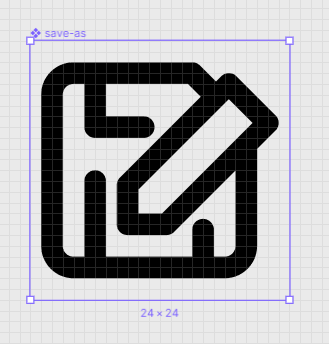
How about this? @colebemis is it okay to have 1px margin on each side?
 MarcelloTheArcane
on 19 Jul 2019
MarcelloTheArcane
on 19 Jul 2019
@MarcelloTheArcane Please break the border where the pencil comes inside the diskette. And maybe remove the bottom lines.
 locness3
on 19 Jul 2019
locness3
on 19 Jul 2019
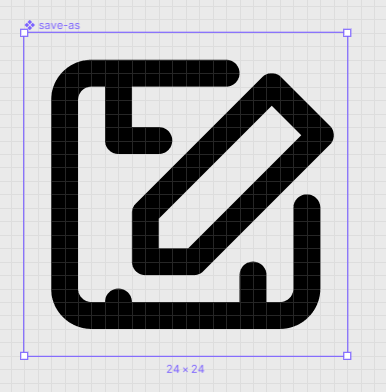
A:
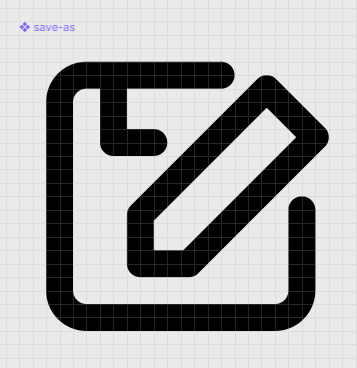
B:
MarcelloTheArcane
on 19 Jul 2019
Second one is beter. Please do a side-by-side with save though.
locness3
on 19 Jul 2019
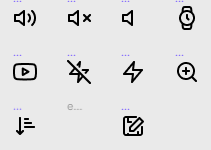
Voila:

MarcelloTheArcane
on 19 Jul 2019
Maybe using something that looks like the current edit icon for the pencil ?
locness3
on 19 Jul 2019
I wasn't aware it had changed, so here's a New and Improved version:


<svg width="24" height="24" viewBox="0 0 24 24" fill="none" xmlns="http://www.w3.org/2000/svg">
  <path d="M13 3H5C4.46957 3 3.96086 3.21071 3.58579 3.58579C3.21071 3.96086 3 4.46957 3 5V19C3 19.5304 3.21071 20.0391 3.58579 20.4142C3.96086 20.7893 4.46957 21 5 21H19C19.5304 21 20.0391 20.7893 20.4142 20.4142C20.7893 20.0391 21 19.5304 21 19V11" stroke="black" stroke-width="2" stroke-linecap="round" stroke-linejoin="round"/>
  <path d="M18.25 2.62132C18.447 2.42434 18.6808 2.26808 18.9382 2.16148C19.1956 2.05487 19.4714 2 19.75 2C20.0286 2 20.3044 2.05487 20.5618 2.16148C20.8192 2.26808 21.053 2.42434 21.25 2.62132C21.447 2.8183 21.6032 3.05216 21.7098 3.30953C21.8165 3.5669 21.8713 3.84274 21.8713 4.12132C21.8713 4.3999 21.8165 4.67574 21.7098 4.93312C21.6032 5.19049 21.447 5.42434 21.25 5.62132L11.125 15.7463L7 16.8713L8.125 12.7463L18.25 2.62132Z" stroke="black" stroke-width="2" stroke-linecap="round" stroke-linejoin="round"/>
  <path d="M7 3V8H8" stroke="black" stroke-width="2" stroke-linecap="round" stroke-linejoin="round"/>
</svg>
Go ahead and follow #171 to submit it!
locness3
on 19 Jul 2019
@locness3 My install of feather is having 'issues'... Could you submit it for me? 🙂
MarcelloTheArcane
on 24 Jul 2019
@MarcelloTheArcane I can help you submit a PR (as tell you how to fix all of the 'issues' 😄) ... I see that you are working out of a fork ... what branch are you on? master?
 jletey
on 24 Jul 2019
jletey
on 24 Jul 2019
@johnletey Ignore that fork 😁
I'm trying to npm install and npm run all on WSL but it doesn't like it for some reason.
npm ERR! path <feather path>\node_modules\.bin\webpack-cli
npm ERR! code UNKNOWN
npm ERR! errno -4094
npm ERR! syscall lstat
npm ERR! UNKNOWN: unknown error, lstat '<feather path>\node_modules\.bin\webpack-cli'
Probably easier for you to submit the SVG yourself if you want 🙂
MarcelloTheArcane
on 24 Jul 2019
@MarcelloTheArcane I don't want to steal your work ... I have gone ahead and formatted it for you ... just use the below SVG code and create a new file via the GitHub UI! Then submit a PR
<svg
  width="24"
  height="24"
  viewBox="0 0 24 24"
  xmlns="http://www.w3.org/2000/svg"
  fill="none"
  stroke="currentColor"
  stroke-width="2"
  stroke-linecap="round"
  stroke-linejoin="round"
>
  <path d="M13 3H5a2 2 0 0 0-2 2v14a2 2 0 0 0 2 2h14a2 2 0 0 0 2-2v-8" />
  <path d="M18.25 2.621a2.121 2.121 0 1 1 3 3L11.125 15.746 7 16.871l1.125-4.125L18.25 2.621z" />
  <path d="M7 3v5h1" />
</svg>
P.S. Did you try to run npm install and then npm run build instead of npm run all?
jletey
on 24 Jul 2019
Thanks for your help @johnletey, I've created a pull request with that via github UI (as you have noticed!)
MarcelloTheArcane
on 24 Jul 2019
Related issues
 alexantr
·
5Comments
MarcelloTheArcane
·
4Comments
alexantr
·
5Comments
MarcelloTheArcane
·
4Comments
 kurisubrooks
·
5Comments
kurisubrooks
·
3Comments
kurisubrooks
·
5Comments
kurisubrooks
·
3Comments
 designgrill
·
5Comments
designgrill
·
5Comments
Most helpful comment
I wasn't aware it had changed, so here's a New and Improved version:

