Feather: Clipboard icon being damaged by zoom: 90%
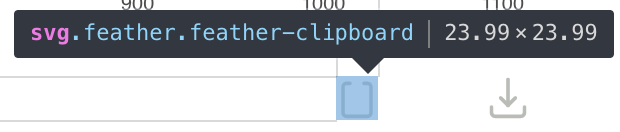
The clipboard icon sometimes looks like this:

This happens when CSS rule zoom: 90% is applied.
 1602
1602
All 11 comments
What browser, OS?
 alexantr
on 2 Nov 2017
alexantr
on 2 Nov 2017
Chrome 61.0.3163.100, Mac OS 10.13
1602
on 2 Nov 2017
@1602 Could you provide some way to replicate this behavior?
 colebemis
on 14 Dec 2017
colebemis
on 14 Dec 2017
@colebemis I only reproduced it once, this is "production" case:
- go to https://1602.github.io/elm-feather-icons/ using mac chrome 61
- make sure zoom is 100%, observe clipboard icon on the top right corner (looking fine)
- zoom down to 90%
- observe damaged clipboard icon on the top
I tried to isolate case here: https://jsfiddle.net/kd5vh9n3/ (also requires changing zoom of the browser). It's not quite the same as "production" case because I purposely set not equal width and height, which isn't the case for "production" but still helps to reproduce the issue (see image at the bottom of this comment). Interesting fact, that this trick only damages one clipboard icon, as I can see.
1602
on 17 Dec 2017
I have the same clipboard rendering issue, even at 100% zoom:
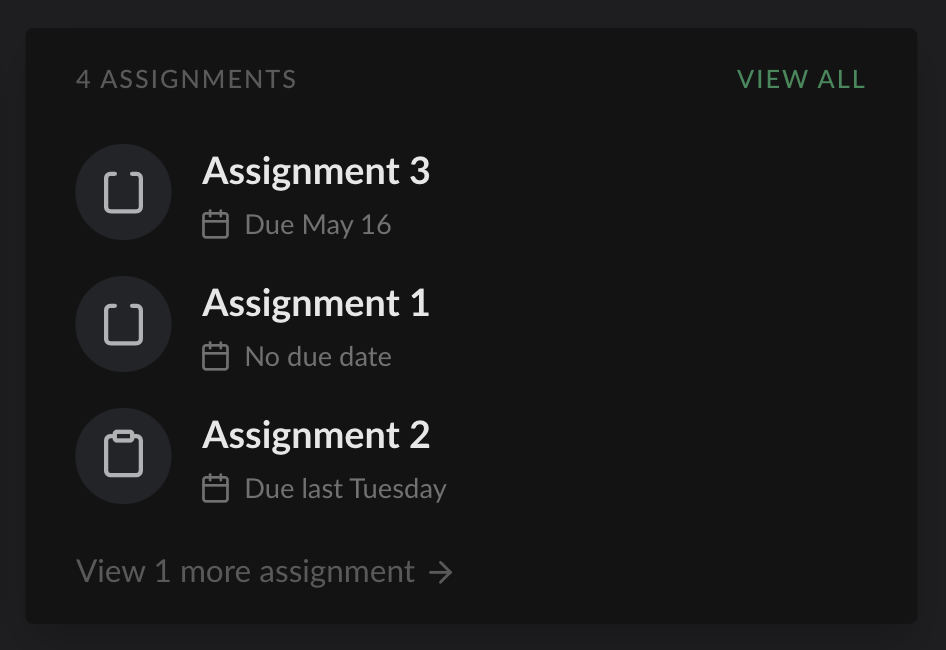
I think I succeeded in creating a small example. I believe the issue appears when the icon is positioned with weird fractional pixel values for its size and position. If you open the fiddle in Chrome and resize the output window just a little bit, you should be able to see the issue clearly – the top path of the clipboard disappears for certain sizes / positions (which are tied to window size in my example)
 controversial
on 5 May 2019
controversial
on 5 May 2019
Looks like that's a problem with chrome, it doesn't happen for me in firefox (on macos)
 locness3
on 5 May 2019
locness3
on 5 May 2019
Yeah, I know it is, but given Chrome’s level of penetration and that this issue has affected Chrome for over a year, it would be great if there were a fix.
controversial
on 5 May 2019
Yeah, I know it is, but given Chrome’s level of penetration and that this issue has affected Chrome for over a year, it would be great if there were a fix.
True. But I think it's more on chrome's side to do it
locness3
on 5 May 2019
Applying scale(.999) to the icon in CSS seems to fix it, if anyone's looking for a temporary workaround!
controversial
on 5 May 2019
Huh, this is such a strange issue. I looked at the SVG file and everything looks normal: https://github.com/feathericons/feather/blob/8f658193d25e943b196a2367319b5d9e85ee9f9f/icons/clipboard.svg#L12-L13
I'm not sure what we can do on our end to fix this. Any ideas?
colebemis
on 6 May 2019
@colebemis experiment shows to me that replacing rect to path element in the icon can fix the problem:
before
<svg
  xmlns="http://www.w3.org/2000/svg"
  width="24"
  height="24"
  viewBox="0 0 24 24"
  fill="none"
  stroke="currentColor"
  stroke-width="2"
  stroke-linecap="round"
  stroke-linejoin="round"
>
  <path d="M16 4h2a2 2 0 0 1 2 2v14a2 2 0 0 1-2 2H6a2 2 0 0 1-2-2V6a2 2 0 0 1 2-2h2"></path>
  <rect x="8" y="2" width="8" height="4" rx="1" ry="1"></rect>
</svg>
after
<svg
  xmlns="http://www.w3.org/2000/svg"
  width="24"
  height="24"
  viewBox="0 0 24 24"
  fill="none"
  stroke="currentColor"
  stroke-width="2"
  stroke-linecap="round"
  stroke-linejoin="round"
>
  <path d="M16 4h2a2 2 0 0 1 2 2v14a2 2 0 0 1-2 2H6a2 2 0 0 1-2-2V6a2 2 0 0 1 2-2h2" />
  <path d="M15 2H9a1 1 0 0 0-1 1v2a1 1 0 0 0 1 1h6a1 1 0 0 0 1-1V3a1 1 0 0 0-1-1z" />
</svg>
result (Chrome 75, zoom 90%)

I suppose that the reason is a difference between renders of the elements in Chrome.
 ahtohbi4
on 8 Jul 2019
ahtohbi4
on 8 Jul 2019
Related issues
 kurisubrooks
·
5Comments
alexantr
·
5Comments
kurisubrooks
·
5Comments
alexantr
·
5Comments
 sadeghbarati
·
5Comments
sadeghbarati
·
5Comments
 josebastian-web
·
3Comments
josebastian-web
·
3Comments
 rsaccon
·
4Comments
rsaccon
·
4Comments
Most helpful comment
@colebemis experiment shows to me that replacing
recttopathelement in the icon can fix the problem:before
after
result (Chrome 75, zoom 90%)
I suppose that the reason is a difference between renders of the elements in Chrome.