Feather: Convert Lines and Polygons to Paths
Hi Cole,
I have some problems with displaying the fonts on my site.
It looks like that when I try to use it as inline SVG:

The problem disappears when I convert the shapes to paths using SVGO or SVGOMG tool.
Would be great if you could convert the icons to paths and ideally use standard paths instead of 2px strokes (it would help people who would like to use your icons as a font).
 piotrkulpinski
All 10 comments
You are making something wrong. Don't convert them. This is blasphemy.
 alexantr
on 8 Jun 2017
alexantr
on 8 Jun 2017
Haha, I wouldn't call this "blasphemy" but using strokes over fills was intentional. Here's an article that details the benefits of SVG stroke: http://danklammer.com/articles/svg-stroke-ftw/. From that picture, it looks like you are setting the fill of the SVGs to something other than none.
 colebemis
on 8 Jun 2017
colebemis
on 8 Jun 2017
Thanks for the tip @colebemis!
PS. Fantastic work with the icons.
piotrkulpinski
on 8 Jun 2017
@colebemis You were right about the fill attribute but I found another related issue.
I tried setting svg * { stroke: currentColor; } to be able to inherit the stroke color from the parent element.
The thing is, it only works with some of the icons, that have the stroke arguments set on the svg element itself, like this one: https://github.com/colebemis/feather/blob/master/icons/core/layout.svg?short_path=7dd79c1
The problem is with files that have those arguments set on each of the shapes inside, eg:
https://github.com/colebemis/feather/blob/master/icons/core/log-out.svg?short_path=2752568
Do you think this is something that should be unified somehow?
piotrkulpinski
on 8 Jun 2017
My way: I'm inserting icons on page with php. Script automatically adds class:
<svg class="feather-icon" ...
CSS:
svg.feather-icon * { stroke: currentColor; }
alexantr
on 8 Jun 2017
@alexantr Thanks for the tip, but it won't work for me as I'm using webpack loader with VueJS.
piotrkulpinski
on 8 Jun 2017
Try this CSS:
svg[stroke], svg [stroke] {
    stroke: currentColor;
}
@alexantr It's not working as well and I'm afraid the CSS won't change that as webpack is not writing outputting the source to the DOM and stores the references in the runtime memory so the DOM looks like this:
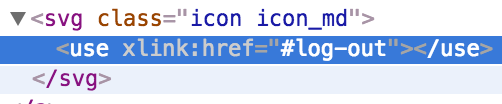
I still think the stoke attrs should be unified one way or another :)
piotrkulpinski
on 8 Jun 2017
I'm pretty sure use won't let you access the contents of the SVG with CSS. So svg [stroke] won't work. I'm working on an SVG system that will solve a lot of these issues.
colebemis
on 8 Jun 2017
In case anyone runs into a similar issue, I've fixed it by using svgo-loader with removeAttrs option to remove those strokes.
piotrkulpinski
on 9 Jun 2017
Related issues
 rotaercz
·
20Comments
alexantr
·
13Comments
rotaercz
·
20Comments
alexantr
·
13Comments
 kurisubrooks
·
12Comments
kurisubrooks
·
12Comments
 HamidFaraji
·
12Comments
HamidFaraji
·
12Comments
 mar4o
·
11Comments
mar4o
·
11Comments
Most helpful comment
Haha, I wouldn't call this "blasphemy" but using strokes over fills was intentional. Here's an article that details the benefits of SVG stroke: http://danklammer.com/articles/svg-stroke-ftw/. From that picture, it looks like you are setting the
fillof the SVGs to something other thannone.