Fd: Multiple instances of `subl` get launched
Environment info
$ sw_vers
ProductName:    Mac OS X
ProductVersion: 10.13.3
BuildVersion:   17D102
$ fd --version
fd 7.0.0
$ subl --version
Sublime Text Build 3143
Steps to reproduce
- Make sure Sublime Text is not running.
- Do the following in a terminal:
$ mkdir test
$ cd test
$ touch {1..10}
$ fd -x subl
Expected
Sublime Text gets launched, and opens the 10 files.
Actual
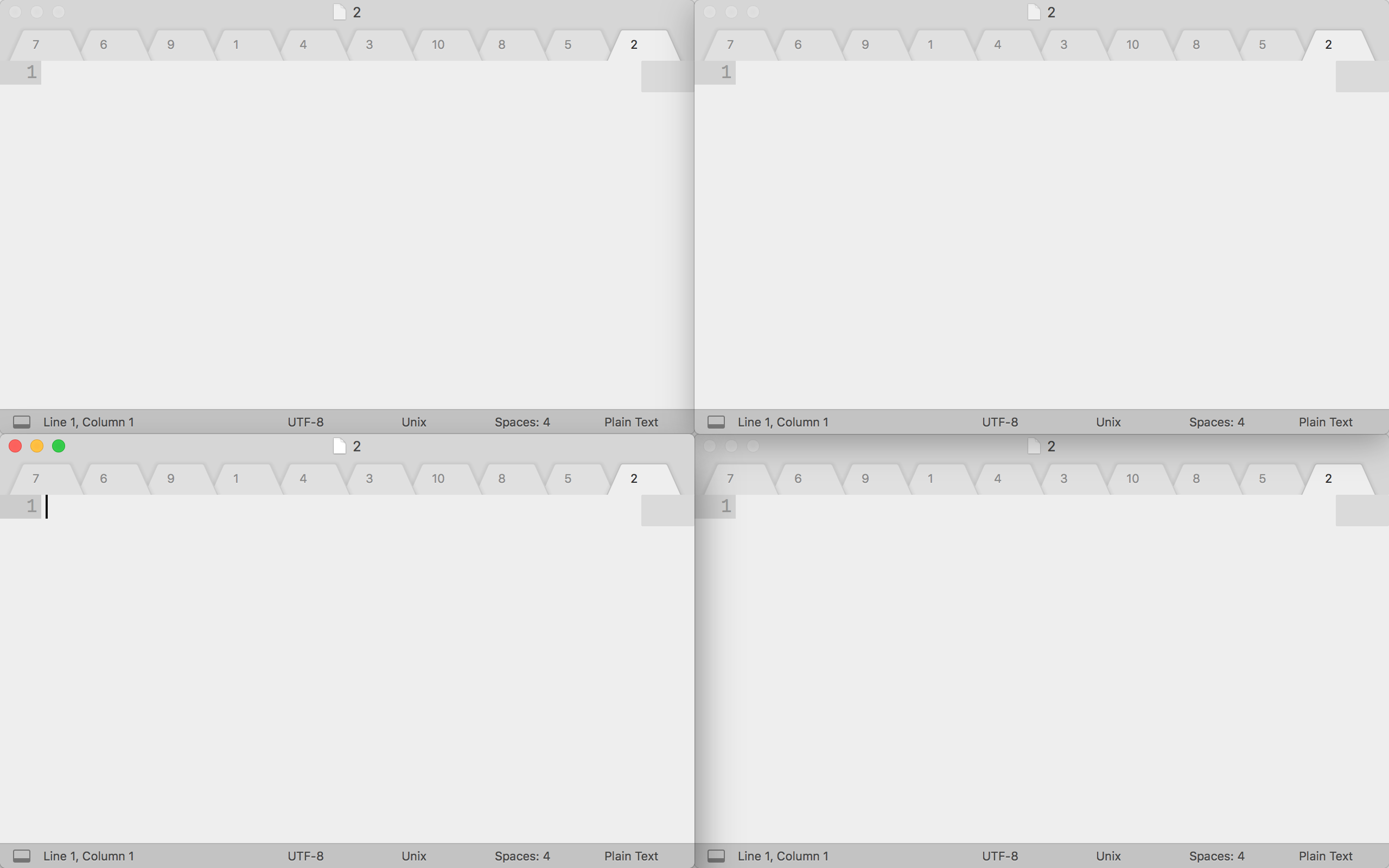
Sublime Text gets launched, and opens the 10 files… four times.
The four windows you see are each from a different running instance of Sublime Text:
Here's the Force Quit window as proof:
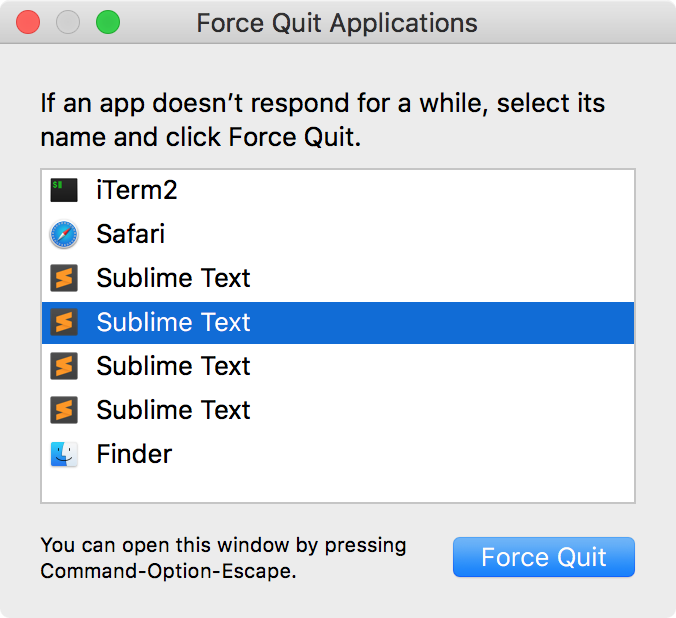
Sometimes different numbers of Sublimes get launched.
I have not tested this with other GUI apps with command-line launchers, but this issue may exist there too. Not sure if this is a fd issue, or a macOS issue, or a Sublime Text issue (I lean towards not a Sublime Text issue because I'm unable to reproduce when Sublime is already running).
 azdavis
All 17 comments
Thank you for the detailed report!
I can not reproduce this on Linux (same Sublime Text Build 3143). However, I have an idea what may be the cause of this.
fd -x <cmd> uses a thread pool with N workers to launch instances of <cmd> in a parallel way (one for each search result). The number of workers is determined by the number of available cores unless explicitly specified via --threads/-j.
My guess is the following: You have four cores(?) which causes fd to launch four instances of subl in parallel. For some reason, this causes Sublime Text to open four windows instead of just a single one(?) - even though it would just open a single window had there been a short delay between the different subl calls. Once the four windows are active, they synchronize and each window contains the same 10 tabs.
Things you could try:
- Use
fd's--threads/-joption to confirm if this is the root cause:
fd -j1 -x subl
- Play with Sublime Text's
--background/-bor--wait/-woptions(?). - Just for debugging purposes, use a short delay before launching
subl:
bash
echo 'sleep $1 && subl $1' > /tmp/launch-subl.sh
fd -x bash /tmp/launch-subl.sh
As a workaround, I would suggest you use xargs, which should hopefully work as expected:
fd . | xargs subl
Related: #265.
 sharkdp
on 1 Apr 2018
sharkdp
on 1 Apr 2018
Thanks for your response.
I have 2 physical cores but 4 logical cores (hyperthreading).
It is indeed the case that for fd -j N -x subl, where N is in {1..4}, exactly that many Sublimes get launched.
Using subl -b or subl -w does not resolve the issue.
Instead of piping to xargs, one other workaround could be to write a wrapper script for fd which checks if subl is in the -x option, and then adds -j 1 to the list of options before calling fd itself. (xargs also breaks on filenames with whitespace.)
azdavis
on 1 Apr 2018
Thank you for checking!
Instead of piping to xargs, one other workaround could be to write a wrapper script for fd which checks if subl is in the -x option, and then adds -j 1 to the list of options before calling fd itself. (xargs also breaks on filenames with whitespace.)
xargs should work with spaces if you use the -0 option:
fd -0 | xargs -0 subl
A wrapper script would also work, of course.
Do you think there is anything we can do here? It seems to me that this is indeed a Sublime Text issue on macOS (checking for available windows and launching a new instance are not synchronized / properly locked)?
sharkdp
on 2 Apr 2018
Other than the workarounds discussed, I'm not sure how to fix this.
I'm also not really sure whose responsibility it is to make sure multiple instances of something don't get launched. If program X (fd) attempts to launch many instances of program Y (subl) at exactly the same time, is it program Y's fault for allowing that many instances to actually get launched and not consolidate all the "launches" into one actual launch? As mentioned before, this problem doesn't happen when Sublime Text is already running, seeming to indicate the "problem" happens before Sublime Text can do anything about it. But I don't know much about this type of thing, so I'm not sure.
azdavis
on 2 Apr 2018
If program X (fd) attempts to launch many instances of program Y (subl) at exactly the same time
My understanding is that that is very much intentional behavior for fd, and for many (maybe most) applications of --exec, where the command is not interactive, it is desirable to run them in parallel to make the execution faster.
 tmccombs
on 2 Apr 2018
tmccombs
on 2 Apr 2018
Oh yeah, I can definitely see how this would be the desired behavior in 90% of use cases.
azdavis
on 3 Apr 2018
I would propose that we use this ticket as a reminder that we should improve the documentation around --exec/-x. In particular, we should:
- stress that
fdlaunches commands in parallel - mention that
--threads 1can be used to run commands sequentially - suggest that
xargs -0should be used if someone wants to open all search results in another program (that supports multiple path arguments).
sharkdp
on 3 Apr 2018
Would it maybe make sense to duplicate exec command {} + from find?
To allow (e.g.) fd *txt --exec vim {} +.
I'm not saying the + syntax is great, but maybe it could be moved to a new flag, --exec-once or something.
 promisedlandt
on 4 Jun 2018
promisedlandt
on 4 Jun 2018
@promisedlandt Thank you for the feedback. That sounds like an interesting idea. How exactly would this work? Would we launch command once and pass all search results as arguments? Would this still use a placeholder {} syntax?
Using a new option --exec-once would also have the benefit that we could change the way that stdin and stdout are handled (if we just spawn a single process), I guess - see #265.
sharkdp
on 6 Jun 2018
How exactly would this work? Would we launch command once and pass all search results as arguments?
Yes, {} gets replaced with all results.
Would this still use a placeholder {} syntax?
Yes. since you might want them in different places in the exec command, e.g. fd *rs --exec-once rsync {} backup_host:/backup/
I'm not sure that --exec-once is a good name, it's just the first thing I came up with :)
So, from a program flow perspective (I have not looked at the fd source):
- collect list of found files (can use threads, just need to combine results)
- build command line from
--exec-onceparameter, substituting{}with the list of found files as one parameter per found file
For reference, from man find:
-exec command {} +
This variant of the -exec action runs the specified command on the selected files, but the command line is built by appending each selected file name at the end; the total number of invocations of the command will be much less than the number of matched files. The command line is built in much the same way that xargs builds its command lines. Only one instance of `{}' is allowed within the command, and (when find is being invoked from a shell) it should be quoted (for example, '{}') to protect it from interpretation by shells. The command is executed in the starting directory. If any invocation returns a non-zero value as exit status, then find returns a non-zero exit status. If find encounters an error, this can sometimes cause an immediate exit, so some pending commands may not be run at all. This variant of -exec always returns true.
You suggested fd .. | xargs vim in #265, but that potentially breaks vim (explanation here), you would need fd .. | xargs -o vim. Which is a bit annoying to type if you don't create a shell function it.
promisedlandt
on 7 Jun 2018
Actually, I would really like to see this being added to fd. I often want to open all search results in vim and the xargs-version doesn't really work all that well as @promisedlandt pointed out. It's also a lot to type.
I suggest that we add the --exec-once <cmd> option which would first collect all search results and then execute <cmd> with {} being replaced by all search results.
As for the name of the command-line option, the only other alternative I came up with was --open-with, which would fit nicely in the --open-with $EDITOR case, but might be strange for other use cases. Another advantage would be that -o is still free.
Note that there is a limit on the number of command line arguments, so we might need to split this into multiple runs of <cmd> (I think this is something that could be left out in a first version).
sharkdp
on 5 Oct 2018
I'd like to give this a try.
As for the name of the command-line option, the only other alternative I came up with was
--open-with, which would fit nicely in the--open-with $EDITORcase, but might be strange for other use cases. Another advantage would be that-ois still free.
--exec-batch sounds more generic (and more accurate than --exec-once if the command-line max args is taken into account).
But I currently can't think of another use-case than --open-with some program that would not be better served by piping. So it sounds to me reasonable to go with this.
Regarding the -o, as it's very commonly used for --output in other CLIs… I'm not sure how wise it is to use it for this purpose.
Finally, regarding the placeholders:
- Should fd restrict to a single one ? (this is the current behaviour of
fd) - Should it de-dupe entries in case of _no_ext_ or _parent_ placeholders?
I would be tempted to say yes to both questions. Any opinions ?
 kimsnj
on 9 Nov 2018
kimsnj
on 9 Nov 2018
@kimsnj Thank you very much for your feedback.
I'd like to give this a try.
Sounds great!
But I currently can't think of another use-case than
--open-withsome program that would not be better served by piping. So it sounds to me reasonable to go with this.
:+1:
Regarding the
-o, as it's very commonly used for--outputin other CLIs… I'm not sure how wise it is to use it for this purpose.
Agreed about -o. I think I would prefer if we just use a capital -X for the short option (in analogy to -x for --exec), even if the long option is called --open-with. Or would this be a reason to use --exec-batch? Hm..
Finally, regarding the placeholders:
- Should fd restrict to a single one ? (this is the current behaviour of
fd)
With -x/--exec, you can actually use multiple placeholders.
I think it is very reasonable to restrict to a single placeholder for the --open-with feature.
- Should it de-dupe entries in case of _no_ext_ or _parent_ placeholders?
Interesting. I hadn't thought about this. I currently cannot think of any use cases where anything but {} would be used with --open-with. If we do not come up with any potential uses now, I think we should just leave the results as-is (without de-duplicating).
sharkdp
on 9 Nov 2018
Agreed about
-o. I think I would prefer if we just use a capital-Xfor the short option (in analogy to-xfor--exec), even if the long option is called--open-with. Or would this be a reason to use--exec-batch? Hm..
It does sound like an argument for --exec-batch :)
- Should it de-dupe entries in case of _no_ext_ or _parent_ placeholders?
Interesting. I hadn't thought about this. I currently cannot think of any use cases where anything but
{}would be used with--open-with. If we do not come up with any potential uses now, I think we should just leave the results as-is (without de-duplicating).
I could see it being use for opening all the folders containing a certain type (e.g. fd jpeg -X photo-gallery {//}).
(btw, this use-case would still lean towards the --open-with… )
kimsnj
on 9 Nov 2018
Ok, let's go with -X/--exec-batch.
I suggest leaving out de-duplication for now.
sharkdp
on 11 Nov 2018
@kimsnj has implemented -X/--exec-batch in #360 :fireworks:
This means we can now use this with any editor (vim also works as all input/output streams are inherited from fd). This means that we can do
fd pattern -X subl
instead of relying on Sublime to handle everything (or doingfd pattern -j1 -x subl)fd pattern -X vim
instead ofvim $(fd pattern)
sharkdp
on 12 Nov 2018
@kimsnj Just tried it out in the release version - awesome!
promisedlandt
on 16 Feb 2019
Related issues
 blueray453
·
3Comments
blueray453
·
3Comments
 nishithkhanna
·
4Comments
nishithkhanna
·
4Comments
 codyro
·
4Comments
blueray453
·
4Comments
sharkdp
·
4Comments
codyro
·
4Comments
blueray453
·
4Comments
sharkdp
·
4Comments
Most helpful comment
@kimsnj Just tried it out in the release version - awesome!