Fasttext: how to install it on Windows computer pls
how to install it on Windows computer pls
do you have bunary file?
I try to run
pip install .
but have many errors
like
c:\users\sndr\anaconda3\Include/pybind11/cast.h:828:38: error: there are no arguments to 'make_copy_constructor' that depend on a template parameter, so a declaration of 'make_copy_constructor' must be available [-fpermissive]
make_copy_constructor(src), make_move_constructor(src));
^
c:\users\sndr\anaconda3\Include/pybind11/cast.h:828:66: error: there are no arguments to 'make_move_constructor' that depend on a template parameter, so a declaration of 'make_move_constructor' must be available [-fpermissive]
make_copy_constructor(src), make_move_constructor(src));
^
c:\users\sndr\anaconda3\Include/pybind11/cast.h: In static member function 'static pybind11::handle pybind11::detail::type_caster_base
c:\users\sndr\anaconda3\Include/pybind11/cast.h:832:9: warning: 'auto' changes meaning in C++11; please remove it [-Wc++0x-compat]
auto st = src_and_type(src);
^
c:\users\sndr\anaconda3\Include/pybind11/cast.h:832:14: error: 'st' does not name a type
auto st = src_and_type(src);
^
c:\users\sndr\anaconda3\Include/pybind11/cast.h:834:13: error: 'st' was not declared in this scope
st.first, return_value_policy::take_ownership, {}, st.second,
^
c:\users\sndr\anaconda3\Include/pybind11/cast.h:834:23: error: 'return_value_policy' is not a class or namespace
st.first, return_value_policy::take_ownership, {}, st.second,
^
c:\users\sndr\anaconda3\Include/pybind11/cast.h:834:60: warning: extended initializer lists only available with -std=c++11 or -std=gnu++11
st.first, return_value_policy::take_ownership, {}, st.second,
^
c:\users\sndr\anaconda3\Include/pybind11/cast.h:835:13: error: 'nullptr' was not declared in this scope
nullptr, nullptr, holder);
^
In file included from python/fastText/pybind/fasttext_pybind.cc:13:0:
c:\users\sndr\anaconda3\Include/pybind11/pybind11.h: At global scope:
c:\users\sndr\anaconda3\Include/pybind11/pybind11.h:1973:29: error: expected unqualified-id before end of line
c:\users\sndr\anaconda3\Include/pybind11/pybind11.h:1973:29: error: expected '}' before end of line
c:\users\sndr\anaconda3\Include/pybind11/pybind11.h:1973:29: error: expected '}' before end of line
c:\users\sndr\anaconda3\Include/pybind11/pybind11.h:1973:29: error: expected declaration before end of line
In file included from c:\users\sndr\anaconda3\Include/pybind11/attr.h:13:0,
from c:\users\sndr\anaconda3\Include/pybind11/pybind11.h:43,
from python/fastText/pybind/fasttext_pybind.cc:13:
c:\users\sndr\anaconda3\Include/pybind11/cast.h: In instantiation of 'bool pybind11::detail::type_caster_generic::load_impl(pybind11::handle, bool) [with ThisT = pybind11::detail::type_caster_generic]':
c:\users\sndr\anaconda3\Include/pybind11/cast.h:491:59: required from here
c:\users\sndr\anaconda3\Include/pybind11/cast.h:638:49: error: invalid initialization of reference of type 'int&' from expression of type 'pybind11::detail::type_caster_generic'
auto &this_ = static_cast
^
c:\users\sndr\anaconda3\Include/pybind11/cast.h:651:48: error: invalid initialization of reference of type 'int&' from expression of type 'const std::vector
auto &bases = all_type_info(srctype);
^
c:\users\sndr\anaconda3\Include/pybind11/cast.h:699:26: error: invalid conversion from 'int' to 'const pybind11::detail::type_info' [-fpermissive]
typeinfo = gtype;
^
In file included from c:\users\sndr\anaconda3\Include/pybind11/cast.h:13:0,
from c:\users\sndr\anaconda3\Include/pybind11/attr.h:13,
from c:\users\sndr\anaconda3\Include/pybind11/pybind11.h:43,
from python/fastText/pybind/fasttext_pybind.cc:13:
c:\users\sndr\anaconda3\Include/pybind11/pytypes.h:298:12: warning: inline function 'virtual pybind11::error_already_set::~error_already_set()' used but never defined
inline ~error_already_set();
^
In file included from c:\users\sndr\anaconda3\Include/pybind11/cast.h:16:0,
from c:\users\sndr\anaconda3\Include/pybind11/attr.h:13,
from c:\users\sndr\anaconda3\Include/pybind11/pybind11.h:43,
from python/fastText/pybind/fasttext_pybind.cc:13:
c:\users\sndr\anaconda3\Include/pybind11/detail/internals.h:17:22: warning: inline function 'PyTypeObject* pybind11::detail::make_static_property_type()' used but never defined
inline PyTypeObject make_static_property_type();
^
c:\users\sndr\anaconda3\Include/pybind11/detail/internals.h:18:22: warning: inline function 'PyTypeObject pybind11::detail::make_default_metaclass()' used but never defined
inline PyTypeObject make_default_metaclass();
^
c:\users\sndr\anaconda3\Include/pybind11/detail/internals.h:19:18: warning: inline function 'PyObject pybind11::detail::make_object_base_type(PyTypeObject*)' used but never defined
inline PyObject *make_object_base_type(PyTypeObject *metaclass);
^
In file included from c:\users\sndr\anaconda3\Include/pybind11/attr.h:13:0,
from c:\users\sndr\anaconda3\Include/pybind11/pybind11.h:43,
from python/fastText/pybind/fasttext_pybind.cc:13:
c:\users\sndr\anaconda3\Include/pybind11/cast.h:479:13: warning: inline function 'void pybind11::detail::keep_alive_impl(pybind11::handle, pybind11::handle)' used but never defined
inline void keep_alive_impl(handle nurse, handle patient);
^
In file included from c:\users\sndr\anaconda3\Include/pybind11/cast.h:13:0,
from c:\users\sndr\anaconda3\Include/pybind11/attr.h:13,
from c:\users\sndr\anaconda3\Include/pybind11/pybind11.h:43,
from python/fastText/pybind/fasttext_pybind.cc:13:
c:\users\sndr\anaconda3\Include/pybind11/pytypes.h:298:12: warning: inline function 'virtual pybind11::error_already_set::~error_already_set()' used but never defined
inline ~error_already_set();
^
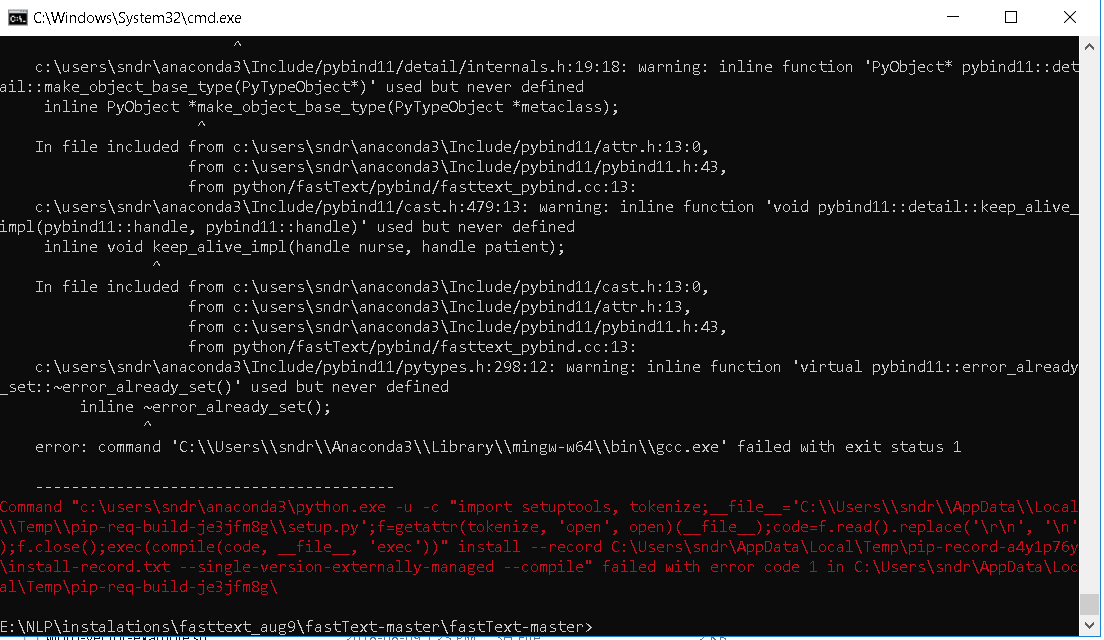
error: command 'C:\Users\sndr\Anaconda3\Library\mingw-w64\bin\gcc.exe' failed with exit status 1
----------------------------------------
Command "c:\users\sndr\anaconda3\python.exe -u -c "import setuptools, tokenize;__file__='C:\Users\sndr\AppData\Local\Temp\pip-req-build-x1v7lvy4\setup.py';f=getattr(tokenize, 'open', open)(__file__);code=f.read().replace('\r\n', '\n');f.close();exec(compile(code, __file__, 'exec'))" install --record C:\Users\sndr\AppData\Local\Temp\pip-record-6xhv0_r4\install-record.txt --single-version-externally-managed --compile" failed with error code 1 in C:\Users\sndr\AppData\Local\Temp\pip-req-build-x1v7lvy4\
You are using pip version 10.0.0, however version 10.0.1 is available.
You should consider upgrading via the 'python -m pip install --upgrade pip' command.
 Sandy4321
All 21 comments
I tried to install the c version on windows but failed, eventually, i installed it in a virtual machine with ubuntu server and accessed it via ssh. Additionally, you could install the python version of it, and it works fine. I had to go through multiple installation errors and fixes. I cannot remember exact steps, but currently I have visual studio 2017 community edition with the following components installed:
Desktop developement with C++
VC++ 2015.3 v14.00 toolset
Windows 10 SDK (10.0.16299.0)
windows 8.1 SDK
 abulhawa
on 27 Jun 2018
abulhawa
on 27 Jun 2018
I would like to inst python version
https://github.com/facebookresearch/fastText/tree/master/python
but can I install it on a windows computer?
there is no mention on this link that it can be installed on Windows computer ??
Sandy4321
on 28 Jun 2018
yes, i have installed and used it on windows.
abulhawa
on 28 Jun 2018
may you share how to do it, since as I wrote above, I get many errors when trying to install by running
''pip install .
'''
Sandy4321
on 29 Jun 2018
Here are the Visual Studio Components I had installed:
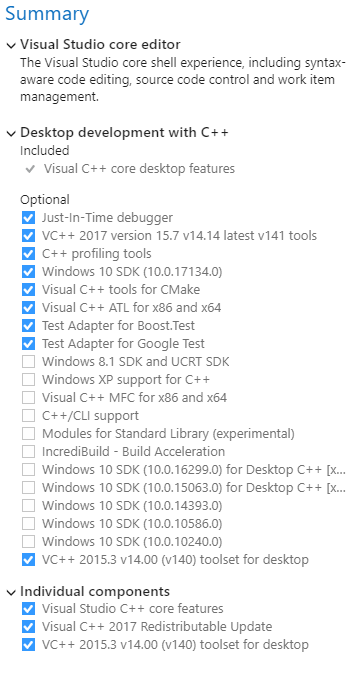
I haven't installed mingw-w64\bin\gcc.exe.
However, I got the following error when I tried to install it:
 src\productquantizer.cc(132): error C3861: 'to_string': identifier not found
    src\productquantizer.cc(132): error C2512: 'std::invalid_argument': no appropriate default constructor available
    src\productquantizer.cc(132): note: No constructor could take the source type, or constructor overload resolution was ambiguous
    error: command 'C:\\Program Files (x86)\\Microsoft Visual Studio\\2017\\Community\\VC\\Tools\\MSVC\\14.14.26428\\bin\\HostX86\\x64\\cl.exe' failed with exit status 2
And I solved this by modifying one line in the file:
fastText\src\productquantizer.h
The line containing
#include <cstring>
modified to:
#include <string>
This resolved the installation error on my windows 10.
abulhawa
on 9 Aug 2018
great thanks for sharing, we getting closer
the question is how you compiled with VS?
because I just copied files to my computer and made the current directory where setup file located and run
pip install .
as we can see from the error above Anaconda cheesed to use mingw-w64\bin\gcc.exe automatically
may you share what you did to compile with VS
thanks
Sandy4321
on 9 Aug 2018
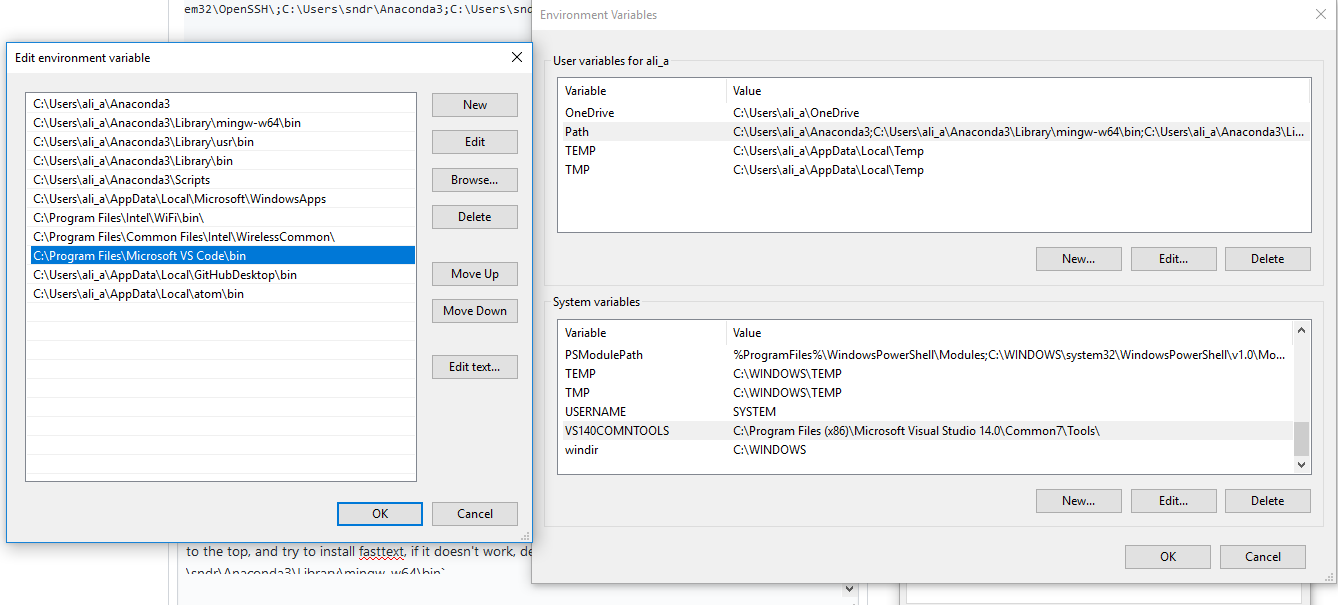
show me the error message you receive, as well as the environment variables in your path.
Open a command prompt and run:
echo %PATH%
abulhawa
on 9 Aug 2018
Microsoft Windows [Version 10.0.17134.165]
(c) 2018 Microsoft Corporation. All rights reserved.
C:\WINDOWS\system32>echo %PATH%
C:\Program Files\NVIDIA GPU Computing Toolkit\CUDA\v9.2\bin;C:\Program Files\NVIDIA GPU Computing Toolkit\CUDA\v9.2libnvvp;C:\Program Files (x86)\Common Files\Oracle\Java\javapath;C:\Windows\system32;C:\Windows;C:\Windows\System32\Wbem;C:\Windows\System32\WindowsPowerShell\v1.0\;C:\Program Files (x86)\NVIDIA Corporation\PhysX\Common;C:\Program Files (x86)\Windows Kits\8.1\Windows Performance Toolkit\;C:\WINDOWS\system32;C:\WINDOWS;C:\WINDOWS\System32\Wbem;C:\WINDOWS\System32\WindowsPowerShell\v1.0\;C:\WINDOWS\System32\OpenSSH\;C:\Users\sndr\Anaconda3;C:\Users\sndr\Anaconda3\Library\mingw-w64\bin;C:\Users\sndr\Anaconda3\Library\usr\bin;C:\Users\sndr\Anaconda3\Library\bin;C:\Users\sndr\Anaconda3\Scripts;C:\Users\sndr\AppData\Local\Microsoft\WindowsApps;C:\Program Files\Microsoft VS Code\bin;
C:\WINDOWS\system32>
Sandy4321
on 9 Aug 2018
Microsoft Windows [Version 10.0.17134.165]
(c) 2018 Microsoft Corporation. All rights reserved.

C:\WINDOWS\system32>echo %PATH%
C:\Program Files\NVIDIA GPU Computing Toolkit\CUDA\v9.2\bin;C:\Program Files\NVIDIA GPU Computing Toolkit\CUDA\v9.2\libnvvp;C:\Program Files (x86)\Common Files\Oracle\Java\javapath;C:\Windows\system32;C:\Windows;C:\Windows\System32\Wbem;C:\Windows\System32\WindowsPowerShell\v1.0\;C:\Program Files (x86)\NVIDIA Corporation\PhysX\Common;C:\Program Files (x86)\Windows Kits\8.1\Windows Performance Toolkit\;C:\WINDOWS\system32;C:\WINDOWS;C:\WINDOWS\System32\Wbem;C:\WINDOWS\System32\WindowsPowerShell\v1.0\;C:\WINDOWS\System32\OpenSSH\;C:\Users\sndr\Anaconda3;C:\Users\sndr\Anaconda3\Library\mingw-w64\bin;C:\Users\sndr\Anaconda3\Library\usr\bin;C:\Users\sndr\Anaconda3\Library\bin;C:\Users\sndr\Anaconda3\Scripts;C:\Users\sndr\AppData\Local\Microsoft\WindowsApps;C:\Program Files\Microsoft VS Code\bin;

C:\WINDOWS\system32>
the error message is too long so Windows does not allow show everything
I attached the file with what is shown
error message for pip aug9 N1.txt
installation
Sandy4321
on 9 Aug 2018
I will happy provide more information
feel free to ask what would be helpfull
Sandy4321
on 9 Aug 2018
open your environment variable window and compare to mine as seen below:
abulhawa
on 9 Aug 2018
mine

Sandy4321
on 9 Aug 2018
and

Sandy4321
on 9 Aug 2018
it's exactly like mine. what version of anaconda and python do you have?
try updating conda:
conda update conda
conda update --all
ok, while debugging this, i somehow crashed my installer :)
i resolved it by going to:
cd "c:\Program Files (x86)\Microsoft Visual Studio 14.0\VC"
then running this command:
vcvarsall x86
see if it helps
abulhawa
on 10 Aug 2018
I have fresh conda installation
conda update conda
done
but this conda update --all
this may distract some custom installed packages
Sandy4321
on 10 Aug 2018
I can share screen by skype my ID sander_torotno
I did this
vcvarsall x86
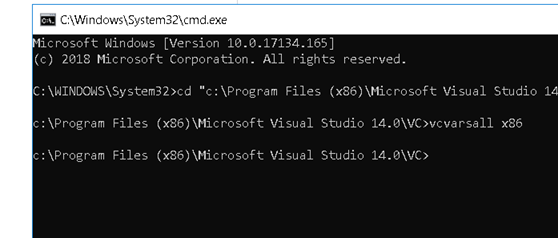
but installatoins fails
Sandy4321
on 12 Aug 2018
try to install using an administrator command line
the skype id is for a bot!
abulhawa
on 12 Aug 2018
another option to try is to pass the compiler to pip:
pip install --global-option build_ext --global-option --compiler=msvc .
don't forget the dot at the end of the command
abulhawa
on 12 Aug 2018
another option to try is to pass the compiler to pip:
pip install --global-option build_ext --global-option --compiler=msvc .don't forget the dot at the end of the command
Thanks for this solution!
 arseninaanna
on 19 Mar 2019
arseninaanna
on 19 Mar 2019
Related issues
 pengyu
·
3Comments
pengyu
·
3Comments
 yasonk
·
3Comments
yasonk
·
3Comments
 PGryllos
·
4Comments
PGryllos
·
4Comments
 hughbzhang
·
3Comments
hughbzhang
·
3Comments
 AhmedIdr
·
3Comments
AhmedIdr
·
3Comments
Most helpful comment
Here are the Visual Studio Components I had installed:

I haven't installed mingw-w64\bin\gcc.exe.
However, I got the following error when I tried to install it:
And I solved this by modifying one line in the file:
fastText\src\productquantizer.hThe line containing
#include <cstring>modified to:
#include <string>This resolved the installation error on my windows 10.