Struggling to get this working ?
Have a setup with the 8266 working perfectly.
Using the same code and wiring setup, just the first 2 LED's light up white and the 3rd LED flickers.
Using 72 APA102 LED's and standard ESP32 dev board.
Wired directly to 5V, no level converter as it wasnt needed on the esp8266 board
Any ideas or anyone got this working yet ?
Thanks
 PhilColbert
All 245 comments
@samguyer any thoughts for @PhilColbert? I don't have any esp32 based setups here to test with, so I'm mostly relying on sam's pull request :)
 focalintent
on 27 Sep 2017
focalintent
on 27 Sep 2017
@PhilColbert Which pin are you using? I have found that the ESP32 is very finicky about the pins.
 samguyer
on 27 Sep 2017
samguyer
on 27 Sep 2017
Hi
Thanks for the reply, tried 13,14 and 25,26 so far....
Seemingly same result, first 2 leds on white, 3rd flashes....
Thanks
PhilColbert
on 27 Sep 2017
You should try the level converter first , also in an ESP 8266 before anything else .
 gnkarn
on 27 Sep 2017
gnkarn
on 27 Sep 2017
Yes, will do :)
thanks
PhilColbert
on 27 Sep 2017
Also, as a sanity check - make sure you haven’t gotten clock and data wired backwards (the behavior you’re describing is not dissimilar to what happens when the clock and data lines have been swapped)
focalintent
on 27 Sep 2017
:) Tried it both ways.... first thing to check that one, been there done that before several times, with them reversed, nothing comes out.
Thanks tho, will try Level converter soon first.
PhilColbert
on 27 Sep 2017
The code that I pushed for the ESP32 is mainly for clockless chips, like the WS2812 family. It was adapted directly from the ESP8266 code, with modifications mainly to handle interrupts. I would not expect to see problems with LEDs that have an explicit clock signal, but I'm pretty new to this stuff (and to hacking FastLED).
samguyer
on 27 Sep 2017
Also: the pins you're using should be fine, but there are so many weird exceptions on this processor. I have gotten things to work reliably on GPIO 18 and 19.
samguyer
on 27 Sep 2017
Ok, will give it a try , thanks.
PhilColbert
on 27 Sep 2017
Tried with level converter, works just the same on the 8266 with level converter.
With the esp32 and a level converter using pins 18 and 19, works exactly the same, first 2 led's are white and then third flickers.
( tried switching clock and data line to make sure its correct - no colour the other way )
Using FastLED version 3.001.006
"No hardware SPI pins defined. All SPI access will default to bitbanged output"
Any idea where to start looking for the issue ?
Thanks
PhilColbert
on 27 Sep 2017
Do you have another strip, or a different kind of strip you can try?
samguyer
on 27 Sep 2017
OK, I think I've made some improvements to the ESP32 support.
@focalintent: do you want me submit another pull request?
samguyer
on 29 Sep 2017
I'm able to drive my UCS1903 strips with an ESP32 (Specifically the DoIt ESP32 Devkit V1 model) without the need for logic level conversion, using the latest FastLED pulled from master (3.001.006).
I have a different issue with FastLED (can't use 3-pin strips and WiFi at the same time, probably due to interrupts). I'll be raising a separate issue or asking in the community about that one though.
 chrisparton1991
on 29 Sep 2017
chrisparton1991
on 29 Sep 2017
@chrisparton1991 I have been working on the interrupt problem on the ESP32, and I think I have a more stable implementation.
samguyer
on 29 Sep 2017
Tried a set of SK6812 - bit better - one wire version, they light up just not the correct ones , i tried led 0 and 20 and led 0 and 15 lit up ?
Do you have the updated code somewhere ? Thanks
PhilColbert
on 29 Sep 2017
You can try my branch here: https://github.com/samguyer/FastLED
All you need is the new copy of FastLED/platforms/esp/32/clockless_esp32.h
samguyer
on 29 Sep 2017
Thanks for the reply ! glad for the help.
Same , I have strip of SK6812 - its nearly working
Setting all the colours to Red, gives a full strip of 230 leds alternating between red - green - blue.
Changing the first 3 leds works, but incorrect colours, so it knows which LED is correct, just colours are out?
Is it worth trying the level converter again - this did nothing last time on all the esp boards.
Any ideas ? :)
Thanks.
PhilColbert
on 29 Sep 2017
I don't think it's a voltage level issue. My guess is that interrupts are coming in at bad times and causing the showPixels function in FastLED to bail out early. What else do you have running on the ESP32 besides the LED code?
samguyer
on 29 Sep 2017
Here's something you could try: find the following comment in clockless_esp32.h in the showRGBInternal function, and comment out the conditional below it:
// if interrupts took longer than 45µs, punt on the current frame
I'd be interested to hear how that goes!
samguyer
on 29 Sep 2017
Nothing, just the LED code - couple of for loops to change the colours, thats it.
I am more interested in the APA102 pixels really, these are for my project, these are interrupt free arent they ?
Wheres best to start looking why these dont work ? :)
Thanks
PhilColbert
on 29 Sep 2017
Huh. That's a drag. It seems like the APAs (and any chip with a separate clock line) should work without any special support (there actually isn't any special support). You say it works for you on an ESP8266?
Debugging the clockless chips is beyond my abilities -- I think you really need an oscilloscope to do it right. Here is an excellent article about how the signal works. One thing to try might be to check and tweak the timing numbers. They are passed in as template arguments T1, T2, and T3 to the ClocklessController template.
https://wp.josh.com/2014/05/13/ws2812-neopixels-are-not-so-finicky-once-you-get-to-know-them/
One crazy idea that I got from this article is to enable interrupts during the transmission of 1 bits, since they can be arbitrarily long!
samguyer
on 29 Sep 2017
Code works perfectly on the 8266.
on the esp32 it just lights up the first 2 leds's white and flickers the 3rd whatever you send to it....
Just want to use the esp32 for the ble on board and the speed.... such a shame it doesnt work
I removed all the conditional code and same result .
Thaks
PhilColbert
on 29 Sep 2017
My only thought is that it has something to do with the specific pin and/or pin configuration that you're using. Here's the setup code I'm using successfully:
```
pinMode(18, OUTPUT);
FastLED.addLeds
FastLED.setBrightness(g_Brightness);
fill_solid(g_LEDs, NUM_LEDS, CRGB::Blue);
FastLED.show();
samguyer
on 29 Sep 2017
Tried that, all leds light up, but alternating red/blue/green along the strip....
thanks anyway :)
PhilColbert
on 29 Sep 2017
Oh, I forgot the call to pinMode. I assume you've got that in there, too.
samguyer
on 29 Sep 2017
1 bits can only be arbitrarily long for the first pixel - because of the signal reshaping that gets done, the hi gets dropped to low coming out of the first chip in the “expected” time and then you end up still running into the reset.
focalintent
on 29 Sep 2017
Tried that, all leds light up, but alternating red/blue/green along the strip
Sounds like what I would expect to happen if you plugged an RGBW strip in and tried to drive it as an RGB strip
focalintent
on 29 Sep 2017
@focalintent OK, I didn't realize that the long 1-bit would not propagate to subsequent pixels. I'm not sure what the long-term solution is, but the code I have right now disables interrupts only for a very short time.
samguyer
on 29 Sep 2017
Hi, does sound like its a RGBW strip.... sorry guys, this is all new to me !
Does fastled have a chipset for RGBW ?
PhilColbert
on 29 Sep 2017
@samguyer thanks so much for your hard work. Your changes fixed my hanging problem but I get strange output on my strips. Interestingly, the output is almost perfect when I drive the strips without any wifi code (some minor flickering, might just be my dodgy temporary connection).
Anyway, I know this is Phil's issue so I don't want to throw all of my problems on the pile :) I'll keep tinkering and see if I can figure anything out. In the worst-case scenario I'll just fork out for some APA102s.
chrisparton1991
on 29 Sep 2017
@chrisparton1991 It sounds like an interrupt problem. I'll try to debug it with WiFi turned on.
samguyer
on 30 Sep 2017
@chrisparton1991 Can you send me your code? Or maybe just a simplified version for me to test, if you don't want to share it all.
samguyer
on 30 Sep 2017
Yeah sure thing, I'm not home right now but I'll get it to you ASAP.
Appreciate the help :)
On 30 Sep. 2017 11:02 am, "Sam Guyer" notifications@github.com wrote:
@chrisparton1991 https://github.com/chrisparton1991 Can you send me
your code? Or maybe just a simplified version for me to test, if you don't
want to share it all.—
You are receiving this because you were mentioned.
Reply to this email directly, view it on GitHub
https://github.com/FastLED/FastLED/issues/504#issuecomment-333270764,
or mute the thread
https://github.com/notifications/unsubscribe-auth/AMdTz1BxWOAM2VYTwrbg4MVWjsXuDdh7ks5snZM1gaJpZM4PkmBp
.
chrisparton1991
on 30 Sep 2017
@samguyer I've retested my strips and I'm getting issues even without any WiFi code in place (using your fork, which fixed my hanging issue). I'll need to do some more investigation. Interestingly, my various 5m LED strips perform differently despite all being UCS1903 from the same manufacturer.
Here's a gist of my code, for what it's worth. I don't think it'll be too helpful though, as it's about a simple example of FastLED as you can get.
https://gist.github.com/chrisparton1991/81228b569fa8238cd4deb209a7f67d41
I'll do some more testing to see if I can eliminate any possibilities. I'll let you know if I find anything.
chrisparton1991
on 30 Sep 2017
I cant get the APA102's to work unfortunately, if anyone cant let me know !
Will try put the hack thats online to get the SK6812 RGBW strips working and make sure these are ok first :)
Thanks for all the help.
PhilColbert
on 30 Sep 2017
@chrisparton1991 That code works perfectly for me when I change it for WS2812 strips. Unfortunately, I don't have other kinds of strips to test.
samguyer
on 30 Sep 2017
No problem @samguyer, thanks for looking into it. I've decided to use ESP8266 chips for the time being. I'll definitely test APA102s on my ESP32 when I get around to purchasing them.
chrisparton1991
on 1 Oct 2017
Gave the 3.1.6 release a spin on a ESP32 with a 300 LED WS2813 strip and could simply not get it to work at all. I've adjusted the timings a bit to get T1H within the specs. Tried a few settings but found these to be closest to what the spec says. The strip is dark and all LEDs will come on in a rainbow fashion when I reset reset the ESP. I'm running the demoreel. Got a 5V 20A supply hooked up this this thingy and the voltage is OK. Haven't tried with external HCT drivers (3.3V on the datapins), however on previous projects WS2813 worked fine with 3.3V. I guess I need to find a ESP8266 somewhere in the mess to compare.
class WS2813Controller : public ClocklessController<DATA_PIN, NS(320), NS(500), NS(940), RGB_ORDER> {};
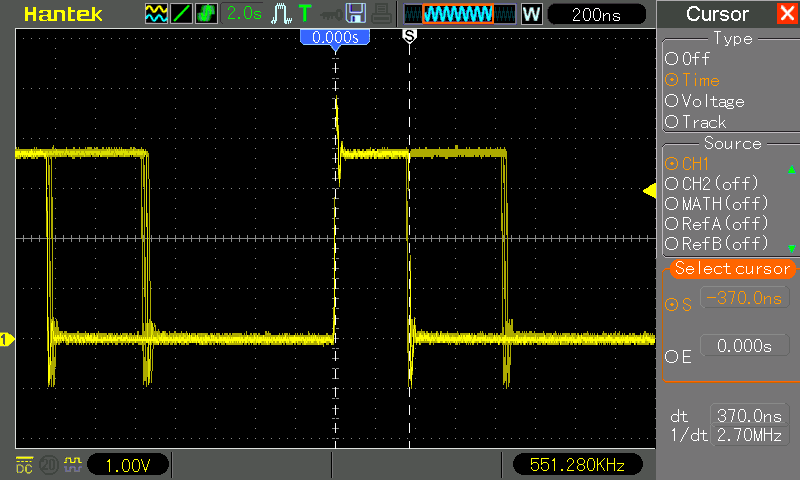
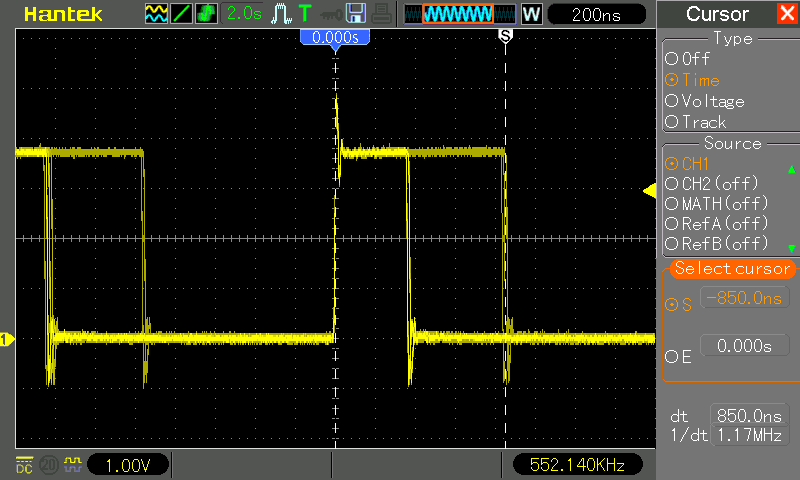
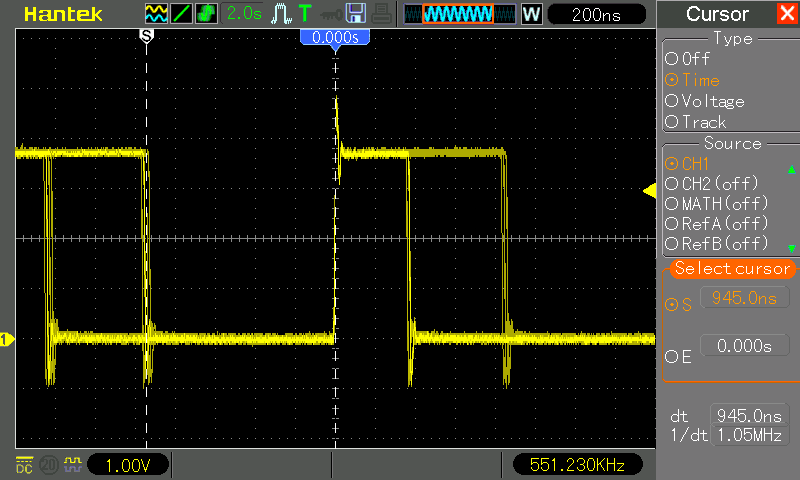
I hooked up the Hantek and checked the timing:
T0H ~370ns Spec says: (300-450ns)
T1H ~850ns Spec says: (750-1000ns)
T0L and T1L ~945ns Spec says: (300ns-100µs)
 Redferne
on 1 Oct 2017
Redferne
on 1 Oct 2017
Yeah - i'm not going to take timing changes - the esp32 clockless code probably needs to be fixed/tweaked so that it outputs in line with the values set in the template definitions (until I get back to working on the library - that ball is in @samguyer 's court :)
focalintent
on 1 Oct 2017
I just made several experiments adding the RMT approach for controlling the ws2812 instead of the bit banging one.
For the ws2812 (I currently don't have other stripes available) it works very well.
You can see my changed file here https://github.com/tbnobody/FastLED/blob/master/platforms/esp/32/clockless_esp32.h
In my opinion, the usage of static variables and methods is not yet so nice but required to implement the interrupt handling (does someone now another way to avoid the static methods?)
The other thing where I am unsure is whether I interprete the timing values T1, T2 and T3 correctly. It works for ws2812 but as mentioned I cannot test it currently with other chipsets.
 tbnobody
on 1 Oct 2017
tbnobody
on 1 Oct 2017
The math is, roughly:
T0H == T1
T0L == T2 + T3
T1H == T1 + T2
T1L == T3
On the esp32, does RMT work for any pin (it looks like the code is setting the pin, but unsure how flexible it actually ends up being)
focalintent
on 2 Oct 2017
Based on the datasheet: https://espressif.com/sites/default/files/documentation/esp32_datasheet_en.pdf RMT should be available on any pin.
tbnobody
on 2 Oct 2017
@tbnobody
Great stuff. Will have a spin of your code tomorrow and check the timing. Thanks!
Redferne
on 2 Oct 2017
@tbnobody That is cool. I had been planning to try the same thing, but had not gotten around to it. One question: does your current implementation limit the total number of pixels?
samguyer
on 2 Oct 2017
@samguyer currently I don't see a limit in the pixel amount beside the available memory. I compiled my source for testing purposes with a count of 600 LEDs and everything is working as expected (I currently have only 60 LED's physically available but there wasn't any problem)
tbnobody
on 2 Oct 2017
Hm one limiation is maybe the amount of parallel pins on which the output occurs. Currently the RMT channel 0 is used for all instances of the ClocklessController class. And as far as I understood it, FastLED supports the parallel output to different pins with different pixel types.
tbnobody
on 2 Oct 2017
@tbnobody Awesome.
samguyer
on 2 Oct 2017
I've discovered a little more information about using an ESP32 to drive clockless strips. Caveat: right now, I only have WS2812 strips.
The showRGBInternal function has a conditional that makes sure that if interrupts are enabled they don't take too much time to service. The conditional looks like this:
// if interrupts took longer than 45µs, punt on the current frame
if((int32_t)(__clock_cycles()-last_mark) > 0) {
if((int32_t)(__clock_cycles()-last_mark) > (T1+T2+T3+((WAIT_TIME-INTERRUPT_THRESHOLD)*CLKS_PER_US))) {
return 0;
}
From what I can tell, this situation is happening a lot. That is, interrupts often take too long to keep the bits going fast enough. I tried removing the conditional while still allowing interrupts, and it causes the LEDs to flicker a lot.
Turning off interrupts for the entire call to showRGBInternal (i.e., but setting FASTLED_ALLOW_INTERRUPTS to 0) fixes the problem completely, but I'm not sure what kind of side-effects that might have on other services, such as WiFi.
My thinking is that the RMT approach might be the right way to go, since the timing of the bit-banging is handled entirely by the RMT subsystem.
samguyer
on 2 Oct 2017
I just made a rough implementation using a different RMT channel for each assigned pin: https://github.com/tbnobody/FastLED/blob/master/platforms/esp/32/clockless_esp32.h
The following code mirrors the stripe on two different ports:
FastLED.addLeds<NEOPIXEL, 18>(leds, NUM_LEDS);
FastLED.addLeds<NEOPIXEL, 19>(leds, NUM_LEDS);
Due to the fact that only 8 RMT channels are available, the amount of ClocklessController instances is limited to 8. In my opinion, thats maybe a acceptable restriction.
tbnobody
on 4 Oct 2017
@tbnobody Very cool.
One question about the behavior: will FastLED.show() return before the RMT has finished sending the bits? Is that the purpose of allocating a separate buffer? (i.e., to avoid a race condition)
samguyer
on 4 Oct 2017
@samguyer this part of the code is still from the original authors. But due to the fact that the memory is freed at the end of the function (and also looking at the semaphore code), I would assume that everything is sent when the function exists. (if not, there is a "use after free" bug).
But I know what you are getting at. I will try to get rid of this additional buffer :)
tbnobody
on 5 Oct 2017
I'm happy to help -- I was planning on working on this same idea myself. I did find one other implementation that looked a little different. It might be worth checking out:
samguyer
on 5 Oct 2017
@tbnobody Looking at it more carefully, I think you're right: the semaphore causes showPixels() to wait until the data is all sent.
samguyer
on 5 Oct 2017
@tbnobody Starting with Lucas Bruder's code, I realized that we can use a much simpler method based on the RMT function rmt_write_items. It allows an arbitrary length signal to be sent without explicit use of interrupts. Check out my first cut here:
https://github.com/samguyer/FastLED/blob/master/platforms/esp/32/clockless_esp32.h
It's not fully ported yet -- the timing numbers are hard-wired for WS2812, and I don't have your feature of incrementing the RMT channel for multiple instances. BUT the code is so much simpler.
samguyer
on 5 Oct 2017
@samguyer you are right. This code is much easier. But as far as I see it, it's allocating pixels.size() * 3 * 8 uint32_t variables (rmt_item32_t) at the beginning of the function.
With 60 LED's that are (60 * 3 * 8 * 32 = 46080bit / 8) = 5760 byte.
The interrupt method which I commited a few minutes ago (without the additional buffer required) is just using the RMTMEM variable which consumes 64 * 8 uint32_t = 2048byte.
With more LED's the difference gets worse (memory consumption of interrupt method is, as far as I see it, independent of the LED count). I am not sure whether it's possible to reduce the memory consumption with Lucas Bruder's code by calling rmt_write_items multiple times with a smaller amount of memory. (but how to measure the time between each rmt_write_items call?)
tbnobody
on 5 Oct 2017
@tbnobody That's a fair point, although the ESP32 has quite a lot of memory. Maybe I'll try calling rmt_write_items multiple times with a limited size buffer. That should be equivalent to the strategy based on interrupts.
Have you thought about how to avoid calling malloc/free every time the strip is rendered? I don't have a good solution to that problem.
samguyer
on 5 Oct 2017
You can avoid the malloc/free call by using a static variable (e.g.) and fill it with a portion of the FastLED data. But then you are just one step away from the interrupt method. It's also using a "static" variable called RMTMEM, which is already defined in the espressif header files.
The problem with calling rmt_write_items multiple time is maybe the time BETWEEN each call. Because I would assume it's not possible to keep the right timing between each call. The interrupt method is updating the first half of the send buffer while the second half is beeing processed by the RMT subsystem. That leads to the exact timing. I think that is only possible with the non-interrupt approach by sending the whole stripe at once.
tbnobody
on 5 Oct 2017
@tbnobody It looks like you're right: I was not able to structure the signal as a series of calls to rmt_write_items, even if I let them run asynchronously while I compute the next chunk. I tried a lot of crazy things, and I did get the time between each call low enough (theoretically), but it still didn't work. I'm not sure why. It looks like the interrupt driven approach is the only one that works with a limited size buffer.
My only reservation about Chris Osborn's code is that there is so much stuff in there that I don't understand. Unless you object, I might take a pass over that code and see if I can simplify it. The rmt_write_items function in the ESP32 core basically does the same thing (fills half the buffer at a time and waits for an interrupt to fill the next half), but doesn't seem to use nearly as many special configuration calls and flags.
samguyer
on 6 Oct 2017
@samguyer no no,I have no objects that you simplify my code. Simple and short code is always good :)
tbnobody
on 6 Oct 2017
OK, see what you think about this:
https://github.com/samguyer/FastLED/blob/master/platforms/esp/32/clockless_esp32.h
There was a lot of unnecessary complexity in the original code (all of the flags and offsets and whatnot). I took advantage of making copyToRmtBlock_half a member of the ClocklessController class, so I can keep track of the state without static local variables.
samguyer
on 7 Oct 2017
Wow, that looks really nice.
Just two small hints. When I tried to compile it the first time I got the error message:
clockless_esp32.h: In member function 'void ClocklessController<DATA_PIN, T1, T2, T3, RGB_ORDER, XTRA0, FLIP, WAIT_TIME>::copyToRmtBlock_half() [with int DATA_PIN = 19; int T1 = 60; int T2 = 150; int T3 = 90; EOrder RGB_ORDER = (EOrder)66u; int XTRA0 = 0; bool FLIP = false; int WAIT_TIME = 5]':
clockless_esp32.h:228:6: error: 'byteval' may be used uninitialized in this function [-Werror=maybe-uninitialized]
byteval <<= 24;
^
clockless_esp32.h: In member function 'void ClocklessController<DATA_PIN, T1, T2, T3, RGB_ORDER, XTRA0, FLIP, WAIT_TIME>::copyToRmtBlock_half() [with int DATA_PIN = 18; int T1 = 60; int T2 = 150; int T3 = 90; EOrder RGB_ORDER = (EOrder)66u; int XTRA0 = 0; bool FLIP = false; int WAIT_TIME = 5]':
clockless_esp32.h:228:6: error: 'byteval' may be used uninitialized in this function [-Werror=maybe-uninitialized]
cc1plus.exe: some warnings being treated as errors
Maybe thats because my compiler settings are a little bit more strict.
I just changed the line
uint32_t byteval;
to
uint32_t byteval = 0;
The other very minor thing which catched my eye was the variable mRGB_channel. The type could be changed from uint16_t to uint8_t.
tbnobody
on 7 Oct 2017
@tbnobody Good call. That's probably a result of me changing the switch statement to have a separate case for 0 and default (I just wanted to make it explicit that it was handling the zero case). The compiler then assumes that the default case can happen, when it can't.
samguyer
on 7 Oct 2017
Good teamwork!
samguyer
on 7 Oct 2017
Can we use RMT and parallel output on ESP32 ?
 kakou-fr
on 9 Oct 2017
kakou-fr
on 9 Oct 2017
@kakou-fr It should work up to 8 parallel strands, since there are 8 RMT channels.
samguyer
on 10 Oct 2017
Note: the RMT version is not part of the main FastLED repo.
samguyer
on 10 Oct 2017
Did a quick test on the RMT version just now and it worked beautifully. Will check the timing on my WS2813 strands tomorrow. Thanks a bunch!
Redferne
on 10 Oct 2017
@tbnobody I have noticed some problems with our code on WS2812 strips that are not a single manufactured part. For example, when trying to light a strip made from several segments wired together, the signal stops at the end of the first segment. I tested it with a different microcontroller and it worked fine.
I started rereading the specs on the timing, and found a great page on WS2812's:
https://wp.josh.com/2014/05/13/ws2812-neopixels-are-not-so-finicky-once-you-get-to-know-them/
The timings he suggests are as follows:
define T1H 900 // Width of a 1 bit in ns
define T1L 600 // Width of a 1 bit in ns
define T0H 400 // Width of a 0 bit in ns
define T0L 900 // Width of a 0 bit in ns
I plugged in those timings and it works perfectly now, but it requires changes to the chipset info that could affect other platforms. @focalintent, do you have any suggestions?
samguyer
on 10 Oct 2017
@tbnobody @focalintent Never mind, I just reworked the code that converts T1, T2, and T3 from ESP32 cycles to RMT cycles and now it all works with no special modifications.
samguyer
on 10 Oct 2017
All of our combined work is now here:
https://github.com/samguyer/FastLED/blob/master/platforms/esp/32/clockless_esp32.h
samguyer
on 10 Oct 2017
Ok thanks, so I just need to use your repo and this code :
define DATA_PIN1 12
define DATA_PIN2 13
define DATA_PIN3 14
CRGB leds[NUMBER_LEDSTRIP][MaxLedsPerStrip];
FastLED.addLeds
FastLED.addLeds
FastLED.addLeds
...
FastLED.show();
kakou-fr
on 10 Oct 2017
I am currently testing this configuration:
FastLED.addLeds<NEOPIXEL, 18>(leds, NUM_LEDS);
FastLED.addLeds<WS2811, 19>(leds, NUM_LEDS);
It's working perfectly!
tbnobody
on 10 Oct 2017
I ask because I tested the parralel ESP-32 from https://github.com/eshkrab/FastLED-esp32, an i benchmark the rendering of 3x1000 leds, and the time on your version is 3x more than the FastLed-esp32 version
kakou-fr
on 10 Oct 2017
@kakou-fr I'm not sure why that's happening. I have never used the parallel output, and I'm not sure how it works. The ESP32 is pretty fast, though, so you might not need it.
samguyer
on 10 Oct 2017
I think that the two implementations are not compareable. The implementation from https://github.com/eshkrab/FastLED-esp32 renders the led's once and outputs the same signal on 8 pins. The implementation of @samguyer and me allows to use different stripes on completly different pins. That means the rendering has to be done for each pin separatly. (Please @samguyer correct me if I am wrong).
On the other hand, the FastLED-esp32 version is using bit banging which leads to incorrect timing if there is e.g. wifi or bluetooth communication --> leads to led flickering.
tbnobody
on 10 Oct 2017
@tbnobody I believe that is correct.
I was not able to get the regular bit-banging implementation to work well on the ESP32. Either you enable interrupts (for WiFi and other services), which causes LED flickering problems, or you disable interrupts, which can cause those other services to timeout or otherwise miss deadlines.
samguyer
on 10 Oct 2017
thanks for reply, i will continue my benchmark and will verify that this is not the same signal on the 8 pins on the other implementation (I enable 3 pins, but just connect one for the moment)
kakou-fr
on 10 Oct 2017
@kakou-fr Thanks. I'll be interested to hear the results -- if we have a performance problem, I'd like to know about it and try to fix it.
samguyer
on 10 Oct 2017
Ok, i will do a real benchmark on my current setup (2 ledstrip with 127 leds, and a matrix of 10x72 leds). I will benchmark the rendering time with the official librairie, the parrallel output fork, and yours. I will also check for rendering/flick problem and post the result here.
kakou-fr
on 10 Oct 2017
@samguyer I think it's nearly impossible that we have a performance problem because the output of e.g. 1000 clockless LED's on one pin requires a predictable time. There is no way that the function returns earlier or later, because otherwise the timing would be incorrect.
If we would have a performance issue e.g. at the reading of the colors, the timing would be incorrect which would automatically lead to glitches and flickering at the LEDs.
FastLED outputs each pin after the other --> Serial Handling. So it's absolutly logically that 3 pins require 3 times more time.
The implementation of https://github.com/eshkrab/FastLED-esp32 outputs the other 2 pins during the delay time for pin one --> Parallel Handling
So for the same stripes with the same data, this approach is really faster. (But if you just want to drive 3 equal stripes, why not connect them all to the same output pin?)
tbnobody
on 10 Oct 2017
I want to dry 3 differents ledstrip, my actual implementation use the ESP8266, and the parrallel output drive the 3 pins differently. So I thought that the fastled-esp32 also drive the 3 ledstrips with differents rendering. I just will verify with 3 ledstrips and post the result. I am agree that the RMT implementation must be faster.
kakou-fr
on 10 Oct 2017
@tbnobody I think the problem might be a little more complicated. We have not implemented the stuff in clockless_block_esp32.h, which supports parallel output. I wonder, though, if it might be simpler to just spin off several FreeRTOS tasks to do parallel output. There should be plenty of CPU power, especially with two cores. Then we don't need a special class with all of the pin management craziness.
samguyer
on 11 Oct 2017
The other option is to code up a version that keeps up to 8 RMT feeds going by setting up separate interrupts for each one. I might look into the feasibility of that approach.
samguyer
on 11 Oct 2017
some benchmark, and yes, i have some glitches and flickering with fastled-esp32 with large ledstrip.
1) fastled
2) fastled-esp32
3) RMT
72 led, one strip
1) 0.3804802894592285
2) 0.38643479347229004
3) 0.4010012149810791
72 led, 3 strip
1) 3.1396563053131104
2) 1.183570146560669
3) 3.1059963703155518
500 led, 3 strip
1) 142.22306203842163
2) 49.005090951919556
3) 137.2031455039978
kakou-fr
on 13 Oct 2017
@kakou-fr Those are interesting numbers. Can you run the same tests on an ESP8266?
samguyer
on 14 Oct 2017
yes, t I will test on a wemos mini pro
kakou-fr
on 14 Oct 2017
esp8266, 1 : classic version, 2 : parralel output
72 led, 1 strip
- 0.37128353118896484
- 0.3874325752258301
72 led, 3 strip
- 2.9937684535980225
- 1.1556882858276367
500 led, 3 strip
- 139.51735734939575
- 49.83317565917969
kakou-fr
on 21 Oct 2017
@samguyer, I've upgraded to APA102 strips and they're running flawlessly on ESP32+WiFi with your latest code. Excellent work :)
I'm currently driving them using 3.3V IO from the ESP32 (no level conversion) and I haven't noticed any issues.
chrisparton1991
on 30 Oct 2017
Hi. I'm using the latest FastLED 3.1.6 stable version and the Adafruit ESP32 Feather Board.
With or without a level shifter it runs perfectly fourteen ws2812b leds. Funny enough, it doesn't work when trying 15. Using other libraries like Adafruit_Neopixel works perfectly.
Any idea what could It be wrong?
 ImanolGo
on 14 Nov 2017
ImanolGo
on 14 Nov 2017
I have found that the timing numbers in FastLED don't seem to work great with the ESP32. I'm not sure why. I have a large display (over 700 LEDs) and I had to tweak the numbers. You can try modifying chipsets.h as follows (around line 530):
// WS2812 - 250ns, 625ns, 375ns
template <uint8_t DATA_PIN, EOrder RGB_ORDER = RGB>
class WS2812Controller800Khz : public ClocklessController<DATA_PIN, NS(400), NS(500), NS(350), RGB_ORDER> {};
// Old timing: class WS2812Controller800Khz : public ClocklessController<DATA_PIN, NS(250), NS(625), NS(375), RGB_ORDER> {};
I would also recommend getting the RMT version of the ESP32 support (see discussion above). It is less vulnerable to interrupt problems.
samguyer
on 14 Nov 2017
If you’re having to tweak the numbers, it means that the clockless code itself is wrong - the numbers should be driving the shape of the signal. I’m in the middle of moving right now so I won’t have access to any of my scopes or hardware to try this out for at least another month. Adjusting the numbers to make it “right” is fixing the problem at the wrong place :/
focalintent
on 14 Nov 2017
I would agree with you, in general, except that the timing numbers in FastLED are different from almost every other implementation of WS2812 drivers that I've seen. In particular, you are very aggressive on the value of T0H.
samguyer
on 14 Nov 2017
Because if I’m not, then it gets read by the leds as T1H (Also, keep in mind I support way more 3-wire chipsets than the ws2812 - many of which have even tighter tolerances on their timing :) - but my guess is that what the esp32 code is generating for the defined timing values isn’t lining up to the defined timing values - on the other platforms the defined timing values line up with the times of the signal hi/lo that actually come off the MCU. It’s tricky/a pain to get right (I had to hand count asm clocks with two platforms to make it work - and on others I have to try to account for timing variances in reading the clock registers - it’s a lot of tweaking while staring at scope output)
focalintent
on 14 Nov 2017
Also the WS2811, WS2812, WS2812B, and the “new” WS2812B all have slightly different spec’d times - just for added fun (and then there’s the places that sell you SK6812’s or Apa104’s as ws2812s :)
focalintent
on 14 Nov 2017
Good times! Mark is going to lend me a scope, so I can see what's going on. But that said, I don't see anyone using a T0H of less than 350ns for WS2812s.
samguyer
on 14 Nov 2017
I wonder if what's happening is that on relatively slow microcontrollers, the granularity of the clock is working in our favor. The timing is rounded up to the nearest clock cycle, which puts it safely in the middle of the time range.
samguyer
on 14 Nov 2017
@ImanolGo Any luck?
samguyer
on 15 Nov 2017
@samguyer, thanks for the help. It worked perfectly using the RMT version of the ESP32 support/
https://github.com/samguyer/FastLED/blob/master/platforms/esp/32/clockless_esp32.h
I hope there is an update soon at the official repository so everyone can benefit from it!!
ImanolGo
on 15 Nov 2017
I’m just waiting for a pull request :)
focalintent
on 15 Nov 2017
Done!
samguyer
on 15 Nov 2017
Just wanted to say thanks for all the work done here using the rmt channels. I was trying to get painless mesh with server and phone app working alongside FastLED without issues. This has worked a treat... thanks again....
 roffey
on 15 Dec 2017
roffey
on 15 Dec 2017
@kakou-fr
how do you declare your strip for esp32 parallel output ?
would you mind sharing the code of your benchmark test for esp8266 and esp32 ?
thank you
 hpwit
on 9 Jan 2018
hpwit
on 9 Jan 2018
Sorry if it's not the right place to ask, but:
What do you think is the maximum number of LEDs an ESP32 can handle?
I'm planning on installing a 20 meter strip on my ceiling and using an ESP32 to control it using WiFi.
If I get the 30 LEDs per meter version of the strip, it's 600 LEDs total. I'm sure that's fine, but I'd like to get the 60 LEDs per meter version, so it would be 1200 LEDs. Do you think the ESP32 can handle them while accepting requests via WiFi?
 mattogodoy
on 10 Jan 2018
mattogodoy
on 10 Jan 2018
@mattogoday .... out of interest I dialled in 1200 as my strip length in my 2 line parallel output esp32. Runs a server type receiving Rest and runs painlessmesh. Push out the expected 33mS frames quite happily 'meshed up' and was happy being controlled by my mobile. So, looks like you are in with a good chance although frame rates are going to be slow. Breaking it up into 4 parallel strips would allow faster frame rates if you need that.
roffey
on 10 Jan 2018
@roffey That's great news. I'll give it a try with 2 lines and if it's too low I'll switch to 4.
Thanks a lot!
mattogodoy
on 10 Jan 2018
The ESP32 support for Arduino maps both the user code and the WiFi support to core 1. I'm not sure why, but that's how it is set up. One thing you can do is set up a separate task to do the FastLED.show() on the other core (core 0). I worked out the code and tested it on the FastLED "Demo reel".
Add the following code anywhere in your sketch:
// -- The core to run FastLED.show()
#define FASTLED_SHOW_CORE 0
// -- Task handles for use in the notifications
static TaskHandle_t FastLEDshowTaskHandle = 0;
static TaskHandle_t userTaskHandle = 0;
void FastLEDshowESP32()
{
if (userTaskHandle == 0) {
const TickType_t xMaxBlockTime = pdMS_TO_TICKS( 200 );
// -- Store the handle of the current task, so that the show task can
// notify it when it's done
userTaskHandle = xTaskGetCurrentTaskHandle();
// -- Trigger the show task
xTaskNotifyGive(FastLEDshowTaskHandle);
// -- Wait to be notified that it's done
ulTaskNotifyTake(pdTRUE, xMaxBlockTime);
userTaskHandle = 0;
}
}
void FastLEDshowTask(void *pvParameters)
{
const TickType_t xMaxBlockTime = pdMS_TO_TICKS( 500 );
// -- Run forever...
for(;;) {
// -- Wait for the trigger
ulTaskNotifyTake(pdTRUE, xMaxBlockTime);
// -- Do the show (synchronously)
FastLED.show();
// -- Notify the calling task
xTaskNotifyGive(userTaskHandle);
}
}
Then add code to initialize the task in your setup() function:
// -- Create the FastLED show task
xTaskCreatePinnedToCore(FastLEDshowTask, "FastLEDshowTask", 2048, NULL, 2, &FastLEDshowTaskHandle, FASTLED_SHOW_CORE);
Finally, call the new show function in place of regular show:
// send the 'leds' array out to the actual LED strip
FastLEDshowESP32();
// FastLED.show();
@samguyer thank you so much for this! I guess you saved me a lot of trouble.
My strips are on their way. I'll give this a try the moment they arrive.
Thanks!
mattogodoy
on 10 Jan 2018
@roffey how do you configure your two lines ?
did you manage parallel output with the ESP32 ?
When I tried it seems that it only light up 32 leds what ever my configuration ?
Would you mind sharing the code ?
hpwit
on 11 Jan 2018
Using the 32 I just did the basics, allowing the software to set up the rmt 'clockless drive format.
Code is too large for here but the basics are very simple ...
include
define LED_PIN 18 // 12//14
define LED_PIN2 19 //14
define COLOR_ORDER GRB
define CHIPSET WS2812B
define NUM_LEDS 72 // tested with 1200
define BRIGHTNESS 200
define FRAMES_PER_SECOND 80
CRGB leds[NUM_LEDS];
CRGB leds2[NUM_LEDS];
CRGBPalette16 gPal;
setup
//0x255,140,140 //0x255,176,240 normal
FastLED.addLeds
FastLED.addLeds
in a function for pixel manipulation
CRGB color = ColorFromPalette( gPal, colorindex);
CRGB color2 = ColorFromPalette( gPal, colorindex2);
In a loop to fill the array
leds[pixelnumber] = color;
leds2[pixelnumber] = color2;
And FastLED.show() in the loop (Arduino).
Maybe not the best or most efficient of ways, but .... it works for me and that is what counts ):
roffey
on 11 Jan 2018
@roffey thank you for this code
I was looking for the real parallel output that apparently has been implemented in the fastled_esp32 but i can't make it work :(
I have a 600 leds panel which works fine with an esp8266 i would like to go for 60*50=3000 leds
and i don't want ot go for a teensy+wi-fi module
hpwit
on 12 Jan 2018
@chrisparton1991 Could you share a snippet of your code for the APA102 led strips?
 maxdd
on 13 Jan 2018
maxdd
on 13 Jan 2018
Hi @maxdd, I use an ESP32+APA102 combination in https://github.com/chrisparton1991/sparkled-client-esp32/blob/master/sparkled-client-esp32.ino, but I've created a minimal snippet below. I'm not using parallel output as has been asked for above, by the way.
For some more details, I'm using the DoIt ESP32 DevKit V1 board and I'm driving the data directly from the pins (no logic level shifting whatsoever).
#include <FastLED.h>
// ESP32 configuration
const uint8_t CLOCK_PIN = 12;
const uint8_t DATA_PIN = 13;
// LED strip configuration
const uint8_t BYTES_PER_LED = 3;
const uint16_t LED_COUNT = 150;
const uint16_t LED_BUFFER_SIZE = BYTES_PER_LED * LED_COUNT;
// Shared application state
const CRGBArray<LED_COUNT> leds;
void setup() {
pinMode(DATA_PIN, OUTPUT);
pinMode(CLOCK_PIN, OUTPUT);
FastLED.addLeds<APA102, DATA_PIN, CLOCK_PIN, BGR>(leds, LED_COUNT).setCorrection(TypicalSMD5050);
}
void loop() {
if ((millis() / 1000) % 2 == 0) {
fill_solid(leds, LED_COUNT, CRGB::Red);
} else {
fill_solid(leds, LED_COUNT, CRGB::Blue);
}
}
I don't understand, is this code running on the SPI?
From this schematic https://raw.githubusercontent.com/playelek/pinout-doit-32devkitv1/master/pinoutDOIT32devkitv1.png the pinout is wrong
maxdd
on 14 Jan 2018
You're right, this isn't running on the SPI. I adapted some old code I had laying around and left it alone once I got it working (there were higher priorities).
I had a total of 20 metres of LED strips running on 8 ESP32s for a month without any issues, so for my purposes the above code is fine.
Having said that, if I get some spare time at some point, I can try hooking them up to SPI. Are you having any specific issues getting your strips to work?
chrisparton1991
on 14 Jan 2018
No i was just wondering if i should go for APA102 due to the SPI benefits or buy the WS2812 and hook them up with a GPIO. By the look of your code it seems that APA102 are also running on normal PWM right? In this case are you sharing the so called CLOCK_PIN across the different led strips or do you have just 1 strip of 2.5m per ESP32? I'm expecting to run roughly 6 meters on a single ESP32
maxdd
on 14 Jan 2018
Sorry, I made a mistake in my last post. I have a total of 40m, so 5 metres per ESP32. 20m of those are APA102, and the remaining 20m are UCS1903 strips. UCS1903 is a horrible chipset and I bought them years ago before I had any experience. FWIW, they worked flawlessly as well.
I have 5m of WS2812B on order at the moment. It's considerably cheaper than the APA102 strips, so if it produces comparable output I'll be using it from here on out (unless I want to do some persistence of vision stuff down the track). That strip should arrive any day, I'll report back once I've tested it in case you're interested in my results.
chrisparton1991
on 14 Jan 2018
One more question, 5 meters on a signle couple of pins per ESP32 right? Could you try to drive 2x5m strips with only one single ESP32 but on 2 different couple of pins? Moreover with the snippet above you don't have any kind of wifi related problems right?
maxdd
on 14 Jan 2018
Yes, a single 5 metre strip per ESP32. I'll have a go at driving 2x5m strips from a single ESP32 sometime today if I get some spare time.
That's right, the snippet above (and more importantly, my repo containing the full sketch) operated for all of December without any issues. I had some issues initially with dropouts and lag, but that was purely a signal issue (tin roof in the way, fixed by relocating a router antenna).
chrisparton1991
on 14 Jan 2018
@hpwit What do you mean by "real parallel output"?
samguyer
on 15 Jan 2018
In my lunch break I hooked up 2x5m LED strips to my ESP32 (on pins 18/19 and 12/13), each running a chasing line pattern with a different colour (one red, one blue).
The red ran flawlessly, and the blue was almost perfect (some faint red pixels stuttering). However, my wiring for this was dreadful (jumper leads + alligator clips in a big tangly mess), so I wouldn't be surprised in the least if the stuttering was an artifact of this. Sorry I couldn't verify this for you, but I had to get back to work.
Performance was fine, with 60fps easily achievable.
chrisparton1991
on 15 Jan 2018
Ok thank you, my last question probably for samguyer is if he can briefly explain how it is handled the data delivering through non-SPI pins. Are you really just doing a train of impulses as per the datasheets timings?
Could you please share the pinouts (of your board for example) you are expecting people to use to actually have a SPI-based communication? I also noticed that lots of people prefer to use 2 non SPI-pins why is that? Isn't SPI communication way better when available?
maxdd
on 15 Jan 2018
@maxdd We did not use the SPI support at all for the ESP32 support. We used the remote control peripheral (RMT), which can be programmed to send a digital signal with precise timing. It has the advantage that once you give it the sequence, it runs independently of the main CPU cores and will not be disturbed by things like interrupts.
I have found the ESP32 to be somewhat finicky about the pins you can use for FastLED. The pins I have used successfully are 12, 14, 16, 17. I'm sure others will work as well, but there are a few that definitely don't work, but I think I set up the fastpin_led.h file with this information (so, you'll get a compile error when you try to use them).
Here is a good pinout diagram:
https://raw.githubusercontent.com/gojimmypi/ESP32/master/images/myESP32%20DevKitC%20pinout.png
samguyer
on 15 Jan 2018
@maxdd Just FYI: on that diagram, the pin numbering I'm referring to is the GPIOxx number.
samguyer
on 15 Jan 2018
@samguyer Does RMT also needs two pins? From the code rmt_set_pin(static_cast
maxdd
on 15 Jan 2018
@maxdd It depends whether you are using a clocked LED (e.g., APA102) or a clockless LED (e.g., WS2812). The clockless LEDs essentially use one pin for clock and data -- that's why the timing is so critical. The RMT device is only needed for these clockless LEDs. For clocked chips, like the APA102, you need two pins, but then the timing of the signal itself is not as sensitive.
samguyer
on 15 Jan 2018
I just did a quick test using the FastLED demo reel. Here are the pins that definitely work on my ESP32 dev board (the GPIO numbers):
0, 2, 4, 5, 12-19, 25-27
Hopefully, plenty of choices for your projects!
samguyer
on 15 Jan 2018
@samguyer hello Sam was it with parallel output ?
coud you share your code ?
thank you $
yves
hpwit
on 15 Jan 2018
@samguyer
thank you for your code on running on core 0. I have used it on the ESP32 and no more blinking !
May I make a change ?
'ulTaskNotifyTake(pdTRUE, xMaxBlockTime); of the FastLEDshowTask is raising an error when the maxtime happens
/Users/ficeto/Desktop/ESP32/ESP32/esp-idf-public/components/freertos/./tasks.c:4776 (xTaskNotify)- assert failed!
abort() was called at PC 0x40085da4 on core 0
Backtrace: 0x400874e0:0x3ffcd600 0x400875df:0x3ffcd620 0x40085da4:0x3ffcd640 0x400d0961:0x3ffcd660
Rebooting...
ets Jun 8 2016 00:22:57'
that happens when I want something to be displayed for a more than 500ticks like a fixed text
hence I replaced it by ulTaskNotifyTake(pdTRUE,portMAX_DELAY);
and now it works fine.
I found the code in https://www.freertos.org/ulTaskNotifyTake.html
hpwit
on 16 Jan 2018
@hpwit That's great!
I just picked a random time for the timeout on the ulTaskNotifyTake. I think it makes sense to use the max.
@focalintent Any thoughts on where I could put the code for the task-based show? Or is it better as an example?
samguyer
on 16 Jan 2018
@hpwit Also: in theory, you could do useful computation on core 1 while core 0 is executing FastLED.show(). But you'd have to change the synchronization and be very careful about creating race conditions.
samguyer
on 16 Jan 2018
@samguyer do we have any idea on the performance of a SPI-DMA based communication wrt the RMT method? Are we even touching an upper limit or the APA102c/WS2812 IC are the limit? Moreover if i have some predefined pattern stored in arrays what is the fastest way to prepare the buffer? Is memcpy available?
maxdd
on 16 Jan 2018
@maxdd My WS2812B strip arrived this afternoon. I hooked it up to my ESP32 using @kriegsman's wonderfull 100 line script and it looks great! https://www.youtube.com/watch?v=KyPaeK50ct0.
chrisparton1991
on 16 Jan 2018
@samguyer I was thinking about that indeed.
it will only be useful if the computation time of you next frame is around the time of display in order to keep a good frame rate.
I will try to come up with some code to do so.
it's a good challenge :)
hpwit
on 16 Jan 2018
@chrisparton1991 Waoooo, im eager to start tinkering, i would like to hear your opinion on both strips. APA102 from aliexpress are generally 30-40% more expansive than the WS2812B equivalent. Is the difference worth it?
maxdd
on 16 Jan 2018
I started with cheap UCS1903 strips, but they were garbage. Then I went to expensive (but awesome) APA102s. I think I've found a happy medium in the WS2812B strips. Considering I need a lot of them (I just ordered 40 metres), the WS2812B strips offer the functionality I'm looking for (5 volt, individually addressable LEDs) without the price tag of the APA102s. I can't notice any visual difference between the lighting of either strip.
So for my use case (outdoor light display synced to music), the 2812Bs are perfect. If you think you might need to drive strips from something like a Raspberry Pi in the future, or you're interested in persistence of vision stuff, you'd want to fork out the cash for the APA102s.
I ordered my new 2812B strips from Ray Wu's store on Alibaba. They're slightly more expensive than I can get on eBay, but he has a good reputation, the shipping is a bit faster, and the soldering pads are really wide.
I have no affiliation with Alibaba or Ray Wu :) Happy tinkering!
chrisparton1991
on 17 Jan 2018
@chrisparton1991 Congrats on getting it running! I love @kriegsman 's "Demo reel" -- so simple, but I could watch it all day.
@hpwit My guess is that it isn't worth it in most cases. You'd have to do some kind of double-buffering to avoid the race conditions and the overhead of copying. I'm not sure how to make FastLED do that.
@maxdd Others can probably comment on the APA102 vs WS2812 better than I can, but I have never had a problem with speed on the ESP32. I use WS2812 strips for almost all of my projects -- mostly because of the lower cost and availability in lots of shapes (rings, e.g.).
The ESP32 cores run at 160MHz, which means that a single CPU cycle is only 12.5ns. By comparison, the signal timing for WS2812s is in the 100's of nanoseconds. For example, sending a "1" bit involves setting the line high for 900ns, then low for 600ns.
samguyer
on 17 Jan 2018
Me too @samguyer, it's beautiful! I realised after posting that video that my RGB ordering was incorrect, but it looks fine regardless.
Also, I agree about the speed aspect. You can run hundreds of 2812s at 60FPS from one controller. I might run a sketch tomorrow with imaginary WS2812 LEDs and time the output to see how many can be written out in 16.67ms.
chrisparton1991
on 17 Jan 2018
@chrisparton1991 By my calculation, you should be able to drive around 500 at 60fps. And again, the limiting factor here is the timing of the WS2812 signal itself, not the CPU. Maybe that's the big advantage of the APA102s -- you can send the signal faster, so you can render more LEDs in a single 1/60" frame.
samguyer
on 17 Jan 2018
@samguyer Yep, you can definitely drive APA102s way (I believe an order of magnitude) faster than 2812s. That said, I'm driving a maximum of 150 LEDs from a given controller, so I have plenty of wiggle room. I suspect the majority of projects would be in the same boat.
60fps may not be essential for all projects, either. There are plenty of effects that look fine at lower refresh rates, though I try to stick to 60 wherever possible.
chrisparton1991
on 17 Jan 2018
@chrisparton1991 I was driving on a single pin 600 ws2812b (from esp8266) and i got e refresh rate of about 55fps (18ms per frame) hence 30E-6s per led (which is in line with the datasheet of the Ws2812b)
theorically you could obtain 555leds in 16.67 ms
hence I've used parallel output on the esp8266 (two lines) =>new FPS 104 (I guess the parallel output takes sometime that forbid the full doubling of the FPS
I have tried on the ESP32 8*450 leds (parallel output- virtually i don't have 3600 leds yet : ) ) I get 69 FPS instead of the theoretical 74FPS =1/(450 * 30E-6)
That gives me 14.5ms to display all.
If i want to stay above the 60FPS I cannot take more than 1/60-1/69=2.7ms to 'compute' the next screen. Which on the ESP32 at 240Mhz is plenty of CPU time or at least requires , nice optimization of your coding :)
hpwit
on 17 Jan 2018
Maybe I'll dig around in the FastLED code and see if double buffering is possible. Then we could take advantage of the max frame-rate.
samguyer
on 17 Jan 2018
Are you guys using the Arduino IDE? I'm trying to get my APA102 strip to work on the DOIT ESP32 Devkit 1 but it seems that there is no signal from the data pin. I have clock hooked up to GPIO22 and data to GPIO23. I've tried pretty much every combination of pins with the same result. Some of the LEDs light up, but there is no colour change or even the colour set in my code. My WS2812b works fine.
Using the latest ESP32 code from github and the FastLED library from Arduino IDE (3.1.6). Any tips on how to troubleshoot this?
 Amunds
on 17 Jan 2018
Amunds
on 17 Jan 2018
@Amunds I probably wouldn't use pins 22 and 23 because they have other functions (I2C SCL and SPI MOSI, respectively). But it sounds like you've already tried other pins.
samguyer
on 17 Jan 2018
@samguyer Yeah it seems to make no difference which pins I use. There is no difference even if I unplug them with the strip on, just one constant yellowish colour across the strip. I tried using the FastLED library from github with no change in results as well.
Amunds
on 17 Jan 2018
@Amunds That's a drag. I have not tried APA102s myself, but they are not as architecture-dependent (there is no specific ESP32 support for APA102s).
You might want to try my code (above) that runs FastLED.show() on core 0 to prevent interrupts from disturbing it.
Also: can you share your code?
samguyer
on 17 Jan 2018
This is the original code used to test the strip: https://gist.github.com/Amunds/94f949b76cabb4fcbd9485f7be7b361f
I tried running your code as well, but nothing changed. I also tried the code @chrisparton1991 posted.
Amunds
on 17 Jan 2018
@Amunds Looks fine to me. I'm not sure what's going on.
samguyer
on 17 Jan 2018
It's beyond my abilities to debug what's wrong, but this code works perfectly: https://github.com/pcbreflux/espressif/blob/master/esp32/arduino/sketchbook/ESP32_APA102/ESP32_APA102.ino
Amunds
on 17 Jan 2018
The only thing I see that's different is the digitalWrite(pin, LOW) on the data and clock pins (which should activate a pull-down resistor, but I'm not completely certain). Might be worth adding that code, just to make sure.
samguyer
on 17 Jan 2018
@samguyer I noticed that as well, tried having both pins on LOW in setup but no change. From what I understand HIGH and LOW sets the voltage of the OUTPUT (3.3V/0V).
The writeByte() function in pcbreflux's sketch does some odd stuff with the setting of the clock output. Maybe someone can shed some light on that?
Amunds
on 17 Jan 2018
Have you tried connecting the ESP32 ground to the LED strip ground? Given that the other code worked for you, it seems unlikely that this is the culprit, but it's fixed lots of problems for me in the past so I figured I'm make the suggestion just in case.
chrisparton1991
on 17 Jan 2018
@chrisparton1991 Yeah the wiring is really simple, 3.3V and GND from the breadboarded ESP32 directly to the strip. Have you ever tried running the APA102s with 3.3V using FastLED on the ESP32? I might try 5V with common ground tomorrow if people think it might help.
Amunds
on 17 Jan 2018
@Amunds I powered 20 metres of APA102 (and 20 metres of UCS1903) from ESP32s using 3.3V logic (no level shifting) for a month without issue, so it's definitely possible.
Any chance you could attach a photo of your breadboard wiring? Doesn't matter if it's a bit messy ;)
chrisparton1991
on 17 Jan 2018
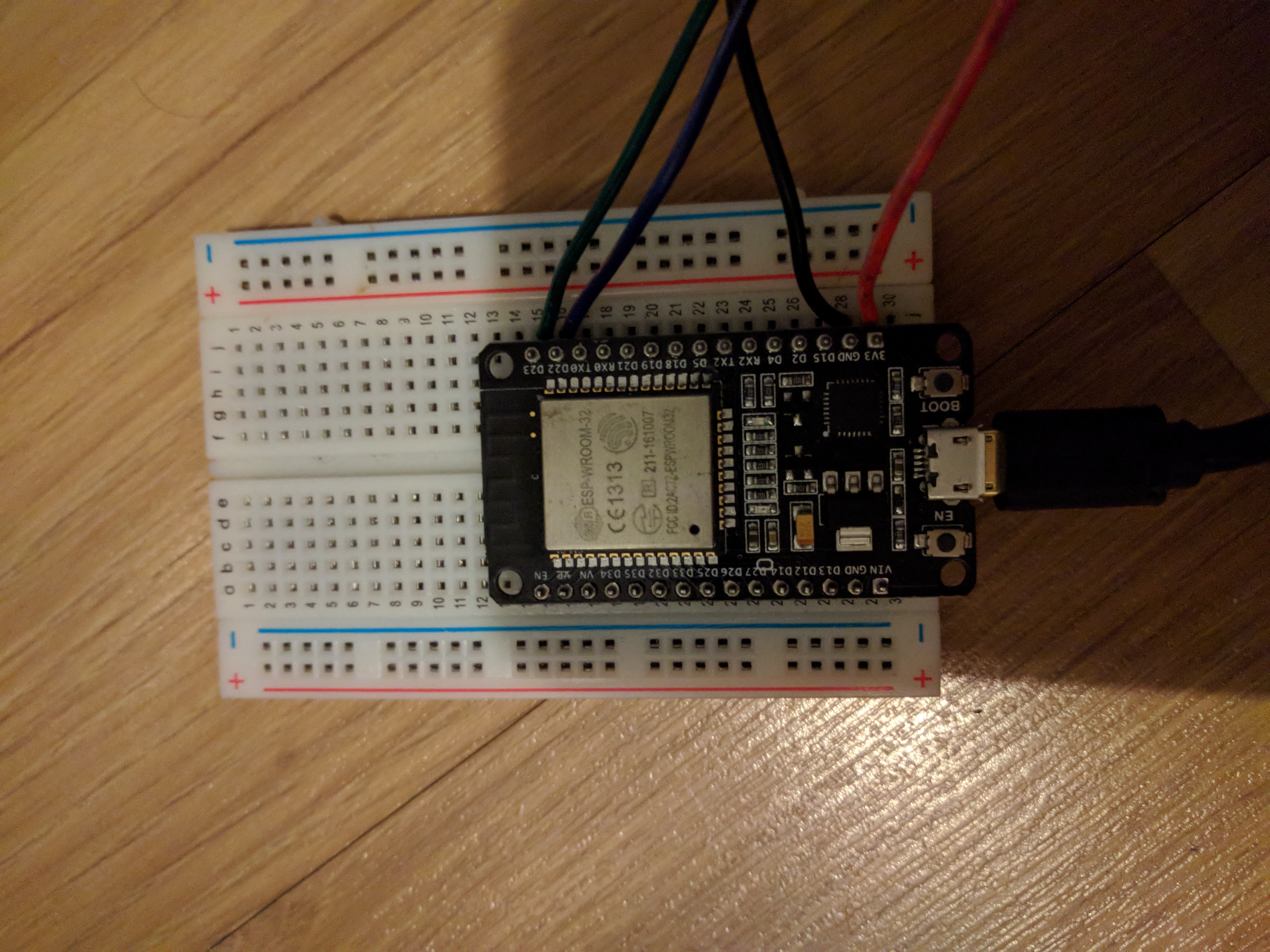
Nothing fancy, just doing the simplest possible thing to eliminate potential problems. Bit hard to see the wire colours, but data is on pin GPIO23 and clock on GPIO22. This is what the espressif sketch is using.
Amunds
on 18 Jan 2018
Is the red 3V3 cable powering the strip? If so, I misunderstood your previous question sorry. I power my strips and ESP32 with 5V, and drive them using 3V3 logic from the ESP32.
I accidentally hooked up my WS2812B strip to 12V power a while back (oops!). The strip powered on but didn't react to the data being sent from the ESP32. I quickly unplugged and hooked up to 5V power and it worked correctly. So perhaps powering the strips with 3V3 is causing an issue?
Also, be careful not to draw too much current through that 3V3 pin. I'm not sure what it's rated for, but it's likely around 200mA (only enough for ~3 fully lit pixels). Could be more or less though.
chrisparton1991
on 18 Jan 2018
For those who are interested in Parallel output on the ESP32.
I was able to 'break' the 8 pin barrier. I am currently running with 12 pins in parallel
I think I can go for more.
I will try to come up with a new commit proposal and also allowing you to select the pins
68FPS for 5040 leds :)
hpwit
on 18 Jan 2018
Nice one @hpwit! Once you're happy with it, is there any chance you could create a Gist with some sample code?
chrisparton1991
on 18 Jan 2018
@chrisparton1991 of course I will :)
hpwit
on 18 Jan 2018
@Amunds it seems you are powering your led with 3.3V and then use 5V level shifting .
I suggest you to power your legs from another source
regards
Yves
hpwit
on 18 Jan 2018
Hi there, tried researching before i gave up and came over here. I am using a node-32s esp32 and while i can get it to work on a few pins i cant get it to work past 70 leds ? at 71 it turns on everything but the first 70 leds and after that it just doesnt turn on. any ideas? i am getting the no hardware spi pins defined thing but i am not sure that matters?
 plankatron
on 18 Jan 2018
plankatron
on 18 Jan 2018
@plankatron could you please send the code that you are using ?
hpwit
on 18 Jan 2018
Just wanted to add that switching from 3V3 VOUT pin on the ESP32 to external 5V with common ground did nothing, unless the pixels are already lit the strip is just black. No signal from the ESP32 to the strip.
Amunds
on 18 Jan 2018
@hpwit just the default example sketches like demoreel100
also of note, i managed to get another library working : https://github.com/RoboticsBrno/SmartLeds
still hoping to get it working with this library as well though
plankatron
on 18 Jan 2018
@chrisparton1991 @samguyer here it is the version up to 16 pins
12-19;0;2;3;4;5;21-23
I need to work on the performances a bit
it's based on the 3.1.6
if you could test
https://github.com/hpwit/fastled-esp32-16PINS
below the performances of the library
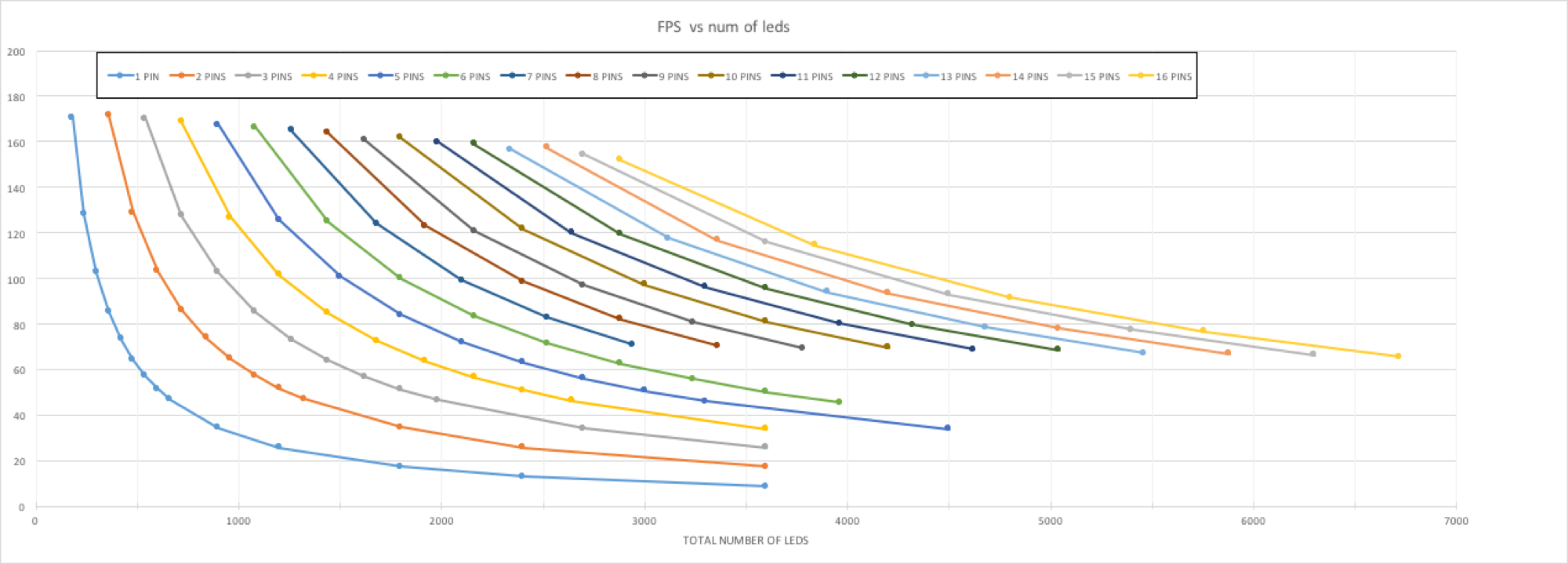
hpwit
on 19 Jan 2018
@hpwit That is a nice graph. It looks like you are using the initial ESP32 support (essentially just a port of the ESP8266 support). I don't think the RMT version is any faster (since the timing is determined by the WS281x timing parameters), but it is more robust to other disturbances (like the WiFi handler).
samguyer
on 19 Jan 2018
@samguyer I do not know too much about RMT ( I have not looked at it yet), do you have performance data to share with the RMT implementation ?
and code sharing for me to test?
I want to build a 3600 led (75*48) and I am looking for the best way to get good performances (at least 80FPS of refresh) without having to couple a teensy with and esp8266 or esp32.
That is why I as investigating the parallel output of @eshkrab to extend it.
hpwit
on 19 Jan 2018
@hpwit I think the performance should be the same regardless of the implementation -- the clock speed of the ESP32 is so much higher than the clock speed of the WS281x chips.
I don't fully understand how parallel output is implemented in FastLED, but I'll look into it. I'd like to make sure we can provide the best possible platform.
samguyer
on 19 Jan 2018
@samguyer
i receive
fastpin.h:206:2: error: static assertion failed: Invalid pin specified
static_assert(validpin(), "Invalid pin specified");
with DATA_PIN 12
and FastLED.addLeds
while with
FastLED.addLeds i receive pragma message: No hardware SPI pins defined. All SPI access will default to bitbanged output
maxdd
on 19 Jan 2018
@maxdd What LEDs are you using? With APA102 you need to specify both DATA_PIN and CLOCK_PIN in addLeds. The pragma message can be safely ignored, it's not an error, just information. Can you make a gist of the sketch?
Amunds
on 19 Jan 2018
Do i have to connect both CLK and DATA with APA102?
maxdd
on 19 Jan 2018
Maxdd, yeah, APA102 don't work without a clock signal because that's what
determines how data is read.
WS281* are expecting data at a set frequency, while APAs don't have such as
a constant. This is why you can do POV with APAs or if a system can't send
data at the rate WS281* expect, APAs are more forgiving.
On Jan 19, 2018 10:36 AM, "maxdd" notifications@github.com wrote:
Do i have to connect both CLK and DATA with APA102?
—
You are receiving this because you were mentioned.
Reply to this email directly, view it on GitHub
https://github.com/FastLED/FastLED/issues/504#issuecomment-359052011, or mute
the thread
https://github.com/notifications/unsubscribe-auth/ADdvx2VMVUg8OxynFEnihUksKhih2jE8ks5tMOCogaJpZM4PkmBp
.
 eshkrab
on 19 Jan 2018
eshkrab
on 19 Jan 2018
ok solved!
maxdd
on 19 Jan 2018
This is why you can do POV with APAs
No - you can do POV with APA's because they have an internal PWM refresh rate of about 20khz vs. the WS2812 which only has a 400hz refresh rate - which means, among other things, you get fewer skips/gaps at lower brightness.
focalintent
on 20 Jan 2018
@chrisparton1991 Here is the version where you can select your pins with parallel output plus modification to add better support for WS2812B
https://github.com/hpwit/fastled-esp32-16PINS
hpwit
on 20 Jan 2018
so is there any way to test why the code wouldnt be working past 70 leds ? specifically the demo-reel-100 code.
its not a power issue, i was attempting to light up about 300 , and ive tested other libraries at this point that do work, but i wanted to try to get things working with fastled as well due to all the development it gets.
plankatron
on 20 Jan 2018
@plankatron i will have a look at it later today
hpwit
on 20 Jan 2018
@plankatron Which branch of FastLED are you using? I had similar issues that I believe had to do with the timing of the signal on the ESP32.
Also: just out of curiosity, is the last LED that works right near the "seam" that joins two strips?
samguyer
on 20 Jan 2018
@samguyer just the default repo
i will check if its on a seam or not , didnt think about checking for that.
plankatron
on 20 Jan 2018
@plankatron Try using my fork of FastLED -- it uses a completely different mechanism to send the bits. I had similar problems before we made these changes.
samguyer
on 20 Jan 2018
I have (maybe a beginner issue) when I initiate mt led strip (what ever the method) and do the first FastLed show() the first led goes in a random color. I have never noticed that before as I was always doing animations.
it seems does not seem to be always there ...
what should I do ?
hpwit
on 23 Jan 2018
One more data point, I am also having problems with this library and ESP32, specifically random colors and flickering when I try to do anything.
Everything works fine when I load micropython and use the neopixel library (it's just slow), so I know the wiring is correct.
 joshuasiler
on 21 Feb 2018
joshuasiler
on 21 Feb 2018
Hey guys,
To be honest, I haven't looked at the fastled port in forever, but my
partner and I did lots of optimising the RMT peripheral ws2812 code for
the esp-idf, making it much faster for 8 parallel led strips (testing at
200 LEDs/strip) and I believe no flashes.
Once I have free time, we'll clean up and post that and I'll go looking at
my port of the fastled library, now that I'm more versed in the topic.
Good luck everyone!
On Feb 21, 2018 11:37 AM, "Joshua Siler" notifications@github.com wrote:
One more data point, I am also having problems with this library and ESP32,
specifically random colors and flickering when I try to do anything.
Everything works fine when I load micropython and use the neopixel library
(it's just slow), so I know the wiring is correct.
—
You are receiving this because you were mentioned.
Reply to this email directly, view it on GitHub
https://github.com/FastLED/FastLED/issues/504#issuecomment-367444930, or mute
the thread
https://github.com/notifications/unsubscribe-auth/ADdvx_b9XjuyJ0p9QijlihnlVbUrIEq0ks5tXHBqgaJpZM4PkmBp
.
eshkrab
on 21 Feb 2018
@joshuasiler Try my branch -- let me know if that helps.
samguyer
on 21 Feb 2018
Thanks for the comments guys. I found this RMT based code that works perfectly https://github.com/MartyMacGyver/ESP32-Digital-RGB-LED-Drivers
It has both arduino and esp-idf examples - will be going with this for now.
joshuasiler
on 22 Feb 2018
Hey everybody, I always had the problem that my ESP32 resetted on FastLED.show();
Resolved it by calling
define FASTLED_ALLOW_INTERRUPTS 0
before including the FastLED-library.
Hope that helps ;)
 Wetterprophet
on 22 Mar 2018
Wetterprophet
on 22 Mar 2018
Use sam’s most recent branch - disabling interrupts can break WiFi, which defeats the purposes of using an esp.
focalintent
on 22 Mar 2018
I've tried @samguyer fork as well as the SmartLED library, nothing seems to work for my APA102s.
I uploaded the sketch that @Amunds linked and that works perfectly. It doesn't use a library, so obviously it's doing something right that the libraries are not.
 hamid-elaosta
on 22 Mar 2018
hamid-elaosta
on 22 Mar 2018
@hamid-elaosta
My guess is you have some other bug in your sketch. The APAs don't really need anything special, since they have a clock signal (unlike WS281x strips). If you post your code on the fastled Google group
samguyer
on 22 Mar 2018
@samguyer I can see why the scant content of my response might lead you to that assumption, my apologies.
Let me elaborate;
I'm using WEMOS LOLIN32's. I first tested this library last summer, and began following this and other issues when it became apparent that support for the ESP32 was lacking.
I have come back to it, having noticed improvements to the ESP32 support and found it still does not function. I have tested the master branch of this library, I have tested the master branch of your fork.
I have tried pulling the v3.1.3 branch of your fork which does not build in PlatformIO, nor does v3.1.0.
I have a short test strip of 22 APA102's connected to pins 18 (SCLK) CLOCK_PIN and 23(MOSI) DATA_PIN. As far as I can tell, both libraries are bit-banging the port and not using hardware SPI (I haven't investigated deeply). Neither your fork, nor this library will have any affect on the connected LEDs on my LOLIN32 using any of the following sketches, configured as follows:
// DATA_PIN 23
// CLOCK_PIN 18
// NUM_LEDS 22
LEDS.addLeds<APA102,DATA_PIN, CLOCK_PIN, RGB>(leds,NUM_LEDS);
https://raw.githubusercontent.com/FastLED/FastLED/master/examples/Blink/Blink.ino
https://raw.githubusercontent.com/FastLED/FastLED/master/examples/Cylon/Cylon.ino
https://raw.githubusercontent.com/FastLED/FastLED/master/examples/RGBCalibrate/RGBCalibrate.ino
...as well as a couple of hand written sketches with additional control setup on the two pins.
Given the nice code linked by @Amunds, which does a clean bit-bang, works perfectly, and reliably, I can rule out that 1) my wiring is incorrect, 2) my LOLIN32 doesn't work and 3) the LEDs don't work.
All this leading me to the conclusion; the library doesn't work with APA102's on a WEMOS LOLIN32.
hamid-elaosta
on 22 Mar 2018
@hamid-elaosta It would be great to have someone working on the clocked chip support for ESP32. All of my work had been for clockless chips, like the WS281x family. All of us here work on this code as volunteers -- people who want to make it better. Would you be willing to do some work to improve the APA 102 support? I can provide some guidance on the ESP32 issues.
samguyer
on 23 Mar 2018
@hamid-elaosta Can you post your issue on the FastLED Google+ group? And please include any code that you have tried (including a link the code from Amunds).
samguyer
on 23 Mar 2018
@samguyer I can post there. I feel this is a better forum for an issue/bug report though?
hamid-elaosta
on 23 Mar 2018
@hamid-elaosta I need a lot more information for a bug report. I need all the code you are running, the exact build instructions, and output from the serial monitor showing where the crash is occurring. I'm not at all convinced that there is a bug in library, especially given the large number of people who are using it successfully.
samguyer
on 23 Mar 2018
@samguyer Ok, so I take a sketch, in PlatformIO (3.5.3a3), such as this one (linked previously)
https://raw.githubusercontent.com/FastLED/FastLED/master/examples/Blink/Blink.ino
I change the FastLED setup line to:
FastLED.addLeds<APA102,DATA_PIN, CLOCK_PIN, RGB>(leds,NUM_LEDS);
and I change the constants to:
#define NUM_LEDS 22
#define DATA_PIN 23
#define CLOCK_PIN 18
I install the library;
pio lib install "FastLED"
I click the "build" button, then I click the "upload" button, both succeed, and yet my LEDs do nothing useful.
I switch out the library folder with various branches/tags of this and your repo, build and deploy again and still nothing.
So I go back to square one, create a blank sketch, setup hardware SPI and my LEDs do exactly as I expect.
Next I try bit-banging the LEDs without SPI and that also works.
All leading me to be convinced there is a bug in the library, in case this issue itself wasn't evidence enough.
I've spent enough time convincing myself there is nothing wrong with my code, It'll be quicker, it seems to just write my own library that to convince you otherwise.
hamid-elaosta
on 23 Mar 2018
@hamid-elaosta I don't have much experience with APA 102 strips or the platform io environment. You could very well be right that there is some problem. That's why it is so valuable to post on the Google group -- you might find other people who have encountered the same problem and solved it.
Again, to some degree, your issue is not relevant to my work at all, since APAs are clocked chips.
samguyer
on 23 Mar 2018
What's needed is for someone to put a scope on the output pins when running APA102 output and see what the clock and date lines look like - the APA102 code is identical across all the platforms FastLED supports - and APA102 is working everywhere else :)
One possible problem may be that the bit-banging is toggling the clock line too quickly (I've seen this happen on some other platforms) - in which case lowering the data rate might help. The other possibility is that the delay code that's generated to control the output rate is effectively getting compiled/optimized out for the esp32, as it's effectively just a series of nop operations - look at the implementations in fastled_delay.h - but if that's the case, then there would effectively be no delay in the clock line toggling, and the APA102's would never see the clock line strobing, and therefore never read the data.
focalintent
on 24 Mar 2018
@hamid-elaosta I asked your question on the Google+ group, and I got an answer almost right away. It jibes with what Dan is saying: you need to set the data rate slower. Here is the example code (notice the data rate argument):
I'm currently using 296 SK9822s in my ESP32 powered hat, using your fork of the library. They are almost identical to APA102Cs and a lot of the chinese vendors sell them as APA102Cs. Not all pins work. I'm currently using:
define DATA_PIN_0 4
define CLK_PIN_0 5
define DATA_PIN_1 25
define CLK_PIN_1 26
define DATA_PIN_2 16
define CLK_PIN_2 17
define DATA_PIN_3 18
define CLK_PIN_3 19
define LED_TYPE SK9822
define COLOR_ORDER BGR
define NUM_LEDS_PER_STRIP 74
define NUM_STRIPS 4
define NUM_LEDS NUM_LEDS_PER_STRIP * NUM_STRIPS
FastLED.addLeds
samguyer
on 24 Mar 2018
@samguyer Thanks for looking into it. I'm not able to investigate today but I can say that I did try various data rates from 1, 8, 12 and 20MHz, none of which worked, so I'm not sure that's the issue affecting me here.
Unfortunately I don't have a scope at my disposal but I do have a logic analyser so I'll look into the outputs for FastLED vs my working implementation with the Arduino SPI library.
Since this most certainly has gotten beyond a bug report and into a discussion I'll report into the G+ group when I can.
@focalintent I'm not sure the LOLIN32 is fast enough to bit bang this too quickly, if I toggle the clock with no delays it works reliably. As I pointed out above, I sadly don't have a scope but I'll see what I can gather with a logic analyser.
EDIT; Original sent from mobile, autocorrect issues.
hamid-elaosta
on 24 Mar 2018
So, I think the problem may be more to do with how FastLED is doing the delay's for bitbang'd output. If those delays are effectively getting optimized out, then the ESP32 will absolutely be toggling the clock way too fast for the APA102 - so, I think the problem is that fastled_delay.h needs to be updated for the esp32, to make sure that it's actually delaying for the number of clock cycles asked for.
focalintent
on 24 Mar 2018
@focalintent The only problem with that theory is that the delay code worked for the clockless chips (their problem was the interrupts). We need to see what the output from the pins looks like.
samguyer
on 24 Mar 2018
@hamid-elaosta Did you make any progress on this problem?
samguyer
on 26 Mar 2018
Hi @samguyer, I'm afriad I've had other commitments and have been unable to look at this for the last few days. Perhaps in a day or too I'll be able to take another bash at it.
I have a logic analyser to hand and am looking at acquiring an oscilloscope. I'll get back as soon as I've managed to gather some more data.
hamid-elaosta
on 26 Mar 2018
@hamid-elaosta Sounds good. Let me know what you find. We can work together to get it working. This is how I became a contributor to the project -- there wasn't good support for WS2812s on the ESP32, so I started learning about it and working on it myself.
samguyer
on 26 Mar 2018
Hi @hamid-elaosta - thanks for the reporting and help on this issue; I'd love to get to the bottom of it.
To that end, @samguyer and I got together in person this evening, with some ESP32 boards, and a logic analyzer, and an assortment of LED strips, including APA102. We've been sitting here for about three hours now and we've been unable to reproduce the problem. That is to say: we hooked up an ESP32 board, and an APA102 strip, and using the exact pin numbers (DATA=23, CLOCK=18) that you use in your code, the strip lights up and works perfectly.
We reproduced the APA102s working perfectly with two different ESP32 boards: one totally generic ESP32 Dev Board and one branded "NodeMCU 32-S" board. The code worked correctly on other pins besides just DATA=23 & CLOCK=18, but we wanted to test with your exact setup, including the specific pin numbers.
Here's a photo of our test setup working as expected, but unfortunately unable to reproduce the problem:

Given this, we can confirm that FastLED on ESP32 is able to correctly drive APA102 LEDs under the setup and circumstances that we're using here. But clearly, something about your setup is different, and you're (obviously) getting different results.
So the question I am pondering now is: given that the exact same code is NOT working for you, but it IS working for us here, what could the other differences possibly be?
The area that I suspect is the build environment: we're testing with the standard "Arduino" IDE and the compiler plug-ins for that. Your test setup is using pio; I wonder if there are compiler version differences that are affecting the generated code.
Sam just checked, and the gcc compiler version for xtensa (ESP) that the Arduino IDE is using is v5.2.0. I wonder if platformio is using the same compiler version; perhaps you could check that and let us know.
What are the other environmental differences between the standard Arduino IDE and platformio? I wonder if those are factors that are affecting the problem you're having.
What else can you think of, given that the basic library seems to work just fine through the Arduino IDE here. Could you perform a basic test through the Arduino IDE, and confirm whether that works for you or not? If so, that would help narrow it down to platformio-related issues, and you could help us dig in further there.
In any case, I'm going to leave this ticket open, because even though we're not seeing any APA102 problem on ESP32, you clearly are having problems still.
Thanks again for the help.
 kriegsman
on 6 Apr 2018
kriegsman
on 6 Apr 2018
One other thought... perhaps there are different compiler optimization settings being passed in to gcc from the Arduino IDE and the platformio environment; please let us know what you find there.
Thanks again.
kriegsman
on 6 Apr 2018
Also - are you sure your test strip is apa102 and not sk9822? The protocols are slightly different - and at the moment, FastLED keeps them separate.
focalintent
on 6 Apr 2018
@focalintent I'm not sure. I bought them as APA102, and they've worked as APA102 in Hyperion for over a year. I'm on mobile so I'm finding it difficult to compare the data sheets for differences. I'll take a better look when I get home from work tonight.
@samguyer @kriegsman Nice work guys, it's good to see it does/can work. So, it looks like my next step is to get 1) more info out of Platformio about what it's doing. 2) build with the Arduino IDE and failing the above, building by hand according the the info you've given me.
If I'm not mistaken, platformio uses its own bootloader, not the Arduino one, so this could be a potential cause. I need to do some reading.
hamid-elaosta
on 6 Apr 2018
@samguyer @kriegsman Ok guys, so I've spent the evening trying to debug this.
I've got the project building with Arduino IDE 1.8.5 and I'm using the ESP32 board from here
My hardware is as follows according to the IDE. To be clear, it's a WEMOS LOLIN32:
Chip is ESP32D0WDQ6 (revision 0)
Features: WiFi, BT, Dual Core
...(snip)
Configuring flash size...
Auto-detected Flash size: 4MB
I have this sketch which works as expected:
#include <Arduino.h>
#include <SPI.h>
#define NUM_LEDS 22
// Data pin that led data will be written out over
#define DATA_PIN 23
// Clock pin only needed for SPI based chipsets when not using hardware SPI
#define CLOCK_PIN 18
#define DEBUG 1
SPISettings settings(12000000, MSBFIRST, SPI_MODE0);
void setup() {
#ifdef DEBUG
Serial.begin(9600);
#endif
// sanity check delay - allows reprogramming if accidently blowing power w/leds
delay(2000);
SPI.begin();
//FastLED.addLeds<APA102, DATA_PIN, CLOCK_PIN, BGR>(leds, NUM_LEDS);
}
void startBlock() {
SPI.transfer32(0x00000000);
}
void endBlock() {
SPI.transfer32(0xFFFFFFFF);
}
int spark = 0;
int down = 0;
void loop() {
SPI.beginTransaction(settings);
startBlock();
for(uint16_t i = 0; i < NUM_LEDS; i++) {
if(i == spark) {
SPI.transfer32(0xEE00FF00);
} else {
SPI.transfer32(0xEE000000);
}
}
if(spark == NUM_LEDS) {
down = 1;
} else if(spark == 0) {
down = 0;
}
if(down == 1) {
spark--;
} else {
spark++;
}
endBlock();
SPI.endTransaction();
delay(10);
}
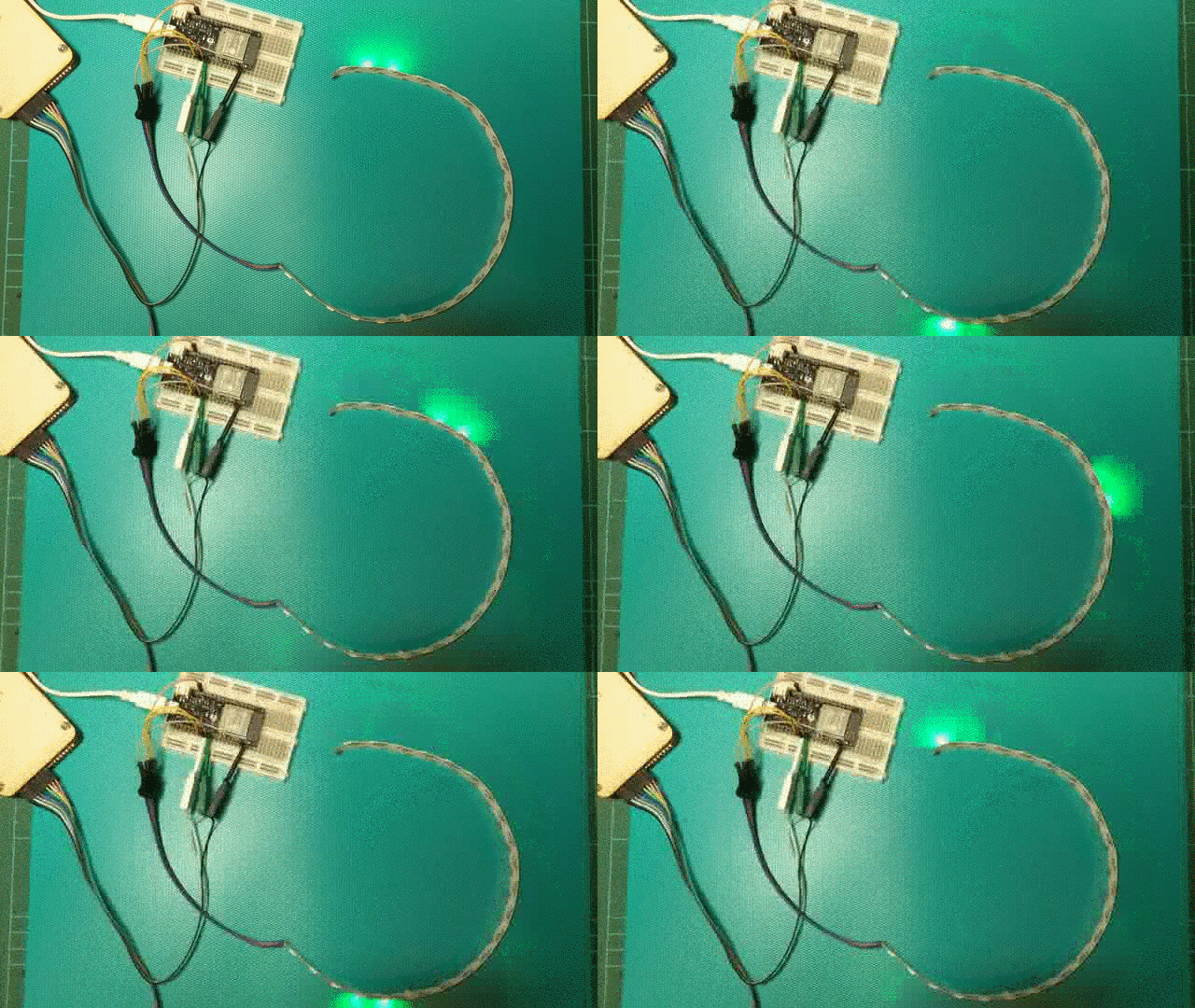
(Sorry about the terrible quality, it started as a 4K video and was hard to shrink)
I confirmed the working clock speeds from my sketch (e.g. 1MHz):
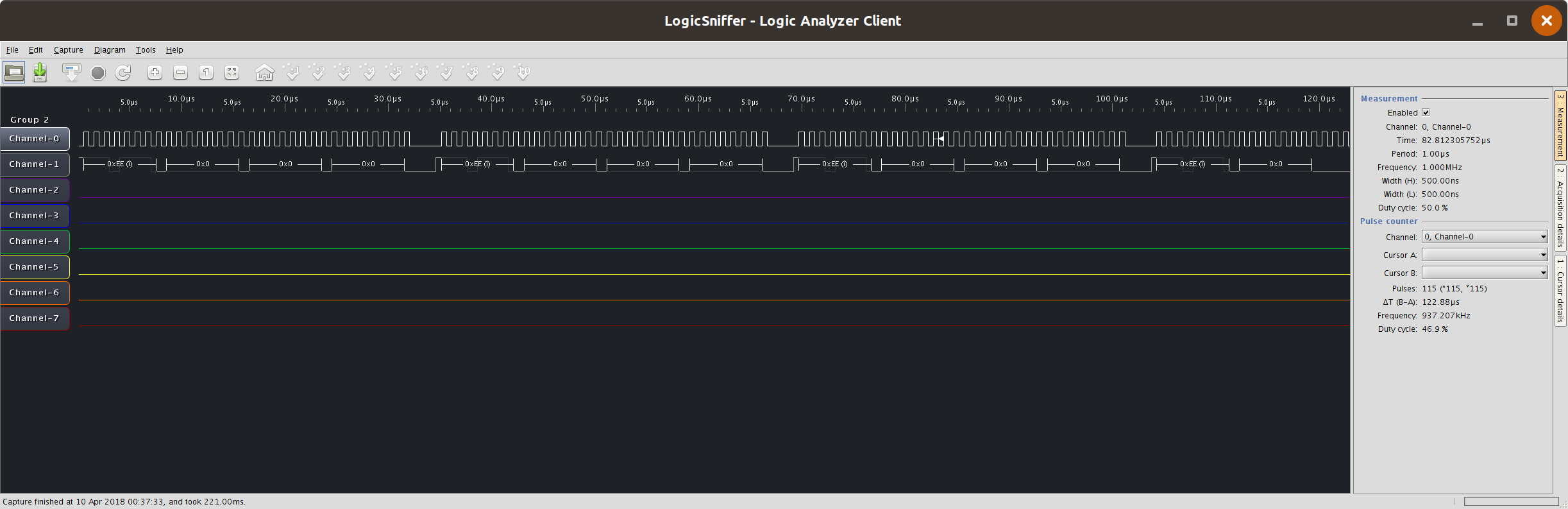
So next I tried with FastLED. The first, obvious note is that FastLED does not use the hardware SPI on this device:
In file included from /home/hamid/Arduino/RGBCalibrate/RGBCalibrate.ino:1:0:
/home/hamid/Arduino/libraries/FastLED/FastLED.h:17:21: note: #pragma message: FastLED version 3.001.007
# pragma message "FastLED version 3.001.007"
^
In file included from /home/hamid/Arduino/libraries/FastLED/FastLED.h:68:0,
from /home/hamid/Arduino/RGBCalibrate/RGBCalibrate.ino:1:
/home/hamid/Arduino/libraries/FastLED/fastspi.h:110:23: note: #pragma message: No hardware SPI pins defined. All SPI access will default to bitbanged output
# pragma message "No hardware SPI pins defined. All SPI access will default to bitbanged output"
Simply defining the SPI_DATA and SPI_CLOCK pins in the platform file, gets rid of the PRAGMA message but, it seems actual support for hardware SPI on ESP32 is not implemented.
Visually, after flashing a FastLED sketch, the LEDs don't change at all after device reset, suggesting they're infact not receiving any communication. e.g. If the LED from my sketch stopped at LED 11, that LED is still lit, the same colour after reset from flashing a FastLED sketch.
Here's the output of the non-working FastLED project. Interestingly, it's only clocking when data is low, and data doesn't change much:
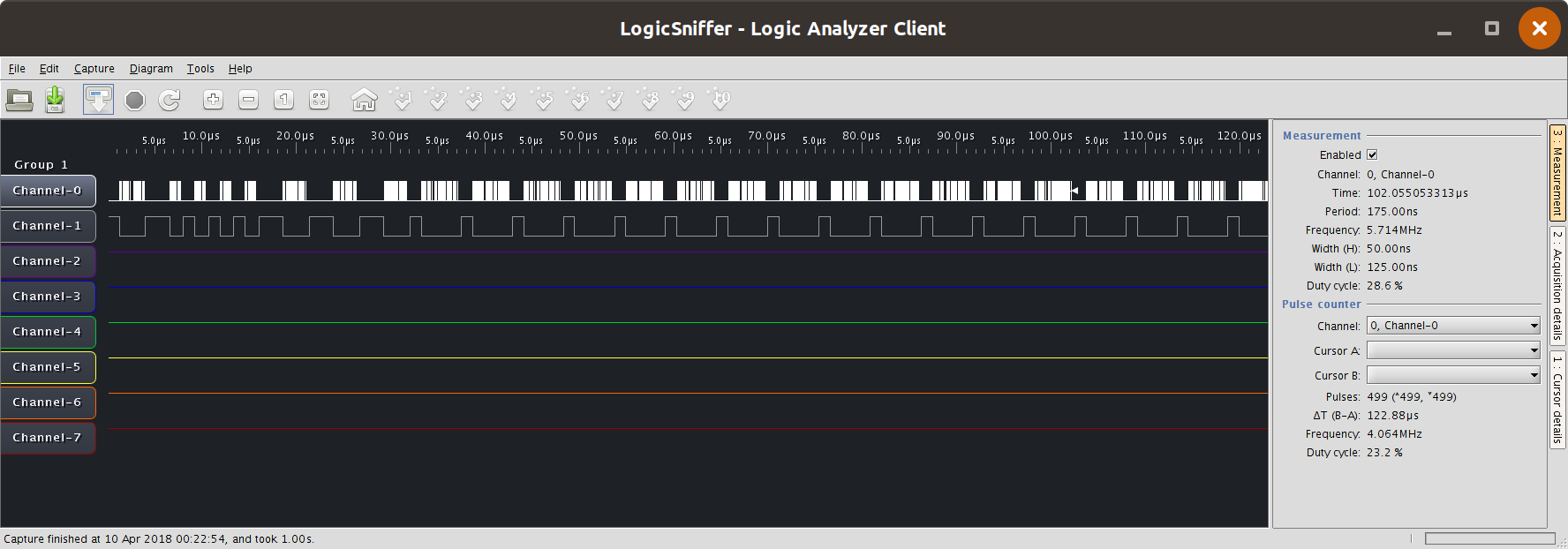
closer view:
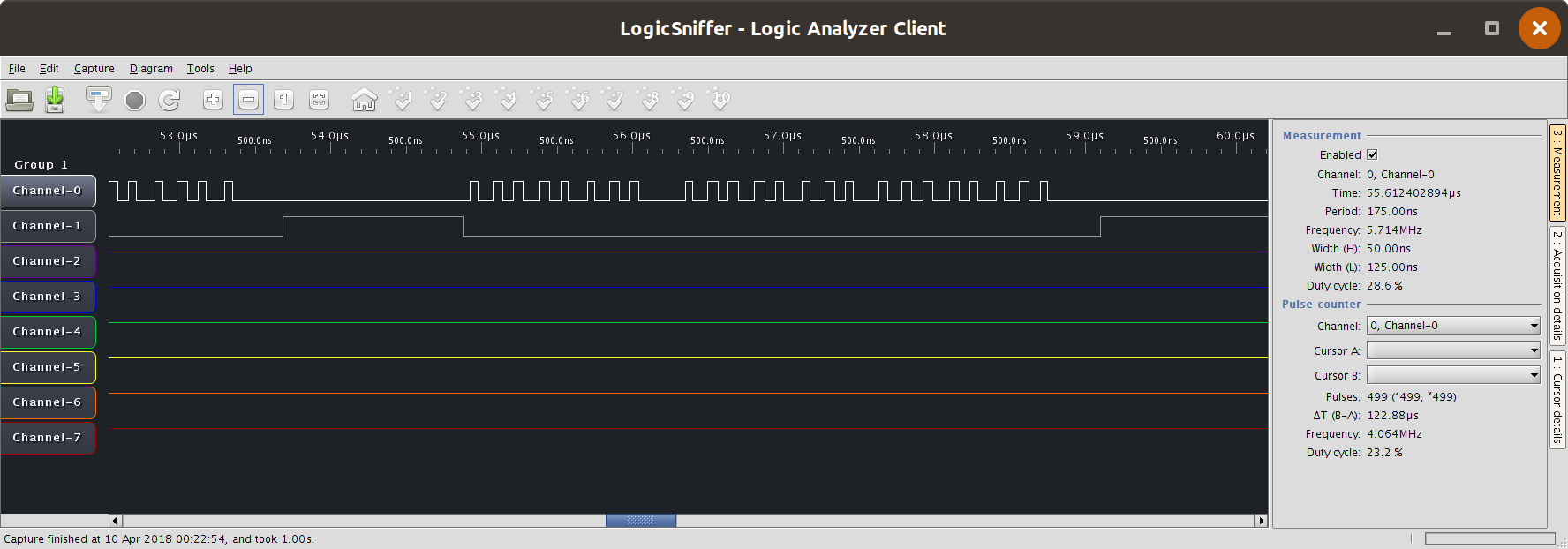
I have tested with debug to the serial terminal, there is no output after the initial boot, so it seems it's not crashing in the code.
I have tested multiple SPI rates with my own sketch, and 1, 2, 4, 8 and 12 MHz all function as expected.
I can provide compilation output if needed (it's verbose). I'm not sure what the next step is.
hamid-elaosta
on 10 Apr 2018
what is the fastled code that you’re compiling for this - so that can be checked/run by other folks (and to compare the output against code that they’ve had running/working)
focalintent
on 10 Apr 2018
Also - exactly what change did you make to shut up the pragma messages? Depending on how you did it you might be messing with some library internals for strange effect.
Also - what happens if you use a pair of pins not attached to the SPI hardware?
focalintent
on 10 Apr 2018
Also, from your pragma output I can tell you haven’t grabbed sam’s latest esp32 tree:
#define FASTLED_VERSION 3001008
#ifndef FASTLED_INTERNAL
# ifdef FASTLED_HAS_PRAGMA_MESSAGE
# pragma message "FastLED version 3.001.008"
# else
# warning FastLED version 3.001.008 (Not really a warning, just telling you here.)
# endif
#endif
Looking again at the scope output - it looks like attempts to set the data pin hi are getting optimized out - it’s almost like the compiler is seeing:
FastPin<DATA_PIN>::hi();
FastPin<CLOCK_PIN>::hi();
And optimizing away the data pin line - if that’s what’s happening it’s because these two lines effectively become:
GPIO0._GPOS = 1 << 23;
GPIO0._GPOS = 1 << 18;
Which probably means a volatile is missing somewhere or not being respected. Which doesn’t directly explain why things are working for Sam and mark but not you (unless you are both building with different compiler optimizations)
focalintent
on 10 Apr 2018
Ok - for laughs - in FastLED/fastspi_bitbang.h try changing this, around line 121:
// write the BIT'th bit out via spi, setting the data pin then strobing the clcok
template <uint8_t BIT> __attribute__((always_inline, hot)) inline static void writeBit(uint8_t b) {
//cli();
if(b & (1 << BIT)) {
FastPin<DATA_PIN>::hi();
FastPin<CLOCK_PIN>::hi(); CLOCK_HI_DELAY;
FastPin<CLOCK_PIN>::lo(); CLOCK_LO_DELAY;
} else {
FastPin<DATA_PIN>::lo();
FastPin<CLOCK_PIN>::hi(); CLOCK_HI_DELAY;
FastPin<CLOCK_PIN>::lo(); CLOCK_LO_DELAY;
}
//sei();
}
to this:
// write the BIT'th bit out via spi, setting the data pin then strobing the clcok
template <uint8_t BIT> __attribute__((always_inline, hot)) inline static void writeBit(uint8_t b) {
//cli();
if(b & (1 << BIT)) {
FastPin<DATA_PIN>::hi();
FastPin<CLOCK_PIN>::lo(); // kick a different register, block premature optimizations?
FastPin<CLOCK_PIN>::hi(); CLOCK_HI_DELAY;
FastPin<CLOCK_PIN>::lo(); CLOCK_LO_DELAY;
} else {
FastPin<DATA_PIN>::lo();
FastPin<CLOCK_PIN>::hi(); CLOCK_HI_DELAY;
FastPin<CLOCK_PIN>::lo(); CLOCK_LO_DELAY;
}
//sei();
}
Another possible change to try is in FastLED/platforms/esp/32/fastpin_esp32.h change line 11 from this:
#define _GPB0 (*(FASTLED_ESP_IO*)(GPIO_OUT_REG))
to this:
#define _GPB0 (*(volatile FASTLED_ESP_IO*)(GPIO_OUT_REG))
@focalintent Right, I forget about @samguyer fork. I got a little sidetracked having to compile my Logic Analyser software from source because there has been no recent release (time to get a new one I think).
The code I'm compiling is the CalibrateRGB sketch I linked on 22nd March, 22:59 GMT (I'm in the UK).
The only change was the ones listed in that post, I'll link the complete sketch in the next day or two when I'm home.
I'll also test those changes you've suggested for clocking.
hamid-elaosta
on 10 Apr 2018
@focalintent Ok, now the interesting part.
So,
- First I got hold of @samguyer fork, ran that, just to be sure, doesn't work.
- Next I edited the platform.txt for my board and turned off optimisations, still doesn't work.
- I restored the platform.txt to -Os and added the
lo()in the bitbang file and it works. Tested Calibrate and DemoReel100, both working. - I restored the bitbang file and set the volatile in
_GPB0which did not work.
hamid-elaosta
on 11 Apr 2018
Ok - so doing two hi pin sets adjacent to each other is getting optimized out by the compiler for the esp32, even when the compiler has optimizations turned off - and more aggressively marking the involved statements as volatile doesn't appear to help with that. Good to know (if a little annoying).
focalintent
on 11 Apr 2018
Ok - so that write bit method should be set to something like this for now - there may be other ways to tweak how this is handled, but not having a setup that I can actually run and test in, there's a limit to how much experimenting I can do.
    // write the BIT'th bit out via spi, setting the data pin then strobing the clcok
    template <uint8_t BIT> __attribute__((always_inline, hot)) inline static void writeBit(uint8_t b) {
        //cli();
        if(b & (1 << BIT)) {
            FastPin<DATA_PIN>::hi();
#ifdef ESP32
                        FastPin<CLOCK_PIN>::lo(); // kick a different register, block premature optimizations?
#endif
            FastPin<CLOCK_PIN>::hi(); CLOCK_HI_DELAY;
            FastPin<CLOCK_PIN>::lo(); CLOCK_LO_DELAY;
        } else {
            FastPin<DATA_PIN>::lo();
            FastPin<CLOCK_PIN>::hi(); CLOCK_HI_DELAY;
            FastPin<CLOCK_PIN>::lo(); CLOCK_LO_DELAY;
        }
        //sei();
    }
I don't think you will see the problem with the APA102 and ESP32, unless you test with an active WiFi connection.
I'm using pin 19 for clock, 15 for data, and a DotStar strip. Also a smaller strip of 12 LEDs.
I was never able to get FastLED to work, so I experimented with both the DotStar library, and a small set of hard coded functions. Both worked perfectly without WiFi, and both had the identical flicker issue with an active WiFi connection. After reading this thread, I remembered that I had to add microsecond delays after the data write, and between clock states, to reliably clock data to HV5530 chips. So I just added 20 microsecond delays before and after setting the clock pin high in the DotStar library, and it is now working perfectly, with no flicker. I'd like to switch back to FastLED, so at some point I'll test the suggested changes. Thanks for the help with this!
 mitchsf
on 18 Apr 2018
mitchsf
on 18 Apr 2018
Didn't get it at all. What do I have to change to make my ESP32 runninf FastLED properly?
At the moment I get:
C:\Program Files (x86)\Arduino\libraries\FastLED-3.1.0/led_sysdefs.h:22:2: error: #error "XTENSA-architecture microcontrollers are not supported."
#error "XTENSA-architecture microcontrollers are not supported."
 Cysign
on 8 May 2018
Cysign
on 8 May 2018
@Cysign First, make sure you have ESP32 support installed in your Arduino IDE. Then get my branch of FastLED. (We are hoping to merge it into the main branch soon.)
samguyer
on 8 May 2018
Thanks for your reply. I could manage to compile FastLED, now. But my oscilloscope doesn't show proper results on my FastLED pin.
Have to have a closer look tomorrow ;)
Cysign
on 8 May 2018
Looks like it compiled and uploaded well, maybe there's another difference to casual Arduino boards. At the moment I didn't use a level converter, but 3.3V should be fine as high level for WS2812:
C:\Users\
esptool.py v2.3.1
Connecting......
Chip is ESP32D0WDQ6 (revision 1)
Features: WiFi, BT, Dual Core
Uploading stub...
Running stub...
Stub running...
Changing baud rate to 921600
Changed.
Configuring flash size...
Auto-detected Flash size: 4MB
Compressed 8192 bytes to 47...
Writing at 0x0000e000... (100 %)
Wrote 8192 bytes (47 compressed) at 0x0000e000 in 0.0 seconds (effective 21845.2 kbit/s)...
Hash of data verified.
Compressed 14320 bytes to 9327...
Writing at 0x00001000... (100 %)
Wrote 14320 bytes (9327 compressed) at 0x00001000 in 0.1 seconds (effective 916.5 kbit/s)...
Hash of data verified.
Compressed 167344 bytes to 86784...
Writing at 0x00010000... (16 %)
Writing at 0x00014000... (33 %)
Writing at 0x00018000... (50 %)
Writing at 0x0001c000... (66 %)
Writing at 0x00020000... (83 %)
Writing at 0x00024000... (100 %)
Wrote 167344 bytes (86784 compressed) at 0x00010000 in 1.5 seconds (effective 886.6 kbit/s)...
Hash of data verified.
Compressed 3072 bytes to 134...
Writing at 0x00008000... (100 %)
Wrote 3072 bytes (134 compressed) at 0x00008000 in 0.0 seconds (effective 4915.1 kbit/s)...
Hash of data verified.
Leaving...
Hard resetting via RTS pin...
Cysign
on 8 May 2018
Well, didn't know I do not have to use a resistor between my controller and WS2812.
Now it seems to work - in some degree.
Just connected two LEDs using DemoReel100.
Fading from red to orange works fine. But then there seems to be a hickup while blue is blinking for just a single time and back to red. Might this be a known issue?
Cysign
on 8 May 2018
Hello, I'm struggling to this lib work with some ESP32 dev kits I've got. They have no brand, just say Devkit v1
Here's the simplest skecth possible:
https://gist.github.com/phrfpeixoto/2e7bf3813c039b0191f0eb231cc52d2f
I'm using Arduino IDE 1.8.5 and FastLED 3.1.6. The chip hangs and reboots as soon as the show() is executed.
configsip: 0, SPIWP:0xee
clk_drv:0x00,q_drv:0x00,d_drv:0x00,cs0_drv:0x00,hd_drv:0x00,wp_drv:0x00
modeGuru Meditation Error: Core 1 panic'ed (Interrupt wdt timeout on CPU1)
Core 1 register dump:
PC : 0x400853b9 PS : 0x00060334 A0 : 0x8008108b A1 : 0x3ffca690
A2 : 0x3ffc1024 A3 : 0x00000000 A4 : 0x00000000 A5 : 0x00000001
A6 : 0x400d0d34 A7 : 0x3ffc22ac A8 : 0x0000abab A9 : 0x0000abab
A10 : 0xb33fffff A11 : 0x0000cdcd A12 : 0x00060322 A13 : 0x00000001
A14 : 0x00060322 A15 : 0x00000000 SAR : 0x0000000e EXCCAUSE: 0x00000006
EXCVADDR: 0x00000000 LBEG : 0x4000c46c LEND : 0x4000c477 LCOUNT : 0xffffffffBacktrace: 0x400853b9:0x3ffca690 0x40081088:0x3ffca6b0 0x400e3dba:0x3ffca6d0
Core 0 register dump:
PC : 0x400d377e PS : 0x00060734 A0 : 0x8008593d A1 : 0x3ffc6df0
A2 : 0x00000008 A3 : 0x00000000 A4 : 0x00000001 A5 : 0x3ffc7434
A6 : 0x00000000 A7 : 0x00000001 A8 : 0x3ffc29e4 A9 : 0x3ffc29c8
A10 : 0x00000000 A11 : 0x00000001 A12 : 0x800869b8 A13 : 0x3ffc6cf0
A14 : 0x00000000 A15 : 0x3ffc6aa0 SAR : 0x00000000 EXCCAUSE: 0x00000006
EXCVADDR: 0x00000000 LBEG : 0x00000000 LEND : 0x00000000 LCOUNT : 0x00000000Backtrace: 0x400d377e:0x3ffc6df0 0x4008593a:0x3ffc6e10
Rebooting...
I'm a beginner here, so bear with me. Can you help me?
 phrfpeixoto
on 10 May 2018
phrfpeixoto
on 10 May 2018
Just noticed that Arduino IDE reported installed version as 3.1.6, which was latest.
Code was actually reporting 3.1.7. Just installed 3.1.8 and still with the same issue.
phrfpeixoto
on 10 May 2018
Managed to get it working on the sandbox sketch. I forced a complete recompile after reinstalling esp32 board libs and fastled master branch from https://github.com/samguyer/FastLED.
phrfpeixoto
on 10 May 2018
@phrfpeixoto That's great! Let us know if you run into other problems. Also, there is a really cool plugin for the Arduino IDE that will decode those ESP call stacks and show you where the crash is. Check it out:
samguyer
on 11 May 2018
@samguyer Thanks for the tip. I hope that fix from you fork make to the origin soon.
phrfpeixoto
on 11 May 2018
@focalintent WIth your modification below, FastLED went from not working at all, to working perfectly. I"m using APA102 LEDs with the ESP32 and latest Arduino core. Thanks.
ifdef ESP32
FastPin<CLOCK_PIN>::lo(); // kick a different register, block premature optimizations?
endif
mitchsf
on 30 May 2018
@samguyer: Have been trying out your fork on the ESP32 with WS2812Bs and parallel output does not seem to work (my code works on the ESP8266).
#define LED_PIN_STRIP1 23 // LED data port pin for upper half strip
#define LED_PIN_STRIP2 19 // LED data port pin for lower half strip
#define NUM_STRIPS 2 // We have two strips, one for the upper half, one for the lower
#define NUM_LEDS_WIDTH 30
#define NUM_LEDS_HEIGHT 18
#define NUM_LEDS (NUM_LEDS_WIDTH*NUM_LEDS_HEIGHT) // Number of LEDs (my configuration is 30*18=540)
#define NUM_LEDS_PER_STRIP (NUM_LEDS/NUM_STRIPS) // 30*18/2=270 LEDs per strip
CRGB leds[NUM_LEDS];
void setupLEDs() {
FastLED.addLeds<WS2812B, LED_PIN_STRIP1, GRB>(leds, 0, NUM_LEDS_PER_STRIP); // first half starts at array index 0
FastLED.addLeds<WS2812B, LED_PIN_STRIP2, GRB>(leds, NUM_LEDS_PER_STRIP, NUM_LEDS_PER_STRIP); // second half starts at array index 270
}
Only the first half of the strips it lit correctly, the other randomly. Swapping pin 19 / 23 does not change anything, so I guess it must be the library. Am I doing something wrong?
 HorstBaerbel
on 10 Aug 2018
HorstBaerbel
on 10 Aug 2018
@HorstBaerbel That is strange. Let me try out your code, and I'll get back to you soon.
samguyer
on 10 Aug 2018
@HorstBaerbel I was not able to reproduce the problem on my setup. Can you tell me about the hardware you're using?
samguyer
on 14 Aug 2018
Thanks for trying. I use a WEMOS Lolin32 clone and a 30A 5V power supply. All 18 strips have 5V and GND individually fed in from the strip start. The script ran on an ESP8266 (ModeMCU clone), but it was flickering etc. like hell because of interrupts. I wanted to use WiFi / Websockets, so figured I should try with an ESP32 to get a stable display. I don't use a level converter, but all my other projects (that have less LEDs though and no parallel output) never needed one...
I have commented out everything except the LED driving code in my script.
// LED strip setup
#define CALIBRATION_TEMPERATURE TypicalLEDStrip
#define MAX_BRIGHTNESS 255 // 0-255
#define LED_PIN_STRIP1 19 // Define LED data port pin for upper half strip
#define LED_PIN_STRIP2 23 // Define LED data port pin for lower half strip
//initialise LED-array
#define NUM_STRIPS 2 // We have two strips, one for the upper half, one for the lower
#define NUM_LEDS_WIDTH 30
#define NUM_LEDS_HEIGHT 18
#define NUM_LEDS (NUM_LEDS_WIDTH*NUM_LEDS_HEIGHT) // Number of LEDs (my configuration is 30*18=540)
#define NUM_LEDS_PER_STRIP (NUM_LEDS/NUM_STRIPS) // 30*18/2=270 LEDs per strip
#define MAX_FRAME_RATE 30 // Maximum 30Hz update rate
CRGB leds[NUM_LEDS];
void setupLEDs() {
// clear led color buffer to black
memset(leds, 0, NUM_LEDS * sizeof(struct CRGB));
// initialize FastLed library for the WS2812B strip
FastLED.addLeds<WS2812B, LED_PIN_STRIP1, GRB>(leds, 0, NUM_LEDS_PER_STRIP); // first half is at pin 19 and starts at array index 0
FastLED.addLeds<WS2812B, LED_PIN_STRIP2, GRB>(leds, NUM_LEDS_PER_STRIP, NUM_LEDS_PER_STRIP); // second half is at pin 23 and starts at array index 270
FastLED.setTemperature(CALIBRATION_TEMPERATURE);
FastLED.setBrightness(MAX_BRIGHTNESS);
FastLED.setDither(DISABLE_DITHER);
}
void initialLEDflash() {
LEDS.showColor(CRGB(127, 0, 0));
delay(333);
LEDS.showColor(CRGB(0, 127, 0));
delay(333);
LEDS.showColor(CRGB(0, 0, 127));
delay(333);
LEDS.showColor(CRGB(0, 0, 0));
}
void setup() {
setupLEDs();
initialLEDflash();
}
void loop() {
// update display if new data arrived, but only with max. 30Hz
EVERY_N_MILLISECONDS(1000 / MAX_FRAME_RATE) {
LEDS.showColor(CHSV(led_color++, 255, 128));
}
}
@HorstBaerbel Can you try something out for me? Instead of using showColor, can you call fill_solid to set the color, then call FastLED.show() separately.
samguyer
on 14 Aug 2018
I found the problem using my (handheld, small and crappy) oscilloscope. I seem to have shorted out pin 19 to GND on the prototype board and were no signals on pin 19. Thanks for the help and sorry for the hassle!
Parallel mode with 540 LEDs is pretty smooth now on the ESP32. Without frame rate limiting (no "EVERY_N_MILLISECONDS") I see a flicker every ~20-30s, but at 60Hz it seems to be gone. Nice work!
HorstBaerbel
on 14 Aug 2018
@HorstBaerbel That's great! Glad to hear you fixed the problem (and that it wasn't some terrible bug in the library!)
samguyer
on 15 Aug 2018
Hi guys,
I am working on a POV project, that is using 4 single strips of apa102 leds rotation around the core.
The used controller is a ESP32, because it's quite cheap and offers a good performance and Bluetooth + Wifi. We are using 4 different strips to display a 70 x 200 image, because of the 4 different stripes we can run at lower RPM and therefore have less noise, but still have a flicker free and bright image.
The issue that we are facing is, that we had to realise, that we can't display 70 x 200 at around 320 RPM, we were only getting to 109 columns displayed. We checked everything to find the reason for this. Then we found out that we had only 6 MHz speed for updating the LEDs... The SPI for the ESP32 seems not to be supported by the FastLED library :-(
With other ways it was possible to get a high SPI rate with the ESP32, but we would still like to use the FastLED library, because we are used to it and it makes things more easy :-)
Is there any chance that the SPI support for the ESP32 will be added?
Thanks a lot.
Cheers,
Nils
 hamburgtech
on 20 Aug 2018
hamburgtech
on 20 Aug 2018
Adding hardware SPI for esp32 is on the “will eventually get done” list - but I don’t have a timeframe for it yet (and no one has submitted support for it)
focalintent
on 20 Aug 2018
Adding hardware SPI for esp32 is on the “will eventually get done” list - but I don’t have a timeframe for it yet (and no one has submitted support for it)
@focalintent Thanks for your quick reply.
Okay sad to hear that it's officially not supported. Is there any known branch that have SPI support for the ESP32?
The ESP32 is a perfect platform for POV project, it's cheap, has a lot of performance, BT and Wifi and so on. But without that SPI support it can't be used like that with FastLED.
Well I will try to get into it and create some ESP32 solution for FastLED, but I think I could need some support for this.
Thanks so far.
Cheers,
Nils
hamburgtech
on 20 Aug 2018
@hamburgtech I tried to add hardware SPI but FastLED is a big project and I'm not familiar with its code base. I ended up writing a simple sketch for ESP32 to take advantage of hardware SPI for my purposes (Hyperion) as the APA102s I'm using are really simple to control over SPI.
hamid-elaosta
on 21 Aug 2018
From https://github.com/FastLED/FastLED/blob/master/PORTING.md
== Porting fastspi.h ==
This is where you define the low level interface to the hardware SPI system (including a writePixels method that does a bunch of housekeeping for writing led data). Use the fastspi_nop.h file as a reference for the methods that need to be implemented. There are ofteh other useful methods that can help with the internals of the SPI code, I recommend taking a look at how the various platforms implement their SPI classes.
The AVR example of how to do this is presets straightforward and can be used as a reference - https://github.com/FastLED/FastLED/blob/master/platforms/avr/fastspi_avr.h - also the teensy 3.2’s support, though that’s a bit more complex - https://github.com/FastLED/FastLED/blob/master/platforms/arm/k20/fastspi_arm_k20.h
The biggest part will be getting the control registers for configuring the SPI output and determining the right register settings for various clock speeds and then writing data into the registers.
As far as I know, no one has done this for the esp’s yet.
focalintent
on 21 Aug 2018
I got myself a strip of 150 SK9822 LEDs and this https://github.com/FastLED/FastLED/issues/504#issuecomment-380532364 fixed the issue for me
    // write the BIT'th bit out via spi, setting the data pin then strobing the clcok
    template <uint8_t BIT> __attribute__((always_inline, hot)) inline static void writeBit(uint8_t b) {
        //cli();
        if(b & (1 << BIT)) {
            FastPin<DATA_PIN>::hi();
#ifdef ESP32
                        FastPin<CLOCK_PIN>::lo(); // kick a different register, block premature optimizations?
#endif
            FastPin<CLOCK_PIN>::hi(); CLOCK_HI_DELAY;
            FastPin<CLOCK_PIN>::lo(); CLOCK_LO_DELAY;
        } else {
            FastPin<DATA_PIN>::lo();
            FastPin<CLOCK_PIN>::hi(); CLOCK_HI_DELAY;
            FastPin<CLOCK_PIN>::lo(); CLOCK_LO_DELAY;
        }
        //sei();
    }
 NZSmartie
on 30 Aug 2018
NZSmartie
on 30 Aug 2018
Same here. I'm working with SK9822 LEDs and #504 fixed the issue when using a LOLIN32. Interestingly, I didn't need to add this register kick-in hack when programing an LOLIN32 Lite. Maybe it's due to a different chip version?
 haaslukas
on 3 Sep 2018
haaslukas
on 3 Sep 2018
Closing this off - just checked in a more reliable version of this fix.
@haaslukas what platforms you do and don't need it on depends heavily on what the hi/lo methods in FastLED compile down to, in terms of low level statements/IR as well as how I/o registers are defined/implemented. My guess is on the esp32 the adjacent FastPin
    (*out_reg) = 0x01;
    (*out_reg) = 0x02;
It's possible that the compiler version you were using with the LOLIN32 lite either had slightly different register definitions that didn't create this situation, and/or had slightly different compiler versions (or options defined in the platform) that didn't quite so aggressively optimize out.
focalintent
on 20 Jan 2019
Related issues
 scodavis
·
8Comments
scodavis
·
8Comments
 mike-belcher
·
5Comments
mike-belcher
·
5Comments
 renarsvilnis
·
3Comments
renarsvilnis
·
3Comments
 marcmerlin
·
3Comments
marcmerlin
·
3Comments
 sfranzyshen
·
9Comments
sfranzyshen
·
9Comments
Most helpful comment
Ok - so that write bit method should be set to something like this for now - there may be other ways to tweak how this is handled, but not having a setup that I can actually run and test in, there's a limit to how much experimenting I can do.