I have made some experiments with the FastLed Noise functions (especially with the 1D version, FastLed Version 3.1.3) and I have found that there are points of discontinuity at the zero crossing points of the curve.
As far as I understand the Perlin Noise function, the curve has to cross the zero line at regular steps (every 256 increments in the FastLed implementation), whereby there are pseudorandom gradients for each zero crossing. Between these points the algorithm should interpolate the curve smoothly, like shown in this diagram https://www.scratchapixel.com/images/upload/noise-part-2/noise-value-vs-perlin3.png?
The gradients should assure a smooth transitions between the preceding section and the subsequent section of the curve.
It seems that this is not the case in this implementation, as there is a sharp edge at the zero crossing points, which means the gradient changes at the transition of the preceding section and the subsequent section of the curve.
Example code (best view the output with the serial plotter of the arduino IDE):
`#include
void setup() {
Serial.begin(9600);
}
void loop()
{
static int cnt = 0;
Serial.print(-128);
Serial.print("\t");
Serial.print(128);
Serial.print("\t");
Serial.println(inoise8_raw(cnt++));
}`
btw: I've also played with the Noise functions of processing. Here this is not the case.
 You69Man
All 37 comments
Great bug report. Thank you.
We'll take a look!
 kriegsman
on 2 Mar 2017
kriegsman
on 2 Mar 2017

kriegsman
on 22 Apr 2017

kriegsman
on 22 Apr 2017
Previous comments: I'm just making some notes about where one of the 'kink points' is.
kriegsman
on 22 Apr 2017
You're definitely right that there's a sudden change in the direction of the curve, but it's not exactly a "discontinuity." It's sort of a "discontinuity in the first derivative".
I'll keep looking into it, but I think it might just be an artifact of the Perlin noise algorithm itself; it's known to have artifacts, and it has been replaced by Simplex noise (also invented by Ken Perlin) to address problems like artifacts along tile boundaries, such as this. If you search for "Perlin noise artifacts" you'll find a number of things written about this.
One common solution is to use multiple "octaves" of Perlin noise, each rotated from each other. However, in this case, you're using the one-dimensional noise function, and I'm not sure there's a simple (low-cost) solution there.
I'm going to leave the ticket open for now, and keep looking at it a little, but I'm not sure there's a clean solution in this case, given the speed of the noise code that we're trying to maintain. If I make any big breakthroughs, I'll post notes here.
I really appreciate the report, and it's been useful to spend some more time reviewing our code to see what's going on.
kriegsman
on 25 Apr 2017
I noticed the discontinuity in the FastLED noise as well. I've ended up my self to use the fixed point implementation of Ken Perlin itself in which I didn't find the discontinuity. I couldn't discover the error in the FastLED code, it seems that all the components are the same as in the Perlin code. I have even tried to replace parts of the FastLED noise code with the Perlin version to see if I could find something. In the end I decided to use the Perlin implementation, since it was running fast enough on a Teensy 3.
 kasperkamperman
on 25 Apr 2017
kasperkamperman
on 25 Apr 2017
There did used to be actual discontinuities, a year or two back, but I fixed those, and it's continuous now.
kriegsman
on 25 Apr 2017
@kriegsman I meant the sudden direction change. I'm almost sure that I checked the new version with the overflow fix. If I look back in my notes I found that the FastLED implementation was more "square" and was a bit slower on the Teensy then the Perlin implementation. Here my (very messy) code which I used to play around with to compare the output values: https://gist.github.com/kasperkamperman/091c3aeadab3ce92ea496a4f4fe60005
kasperkamperman
on 25 Apr 2017
Amusingly, we optimized the daylights out of the code for 8-bit AVR, and haven't ever gone back and done a 32-bit ARM -specific optimization pass!
kriegsman
on 25 Apr 2017
And the overhead of constraining to 8 or 16 bit values on a 32bit platform will make it slower than a pure 32-bit version.
 focalintent
on 25 Apr 2017
focalintent
on 25 Apr 2017
Thanks for taking care of this issue (and the whole library)!
I've also tried to examine the noise code but unfortunately it's very hard to understand due to it's optimizations and the lack of documentation.
So, for what I understand the key function for the smooth transient of one gradient to the the next gradient is the s-shape function that is used to interpolate between the sections (or cube edges in the 3D version). In the original perlin implementation this is done by the f() function ...
static double f(double t) { return t * t * t * (t * (t * 6 - 15) + 10); }
... which is used by the fade function. I don't understand all the mathematical details but I've recognized that in the FastLED implementation the fade function was replaced by a scale function:
#define FADE(x) scale16(x,x)
The scale function however seems to be something completely different that an s-shape fade function.
I also didn't find anything else in the code that would substitude for the s-shape function. So in my opinion this function is missing for a correct implementation.
You69Man
on 25 Apr 2017
Just a thought: Can it be that it was tried to approximate the s-shape function by use of two parabolas (scale16(x,x)) for performance reasons? Could be a nice idea but it seems that the approach was somehow incomplete as it would require also the negative part of the parabola for the upper/right part of the s-shape.
You69Man
on 25 Apr 2017
Ok, just gave it a try in the int8_t inoise8_raw(uint16_t x): function.
I replaced the original
u = scale8(u,u);
with
if (u < 0x80)
u = scale8(u,u)<<1;
else
u = 0xff - scale8(0xff - u, 0xff - u) << 1;
to achive an approximation of an s-shape by two parabolas.
The result is promising!
Original:

with s-shape:

You69Man
on 25 Apr 2017
So, for inoise_raw(x) you should replace
// u = scale8(u,u);
by
(!(u&0x80))?u=scale8(u,u)<<1:u=0xff-scale8(0xff-u,0xff-u)<<1;
For inoise8_raw(x,y) you should replace
// u = scale8_LEAVING_R1_DIRTY(u,u); v = scale8(v,v);
by
  (!(u&0x80))?u=scale8_LEAVING_R1_DIRTY(u,u)<<1:u=0xff-scale8_LEAVING_R1_DIRTY(0xff-u,0xff-u)<<1;
  (!(v&0x80))?v=scale8(v,v)<<1:v=0xff-scale8(0xff-v,0xff-v)<<1;
For the inoise8_raw(x,y,z) you should replace
// u = scale8_LEAVING_R1_DIRTY(u,u); v = scale8_LEAVING_R1_DIRTY(v,v); w = scale8(w,w);
by
  (!(u&0x80))?u=scale8_LEAVING_R1_DIRTY(u,u)<<1:u=0xff-scale8_LEAVING_R1_DIRTY(0xff-u,0xff-u)<<1;
  (!(v&0x80))?v=scale8_LEAVING_R1_DIRTY(v,v)<<1:v=0xff-scale8_LEAVING_R1_DIRTY(0xff-v,0xff-v)<<1;
  (!(w&0x80))?w=scale8(w,w)<<1:w=0xff-scale8(0xff-w,0xff-w)<<1;
And following does the trick for the inoise16 functions:
//#define FADE(x) scale16(x,x)
#define FADE(x) ((!(x&0x8000))?x=scale16(x,x)<<1:x=0xffff-scale16(0xffff-x,0xffff-x)<<1)
And then you get these wonderful smooth curves:

instead of these edged, bouncing things:

and all for practically the same performance!
Feel free to optimize (but please do not overoptimize ;-)
You69Man
on 26 Apr 2017
Nice output! I'll take a look, and thank you for the help!
kriegsman
on 26 Apr 2017
Thank you. Yep, we've got a couple of problems here, and we've started in on fixes. There will probably be a few different changes required, but this is clearly one of them. Thanks again and stay tuned -- but with the caveat that there's going to be a little delay in coding and testing all the changes.
kriegsman
on 29 Apr 2017
No problem, you're welcome. Looking forward for a fixed release!
You69Man
on 29 Apr 2017
Just for completeness. I've found my sketch in which I tried to compare the Perlin function, the FastLED version and some modifications I did to the FastLED version.
I've ended up using the Perlin version, because it gave the best results for my application.
https://gist.github.com/kasperkamperman/091c3aeadab3ce92ea496a4f4fe60005
kasperkamperman
on 1 Jun 2017
Jason Coon directed me here. Great to read all this since I have trouble with these spikes as well.
Just wondering if there is any float32 implementation arround which could be performed by the Teensy 3.6 FPU. Maybe even parallel while doing integer stuff at the same time.
 StefanPetrick
on 28 Jun 2017
StefanPetrick
on 28 Jun 2017
I'd start with Perlins implementation (uses doubles): http://mrl.nyu.edu/~perlin/noise/
kasperkamperman
on 28 Jun 2017
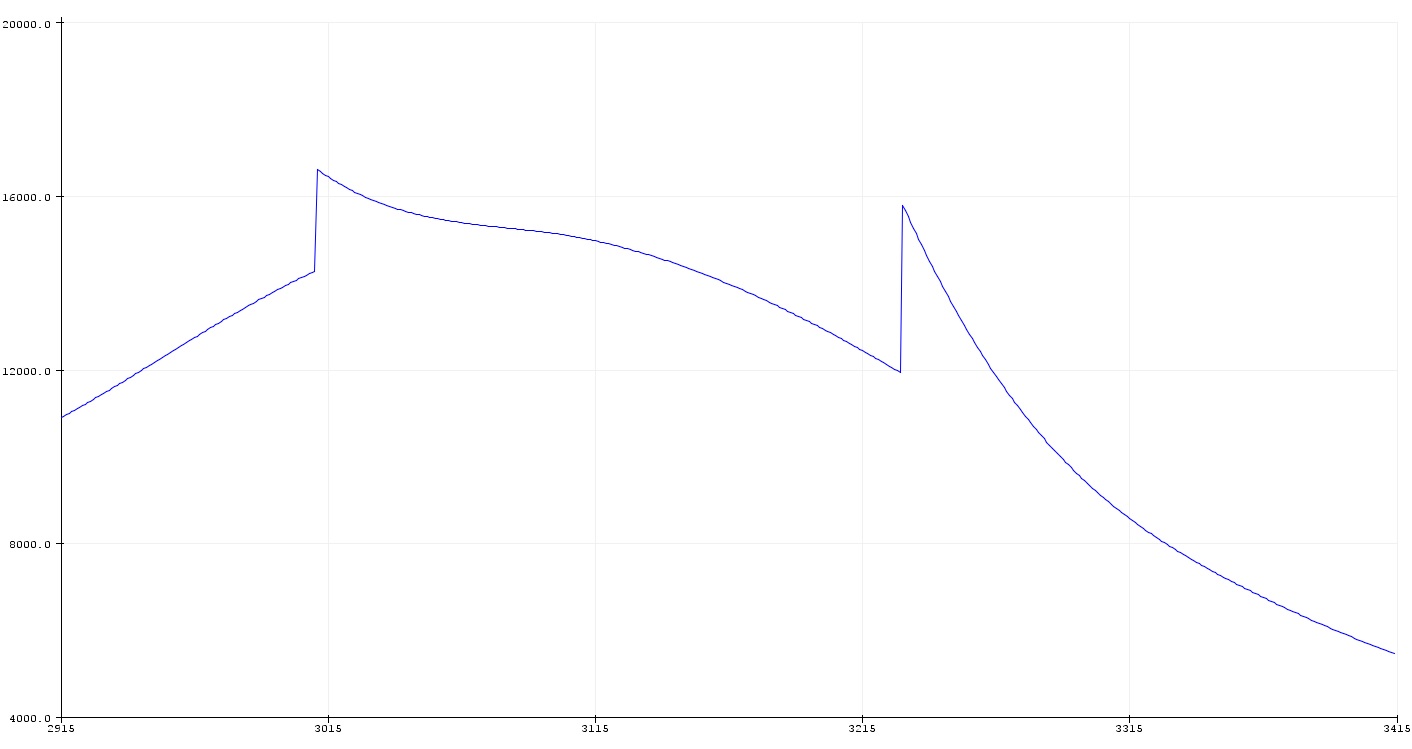
Thank you. Tryed your inoise16_mod code and get results like this:
StefanPetrick
on 28 Jun 2017
Yes, that mod version was my own way if trying to find optimalisations. However I'm partly "blind", because I don't really understand the math.
But this you the the renderNoise() function, because (as far as I remember) that was my copy of Perlins Inoise (https://mrl.nyu.edu/%7Eperlin/noise/INoise.java). If I quickly scan the code, I only changed the grad() function for a more optimized.
However I didn't create those nice plots like you, but I found myself that inoise from perlin gave to most pleasing results.
Maybe you could plot the renderNoise() function? (or take perlins original code).
kasperkamperman
on 28 Jun 2017
I´ll see if I can gain enough understanding of the math behind to get perlins original running. After years of just using FastLEDs noise functions and finding ways arround the flaws it´s maybe time to finally understand the math fully.
StefanPetrick
on 28 Jun 2017
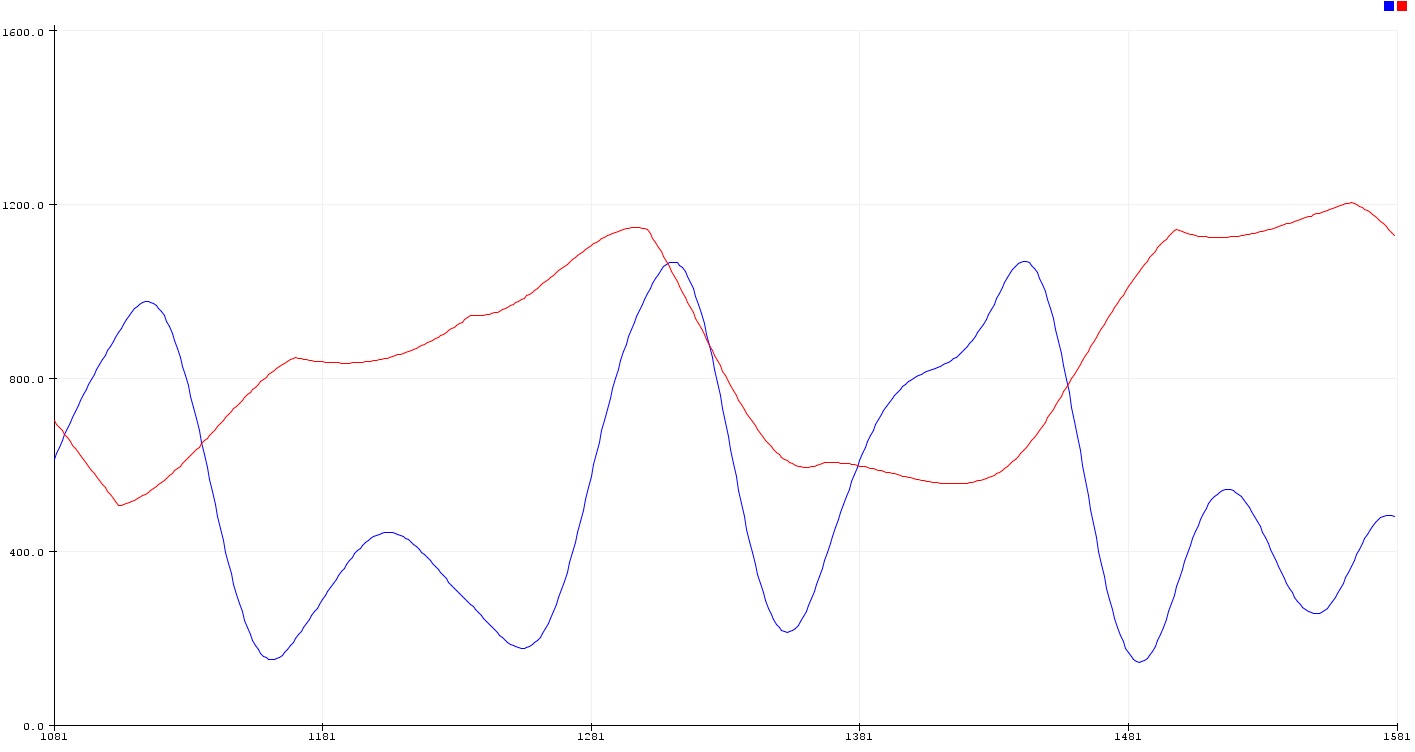
Yeah! renderNoise (blue chart) looks good. For comparison FastLED inoise16 with the same coordiantes (red chart)
StefanPetrick
on 28 Jun 2017
...but renderNoise struggels in a different way...
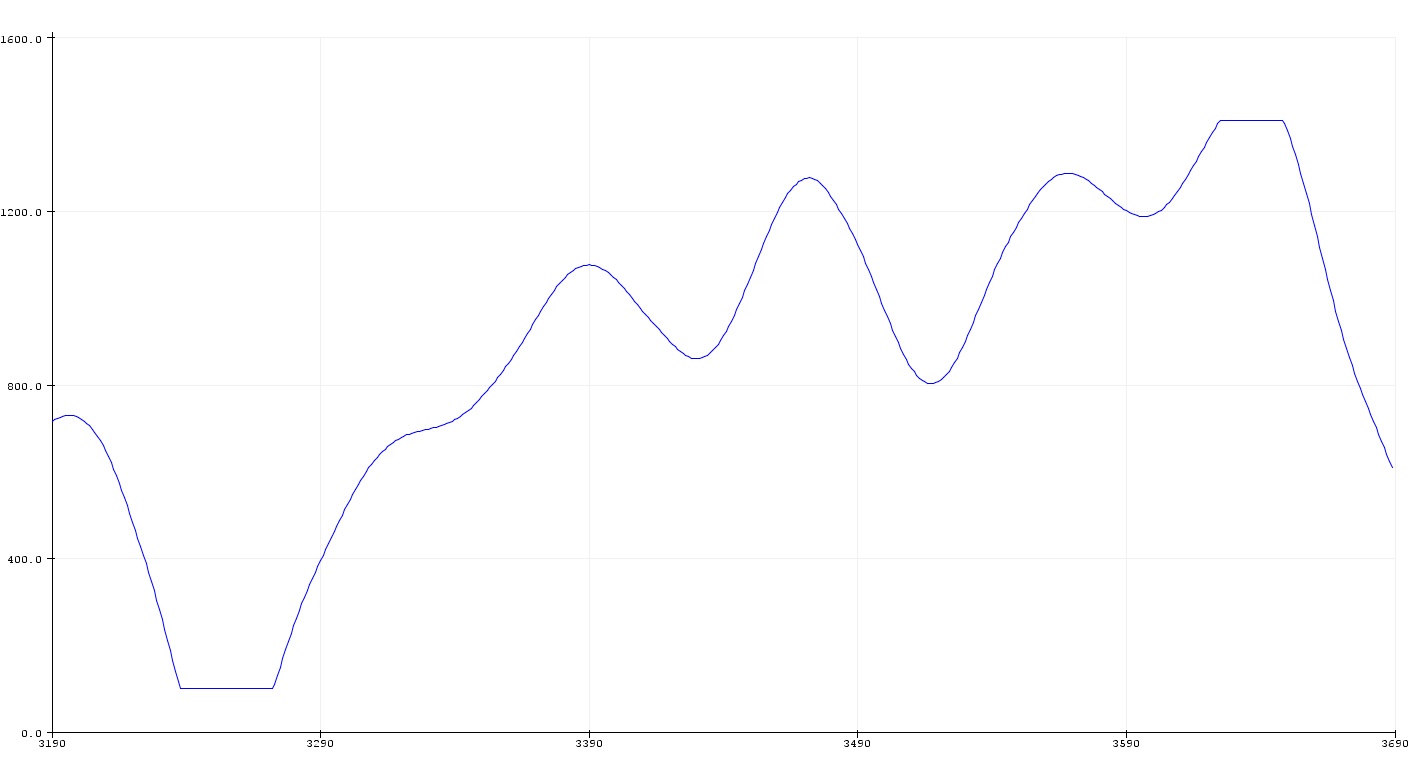
edit: It performs those rapid jumps, too.
StefanPetrick
on 28 Jun 2017
That's because of the constrain I think and that might be solved by scaling in a proper way. I use a contrast function over the noise (not in this), so I do this even by purpose. I don't like to stay much in the middle and use the function to move from off to full brightness.
The inoise is 12 bit instead of 16. I didn't understand enough to change that. However for now it's smooth enough for my purposes (although I'm for sure interested in a proper 16 bit version).
kasperkamperman
on 28 Jun 2017
Just a small heads-up: we found some earlier math bugs in the FastLED inoise, and I'm (slowly) working on fixing them now, improving smoothness. No definite time frame, but we do have some of the problems found, and some fixed already.
kriegsman
on 28 Jun 2017
That´s great news, Mark! Just for the record: The 2 custom versions kasperkampermann showed are arround 12% / 30% faster compared to inoise16. Tested on a Teensy 3.2@120 MHz, compile option "Fastest + LTO".
StefanPetrick
on 28 Jun 2017
Cool, and thanks for the info.
The inoise functions were written to be optimized for AVR, since that's the platform that needed the most help performance-wise. So they're pretty focused on 8- and 16-bit everything. We keep kicking around the idea of doing a 32-bit optimized version, too, for ARM, ESP/Xtensa, etc., but as you know we've had to take a break for personal reasons. I'm hoping to do some more library work starting this summer.
kriegsman
on 28 Jun 2017
I fully understand. Take your time, guys. The right moment will come one day or another. If I meanwhile come across a solution working fast and precise on 32 bit ARM I´ll post it here.
StefanPetrick
on 28 Jun 2017
With the help of the PJRC forum I got this code running. Waveform looks good.
/*
 Ken Perlins improved noise   -  http://mrl.nyu.edu/~perlin/noise/
 C-port:  http://www.fundza.com/c4serious/noise/perlin/perlin.html
 by Malcolm Kesson;   arduino port by Peter Chiochetti, Sep 2007 :
 -  make permutation constant byte, obsoletes init(), lookup % 256
*/

static const byte p[] = {   151,160,137,91,90, 15,131, 13,201,95,96,
53,194,233, 7,225,140,36,103,30,69,142, 8,99,37,240,21,10,23,190, 6,
148,247,120,234,75, 0,26,197,62,94,252,219,203,117, 35,11,32,57,177,
33,88,237,149,56,87,174,20,125,136,171,168,68,175,74,165,71,134,139,
48,27,166, 77,146,158,231,83,111,229,122, 60,211,133,230,220,105,92,
41,55,46,245,40,244,102,143,54,65,25,63,161, 1,216,80,73,209,76,132,
187,208, 89, 18,169,200,196,135,130,116,188,159, 86,164,100,109,198,
173,186, 3,64,52,217,226,250,124,123,5,202,38,147,118,126,255,82,85,
212,207,206, 59,227, 47,16,58,17,182,189, 28,42,223,183,170,213,119,
248,152,2,44,154,163,70,221,153,101,155,167,43,172, 9,129,22,39,253,
19,98,108,110,79,113,224,232,178,185,112,104,218,246, 97,228,251,34,
242,193,238,210,144,12,191,179,162,241,81,51,145,235,249,14,239,107,
49,192,214, 31,181,199,106,157,184, 84,204,176,115,121,50,45,127, 4,
150,254,138,236,205, 93,222,114, 67,29,24, 72,243,141,128,195,78,66,
215,61,156,180
};

float fade(float t){ return t * t * t * (t * (t * 6 - 15) + 10); }
float lerp(float t, float a, float b){ return a + t * (b - a); }
float grad(int hash, float x, float y, float z)
{
int     h = hash & 15;          /* CONVERT LO 4 BITS OF HASH CODE */
float  u = h < 8 ? x : y,      /* INTO 12 GRADIENT DIRECTIONS.   */
          v = h < 4 ? y : h==12||h==14 ? x : z;
return ((h&1) == 0 ? u : -u) + ((h&2) == 0 ? v : -v);
}

#define P(x) p[(x) & 255]

float pnoise(float x, float y, float z)
{
int   X = (int)floor(x) & 255,             /* FIND UNIT CUBE THAT */
      Y = (int)floor(y) & 255,             /* CONTAINS POINT.     */
      Z = (int)floor(z) & 255;
x -= floor(x);                             /* FIND RELATIVE X,Y,Z */
y -= floor(y);                             /* OF POINT IN CUBE.   */
z -= floor(z);
float   u = fade(x),                       /* COMPUTE FADE CURVES */
        v = fade(y),                       /* FOR EACH OF X,Y,Z.  */
        w = fade(z);
int  A = P(X)+Y,
     AA = P(A)+Z,
     AB = P(A+1)+Z,                        /* HASH COORDINATES OF */
     B = P(X+1)+Y,
     BA = P(B)+Z,
     BB = P(B+1)+Z;                        /* THE 8 CUBE CORNERS, */

return lerp(w,lerp(v,lerp(u, grad(P(AA  ), x, y, z),   /* AND ADD */
                          grad(P(BA  ), x-1, y, z)),   /* BLENDED */
              lerp(u, grad(P(AB  ), x, y-1, z),        /* RESULTS */
                   grad(P(BB  ), x-1, y-1, z))),       /* FROM  8 */
            lerp(v, lerp(u, grad(P(AA+1), x, y, z-1),  /* CORNERS */
                 grad(P(BA+1), x-1, y, z-1)),          /* OF CUBE */
              lerp(u, grad(P(AB+1), x, y-1, z-1),
                   grad(P(BB+1), x-1, y-1, z-1))));
}
Did a short test comparing Teensy 3.2 and 3.6. Rendering 16x16 values and pushing the data to 256 APA102s. Results:
Teensy 3.2@120 MHz (Fastest + LTO): 85 fps
Teensy 3.6@180 MHz (Fast): 472 fps
Teensy 3.6@240 MHz (Fastest + LTO): 896 fps
edit: replaced floor with floorf for FPU usage
Teensy 3.6@240 MHz (Fastest + LTO): 1400 fps now
StefanPetrick
on 28 Jun 2017
Out of curiosity how does this floating point version compares in speed with the renderNoise (with is integer math)?
kasperkamperman
on 28 Jun 2017
Your integer version is faster by the factor 5.27
Task + setup: Render noise, map the data, output SPI 24 MHz, Teensy 3.2@120 MHz, LTO
Same code but different Perlin Noise implementations.
FastLEDs inoise16: 350 fps
inoise16_mod: 390 fps
renderNoise: 448 fps
pnoise float32: 85 fps
StefanPetrick
on 28 Jun 2017
Thanks! I'll stick with "renderNoise" then for now.
kasperkamperman
on 28 Jun 2017
You´re welcome.
StefanPetrick
on 28 Jun 2017
Just for the record - I found an exzellent german paper explaining in great detail on 41 pages how multidimensional gradient noise functions and especially the original Perlin noise works.
I consider it to be readable even without studying math before - at least I understand the ideas behind better than before now. Contains nice pictures, too.
StefanPetrick
on 10 Jul 2017
Thanks for the code; we've got an alternate implementation (which does the same thing, basically), but that also allows people to switch back and forth in case they need to preserve the old 'look' for some reason. I'll be committing it shortly. Thank you again for all your help on this one, everyone.
kriegsman
on 16 May 2018
Related issues
 altimmons
·
3Comments
altimmons
·
3Comments
 maddogjt
·
3Comments
maddogjt
·
3Comments
 marmilicious
·
3Comments
marmilicious
·
3Comments
 MFornander
·
7Comments
MFornander
·
7Comments
 Polishfuze
·
4Comments
Polishfuze
·
4Comments
Most helpful comment
So, for inoise_raw(x) you should replace
// u = scale8(u,u);by
(!(u&0x80))?u=scale8(u,u)<<1:u=0xff-scale8(0xff-u,0xff-u)<<1;For inoise8_raw(x,y) you should replace
// u = scale8_LEAVING_R1_DIRTY(u,u); v = scale8(v,v);by
For the inoise8_raw(x,y,z) you should replace
// u = scale8_LEAVING_R1_DIRTY(u,u); v = scale8_LEAVING_R1_DIRTY(v,v); w = scale8(w,w);by
And following does the trick for the inoise16 functions:
And then you get these wonderful smooth curves:


instead of these edged, bouncing things:
and all for practically the same performance!
Feel free to optimize (but please do not overoptimize ;-)