Fastapi: Background Task - Kafka Consumer not getting closed on Application Shutdown Ctrl+C
I have added a Kafka Consumer in an API call and when I try to close the application via Ctrl+C - I get below INFO message but the application never shuts down and I can see the PID attached to Kafka on port 9092 with uvicorn threads.
The impact on multiple times hitting of Ctrl_C also leads to nothing and my code for _shutdown event_ is never being called.
^CINFO: Shutting down
INFO: Waiting for background tasks to complete. (CTRL+C to force quit)
Below is my code -
from fastapi import FastAPI, BackgroundTasks
from kafka import KafkaConsumer
from singleton import my_single_instance

consumer = KafkaConsumer('mitsuki',bootstrap_servers='localhost:9092',group_id = 'series-arc')

def consume_messages():
    for msg in consumer:
        print(msg)

app = FastAPI()

@app.on_event("shutdown")
def close_consumer():
    print('App Down')
    print(consumer.close())

@app.get('/start-consuming-kafka')
async def cool(bt:BackgroundTasks):
    if not my_single_instance.consumer_created:
        bt.add_task(consume_messages)
        my_single_instance.consumer_created = True
    return {'message':'Hello World 123'}
Background tasks are running even after hitting Ctrl+C. I waited for 30 mins to see the Kafka Consumer goes down but it never happened.
Is it the expected behavior or I have to go with some alternative approach.
My end goal is this -
I want to add more tasks to increase the parallelism for same Kafka Consumer as I have multiple partitions.
Rule for Kafka Consumer - Number of Partition = Number of Consumer with same Consumer group ID.
So I have 20 partitions for my Kafka Topic and I want to add 5 Background tasks.
I will spin up 4 replicas of same application instance in Kubernetes and then all 20 partitions will be covered up by background task consumer thread.
Kindly advise.
 arpan2501
All 10 comments
My guess is that this is caused by the kafka library you're using. The documentation for KafkaConsumer.close (https://kafka-python.readthedocs.io/en/master/apidoc/KafkaConsumer.html#kafka.KafkaConsumer.close) says "Close the consumer, waiting indefinitely for any needed cleanup" which makes me think that that call is waiting on "something" to happen before the call can be completed.
I'm also not sure this is the correct use of background tasks. The way I've used background tasks (sometimes with Kafka), is to have the task perform some action that takes longer than I want to wait in an HTTP route, but also doesn't need to run indefinitely. A Kafka consumer that's running perpetually could be run more effectively using https://docs.python.org/3/library/asyncio-eventloop.html#asyncio.loop.run_in_executor that gets started during server startup. So, what's happening here, is because your background task is perpetual and therefore never completes, the consumer can never close. You can replicate this by replacing your consume_messages function with a long sleep. Once the sleep is finished, then the shutdown event will be triggered.
 n8sty
on 22 Nov 2020
n8sty
on 22 Nov 2020
Thanks @n8sty I will try to read more on _asyncio-eventloop_ but I found some unusual behavior -
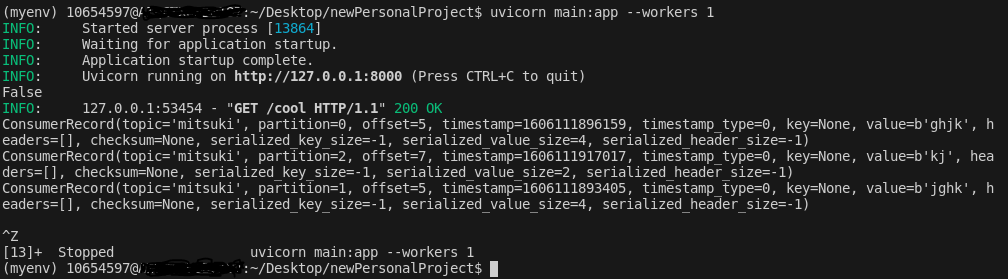
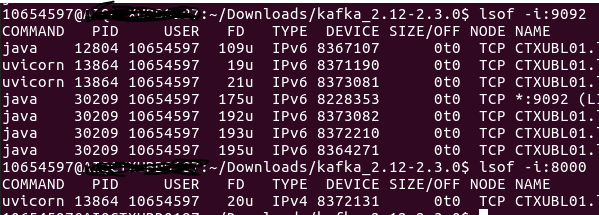
I have stopped the application using Ctrl+Z and the application stopped but the PID were still active -
How is it possible?
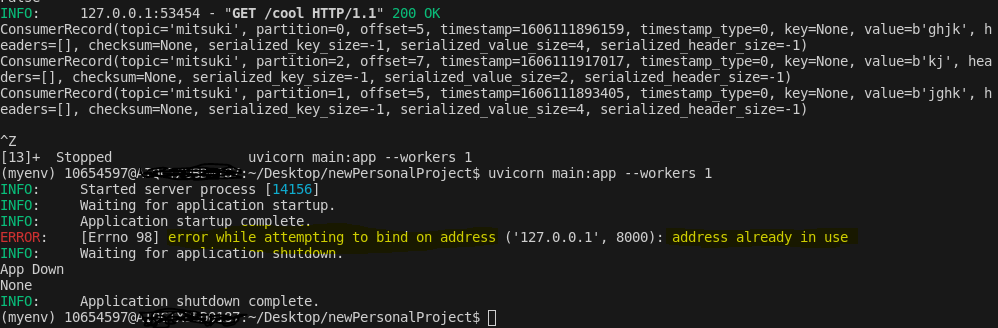
First Screenshot depicts application being closed but second screenshot says the PID is active. And next screenshot says Address already in use when I try to start the app again - it's getting me bit confused now-
arpan2501
on 23 Nov 2020
Ctrl-C and Ctrl-Z do different things, C kills processes, Z turns them into a background process
 Mause
on 23 Nov 2020
Mause
on 23 Nov 2020
Thanks @Mause for quick reply and got it now.
But any thoughts on how can we stop the background task as it doesn't come in shutdown event when i do Ctrl+C.
Or Background Task were not made for indefinitely running tasks like Kafka Consumer.
If there is _add_task_ then there should be _remove_task_ as well for BackgroundTasks class and they can be called up on startup event and shutdown event respectively.
Kindly advise.
arpan2501
on 23 Nov 2020
Background tasks are very definitely not for indefinitely running talks. You will have to run it another way
Mause
on 23 Nov 2020
Background tasks are very definitely not for indefinitely running talks. You will have to run it another way
It would be great to get some recommendation and I will definitely try it.
arpan2501
on 23 Nov 2020
Have you tried @n8sty's recommendation?
A Kafka consumer that's running perpetually could be run more effectively using https://docs.python.org/3/library/asyncio-eventloop.html#asyncio.loop.run_in_executor
Mause
on 23 Nov 2020
@Mause and @n8sty - Thanks for the information and sharing the knowledge :-) . I have started on this track and currently my consumers(3 threads to 3 partitions - all different threads but same PID) is attached. Let me know your thoughts on the same if we can optimize it or some other technique to follow -
from fastapi import FastAPI, BackgroundTasks
from aiokafka import AIOKafkaConsumer
from singleton import my_single_instance
import asyncio

async def consume_messages():
    loop = asyncio.get_event_loop()
    consumer = AIOKafkaConsumer(
        'mitsuki',
        loop=loop, bootstrap_servers='localhost:9092',
        group_id="series-arc")
    await consumer.start()
    try:
        async for msg in consumer:
            print("consumed: ", msg.topic, msg.partition, msg.offset,
                  msg.key, msg.value, msg.timestamp)
    finally:
        print('Signal to close')
        await consumer.stop()

app = FastAPI()

@app.get('/cool')
async def start(bt:BackgroundTasks):
    if not my_single_instance.consumer_created:
        #bt.add_task(consume_messages)  Commented this Background task and now Ctrl + C works
        asyncio.ensure_future(consume_messages())
        asyncio.ensure_future(consume_messages())
        asyncio.ensure_future(consume_messages())
        my_single_instance.consumer_created = True
    return {'message':'Ok'}
The above still isn't the correct use of background tasks. Background tasks shouldn't run for the lifetime of an application, they should be used for tasks that need to happen asynchronously to a HTTP request. Like I said above, try using some other method to create and then safely stop an additional process. One such way is asyncio.loop.run_in_executor, but there are plenty of others (eg: threads, processes, cron). If you want to use an HTTP request to control a longer running background process you can have the HTTP request synchronously set some flag on app.state, and the background process can act according to the value(s) of that flag. I'll repeat just to emphasize, background tasks are meant to be ephemeral and should not run for the lifetime of a FastAPI application (or Starlette) instance.
I think this issue should be closed since there's no actual FastAPI specific component to the question.
n8sty
on 23 Nov 2020
Thanks All, I will be closing the issue which clarifies the background tasks are not for _forever_ running tasks.
Anyone else having the same query w.r.t Kafka Consumer in Web App can use the below process(No More Background tasks).
@app.on_event("startup")
async def app_start_event():
    print('Hello')
    asyncio.ensure_future(consume_messages())

@app.get('/cool')
async def start():
    return {'message':'Ok'}
and you can start the application with 3 workers -
uvicorn main:app --workers 3
So three threads will be spawned up each being attached to Kafka Partition.
Cheers to @Mause and @n8sty for clarifying.
arpan2501
on 24 Nov 2020
Related issues
 KoduIsGreat
·
3Comments
KoduIsGreat
·
3Comments
 scheung38
·
3Comments
scheung38
·
3Comments
 danielgtaylor
·
3Comments
danielgtaylor
·
3Comments
 levchik
·
3Comments
levchik
·
3Comments
 zero0nee
·
3Comments
zero0nee
·
3Comments
Most helpful comment
The above still isn't the correct use of background tasks. Background tasks shouldn't run for the lifetime of an application, they should be used for tasks that need to happen asynchronously to a HTTP request. Like I said above, try using some other method to create and then safely stop an additional process. One such way is
asyncio.loop.run_in_executor, but there are plenty of others (eg: threads, processes, cron). If you want to use an HTTP request to control a longer running background process you can have the HTTP request synchronously set some flag onapp.state, and the background process can act according to the value(s) of that flag. I'll repeat just to emphasize, background tasks are meant to be ephemeral and should not run for the lifetime of a FastAPI application (or Starlette) instance.I think this issue should be closed since there's no actual FastAPI specific component to the question.