Fastapi: not able to post base64 image to post api
I am new to fastapi, and I am trying to send encode image to fastapi post url and got below error
INFO: Application startup complete.
INFO: 127.0.0.1:53472 - "POST /imgresize/ HTTP/1.1" 422 Unprocessable Entity
INFO: 127.0.0.1:53478 - "POST /imgresize/ HTTP/1.1" 422 Unprocessable Entity
`
@app.post("/imgresize/")
def imgresize(imagedata :str = Body(...)):
try:
img = io.BytesIO(base64.b64decode(imagedata))
pimg = Image.open(img).convert('RGB')
frame = cv2.cvtColor(np.array(pimg), cv2.COLOR_RGB2BGR)
font = cv2.FONT_HERSHEY_SIMPLEX
bottomLeftCornerOfText = (40,40)
fontScale = 1
fontColor = (255,255,255)
lineType = 2
    cv2.putText(frame,'processed in backend!',
        bottomLeftCornerOfText,
        font,
        fontScale,
        fontColor,
        lineType)

    imgencode = cv2.imencode('.jpg', frame)[1]
    stringData = base64.b64encode(imgencode).decode('utf-8')
    return stringData

except Exception as e:
    raise e
`
`
import base64
import requests
with open("lion.jpg", "rb") as f:
encoded_string = base64.b64encode(f.read()).decode('utf-8')
print(type(encoded_string))
print(encoded_string)
r = requests.post("http://127.0.0.1:8000/imgresize/", data={'data':encoded_string})
print(r)
`
 tiru1930
All 8 comments
Hey @tiru1930 , please follow the template, review all the checks, etc. or create a new question with the template: https://github.com/tiangolo/fastapi/issues/new/choose
And format your code.
 Kludex
on 16 Jun 2020
Kludex
on 16 Jun 2020
@tiru1930 you want triple backticks ( ``` ) before and after your code, not singles.
It looks like the problems you are encountering are:
- The
dataparam torequests.postdoes not encode your payload as JSON unless you specifically pass thecontent_typeparam as well. If you use thejsonargument instead ofdatait does this for you. - When you only have one item in your body, FastAPI makes that item the entire body. So you want to just pass the string, not an object with a "data" key. If you want to have a full object even though you're providing a single value in the body, follow these docs.
Here's a self-contained example showing the problem and solution. Note that TestClient uses requests so client.post is effectively the same in this case as requests.post.
import fastapi
from fastapi import Body
from starlette.testclient import TestClient

app = fastapi.FastAPI()


@app.post("/")
def test(data: str = Body(...)):
    print(data)


if __name__ == '__main__':
    client = TestClient(app)
    print(client.post("/", data={"data": "hi"}))  # This does not work
    print(client.post("/", json="hi"))  # This does
 dbanty
on 16 Jun 2020
dbanty
on 16 Jun 2020
Thank you,I was able make this work, after adding json.dumps to data in my
client request
On Tue, 16 Jun 2020, 19:04 Dylan Anthony, notifications@github.com wrote:
@tiru1930 https://github.com/tiru1930 you want triple backticks ( ``` )
before and after your code, not singles.It looks like the problems you are encountering are:
- The data param to requests.post does not encode your payload as
JSON unless you specifically pass the content_type param as well. If
you use the json argument instead of data it does this for you.- When you only have one item in your body, FastAPI makes that item
the entire body. So you want to just pass the string, not an object with a
"data" key. If you want to have a full object even though you're providing
a single value in the body, follow these docs
https://fastapi.tiangolo.com/tutorial/body-multiple-params/#embed-a-single-body-parameter
.Here's a self-contained example showing the problem and solution. Note
that TestClient uses requests so client.post is effectively the same in
this case as requests.post.import fastapifrom fastapi import Bodyfrom starlette.testclient import TestClient
app = fastapi.FastAPI()@app.post("/")def test(data: str = Body(...)):
print(data)if __name__ == '__main__':
client = TestClient(app)
print(client.post("/", data={"data": "hi"})) # This does not work
print(client.post("/", json="hi")) # This does—
You are receiving this because you were mentioned.
Reply to this email directly, view it on GitHub
https://github.com/tiangolo/fastapi/issues/1582#issuecomment-644769385,
or unsubscribe
https://github.com/notifications/unsubscribe-auth/AC5FIV6MZWEJLPF2CJHBYSTRW5YHZANCNFSM4N7KOLFQ
.
tiru1930
on 16 Jun 2020
Thanks for the help here @Kludex and @dbanty ! :clap: :bow:
If that solves the original problem, then you can close this issue @tiru1930 :heavy_check_mark:
 tiangolo
on 17 Jun 2020
tiangolo
on 17 Jun 2020

i am trying to pass json string as per @dbanty ,
and server have :
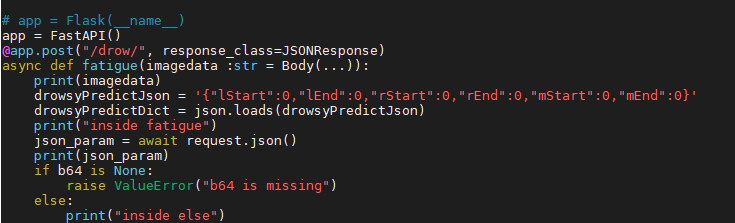
and i am getting error on local:-
Traceback (most recent call last):
File "C:\Users\parasj\AppData\Local\Programs\Python\Python38\lib\site-packages\urllib3\connectionpool.py", line 670, in urlopen
httplib_response = self._make_request(
File "C:\Users\parasj\AppData\Local\Programs\Python\Python38\lib\site-packages\urllib3\connectionpool.py", line 381, in _make_request
self._validate_conn(conn)
File "C:\Users\parasj\AppData\Local\Programs\Python\Python38\lib\site-packages\urllib3\connectionpool.py", line 976, in _validate_conn
conn.connect()
File "C:\Users\parasj\AppData\Local\Programs\Python\Python38\lib\site-packages\urllib3\connection.py", line 361, in connect
self.sock = ssl_wrap_socket(
File "C:\Users\parasj\AppData\Local\Programs\Python\Python38\lib\site-packages\urllib3\util\ssl_.py", line 390, in ssl_wrap_socket
return context.wrap_socket(sock)
File "C:\Users\parasj\AppData\Local\Programs\Python\Python38\lib\ssl.py", line 500, in wrap_socket
return self.sslsocket_class._create(
File "C:\Users\parasj\AppData\Local\Programs\Python\Python38\lib\ssl.py", line 1040, in _create
self.do_handshake()
File "C:\Users\parasj\AppData\Local\Programs\Python\Python38\lib\ssl.py", line 1309, in do_handshake
self._sslobj.do_handshake()
OSError: [Errno 0] Error
During handling of the above exception, another exception occurred:
On server getting error :

 parasjain06
on 18 Sep 2020
parasjain06
on 18 Sep 2020
Looks like you're sending a https request when the local server doesn't have it configured?
 Mause
on 19 Sep 2020
Mause
on 19 Sep 2020
That's right thanks.
@Mause i want to know how can i pass frame to fastApi and read it there.
How can i pass frame obtained from cv2.read() to a fastApi as I want to use it in fastAPI.
parasjain06
on 19 Sep 2020
@parasjain06 maybe open a new issue for that?
Mause
on 22 Sep 2020
Related issues
 laith43d
·
3Comments
laith43d
·
3Comments
 KoduIsGreat
·
3Comments
KoduIsGreat
·
3Comments
 levchik
·
3Comments
levchik
·
3Comments
 mr-bjerre
·
3Comments
mr-bjerre
·
3Comments
 devtud
·
3Comments
devtud
·
3Comments