Fastapi: How can I return a 202 Accepted response for long running REST call?
Hope this is the right place for a question.
I have a REST API post request that does a lot of computation, /crunch. Rather than block the event loop I would like /crunch to return 202 Accepted status code along with a token string. Then the user of the API can call get request /result/{token} to check on the status of the computation. This is outlined nicely here for example.
Is it possible to modify the response status code, for example, similar to this approach in Sanic?
 danieljfarrell
All 6 comments
@danieljfarrell
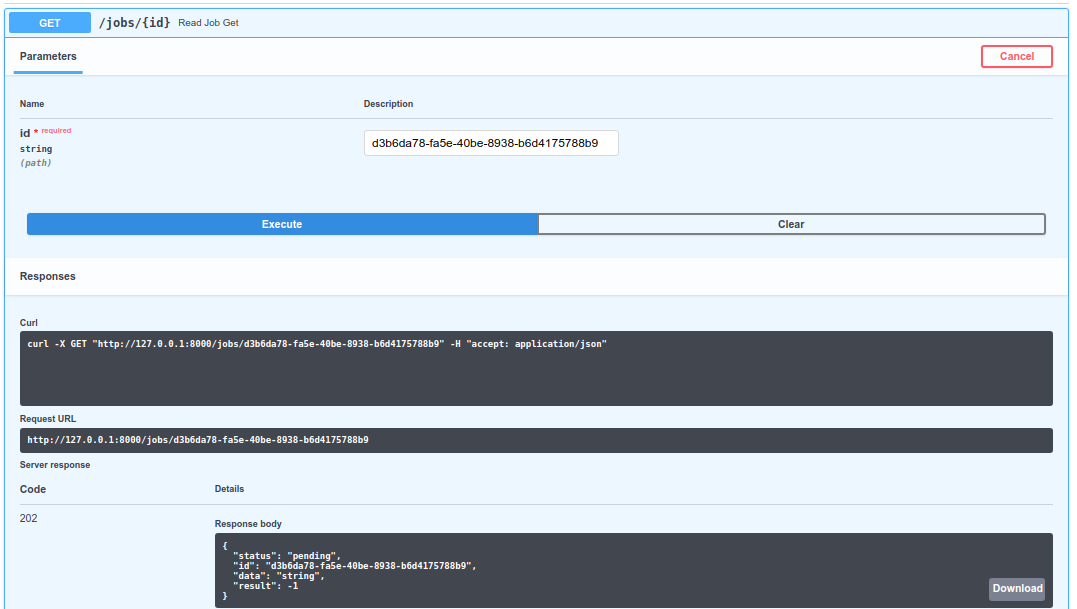
Its really easy to modify the response code to suit your needs. In the example below, I use /jobs to post new jobs to. This returns a HTTP_201_CREATED on submit. You can then take the _id_ that it generates and call GET /jobs/{id} to check the status, along with its HTTP_202_ACCEPTED code :tada:. Note: I'm using deque's because they're thread-safe, but I haven't thoroughly tested this out and haven't implemented task switching/moving jobs around to different queues. Hope it helps!
from fastapi import FastAPI
from pydantic import BaseModel
from uuid import uuid4
from collections import deque
from starlette.status import HTTP_201_CREATED, HTTP_202_ACCEPTED
# see https://github.com/encode/starlette/blob/master/starlette/status.py

queues = dict(
    pending=deque(),
    working=deque(),
    finished=deque()
)

def get_job(id: str, queue: str = None, order=['finished', 'working', 'pending']):
    _id = str(id)
    # if queue:
    #    order = [queue]
    for queue in order:
        for job in queues[queue]:
            # print(job['id'])
            if str(job['id']) == _id:
                return job, queue
    return 'not found', None #this will fail horribly


app = FastAPI()

class BaseJob(BaseModel):
    data: bytes = None

class JobStatus(BaseModel):
    status: str
    id: str
    data: bytes = None
    result: int = -1


@app.get("/jobs/{id}", response_model=JobStatus, status_code=HTTP_202_ACCEPTED)
async def read_job(id: str):
    job, status = get_job(id)
    d = dict(
        id=job['id'],
        status=status,
        data=job['data'],
        result=job.get('result', -1)
    )
    return d

@app.post("/jobs/", response_model=JobStatus, status_code=HTTP_201_CREATED)
async def create_job(*, job: BaseJob):
    _job = dict(
        id=str(uuid4()),
        status='pending',
        data=job.data
    )
    queues['pending'].append(_job)
    return _job
Submitting a new job, getting its id

Getting the status for a job, given its id
 rcox771
on 8 Jan 2019
rcox771
on 8 Jan 2019
Thanks @rcox771 for the thorough response!
Sorry for the delay @danieljfarrell , I had planned to create a tutorial in the docs for these cases (it will come in the next days nevertheless).
First, to customize the status code, in general, you can do as @rcox771 says. In the path operation decorator with the status_code param.
Copying from @rcox771's example:
...

@app.get("/jobs/{id}", response_model=JobStatus, status_code=HTTP_202_ACCEPTED)
async def read_job(id: str):
    # your code here
    pass
The status_code param receives a number, so you can also pass 202 directly.
But when you don't remember exactly which status code is for what (as frequently happens to me), you can import the variables from starlette.status, they are just a shortcut, so you can use completion and start typing accep and the editor will suggest HTTP_202_ACCEPTED, even if you didn't remember the status code was 202.
About background jobs, as FastAPI is fully based on Starlette and extends it, you can use Starlette's integrated background tasks. It is not in FastAPI's docs yet, but will come soon.
For these Starlette's background tasks to work in FastAPI you need to return a Response directly (to include the tasks in it): https://fastapi.tiangolo.com/tutorial/custom-response/
In more complex scenarios, when you need distributed task workers, possibly in several servers, with different dependencies (for example, one worker might need pvtrace, but you don't want to have to install it everywhere, including the API), you can use Celery.
I hope to add that to the tutorials too, but meanwhile, you can see how to set it all up with the full-stack project generator, it includes Celery: https://github.com/tiangolo/full-stack-fastapi-couchbase
 tiangolo
on 8 Jan 2019
tiangolo
on 8 Jan 2019
Thanks so much! This project is so cool and the documentation is amazing.
danieljfarrell
on 10 Jan 2019
That's great to hear! Thanks @danieljfarrell !
The status code docs are live now: https://fastapi.tiangolo.com/tutorial/response-status-code/
I still owe you the docs for background tasks.
tiangolo
on 14 Jan 2019
Thanks!
What’s the history of this project? It seems to have come from nowhere to awesome in a few weeks from viewing the commit history.
danieljfarrell
on 16 Jan 2019
@danieljfarrell here's a bit of history, now in the docs: https://fastapi.tiangolo.com/history-design-future/
And I quoted you :grin:
tiangolo
on 2 Mar 2019
Related issues
 RenanAlonkin
·
3Comments
RenanAlonkin
·
3Comments
 zero0nee
·
3Comments
zero0nee
·
3Comments
 DrPyser
·
3Comments
DrPyser
·
3Comments
 iwoloschin
·
3Comments
iwoloschin
·
3Comments
 updatatoday
·
3Comments
updatatoday
·
3Comments
Most helpful comment
Thanks so much! This project is so cool and the documentation is amazing.