Fastai: Memory Error: Loads the entire dataset into Memory
The RAM is getting filled up after a few iterations, this causes a problem in handling large datasets. I am not sure but I think it is loading the entire data into Memory.
 srmsoumya
All 5 comments
I faced the same OOM issue. It's caused by ThreadPoolExecutor in DataLoader class defined in fastai/dataloader.py. I am able to run the code after replacing the thread pool by a single execution thread. Here's the diff:
``` def __iter__(self):
- with ThreadPoolExecutor(max_workers=self.num_workers) as e:
- for batch in e.map(self.get_batch, iter(self.batch_sampler)):
- yield get_tensor(batch, self.pin_memory)
- for batch in map(self.get_batch, iter(self.batch_sampler)):
- yield get_tensor(batch, self.pin_memory)
```
I tried to set max_workers to 1 too but that didn't work. Understanding where memory is being lost will require more ananlysis.
 farhanhubble
on 4 Mar 2018
farhanhubble
on 4 Mar 2018
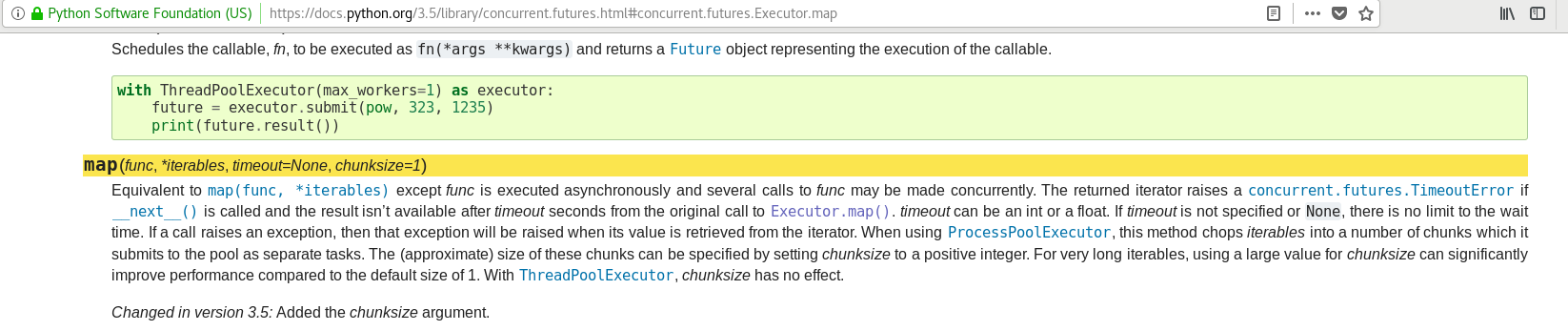
After a little bit of analysis, the OOM error is caused because ThreadPoolExecutor creates all batches and stores them in memory and then returns a generator to fetch the batches from. This behavior has changed from Python 3.5 to 3.6

farhanhubble
on 4 Mar 2018
Linking a related forum thread. The pool executor change doesn't seem to solve issue for me. 30GB RAM is used up in no time by Kaggle's google landmark dataset.
EDIT: Maybe a slightly different issue since this one was reported to only occur after a few iterations..
 WilliamNurmi
on 6 Mar 2018
WilliamNurmi
on 6 Mar 2018
Best off using the forum for this.
 jph00
on 6 Mar 2018
jph00
on 6 Mar 2018
with ThreadPoolExecutor
making num workers =0 will execute the code that you are putting there is a if condition in a dataloader...
so that we dont have to modify the loader at all
 jaideep11061982
on 14 Sep 2018
jaideep11061982
on 14 Sep 2018
Related issues
 FrancescoSaverioZuppichini
·
4Comments
FrancescoSaverioZuppichini
·
4Comments
 mlsmall
·
5Comments
FrancescoSaverioZuppichini
·
3Comments
mlsmall
·
5Comments
FrancescoSaverioZuppichini
·
3Comments
 benvenutto
·
4Comments
benvenutto
·
4Comments
 dsblank
·
4Comments
dsblank
·
4Comments
Most helpful comment
I faced the same OOM issue. It's caused by ThreadPoolExecutor in
DataLoaderclass defined in fastai/dataloader.py. I am able to run the code after replacing the thread pool by a single execution thread. Here's the diff:``` def __iter__(self):
```
I tried to set max_workers to 1 too but that didn't work. Understanding where memory is being lost will require more ananlysis.