Falco: Not able to detect k8s metadata with containerd
Describe the bug
We switched our kubernetes clusters from docker to containerd. After we are not able to see kubernetes metadatas at all in falco events.
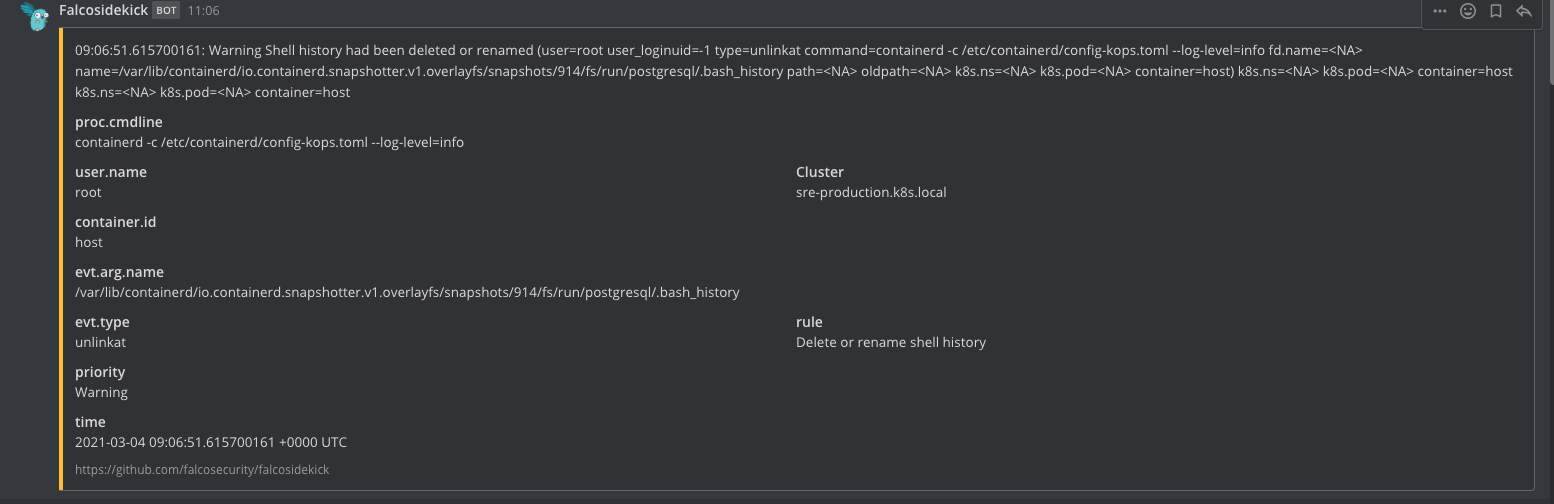
After (with docker):
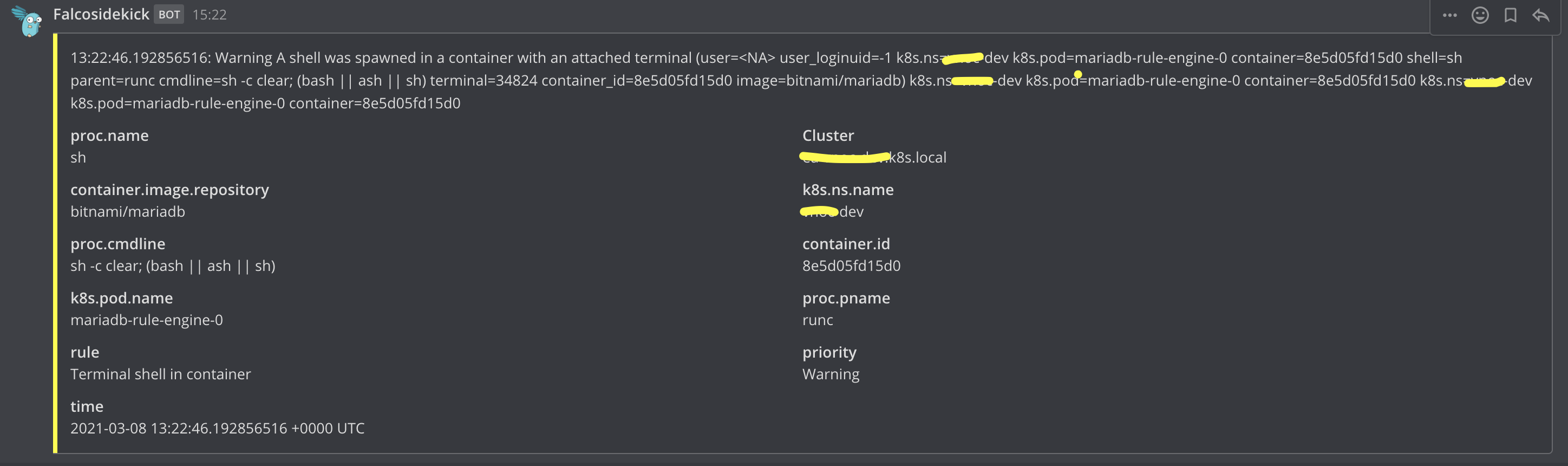
Before (with containerd):
How to reproduce it
Install kubernetes cluster with manifests https://gist.github.com/zetaab/e134a6dbb80de296909a6d7ed34c3232
Expected behaviour
We expect that we could see kubernetes metadatas in events like it did work with docker.
Screenshots
Environment
Kubernetes cluster installed with kOps running in OpenStack / AWS
Falco version: 0.27.0
System info:
# falco --support | jq .system_info
{
  "machine": "x86_64",
  "nodename": "nodes-esptnl-rzkxpp",
  "release": "4.19.0-13-cloud-amd64",
  "sysname": "Linux",
  "version": "#1 SMP Debian 4.19.160-2 (2020-11-28)"
}
- Cloud provider or hardware configuration: openstack / aws
- OS: debian buster
- Kernel: 4.19.0-13-cloud-amd64
- Installation method: kubernetes
Additional context
falco kubernetes installation manifests https://gist.github.com/zetaab/e134a6dbb80de296909a6d7ed34c3232
 zetaab
All 18 comments
@zetaab How do you generate those events? It looks like the event from containerd 's container ID is host, while the event from docker 's container id is 8e5d05fd15d0. That may explain why you don't see k8s metadata in the containerd one.
 holyspectral
on 8 Mar 2021
holyspectral
on 8 Mar 2021
@holyspectral I am connecting to kubernetes container using kubectl exec -it <container> -- sh
zetaab
on 9 Mar 2021
@zetaab thanks for the reply! if you run the same command on containerd environment, would the issue be reproduced?
holyspectral
on 9 Mar 2021
yes, with docker I can see the k8s metadata if I do that - but with containerd I see only "container.id=host"
zetaab
on 9 Mar 2021
I tried on my GKE cluster + containerd with ebpf enable and I can see container id without problem.
Do the events you see come from the same falco rule? Or like the screenshots you attached, they come from two different rules?
holyspectral
on 10 Mar 2021
We ran the Falco event-generator the check if this issue is related to some type of rules, but unfortunately metadata is missing all the time.
If you can't reproduce the issue on GKE, then an important detail might be that as we are running Debian Buster nodes in the cluster.
 ottosulin
on 11 Mar 2021
ottosulin
on 11 Mar 2021
Falco fetches container metadata by connecting to the container runtime (e.g., containerd).
If the container metadata is missing all the time, it's likely to be a configuration issue. Basically, that happens when Falco is not able to talk with the container runtime.
Otherwise, if it's an intermittent problem (sometimes the metadata are present, sometimes are missing), there may be several different causes. And ofc, this scenario is harder to debug.
In which scenario are you?
 leogr
on 11 Mar 2021
leogr
on 11 Mar 2021
We are missing the metadata all the time.
As you can see from the gist provided in the issue, we have already check & tried the common problems. HOST_ROOT env variable is not an issue and neither is the async fetching, as toggling it on & off does not make a difference.
Are there any other details that you might need? We are running containerd v1.4.3.
ottosulin
on 11 Mar 2021
Not sure if run grpcurl in falco container can help to find out more on what happened in the environment. This is what I got in my GKE cluster. They both look ok.
# ./grpcurl -plaintext -proto cri.proto -unix /host/run/containerd/containerd.sock runtime.v1alpha2.RuntimeService/Version
{
"version": "0.1.0",
"runtimeName": "containerd",
"runtimeVersion": "1.4.1",
"runtimeApiVersion": "v1alpha2"
}
# ./grpcurl -plaintext -proto cri.proto -unix /host/run/containerd/containerd.sock runtime.v1alpha2.RuntimeService/ListContainers
{
"containers": [
{
......
},
]
}
You can find grpcurl here and cri.proto here . Let me know what you see.
holyspectral
on 11 Mar 2021
# ./grpcurl -plaintext -proto cri.proto -unix /host/run/containerd/containerd.sock runtime.v1alpha2.RuntimeService/Version
{
"version": "0.1.0",
"runtimeName": "containerd",
"runtimeVersion": "v1.4.3",
"runtimeApiVersion": "v1alpha2"
}
ListContainers will return array of containers
one example:
{
"id": "2f0fc4d462d7b55a7684c21a3c781c385d0e90c323dc71610d873a323a920f20",
"podSandboxId": "8fb7f10600b27691fe4d9c644ec40e26d1ce1a6cabf7212188ffccb8c62c14e3",
"metadata": {
"name": "postgres"
},
"image": {
"image": "sha256:629b479e767ba8b78e6dbd366bf0235abb3f4d2d8ca4bcca82df56543e322eb4"
},
"imageRef": "sha256:629b479e767ba8b78e6dbd366bf0235abb3f4d2d8ca4bcca82df56543e322eb4",
"state": "CONTAINER_RUNNING",
"createdAt": "1614670197868951320",
"labels": {
"io.kubernetes.container.name": "postgres",
"io.kubernetes.pod.name": "dapi-sre-sandbox-2",
"io.kubernetes.pod.namespace": "dapi",
"io.kubernetes.pod.uid": "7ef0df70-d762-49bc-a498-59ed4fb0ba2b"
},
"annotations": {
"io.kubernetes.container.hash": "6a88411c",
"io.kubernetes.container.ports": "[{\"containerPort\":8008,\"protocol\":\"TCP\"},{\"containerPort\":5432,\"protocol\":\"TCP\"},{\"containerPort\":8080,\"protocol\":\"TCP\"}]",
"io.kubernetes.container.restartCount": "0",
"io.kubernetes.container.terminationMessagePath": "/dev/termination-log",
"io.kubernetes.container.terminationMessagePolicy": "File",
"io.kubernetes.pod.terminationGracePeriod": "300"
}
},
btw executed this inside running falco container I also tried it locally in node. The result is same in both (when running in host I removed /host from start of the containerd sock path)
zetaab
on 11 Mar 2021
I tried on my GKE cluster + containerd with ebpf enable and I can see container id without problem.
@holyspectral out of curiosity, what's your installation method?
leogr
on 11 Mar 2021
@leogr
I have falco built from master branch with sysdig dev branch.
The ebpf program is built from source and kernel header.
They're installed via helm.
holyspectral
on 11 Mar 2021
This is what I saw after I switch back to the latest release of falco...I can still see k8s metadata without problem.
Environment: GKE v1.18.12-gke.1210
Node: Ubuntu + containerd + ebpf enabled
Install method: helm install falco -f values.yaml falcosecurity/falco --set ebpf.enabled=true
After exec into falco pod, I can see events with k8s metadata.
21:09:12.710210602: Warning Shell history had been deleted or renamed (user=root user_loginuid=-1 type=openat command=bash fd.name=/root/.bash_history name=/root/.bash_history path=<NA> oldpath=<NA> k8s.ns=default k8s.pod=falco-9j5l4 container=eaf7822a6d6a) k8s.ns=default k8s.pod=falco-9j5l4 container=eaf7822a6d6a
Even after I upgrade containerd to 1.4.3, I still can't reproduce the issue. At this point, I become not so sure that it's related to containerd...
@zetaab @ottosulin when you see the issue, is the container ID always host? As far as I know, when libsinsp fails to resolve container id, it will fallback to host. I can't say something is definitely wrong there, but having more information on what cgroup path falco detects would be very helpful.
Could you get into one of the containers and run cat /proc/self/cgroup and attach its output here? Also, if you have access to one of falco rules, adding memcgrp=%thread.cgroup.memory in output field and seeing what falco prints will be helpful too.
holyspectral
on 11 Mar 2021
Here are the cgroups from one falco-sidekick:
11:memory:/system.slice/containerd.service/kubepods-burstable-pod72ce270c_cf79_40c9_aa90_2ccfd43302bd.slice:cri-containerd:1691d28c1de74c74c91f3c0611b4d4c9fb12458a0760451f513cf7b5f2a8fa21
10:blkio:/system.slice/containerd.service/kubepods-burstable-pod72ce270c_cf79_40c9_aa90_2ccfd43302bd.slice:cri-containerd:1691d28c1de74c74c91f3c0611b4d4c9fb12458a0760451f513cf7b5f2a8fa21
9:cpuset:/kubepods-burstable-pod72ce270c_cf79_40c9_aa90_2ccfd43302bd.slice:cri-containerd:1691d28c1de74c74c91f3c0611b4d4c9fb12458a0760451f513cf7b5f2a8fa21
8:freezer:/kubepods-burstable-pod72ce270c_cf79_40c9_aa90_2ccfd43302bd.slice:cri-containerd:1691d28c1de74c74c91f3c0611b4d4c9fb12458a0760451f513cf7b5f2a8fa21
7:net_cls,net_prio:/kubepods-burstable-pod72ce270c_cf79_40c9_aa90_2ccfd43302bd.slice:cri-containerd:1691d28c1de74c74c91f3c0611b4d4c9fb12458a0760451f513cf7b5f2a8fa21
6:pids:/system.slice/containerd.service/kubepods-burstable-pod72ce270c_cf79_40c9_aa90_2ccfd43302bd.slice:cri-containerd:1691d28c1de74c74c91f3c0611b4d4c9fb12458a0760451f513cf7b5f2a8fa21
5:rdma:/
4:perf_event:/kubepods-burstable-pod72ce270c_cf79_40c9_aa90_2ccfd43302bd.slice:cri-containerd:1691d28c1de74c74c91f3c0611b4d4c9fb12458a0760451f513cf7b5f2a8fa21
3:devices:/system.slice/containerd.service/kubepods-burstable-pod72ce270c_cf79_40c9_aa90_2ccfd43302bd.slice:cri-containerd:1691d28c1de74c74c91f3c0611b4d4c9fb12458a0760451f513cf7b5f2a8fa21
2:cpu,cpuacct:/system.slice/containerd.service/kubepods-burstable-pod72ce270c_cf79_40c9_aa90_2ccfd43302bd.slice:cri-containerd:1691d28c1de74c74c91f3c0611b4d4c9fb12458a0760451f513cf7b5f2a8fa21
1:name=systemd:/system.slice/containerd.service/kubepods-burstable-pod72ce270c_cf79_40c9_aa90_2ccfd43302bd.slice:cri-containerd:1691d28c1de74c74c91f3c0611b4d4c9fb12458a0760451f513cf7b5f2a8fa21
0::/system.slice/containerd.service
… and the alert with additional information:
11:17:32.711544377: Warning Shell history had been deleted or renamed (memcgrp=/user.slice/user-1000.slice/session-381.scope user=<NA> user_loginuid=1000 type=openat command=bash fd.name=/home/debian/.bash_history name=/home/debian/.bash_history path=<NA> oldpath=<NA> k8s.ns=<NA> k8s.pod=<NA> container=host) k8s.ns=<NA> k8s.pod=<NA> container=host k8s.ns=<NA> k8s.pod=<NA> container=host
Are these what you were looking for?
ottosulin
on 12 Mar 2021
Thanks @ottosulin ! I put the logic here to my local and it couldn't parse the cgroup path you provide. That's probably why you can't see k8s metadata in your scenario. Probably something to be addressed in https://github.com/falcosecurity/libs
From your cgroup format and code here, I think systemd is used as your containerd's cgroup driver?
https://github.com/containerd/cri/blob/release/1.4/pkg/server/helpers_unix.go#L66
holyspectral
on 12 Mar 2021
kOPS is enabling systemd cgroups automatically if k8s >= 1.20: https://github.com/kubernetes/kops/blob/87fadb106a11399522ef70b02008508b076d4119/pkg/model/components/containerd.go#L65-L66
Now, according to Otto's logs, shouldn't the suffix be empty string instead of .scope for systemd containerd?
https://github.com/falcosecurity/libs/blob/f6754c1658abaadbcf616211ea68282f99a6566b/userspace/libsinsp/container_engine/cri.cpp#L51
 rofafor
on 13 Mar 2021
rofafor
on 13 Mar 2021
It seems that containerd systemd cgroups were added between kops 1.20 alpha 1 and 1.20 beta
this is the output from machine which do have containerd systemd cgroups (I think ottos output is from machine which does not have containerd systemd cgroups):
/app $ cat /proc/self/cgroup
11:blkio:/kubepods.slice/kubepods-burstable.slice/kubepods-burstable-pod42d4123d_ae8b_4941_aead_64741a830402.slice/cri-containerd-790a0254dc76bfdbc6e218d1d3303585376a65eca0e4fc36bf7b4b9aaad39706.scope
10:cpuset:/kubepods.slice/kubepods-burstable.slice/kubepods-burstable-pod42d4123d_ae8b_4941_aead_64741a830402.slice/cri-containerd-790a0254dc76bfdbc6e218d1d3303585376a65eca0e4fc36bf7b4b9aaad39706.scope
9:devices:/kubepods.slice/kubepods-burstable.slice/kubepods-burstable-pod42d4123d_ae8b_4941_aead_64741a830402.slice/cri-containerd-790a0254dc76bfdbc6e218d1d3303585376a65eca0e4fc36bf7b4b9aaad39706.scope
8:memory:/kubepods.slice/kubepods-burstable.slice/kubepods-burstable-pod42d4123d_ae8b_4941_aead_64741a830402.slice/cri-containerd-790a0254dc76bfdbc6e218d1d3303585376a65eca0e4fc36bf7b4b9aaad39706.scope
7:perf_event:/kubepods.slice/kubepods-burstable.slice/kubepods-burstable-pod42d4123d_ae8b_4941_aead_64741a830402.slice/cri-containerd-790a0254dc76bfdbc6e218d1d3303585376a65eca0e4fc36bf7b4b9aaad39706.scope
6:rdma:/
5:cpu,cpuacct:/kubepods.slice/kubepods-burstable.slice/kubepods-burstable-pod42d4123d_ae8b_4941_aead_64741a830402.slice/cri-containerd-790a0254dc76bfdbc6e218d1d3303585376a65eca0e4fc36bf7b4b9aaad39706.scope
4:freezer:/kubepods.slice/kubepods-burstable.slice/kubepods-burstable-pod42d4123d_ae8b_4941_aead_64741a830402.slice/cri-containerd-790a0254dc76bfdbc6e218d1d3303585376a65eca0e4fc36bf7b4b9aaad39706.scope
3:pids:/kubepods.slice/kubepods-burstable.slice/kubepods-burstable-pod42d4123d_ae8b_4941_aead_64741a830402.slice/cri-containerd-790a0254dc76bfdbc6e218d1d3303585376a65eca0e4fc36bf7b4b9aaad39706.scope
2:net_cls,net_prio:/kubepods.slice/kubepods-burstable.slice/kubepods-burstable-pod42d4123d_ae8b_4941_aead_64741a830402.slice/cri-containerd-790a0254dc76bfdbc6e218d1d3303585376a65eca0e4fc36bf7b4b9aaad39706.scope
1:name=systemd:/kubepods.slice/kubepods-burstable.slice/kubepods-burstable-pod42d4123d_ae8b_4941_aead_64741a830402.slice/cri-containerd-790a0254dc76bfdbc6e218d1d3303585376a65eca0e4fc36bf7b4b9aaad39706.scope
0::/system.slice/containerd.service
so .scope do exists there and actually now in this cluster we can see the k8s metadata. So the problem is if the containerd systemd cgroups are not used.
this does not exist in nodes that does not work (in case of kops its defined in cat /etc/containerd/config-kops.toml):
[plugins."io.containerd.grpc.v1.cri".containerd.runtimes.runc.options]
SystemdCgroup = true
not working containerd config:
root@nodes-helpa-hgah1q:~# cat /etc/containerd/config-kops.toml
version = 2

[plugins]

  [plugins."io.containerd.grpc.v1.cri"]

    [plugins."io.containerd.grpc.v1.cri".containerd]

      [plugins."io.containerd.grpc.v1.cri".containerd.runtimes]

        [plugins."io.containerd.grpc.v1.cri".containerd.runtimes.runc]
          runtime_type = "io.containerd.runc.v2"
working
root@nodes-helpa-zj2t5t:/home/debian# cat /etc/containerd/config-kops.toml
version = 2

[plugins]

  [plugins."io.containerd.grpc.v1.cri"]

    [plugins."io.containerd.grpc.v1.cri".containerd]

      [plugins."io.containerd.grpc.v1.cri".containerd.runtimes]

        [plugins."io.containerd.grpc.v1.cri".containerd.runtimes.runc]
          runtime_type = "io.containerd.runc.v2"

          [plugins."io.containerd.grpc.v1.cri".containerd.runtimes.runc.options]
            SystemdCgroup = true
so our way to fix this is to roll all machines in clusters.
zetaab
on 14 Mar 2021
Related issues
 agilgur5
·
4Comments
agilgur5
·
4Comments
 natalysheinin
·
6Comments
natalysheinin
·
6Comments
 paulmilbank
·
6Comments
paulmilbank
·
6Comments
 dinvlad
·
7Comments
dinvlad
·
7Comments
 scallopboat
·
7Comments
scallopboat
·
7Comments
Most helpful comment
not working containerd config:
working
so our way to fix this is to roll all machines in clusters.