Facenet: Transfer learning on Asian dataset with very low accuracy training on GPU.
Hi, I have a problem when trying to use train_softmax.py to fine-tune the 20180402-114759.pb model, both provided by David.
I have an EXTREMELY LOW training accuracy, like about 7%~16%
and EXTREMELY HIGH loss, like about 6
But when training on CPU, accuracy is 100% and loss is about 0.02......
The command is :
python3 train_softmax.py
--logs_base_dir logs/
--models_base_dir models/
--data_dir /home/mis/Documents/facenet-master-original/src/datasets/celebrity_small
--image_size 160
--model_def models.inception_resnet_v1
--pretrained_model models/20180402-114759/model-20180402-114759.ckpt-80
--optimizer RMSPROP
--learning_rate -1
--max_nrof_epochs 80
--keep_probability 0.8
--random_crop
--random_flip
--learning_rate_schedule_file datasets/learning_rate_schedule_classifier_casia.txt
--weight_decay 5e-5
--center_loss_factor 1e-2
--center_loss_alfa 0.9
learning_rate_schedule_classifier_casia.txt
0: 0.05
60: 0.005
80: 0.0005
91: -1
The Asian dataset I used is: https://github.com/deepinsight/insightface/issues/256
I chose the first 432 classes containing a total of 70000+ images to finetune.
tensorflow: 1.10.1
CUDA 9.0
cuDNN 7.0.5.15
GPU: GeForce GTX 1080 Ti
===================================================
one of my result is like this:
Epoch: [80][998/1000] Time 0.323 Loss 5.842 Xent 4.828 RegLoss 1.014 Accuracy 0.067 Lr 0.00050 Cl 1.061
I've searched for similar issues but the most related issue i could find(link below) tells me to update CUDA version, which I am pretty sure is not my case......
https://github.com/tensorflow/tensorflow/issues/3891
Could someone help me solve my problem?
Because the fact that the 100% accuracy when training on CPU and the 7% accuracy on GPU confuses me a lot...
THANKS!!
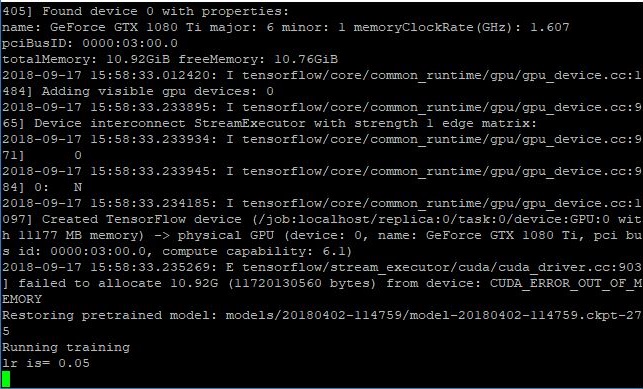
THE FOLLOWING IMAGE is the related and suspicious warning:
 josephj1o4e1
All 5 comments
I realized that the main cause should be CUDA_ERROR_OUT_OF_MEMORY, and there is actually no difference between training with CPU and with GPU......
So I still need to dig in whether it is the parameter I gave is not right or if it is some other reason such as wrong environment setup....
oh by the way, the CUDA_ERROR_OUT_OF_MEMORY, still appears, even if i set the batch size to 1.
josephj1o4e1
on 19 Sep 2018
hi
i got same problem when i use gpu traing
Did you find a way to solve it?
thanks
 lqd1994
on 15 Oct 2018
lqd1994
on 15 Oct 2018
@josephj1o4e1 when I trying to use the 20180402-114759.pb model to train my own dataset ,I got an error:Assign requires shapes of both tensors to match. lhs shape= [500] rhs shape= [8631]
It seems that my images classes number and the model classes number isn't match . If it is true ,you should have had the same problem,do you?
how did you use the pretrain model to train a different classes number dataset?thx
 bing1zhi2
on 22 Nov 2018
bing1zhi2
on 22 Nov 2018
@lqd1994
HEY sorry for the late reply
yes i have found the problem
this is the revised command that i've used
but actually im not really sure which is the real and main reason that caused the result.
Maybe the optimizer, maybe the "use_fixed_image_standardization" command, maybe the absence of center_loss_factor and center_loss_alfa.
Let you guys test it out~!
@bing1zhi2 sorry i dont have this error, hope you find your answer somehow!
Thank you guys for replying!
$ python3 train_softmax.py
--logs_base_dir logs/
--models_base_dir models/
--data_dir /home/mis/文件/facenet-master-original/src/datasets/celebrity_small
--image_size 160
--model_def models.inception_resnet_v1
--pretrained_model models/20180402-114759/model-20180402-114759.ckpt-275
--optimizer ADAM
--learning_rate -1
--max_nrof_epochs 500
--epoch_size 1000
--batch_size 90
--keep_probability 0.4
--random_flip
--use_fixed_image_standardization
--learning_rate_schedule_file datasets/learning_rate_schedule_classifier_casia.txt
--weight_decay 5e-4
josephj1o4e1
on 15 Feb 2019
@bing1zhi2 i have the same problem .
train_softmax.py line 146. if your len(train_set) is not same as the pretain model , you will get different model .
logits = slim.fully_connected(prelogits, len(train_set), activation_fn=None,
        weights_initializer=slim.initializers.xavier_initializer(),
        weights_regularizer=slim.l2_regularizer(args.weight_decay),
        scope='Logits', reuse=False)
so it occurs error when restore pretrain model.
saver_.restore(sess, pretrained_model)
the way to solve: create a new saver and restore it , origin saver will save the model you trained, so do not change it .
if pretrained_model:
    saver_ = tf.train.Saver(tf.trainable_variables(scope="InceptionResnetV1"))
    saver_.restore(sess, pretrained_model)
但是我发现训练效果并不好。。。
 supermanhuyu
on 20 Mar 2019
supermanhuyu
on 20 Mar 2019
Related issues
 RaviRaaja
·
3Comments
RaviRaaja
·
3Comments
 tonybaigang
·
3Comments
tonybaigang
·
3Comments
 allahbaksh
·
3Comments
allahbaksh
·
3Comments
 MrXu
·
3Comments
MrXu
·
3Comments
 haochange
·
3Comments
haochange
·
3Comments
Most helpful comment
@bing1zhi2 i have the same problem .
train_softmax.py line 146. if your len(train_set) is not same as the pretain model , you will get different model .
so it occurs error when restore pretrain model.
the way to solve: create a new saver and restore it , origin saver will save the model you trained, so do not change it .
但是我发现训练效果并不好。。。