Facebook-for-woocommerce: Admin-Ajax causing Excess CPU!
I just encountered an issue with my website exceeding the CPU limit on my hosting plan.
My website was temporarily shut down because I exceeded the monthly CPU limit - which is already a high limit.
I have had less than 5k visitors a month, and was wondering why on earth I was exceeding the CPU limit with so little traffic.
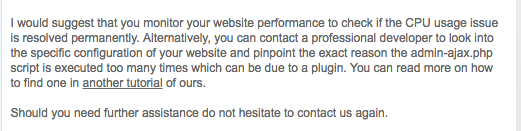
It turns out that the reason for the excess CPUs is because of too many ajax calls.
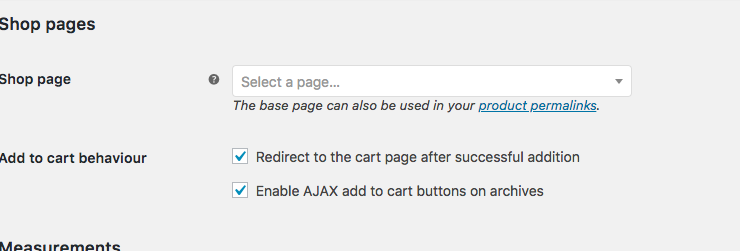
I couldn't figure out why this was happening - and then I remembered that about 2 weeks ago when I was having issues with the Add to Cart pixel - I was informed here on GitHub to enable the Ajax function on the product pages and archives in order to fire the Add to Cart pixel correctly when someone clicks Add to Cart.
I think this might be the reason I am having the excess CPU issue.
I have attached a screen shot of what my hosting rep told me regarding the Ajax function.
Is there another way around this? If I disable the Ajax function on the Product settings, is it going to prevent my Add to Cart pixel from firing?
I already have a high CPU limit on my current plan, which is affordable for me. If I upgrade to the next plan for unlimited CPU, it is way out of my budget and I do not want to run into this issue of my website being shut down again from excess CPU.
 belladonnaboutique
All 16 comments
belladonnaboutique
on 19 Mar 2018
Hello again,
I'm not so sure the cause is the AJAX Add To Cart, if you have 5k monthly visitors then I'd roughly expect 5k AJAX add to carts.
The notice you received says admin-ajax which implies it's ajax calls in the admin panel that's causing this. We have an AJAX call in the configuration page that does an ajax call every few seconds in order to check the status of product sync for Force Resync, even when product sync has finished, I venture to guess that is the cause.
We can make this far more efficient and potentially disable it entirely if it's causing problems for you. It's an easy fix so you can expect an update from us on this in the next version.
 dmitridr
on 19 Mar 2018
dmitridr
on 19 Mar 2018
In the meantime, avoiding using Force Resync or visiting the plugin configuration page at all should lower the amount of ajax calls.
dmitridr
on 19 Mar 2018
I have a working fix which greatly reduces the load on ajax admin calls, also makes force resync much faster, should be out in 1.8.2.
dmitridr
on 21 Mar 2018
Ok thank you! Any idea when that will be released? I had another CPU excess
today and my site is now down again even though I haven’t done anything or
done a force resync. 😕
On Tue, Mar 20, 2018 at 7:03 PM Dmitri Dranishnikov <
[email protected]> wrote:
I have a working fix which greatly reduces the load on ajax admin calls,
also makes force resync much faster, should be out in 1.8.2.—
You are receiving this because you authored the thread.
Reply to this email directly, view it on GitHub
https://github.com/facebookincubator/facebook-for-woocommerce/issues/334#issuecomment-374786914,
or mute the thread
https://github.com/notifications/unsubscribe-auth/Ah_qnwiZFc21Lrp_qstPxIwps1ptEOemks5tgYrXgaJpZM4SwaDB
.
belladonnaboutique
on 21 Mar 2018
We can get the fix out by this time tomorrow for sure.
dmitridr
on 21 Mar 2018
Oh yay!! Thank you so much! I hope this helps!! I appreciate the fast
response to this! Now I just need to get my hosting to lift the CPU limit
again so my site can be restored.
On Tue, Mar 20, 2018 at 7:32 PM Dmitri Dranishnikov <
[email protected]> wrote:
We can get the fix out by this time tomorrow for sure.
—
You are receiving this because you authored the thread.
Reply to this email directly, view it on GitHub
https://github.com/facebookincubator/facebook-for-woocommerce/issues/334#issuecomment-374792703,
or mute the thread
https://github.com/notifications/unsubscribe-auth/Ah_qn9_Hfa8fY3RYcmPSNDs07JAOj0-Qks5tgZGEgaJpZM4SwaDB
.
belladonnaboutique
on 21 Mar 2018
I had turned my ads off, stopped logging into my site entirely, and my site
still somehow reached the CPU limit. Now my site is down for the 5th time
in a few days and they will not restore it until April 1st!
On Tue, Mar 20, 2018 at 7:34 PM Elizabeth Breuder <
[email protected]> wrote:
Oh yay!! Thank you so much! I hope this helps!! I appreciate the fast
response to this! Now I just need to get my hosting to lift the CPU limit
again so my site can be restored.On Tue, Mar 20, 2018 at 7:32 PM Dmitri Dranishnikov <
[email protected]> wrote:We can get the fix out by this time tomorrow for sure.
—
You are receiving this because you authored the thread.
Reply to this email directly, view it on GitHub
https://github.com/facebookincubator/facebook-for-woocommerce/issues/334#issuecomment-374792703,
or mute the thread
https://github.com/notifications/unsubscribe-auth/Ah_qn9_Hfa8fY3RYcmPSNDs07JAOj0-Qks5tgZGEgaJpZM4SwaDB
.
belladonnaboutique
on 21 Mar 2018
As promised we have a new version of the plugin v1.8.2 which significantly reduces the load on admin-ajax.php, there was a bug in Force Resync in older versions, so that admin-ajax.php would continue to be called even long after the resync was over, I suspect this to be the cause of your issue.
To get the full benefit of the new functionality you'll want to reset the plugin once, via Reconfigure > Advanced Options > Delete, and set up again. This will ensure that your Force Resync uses the new feed-based upload approach, instead of the old approach that called admin-ajax.php a lot.
The new version can be found here.
https://github.com/facebookincubator/facebook-for-woocommerce/releases
I'm sorry to hear about your server. Hopefully with the new version, this won't happen again.
dmitridr
on 21 Mar 2018
Is this the “new” version released two weeks ago?
I haven’t touched force resync - this is happening because Ajax is
configured for add to cart, the product pages and the archives.
Does this updated version address that setting? The Ajax for adds to cart
and on the other pages? Or only force resync?
On Wed, Mar 21, 2018 at 6:35 PM Dmitri Dranishnikov <
[email protected]> wrote:
As promised we have a new version of the plugin v1.8.2 which significantly
reduces the load on admin-ajax.php, there was a bug in Force Resync in
older versions, so that admin-ajax.php would continue to be called even
long after the resync was over, I suspect this to be the cause of your
issue.To get the full benefit of the new functionality you'll want to reset the
plugin once, via Reconfigure > Advanced Options > Delete, and set up
again. This will ensure that your Force Resync uses the new feed-based
upload approach, instead of the old approach that called admin-ajax.php a
lot.The new version can be found here.
https://github.com/facebookincubator/facebook-for-woocommerce/releasesI'm sorry to hear about your server. Hopefully with the new version, this
won't happen again.—
You are receiving this because you authored the thread.
Reply to this email directly, view it on GitHub
https://github.com/facebookincubator/facebook-for-woocommerce/issues/334#issuecomment-375118378,
or mute the thread
https://github.com/notifications/unsubscribe-auth/Ah_qn6OpTPVwwLGppMK0miNt-CC-vqqDks5tgtXOgaJpZM4SwaDB
.
belladonnaboutique
on 22 Mar 2018
Ok I just re read what you wrote and that makes sense! I am concerned about
the settings though still, for Ajax add to cart and product pages/archives.
Should that be okay moving forward?
On Wed, Mar 21, 2018 at 7:18 PM Elizabeth Breuder <
[email protected]> wrote:
Is this the “new” version released two weeks ago?
I haven’t touched force resync - this is happening because Ajax is
configured for add to cart, the product pages and the archives.Does this updated version address that setting? The Ajax for adds to cart
and on the other pages? Or only force resync?On Wed, Mar 21, 2018 at 6:35 PM Dmitri Dranishnikov <
[email protected]> wrote:As promised we have a new version of the plugin v1.8.2 which
significantly reduces the load on admin-ajax.php, there was a bug in
Force Resync in older versions, so that admin-ajax.php would continue to
be called even long after the resync was over, I suspect this to be the
cause of your issue.To get the full benefit of the new functionality you'll want to reset the
plugin once, via Reconfigure > Advanced Options > Delete, and set up
again. This will ensure that your Force Resync uses the new feed-based
upload approach, instead of the old approach that called admin-ajax.php
a lot.The new version can be found here.
https://github.com/facebookincubator/facebook-for-woocommerce/releasesI'm sorry to hear about your server. Hopefully with the new version, this
won't happen again.—
You are receiving this because you authored the thread.
Reply to this email directly, view it on GitHub
https://github.com/facebookincubator/facebook-for-woocommerce/issues/334#issuecomment-375118378,
or mute the thread
https://github.com/notifications/unsubscribe-auth/Ah_qn6OpTPVwwLGppMK0miNt-CC-vqqDks5tgtXOgaJpZM4SwaDB
.
belladonnaboutique
on 22 Mar 2018
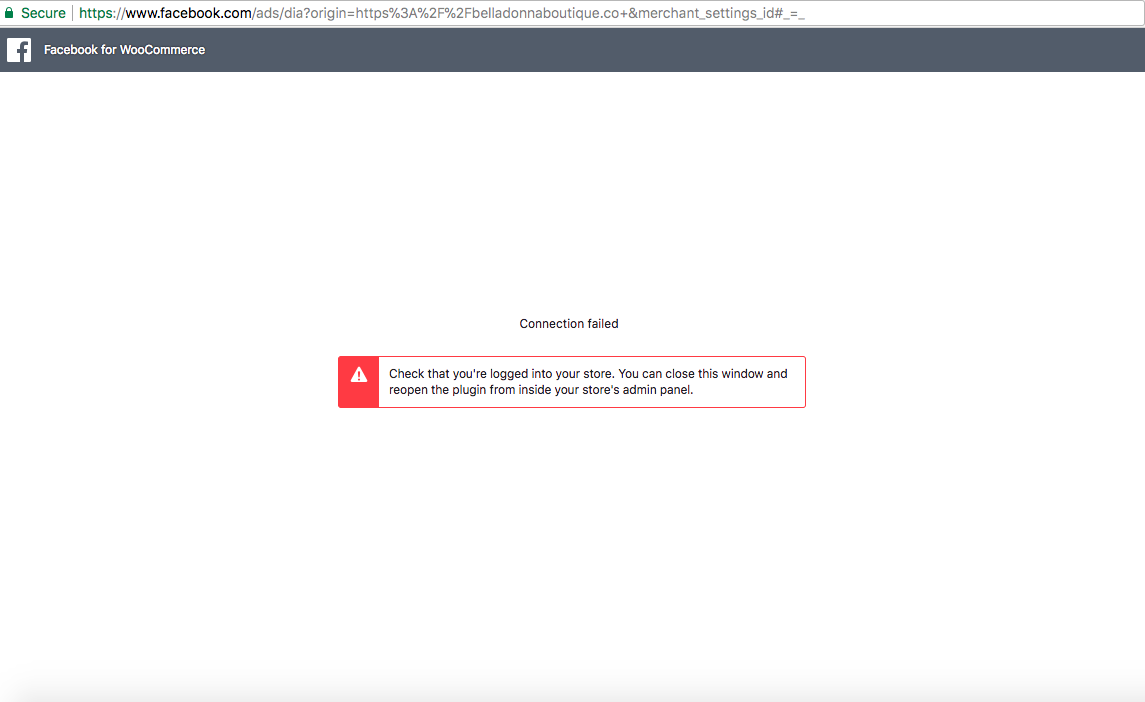
Soo I followed your instructions of Reconfigure > Advanced Settings > Delete plugin. Then I uploaded the new version 1.8.2 and initiated the set up again, and got this error message.
I attempted twice. I am logged into my Woo dashboard as well as my FB page account so I am not sure why I am getting this message that I need to be logged in?
belladonnaboutique
on 22 Mar 2018
Hello again,
I see you're timing out at the last step in our logs. We use an ajax call to save the new settings in your DB. So if your hosting provider is blocking ajax calls because you exceed the limit, you may have to wait until the limit has been lifted in order to finish set up.
To answer your previous question, no we have not addressed ajax add to cart in this latest update. If you'd like to remove it, you can try the advice in #219 to switch to 'ViewCart'. I can elaborate on that if needed.
There's also a couple of guides online on how to diagnose high ajax usage to see where it's coming from. For example : https://kinsta.com/blog/admin-ajax/ those may be useful. If you suspect it is Ajax add to cart that is the problem, you can try disabling the ajax function on the products page, and following the advice of #219 to enable ViewCart as I mentioned earlier.
dmitridr
on 22 Mar 2018
At that point last night the limit had been lifted. It is lifted now and
they told me the CPUs are finally going down. I had discovered that a WP
Staging site plugin was also using Ajax calls and my CPUs, and I deleted
the staging sites and the plugin. I am wondering if that was also
contributing to the problem.
I haven’t tried setting up the new FB plugin again today because this
morning I exceeded the CPU again, but a few hours ago they said it had
finally started to go down and had likely needed time for the changes I
made last night to go into effect.
I will try configuring the plugin again and see if it works okay now that
the CPUs have gone down.
On Thu, Mar 22, 2018 at 4:32 PM Dmitri Dranishnikov <
[email protected]> wrote:
Hello again,
I see you're timing out at the last step in our logs. We use an ajax call
to save the new settings in your DB. So if your hosting provider is
blocking ajax calls because you exceed the limit, you may have to wait
until the limit has been lifted in order to finish set up.To answer your previous question, no we have not addressed ajax add to
cart in this latest update. If you'd like to remove it, you can try the
advice in #219
https://github.com/facebookincubator/facebook-for-woocommerce/issues/219
to switch to 'ViewCart'. I can elaborate on that if needed.There's also a couple of guides online on how to diagnose high ajax usage
to see where it's coming from. For example :
https://kinsta.com/blog/admin-ajax/ those may be useful. If you suspect
it is Ajax add to cart that is the problem, you can try disabling the ajax
function on the products page, and following the advice of #219
https://github.com/facebookincubator/facebook-for-woocommerce/issues/219
to enable ViewCart as I mentioned earlier.—
You are receiving this because you authored the thread.
Reply to this email directly, view it on GitHub
https://github.com/facebookincubator/facebook-for-woocommerce/issues/334#issuecomment-375447860,
or mute the thread
https://github.com/notifications/unsubscribe-auth/Ah_qn28HepuLpkxiAgIzN8e4BliE9kyBks5thAp0gaJpZM4SwaDB
.
belladonnaboutique
on 22 Mar 2018
I was able to set it up! Yay its working now! Thanks so much for your fast
assistance on fixing the plugin, I really appreciate it! Hopefully there
should be no more issues of CPU overload with the fix and with the Staging
plugin deleted.
I really appreciate your prompt support with the plugin!!!
On Thu, Mar 22, 2018 at 5:21 PM, Elizabeth Breuder <
[email protected]> wrote:
At that point last night the limit had been lifted. It is lifted now and
they told me the CPUs are finally going down. I had discovered that a WP
Staging site plugin was also using Ajax calls and my CPUs, and I deleted
the staging sites and the plugin. I am wondering if that was also
contributing to the problem.I haven’t tried setting up the new FB plugin again today because this
morning I exceeded the CPU again, but a few hours ago they said it had
finally started to go down and had likely needed time for the changes I
made last night to go into effect.I will try configuring the plugin again and see if it works okay now that
the CPUs have gone down.On Thu, Mar 22, 2018 at 4:32 PM Dmitri Dranishnikov <
[email protected]> wrote:Hello again,
I see you're timing out at the last step in our logs. We use an ajax call
to save the new settings in your DB. So if your hosting provider is
blocking ajax calls because you exceed the limit, you may have to wait
until the limit has been lifted in order to finish set up.To answer your previous question, no we have not addressed ajax add to
cart in this latest update. If you'd like to remove it, you can try the
advice in #219
https://github.com/facebookincubator/facebook-for-woocommerce/issues/219
to switch to 'ViewCart'. I can elaborate on that if needed.There's also a couple of guides online on how to diagnose high ajax usage
to see where it's coming from. For example :
https://kinsta.com/blog/admin-ajax/ those may be useful. If you suspect
it is Ajax add to cart that is the problem, you can try disabling the ajax
function on the products page, and following the advice of #219
https://github.com/facebookincubator/facebook-for-woocommerce/issues/219
to enable ViewCart as I mentioned earlier.—
You are receiving this because you authored the thread.
Reply to this email directly, view it on GitHub
https://github.com/facebookincubator/facebook-for-woocommerce/issues/334#issuecomment-375447860,
or mute the thread
https://github.com/notifications/unsubscribe-auth/Ah_qn28HepuLpkxiAgIzN8e4BliE9kyBks5thAp0gaJpZM4SwaDB
.
belladonnaboutique
on 22 Mar 2018
Glad I could help! Yeah it definitely could be other plugins contributing to the problem as well, I'm sure ours contributed to the problem if you did use Force Resync even once or left the configuration page open for a significant amount of time. That part shouldn't be a problem anymore.
If it continues to be a problem, I recommend disabling the AJAX add to cart button on archives to see if it helps, but I'm doubtful that that would be the cause. I'm closing this out, but if there's more issues of CPU overload that you suspect is caused by our plugin, feel free to open a new issue and reference this one.
dmitridr
on 23 Mar 2018
Related issues
 SNCasey1988
·
3Comments
SNCasey1988
·
3Comments
 AlexanderBMAS
·
4Comments
AlexanderBMAS
·
4Comments
 Jany-M
·
5Comments
Jany-M
·
5Comments
 lcorsa
·
6Comments
lcorsa
·
6Comments
 vesceram
·
5Comments
vesceram
·
5Comments