Facebook-for-woocommerce: Old & Deleted Products Syncing to Shop && (Fixed in 1.6.4) Primary Shop Image Incorrect
Hopefully it makes sense from my screenshots. I have a featured category on the FB homepage and it's all of a sudden pulling the wrong images - seems to be the first gallery image of the product and not the featured image anymore. However when you click into the shop tab, it all looks good.

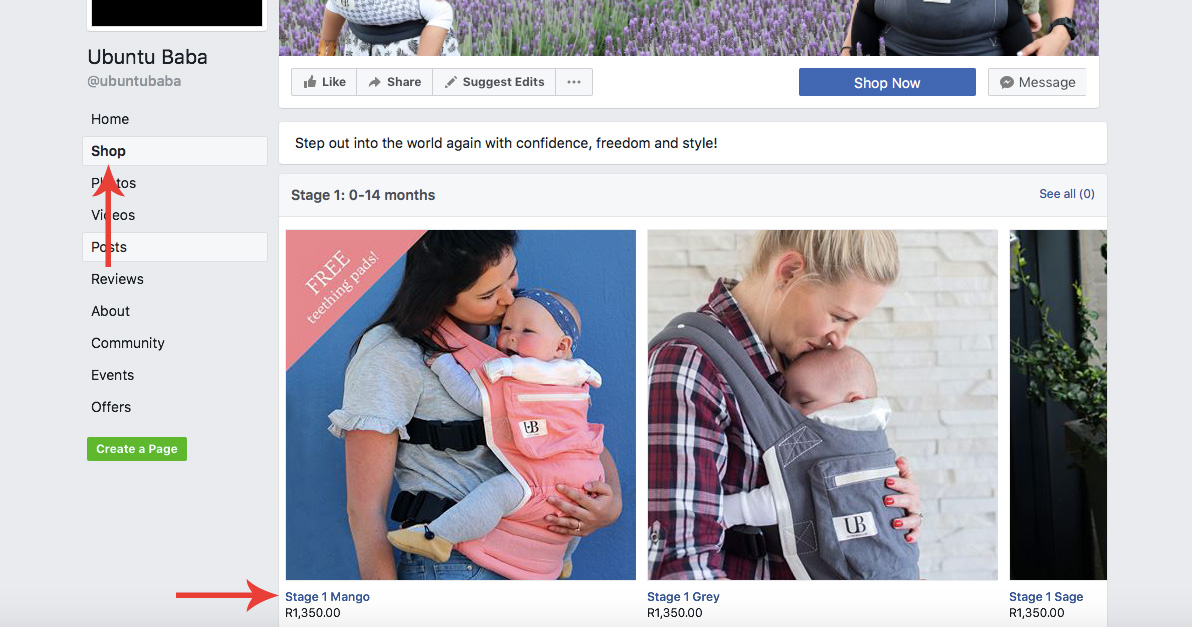
 ubuntubaba
All 12 comments
Hello,
Thanks for writing in.
- Could you tell us the plugin version you are using?
- And anything specific you might have done in relation to the product before the change was observed?
- Could you link us to a specific product which has the problem?
We also changed the order of the images in our new version v1.6.4, so if you have not updated you could consider trying an update, then updating the product in question to see if that fixes the problem.
 dmitridr
on 14 Oct 2017
dmitridr
on 14 Oct 2017
Could be related to #81
dmitridr
on 14 Oct 2017
- Version 1.5.1
- Haven't made any changes to the product, it's not just that product,
it's all the ones in the featured area on home page of facebook, but when
you view the product in the actual shop it's fine, so it's definitely a
plugin issue - If you go to the home page of my Facebook and look at the shop section
there, then look at the actual shop, you will see the difference:
https://www.facebook.com/ubuntubaba/ - 1 of the products that is shown
on the home page (check my screenshots from before) is this one:
https://www.facebook.com/commerce/products/1559076347499430/ - so you
can see the little white set of teething pads is the first gallery image
from woocommerce, that is showing on the Facebook home page shop section,
instead of the Mom wearing her baby - however the correct image is showing
when you go into the actual FB shop and view all products.
Shannon McLaughlin
Ubuntu Baba Founder
www.ubuntubaba.com
On Sat, Oct 14, 2017 at 12:01 AM, Dmitri Dranishnikov <
[email protected]> wrote:
Hello,
Thanks for writing in.
- Could you tell us the version you are using?
- And anything specific you might have done in relation to the product
before the change was observed?- Could you link us to a specific product which has the problem?
We also changed the order of the images in our new version v1.6.4
https://github.com/facebookincubator/facebook-for-woocommerce/releases,
so if you have not updated you could consider trying an update, then
updating the product in question to see if that fixes the problem.—
You are receiving this because you authored the thread.
Reply to this email directly, view it on GitHub
https://github.com/facebookincubator/facebook-for-woocommerce/issues/90#issuecomment-336577968,
or mute the thread
https://github.com/notifications/unsubscribe-auth/AfQ1x8bn-vffi4FM641trTB7VW9GbBxQks5sr92qgaJpZM4P5FWT
.
ubuntubaba
on 14 Oct 2017
Yes, it's exactly the same problem.
Shannon McLaughlin
Ubuntu Baba Founder
www.ubuntubaba.com
On Sat, Oct 14, 2017 at 12:12 AM, Dmitri Dranishnikov <
[email protected]> wrote:
Could be related to #81
https://github.com/facebookincubator/facebook-for-woocommerce/issues/81—
You are receiving this because you authored the thread.
Reply to this email directly, view it on GitHub
https://github.com/facebookincubator/facebook-for-woocommerce/issues/90#issuecomment-336579869,
or mute the thread
https://github.com/notifications/unsubscribe-auth/AfQ1x2udJ7hIirEKhDlVRUnCavIt5JkRks5sr-BhgaJpZM4P5FWT
.
ubuntubaba
on 14 Oct 2017
Thank you for sending the info!
1.5.1 had a lot of issues including some relating to the image orderings, could you try upgrading to the newest version, 1.6.4 and doing a 'Force Resync' to see if the problem is fixed? I am reasonably sure that it will address your problem since we explicitly fixed the image ordering in 1.6.4.
You can find the latest version here :
https://github.com/facebookincubator/facebook-for-woocommerce/releases
dmitridr
on 14 Oct 2017
Okay thanks, have installed the new plugin - how do I do a force resync?
Shannon McLaughlin
Ubuntu Baba Founder
www.ubuntubaba.com
On Sat, Oct 14, 2017 at 12:33 AM, Dmitri Dranishnikov <
[email protected]> wrote:
Thank you for sending the info!
1.5.1 had a lot of issues including some relating to the image orderings,
could you try upgrading to the newest version, 1.6.4 and doing a 'Force
Resync' to see if the problem is fixed? I am reasonably sure that it will
address your problem since we explicitly fixed the image ordering in 1.6.4.You can find the latest version here :
https://github.com/facebookincubator/facebook-for-woocommerce/releases—
You are receiving this because you authored the thread.
Reply to this email directly, view it on GitHub
https://github.com/facebookincubator/facebook-for-woocommerce/issues/90#issuecomment-336582962,
or mute the thread
https://github.com/notifications/unsubscribe-auth/AfQ1x2P1GvTpGfWU8G96Ep3twmVTHcTPks5sr-VLgaJpZM4P5FWT
.
ubuntubaba
on 15 Oct 2017
Hi, sorry there are now new issues arising. The plugin is pulling old products and prices that don't even exist anymore - this is becoming very time consuming for me. I want to delete the plugin entirely from the FB page and rather do it manually - I have deleted the plugin from the website, however it's now impossible to delete the products from my FB page directly. Is there something else I need to do now no my FB page to be able to use it like normal again, because there is no way to delete the products and start from scratch?
ubuntubaba
on 16 Oct 2017
Hello,
Sorry that you're having more trouble, trashed/draft products are a known issue that we are fixing in #75
If you have the plugin installed, you can do this by clicking Reconfigure Settings.
Then go to Advanced Options and hitting Delete. This will erase all the FB-side items created by the plugin.
If you cannot do this (possibly if you wiped the plugin info from the DB), we can also delete your shop and products manually with your permission. If you didn't wipe the DB, reinstalling the plugin and following the above steps should work.
dmitridr
on 17 Oct 2017
I have removed the plugin via the Wordpress Dashboard - not sure if
possible for me to still do this now? If you can delete my shop and
products manually I'd be so grateful. Then I will go and add them manually,
we only have a few products so it's no problem.
Please let me know if I need to add you as admin to the page or how you do
this? Thank you for the assistance!
Shannon McLaughlin
Ubuntu Baba Founder
www.ubuntubaba.com
On Tue, Oct 17, 2017 at 2:58 AM, Dmitri Dranishnikov <
[email protected]> wrote:
Hello,
Sorry that you're having more trouble, trashed/draft products are a known
issue that we are fixing in #75
https://github.com/facebookincubator/facebook-for-woocommerce/issues/75If you have the plugin installed, you can do this by clicking Reconfigure
Settings.
Then go to Advanced Options and hitting Delete. This will erase all the
FB-side items created by the plugin.If you cannot do this (possibly if you wiped the plugin info from the DB),
we can also delete your shop and products manually with your permission.—
You are receiving this because you authored the thread.
Reply to this email directly, view it on GitHub
https://github.com/facebookincubator/facebook-for-woocommerce/issues/90#issuecomment-337086099,
or mute the thread
https://github.com/notifications/unsubscribe-auth/AfQ1xwjrE-lhhjtBjQg30BzwgrBxgotrks5ss_vPgaJpZM4P5FWT
.
ubuntubaba
on 17 Oct 2017
Hello,
I've disabled your shop, you should be able to create a new one manually now.
We're working towards resolving the issues you experienced in v1.6.5 or v1.6.6 so I hope you'll consider trying our plugin again in the future.
A note for others who may having the uninstall problem:
If you uninstall the plugin, the FB side will not be erased, you will need to follow the steps listed in my previous comment in order to delete all the settings/products on FB. If you already uninstalled the plugin, you can still reinstall the plugin and follow the steps.
dmitridr
on 17 Oct 2017
Thank you, I certainly will, will check back in a few weeks time. Thx for
the great support.
On Tue, 17 Oct 2017 at 8:49 PM, Dmitri Dranishnikov <
[email protected]> wrote:
Hello,
I've disabled your shop, you should be able to create a new one manually
now.
I'm hoping we can resolve the issues you experienced in v1.6.5 or v1.6.6
so I hope you'll consider trying our plugin again in the future.A note for others who may having the uninstall problem:
If you uninstall the plugin, the FB side will not be erased, you will need
to follow the steps listed in my previous comment in order to delete all
the settings/products on FB. If you already uninstalled the plugin, you can
still reinstall the plugin and follow the steps.—
You are receiving this because you authored the thread.
Reply to this email directly, view it on GitHub
https://github.com/facebookincubator/facebook-for-woocommerce/issues/90#issuecomment-337331190,
or mute the thread
https://github.com/notifications/unsubscribe-auth/AfQ1xynlNmwOTotrFmev921wiU4Zkq4Hks5stPbGgaJpZM4P5FWT
.>
Shannon McLaughlin
Ubuntu Baba Founder
www.ubuntubaba.com
ubuntubaba
on 17 Oct 2017
Hello Again,
We fixed the old / trashed products syncing to FB in some instances.
If you upgrade to v1.7.2 and 'Force Resync' or 'Delete Settings' and reupload, it should fix the problem.
If the problem persists feel free to open a new issue and reference this one. Thanks!
dmitridr
on 6 Dec 2017
Related issues
 monogios
·
6Comments
monogios
·
6Comments
 zzbeck
·
6Comments
zzbeck
·
6Comments
 justinrains
·
3Comments
justinrains
·
3Comments
 vesceram
·
5Comments
vesceram
·
5Comments
 Jany-M
·
5Comments
Jany-M
·
5Comments