face_recognition fails to detect some obvious faces.
- face_recognition version:1.2.3
- Python version: Python 3.5.6 :: Anaconda, Inc.
- Operating System: Ubuntu 16.04
Description
Thank you for a great tool! I am trying to detect faces for COCO dataset(Images which have faces). For 50% of times, it is able to detect the faces correctly, but other 50% of images it fails. I presume this has to do something with the threshold.
What I Did
I got a chance to go through the code flow. But I could not quite understand how can I actually tweak the threshold to detect the faces which are most probably missed due to low confidence.
The Command which I am using is:
face_locations = face_recognition.face_locations(image) , which eventually calls following function(according to my understanding):
_raw_face_locations(img, number_of_times_to_upsample=1, model="hog") ---> face_detector(img, number_of_times_to_upsample) ---> dlib.get_frontal_face_detector()
Now in dlib repo, I see that this is connected to file dlib/dlib/image_processing/object_detector_abstract.h, where we have following definitions :
template <
            typename image_type
            >
        std::vector<rectangle> operator() (
            const image_type& img,
            double adjust_threshold = 0
        );
        /*!
            requires
                - img == an object which can be accepted by image_scanner_type::load()
            ensures
                - This function is identical to the above operator() routine, except that
                  it returns a std::vector<rectangle> which contains just the bounding
                  boxes of all the detections.
        !*/
What i am not able to understand how can I change adjust_threshold ? using the Function: face_recognition.face_locations(image).So, that it can detect some of the less obvious faces in the images .
Example Image for which it misses the faces:
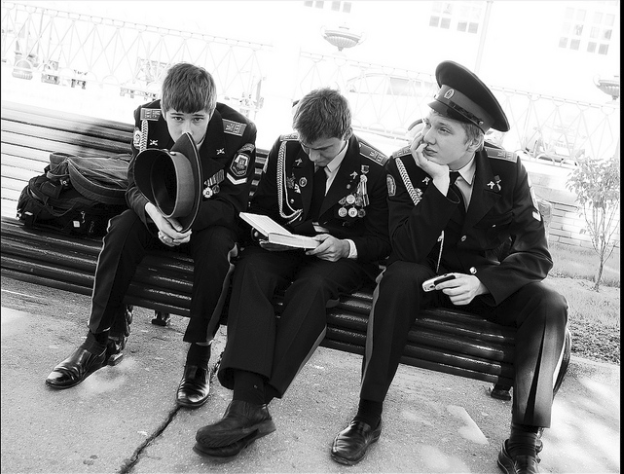
None of the faces were detected. I understand this could be one of the difficult cases, But If I can detect the faces, with some tweaking (by lowering the confidence) It will serve my purpose.
Thank you.
Regards,
Nitin
 nbansal90
All 2 comments
Hi @nbansal90,
If I'm not wrong with my understanding, you're asking how to tweak the threshold in the face_recognition.face_locations(image), such that you can find the faces in the above image?
In this library, the threshold is used to find out the best match, while comparing the input encodings with the saved encodings, the lower the threshold, the stricter the comparison. You can read the info more clearly in the documentation
Now, to detect the faces more clearly in the given image, use model='cnn' instead of 'hog', by adding the parameters next to the image.
face_recognition.face_locations(image, number_of_times_to_upsample=1, model='cnn').
You can find two faces in the above image.
Hope this might clear your doubt.
Regards,
Chaitu
 chaitudarz
on 23 Jun 2019
chaitudarz
on 23 Jun 2019
Or You can just increase the number_of_times_to_upsample to improve the detector's performance.
 mihir135
on 19 Nov 2019
mihir135
on 19 Nov 2019
Related issues
 leonardofmed
·
4Comments
leonardofmed
·
4Comments
 damey2011
·
3Comments
damey2011
·
3Comments
 cjosephson
·
5Comments
cjosephson
·
5Comments
 ramineniraviteja
·
5Comments
ramineniraviteja
·
5Comments
 safaad
·
4Comments
safaad
·
4Comments
Most helpful comment
Hi @nbansal90,
If I'm not wrong with my understanding, you're asking how to tweak the threshold in the face_recognition.face_locations(image), such that you can find the faces in the above image?
In this library, the threshold is used to find out the best match, while comparing the input encodings with the saved encodings, the lower the threshold, the stricter the comparison. You can read the info more clearly in the documentation
Now, to detect the faces more clearly in the given image, use model='cnn' instead of 'hog', by adding the parameters next to the image.
face_recognition.face_locations(image, number_of_times_to_upsample=1, model='cnn').
You can find two faces in the above image.
Hope this might clear your doubt.
Regards,
Chaitu