Face-api.js: Issue loading: TypeError: Nt.makeTensor is not a function
I just started and in the latest version I am getting the following error in the browser:
tf-core.esm.js:17 Uncaught (in promise) TypeError: Nt.makeTensor is not a function
    at Sn (tf-core.esm.js:17)
    at kn (tf-core.esm.js:17)
    at o (tf-core.esm.js:17)
    at Fh (tf-core.esm.js:17)
    at tf-core.esm.js:17
    at Array.forEach (<anonymous>)
    at tf-core.esm.js:17
    at Array.forEach (<anonymous>)
    at tf-core.esm.js:17
    at tf-core.esm.js:17
I installed face-api.js with npm install face-api.js. Now using it as follows:
import * as faceapi from 'face-api.js';

await faceapi.nets.tinyFaceDetector.loadFromUri('/models');
As soon as I try to load the model, I get the type error above. Any idea's where it is going wrong? I saw this https://github.com/tensorflow/tfjs/issues/2194#issuecomment-546187719 but couldn't see a solution to that. Thanks!
 luucv
luucv
All 23 comments
Hi, I just got the same error([email protected]) and I downgraded to [email protected], and this error disappeared, however, a new error rendered. Anyway, you could have a try.
 hsparrow
on 30 Oct 2019
hsparrow
on 30 Oct 2019
When downgrading tfjs-core to 1.2.9 I get this error when trying to use the library
SsdMobilenetv1.js:26 Uncaught (in promise) Error: SsdMobilenetv1 - load model before inference
at SsdMobilenetv1.forwardInput (SsdMobilenetv1.js:26)
at SsdMobilenetv1.
at step (tslib.es6.js:196)
at Object.next (tslib.es6.js:127)
at fulfilled (tslib.es6.js:80)
here is the lock file of a project where this library still works.
 Spodeopieter
on 30 Oct 2019
Spodeopieter
on 30 Oct 2019
@Spodeopieter, I think your last error has to do with not asynchronously loading in your model. Are you sure it is being loaded in correctly before you try to use it?
luucv
on 30 Oct 2019
@luucv this is how I am loading the models :
loadModels = async () => {
const MODEL_URL = "/models";
await faceapi.loadSsdMobilenetv1Model(MODEL_URL);
await faceapi.loadFaceLandmarkModel(MODEL_URL);
await faceapi.loadFaceRecognitionModel(MODEL_URL);
};
Spodeopieter
on 30 Oct 2019
@luucv have the same error right now. I installed face-api.js via yarn. I retried it with npm install face-api.js and it worked without any problem.
I'm using webpack-encore with Symfony.
 ghost
on 1 Nov 2019
ghost
on 1 Nov 2019
Have the same problem.
Try to delete package-lock.json, node_modules. Then install the latest version (currently 0.21.0)
 justlp
on 1 Nov 2019
justlp
on 1 Nov 2019
The issue is most certainly due to your package managers installing a tfjs core version other than 1.2.9 (which is the one the latest face-api.js version uses). May be an issue with yarn?
Try deleting your yarn locks / package locks and do a clean installation. If for some reason the issue still remains, try explicitly installing npm i @tensorflow/[email protected].
 justadudewhohacks
on 1 Nov 2019
justadudewhohacks
on 1 Nov 2019
@justadudewhohacks Thanks for the Tip!
I've solved my problem :D
You do not just have to say "@tensorflow/tfjs-core": "1.2.9" in the dependencies-section of the package.json, you also have to prevent _tfjs-image-recognition-base_ from getting a newer version:
"resolutions": {
    "tfjs-image-recognition-base/@tensorflow/tfjs-core": "<=1.2.9"
}
I've solved by taking these steps:
- delete tensorflow node module
npm i @tensorflow/[email protected]npm i @tensorflow/[email protected]
The 1.2.9 is the last one supported by latest face-api.js version as @justadudewhohacks said.
 giuseppedev
on 6 Nov 2019
giuseppedev
on 6 Nov 2019
I have same problem.
"@tensorflow/tfjs-core": "1.2.9",
"@tensorflow/tfjs-node": "1.2.9",
"face-api.js": "^0.21.0",
5 days ago, It was operating normally.
 sudokzt
on 7 Nov 2019
sudokzt
on 7 Nov 2019
@justadudewhohacks Thanks for the Tip!
I've solved my problem :DYou do not just have to say
"@tensorflow/tfjs-core": "1.2.9"in the dependencies-section of the package.json, you also have to prevent _tfjs-image-recognition-base_ from getting a newer version:"resolutions": { "tfjs-image-recognition-base/@tensorflow/tfjs-core": "<=1.2.9" }
This helped. looks like tfjs-image-recognition-base was secretly installing the latest tfjs behind our backs.
 Sxela
on 9 Nov 2019
Sxela
on 9 Nov 2019
have same problem, resolutions no helped
 paulvales
on 9 Nov 2019
paulvales
on 9 Nov 2019
installing face-api with npm instead of yarn seems to solve the problem for me.
Spodeopieter
on 9 Nov 2019
installing face-api with npm instead of yarn seems to solve the problem for me.
I'm running into the same issue with yarn, installing with npm solved me problem as well.
 cmaycumber
on 9 Nov 2019
cmaycumber
on 9 Nov 2019
looks like
tfjs-image-recognition-basewas secretly installing the latest tfjs behind our backs.
I added the resolutions section as suggested above and by this help doc but it was apparently ignored by yarn cuz it resolved to 1.3.1 anyway per yarn.lock. I've got a yarn monorepo so I'm sure there's either some logical reason or some bug as to why that was the case.
I was able to get around it by manually editing the yarn.lock to change the section for "@tensorflow/tfjs-core@^1.2.9": to be identical to the section for "@tensorflow/[email protected]": (no caret). But that seems super hacky and tenuous. If this is working in npm but not yarn that seems like a yarn bug to me.
 SteveShaffer
on 11 Nov 2019
SteveShaffer
on 11 Nov 2019
I've solved by taking these steps:
- delete tensorflow node module
npm i @tensorflow/[email protected]npm i @tensorflow/[email protected]The 1.2.9 is the last one supported by latest face-api.js version as @justadudewhohacks said.
This solved the same issue I was having. Hope this helps somebody.
 naveensky
on 21 Nov 2019
naveensky
on 21 Nov 2019
So for me nothing worked what did work was this
FOR YARN USERS
add
"resolutions": {
    "tfjs-image-recognition-base/@tensorflow/tfjs-core": "<=1.2.9"
}in the package add these lines
"dependencies": {
"@tensorflow/tfjs-core": "1.2.9",
"face-api.js": "^0.21.0",
"next": "9.1.4",
"react": "16.12.0",
"react-dom": "16.12.0",
"react-stickynode": "^2.1.1",
"styled-components": "^4.4.1",
"tfjs-image-recognition-base": "^0.6.2"
}
actually installing tfjs-image-recognition-base worked!
 JaeDukSeo
on 22 Nov 2019
JaeDukSeo
on 22 Nov 2019
I have this same issue. I get the error:
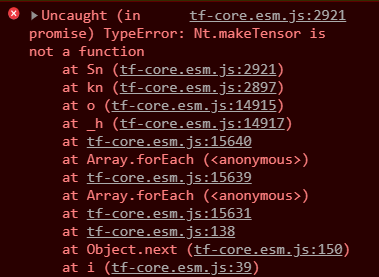
when I try to load any model.
I have the models in public/models and am trying to access them with
await faceapi.nets.ssdMobilenetv1.loadFromUri('/models')
I've tried all the fixes mentioned above and I don't think it's an issue with versioning, or npm.
Is there another way to load the models? Thanks!
 blazinaj
on 26 Nov 2019
blazinaj
on 26 Nov 2019
Also having the same issue, though my error message reads:
engine_1.ENGINE.makeTensor is not a function
Tried some of the above fixes with no luck. Using tfjs 1.2.9 also.
 Foxyf76
on 30 Nov 2019
Foxyf76
on 30 Nov 2019
We need to upgrade to TFJS 1.3.x for other reasons. Any idea what's causing this problem with newer TFJS packages? I don't see makeTensor anywhere in the code here or in tfjs-image-recognition-base
I'm guessing maybe the models need to be regenerated for TF 1.3.x?
 jjs-stripe
on 8 Dec 2019
jjs-stripe
on 8 Dec 2019
I've solved by taking these steps:
- delete tensorflow node module
npm i @tensorflow/[email protected]npm i @tensorflow/[email protected]The 1.2.9 is the last one supported by latest face-api.js version as @justadudewhohacks said.
It solved my problem.
 hua1995116
on 15 Dec 2019
hua1995116
on 15 Dec 2019
I upgraded the tfjs-core version the latest release. Also I decided to move tfjs-image-recognition-base to face-api.js, so yarn should not have any reason to install different versions of tfjs-core anymore unless you or one if your dependencies is explicitly installing another version.
justadudewhohacks
on 16 Dec 2019
I'm getting a "Kt.makeTensor is not a function", more specifically:
Uncaught (in promise) TypeError: Kt.makeTensor is not a function
at Rn (face-api.min.js:2426)
at In (face-api.min.js:2407)
at e (face-api.min.js:11444)
at Vh (face-api.min.js:11445)
at face-api.min.js:12054
at Array.forEach (
at face-api.min.js:12053
at Array.forEach (
at face-api.min.js:12047
at face-api.min.js:103
I've tried all these resolutions and none of them worked. Could anyone help please?
 MadalenaSousa
on 29 Nov 2020
MadalenaSousa
on 29 Nov 2020
Related issues
 SunilKapadia1208
·
7Comments
SunilKapadia1208
·
7Comments
 MilindModi
·
6Comments
MilindModi
·
6Comments
 liyinghao666
·
5Comments
liyinghao666
·
5Comments
 XDmoyang
·
6Comments
XDmoyang
·
6Comments
 shriyaaa
·
7Comments
shriyaaa
·
7Comments
Most helpful comment
@justadudewhohacks Thanks for the Tip!
I've solved my problem :D
You do not just have to say
"@tensorflow/tfjs-core": "1.2.9"in the dependencies-section of the package.json, you also have to prevent _tfjs-image-recognition-base_ from getting a newer version: