Face-api.js: Uncaught (in promise) TypeError: faceapi.allFacesMtcnn(...).map is not a function
I'm using VueJS. How can I fix these errors?
Code (VueJS)
onPlay: async function(videoEl) {
                if(videoEl.paused || videoEl.ended || !modelLoaded)
                    return false;
                let minFaceSize = 200;
                const { width, height } = faceapi.getMediaDimensions(videoEl);
                const canvas = document.getElementById('inputVideo');
                canvas.width = width;
                canvas.height = height;
                const mtcnnParams = {
                    minFaceSize
                };
                const fullFaceDescriptions = (faceapi.allFacesMtcnn(videoEl, mtcnnParams)).map(fd => fd.forSize(width, height));
                fullFaceDescriptions.forEach(({ detection, landmarks, descriptor }) => {
                    faceapi.drawDetection('overlay', [detection], { withScore: false });
                    faceapi.drawLandmarks('overlay', landmarks.forSize(width, height), { lineWidth: 4, color: 'red' });
                    const bestMatch = getBestMatch(trainDescriptorsByClass, descriptor);
                    const text = `${bestMatch.distance < maxDistance ? bestMatch.className : 'unkown'} (${bestMatch.distance})`;
                    const { x, y, height: boxHeight } = detection.getBox();
                    faceapi.drawText(
                    canvas.getContext('2d'),
                    x,
                    y + boxHeight,
                    text,
                    Object.assign(faceapi.getDefaultDrawOptions(), { color: 'red', fontSize: 16 })
                    )
                });
                setTimeout(() => onPlay(videoEl), 150);
            },
            run: async function() {
                await faceapi.loadMtcnnModel("/img/face-api/weights");
                await faceapi.loadFaceRecognitionModel("/img/face-api/weights/");
                trainDescriptorsByClass = initTrainDescriptorsByClass(faceapi.recognitionNet);
                modelLoaded = true;
                const videoEl = document.getElementById('inputVideo');
                navigator.getUserMedia(
                    { video: {} },
                    stream => videoEl.srcObject = stream,
                    err => console.error(err)
                );
                this.onPlay(videoEl);
            }
Code (HTML)
<div style="position: relative" class="margin">
        <video ref="inputVideo" onload="onPlay(this)" id="inputVideo" autoplay="true" muted></video>
        <canvas id="overlay" />
</div>
 chtsngn
All 9 comments
Hi,
faceapi.allFacesMtcnn returns a Promise. You forgot the await keyword: (await faceapi.allFacesMtcnn(videoEl, mtcnnParams)).map(...).
 justadudewhohacks
on 10 Aug 2018
justadudewhohacks
on 10 Aug 2018
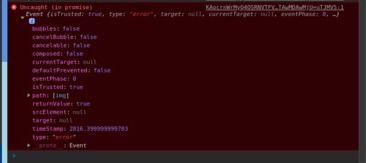
@justadudewhohacks thanks, it's working. But there is another problem.
Uncaught (in promise)
Event {isTrusted: true, type: "error", target: null, currentTarget: null, eventPhase: 0, …}
I guess, I forgot one more place.
chtsngn
on 10 Aug 2018
This could be caused by anything. Could you show me the line, where this error is thrown.
justadudewhohacks
on 11 Aug 2018
I solved this. The path to the Images folder isn't correct.
Last question; How can i train recognition? I took 10 images (from web camera). But, distance value changes between 0.6 - 0.7.
chtsngn
on 11 Aug 2018
You could use multiple images to compute reference descriptors and then compute the average of the euclidean distances between all reference descriptors and a input descriptor.
Usually, you should already get quite good results using a single image only. Can you share the image/s you are using as reference and the images of the faces, you are trying to recognize.
justadudewhohacks
on 11 Aug 2018
Ok. Thanks for help.
chtsngn
on 11 Aug 2018
script2.js:17 Uncaught (in promise) TypeError: fd.forSize is not a function
at script2.js:17
at Array.map (
at onPlay (script2.js:17)
 thirukumars
on 31 Jul 2019
thirukumars
on 31 Jul 2019
this is html code
thirukumars
on 31 Jul 2019
and the script is
$(document).ready(function() {
run()
})
async function onPlay(videoEl) {
if(videoEl.paused || videoEl.ended || !modelLoaded)
return false;
let minFaceSize = 200;
const { width, height } = faceapi.getMediaDimensions(videoEl);
const canvas = document.getElementById('inputVideo');
canvas.width = width;
canvas.height = height;
const mtcnnParams = {
minFaceSize
};
const fullFaceDescriptions = (await faceapi.allFacesMtcnn(videoEl, mtcnnParams)).map(fd => fd.forSize(width, height));
fullFaceDescriptions.forEach(({ detection, landmarks, descriptor }) => {
faceapi.drawDetection('overlay', [detection], { withScore: false });
faceapi.drawLandmarks('overlay', landmarks.forSize(width, height), { lineWidth: 4, color: 'red' });
// const bestMatch = getBestMatch(trainDescriptorsByClass, descriptor);
// const text = ${bestMatch.distance < maxDistance ? bestMatch.className : 'unkown'} (${bestMatch.distance});
// const { x, y, height: boxHeight } = detection.getBox();
faceapi.drawText(
canvas.getContext('2d'),
x,
y + boxHeight,
text,
Object.assign(faceapi.getDefaultDrawOptions(), { color: 'red', fontSize: 16 })
)
});
setTimeout(() => onPlay(videoEl), 150);
};
async function run() {
await faceapi.loadMtcnnModel("/models");
await faceapi.loadFaceRecognitionModel("/models");
// trainDescriptorsByClass = initTrainDescriptorsByClass(faceapi.recognitionNet);
modelLoaded = true;
const videoEl = document.getElementById('inputVideo');
navigator.getUserMedia(
{ video: {} },
stream => videoEl.srcObject = stream,
err => console.error(err)
);
this.onPlay(videoEl);
}
thirukumars
on 31 Jul 2019
Related issues
 joesalloum
·
6Comments
joesalloum
·
6Comments
 XDmoyang
·
6Comments
XDmoyang
·
6Comments
 salamanders
·
3Comments
salamanders
·
3Comments
 MichaelFay
·
4Comments
MichaelFay
·
4Comments
 hawxxx
·
5Comments
hawxxx
·
5Comments