Face-api.js: Uncaught (in promise) Error: Error in slice4D while running MtcnnFaceRecognitionWebcam
Hello,
At first, the library and your tutorial are amazing. I am currently implementing a real time face recognition from webcam with nodeJS and face-api and there was an error comes up. It happens few minutes after the streaming appeared or sometimes right after the webcam stream appeared. While it's working, it detect and recognize face quite good, but it would stop detecting and recognizing after some times (the webcam stream still works).
Below is the error message taken from console window from Chrome 68 after it stop detecting or recognizing.
Uncaught (in promise) Error: Error in slice4D: begin[1] + size[1] (519) would overflow input.shape[1] (480) tf-core.esm.js:17
at assert (tf-core.esm.js:17)
at assertParamsValid (tf-core.esm.js:17)
at e.slice (tf-core.esm.js:17)
at tf-core.esm.js:17
at e.tidy (tf-core.esm.js:17)
at n.value (tf-core.esm.js:17)
at extractFaceTensors.ts:43
at Array.map ()
at extractFaceTensors.ts:42
at e.tidy (tf-core.esm.js:17)
Then I tried to run your examples directly and same thing keeps happening.
(519)
number here changed each time error appeared, it seemed to depends on the duration of time it can run.
Whenever I reload the page, it repeats the error after some another duration of time.
Am I doing wrong somewhere? (noob in JS)
Thank you.
 TuanHungVU1202
All 6 comments
Hmm maybe a rounding issue at the border of the image, not sure. I will try to reproduce it. Did you adjust the parameters or does the error also occur when running the example as is?
 justadudewhohacks
on 9 Aug 2018
justadudewhohacks
on 9 Aug 2018
I only changed minFaceSize from 200 to 150. And the error also occurs with the example as well.
UPDATE:
As I did some playing around with the minFaceSize param (increasing and decreasing) and tried to move my face closer and further to the webcam, it seemed that when my face is getting too close, the error would occur immediately. If not, it still occurs after a minute.
Is there anyway that we can get rid of this?
Because each time the error appear, I have to reload the page to start detecting/recognizing again.
TuanHungVU1202
on 10 Aug 2018
@justadudewhohacks confirmed, I'm getting this overflow error too. It happens when I run MTCNN with minFaceSize: 200 and when I put my face too close so that the whole face isn't seen. To replicate, run forwardpass/allfacesmtcnn with webcam videoel as input and go very close to far a couple of times.
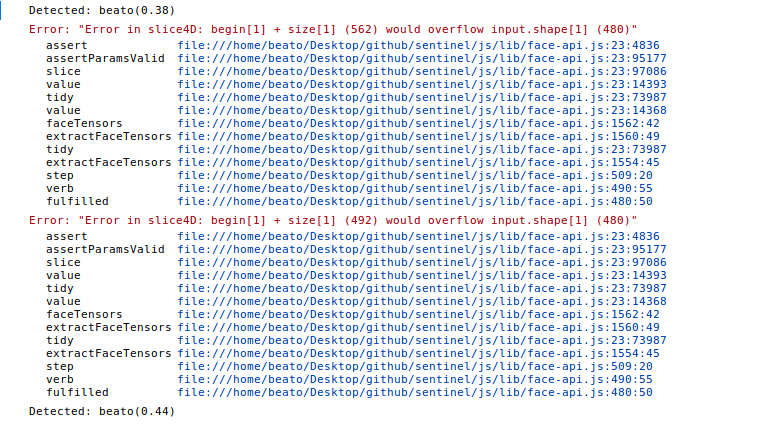
@TuanHungVU1202 you could wrap your forward pass with try...catch block and just log the errors. Worked for my purposes. :)
 beatobongco
on 11 Aug 2018
beatobongco
on 11 Aug 2018
@beatobongco Thanks. I made it with your temp solution. But I still hope we can fix this permanently because it's too laggy for my purpose.
TuanHungVU1202
on 11 Aug 2018
I could reproduce the issue, it was due to the bounding boxes reaching over the image borders. This should now be fixed.
justadudewhohacks
on 13 Aug 2018
@justadudewhohacks perfect, just tested and everything works like a charm.
TuanHungVU1202
on 13 Aug 2018
Related issues
 salamanders
·
3Comments
salamanders
·
3Comments
 Bornlex
·
7Comments
Bornlex
·
7Comments
 LeonardoDB
·
6Comments
LeonardoDB
·
6Comments
 joesalloum
·
6Comments
joesalloum
·
6Comments
 gmanojisaac
·
6Comments
gmanojisaac
·
6Comments