Face-api.js: Unstable MTCNN face landmark detection
Hi, we've been messing around with face-api and especially MTCNN face detection and 5 face landmarks detection. I think you guys did a great job on the lib overall 😄
However we were trying to get it work faster and more precisely. So far we've been able to get 7fps on a webcam stream.
Below we recorded some gifs to visualize.

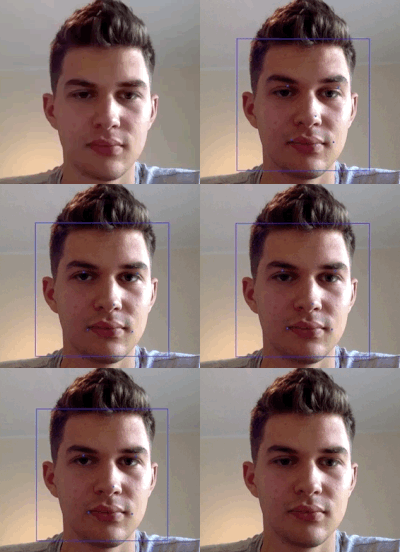
The questions I have regarding these are:
- What do you think could help us improve the amount of recognitions per second (the thing I called fps before) ?
- As you can see on the GIFs the recognitions are quite unstable even when the person is not moving, do you think there is some way that we could improve stability of the algorithm ?
Hope I made it clear 😉
 MatiKicinski
All 10 comments
Hi,
First of all I would try it out with better lightning. I found that the algorithm is very sensitive to lightning conditions, the shadows on your faces might make it less precise.
Also could you tell me the parameters you are using, e.g. min face size and stage threshold values as well as, which browser you are using. Currenty the package works best in chrome.
To get better fps, mainly increasing the min face size does help.
 justadudewhohacks
on 24 Jul 2018
justadudewhohacks
on 24 Jul 2018
We are using
maxNumScales: 10,
scaleFactor: 0.709,
scoreThresholds: [0.6, 0.7, 0.7],
minFaceSize: 200
And I was trying it with various min face sizes and 200 seemed to be optimal as higher values would require me to lean over the laptop so that my face is big enough. And we've been using chrome.
MatiKicinski
on 24 Jul 2018
We also discovered this problem with lighting, however, we can't assure the optimal lighting. We want to use the app in various conditions.
 MaciejWWojcik
on 24 Jul 2018
MaciejWWojcik
on 24 Jul 2018
You could also try to increase the scaleFactor by a bit, to make the detector compute at more scales to avoid "blind spots". You can by the way use mtcnn.forwardWithStats to receive information about the scales / image sizes that have been used in stage 1, e.g:
const { results, stats } = mtcnn.forwardWithStats
console.log(stats.pyramid)
console.log(stats.scales)
Might help you finetune parameters.
May I ask what GPUs are built in your laptops? 7 fps seems to be pretty slow.
justadudewhohacks
on 26 Jul 2018
I tried to improve the results by modifying scale factor, but didn't get astonishing result, perhaps I didn't do it thoroughly enough.
I am working on a laptop with Intel HD Graphics 6000 1536 MB, it's not a graphics demon but it handles basic graphics display quite well, I even used it for video editing and I must say it worked pretty smoothly 😉
MatiKicinski
on 26 Jul 2018
I see. I think there are currently still issues with tfjs + Intel that have to be resolved, not sure if this influence the results you get with MTCNN.
The results of the above posted GIFs actually don't look too bad, there are simply some blind spots.
justadudewhohacks
on 26 Jul 2018
$(document).ready(function() {
run()
})
async function run() {
// load the models
await faceapi.loadTinyFaceDetectorModel('./models')
await faceapi.loadMtcnnModel('./models')
await faceapi.loadFaceRecognitionModel('./models')
const videoEl = document.getElementById('inputVideo')
console.log("what is happening");
navigator.getUserMedia(
  { video: {} },
  stream => videoEl.srcObject = stream,
  err => console.error(err)
);
this.onPlay(videoEl);
}
async function onPlay(videoEl) {
// Promise.all([
// faceapi.nets.ssdMobilenetv1.loadFromUri('./models'),
// faceapi.nets.tinyFaceDetector.loadFromUri('./models'),
// faceapi.nets.faceRecognitionNet.loadFromUri('./models')
// ])
const mtcnnForwardParams = {
maxNumScales: 10,
scaleFactor: 0.709,
scoreThresholds: [0.6, 0.7, 0.7],
minFaceSize: 200
};
// await faceapi.drawDetection('./models')
// await faceapi.drawLandmarks('./models')
// const mtcnnResults = await faceapi.mtcnn(document.getElementById('inputVideo'), mtcnnForwardParams)
const overlay=document.getElementById('overlay');
const mtcnnResults = await faceapi.mtcnn(document.getElementById('inputVideo'), mtcnnForwardParams)
faceapi.drawDetection(overlay, mtcnnResults.map(res => res.faceDetection), { withScore: false })
faceapi.drawLandmarks(overlay, mtcnnResults.map(res => res.faceLandmarks), { lineWidth: 4, color: 'red' })
const options = new faceapi.MtcnnOptions(mtcnnParams)
const input = document.getElementById('inputVideo')
const fullFaceDescriptions = await faceapi.detectAllFaces(input,options).withFaceLandmarks().withFaceDescriptors()
// const alignedFaceBoxes = results.map(
// ({ faceLandmarks }) => faceLandmarks.align()
// )
// const alignedFaceTensors = await extractFaceTensors(input, alignedFaceBoxes)
// const descriptors = await Promise.all(alignedFaceTensors.map(
// faceTensor => faceapi.computeFaceDescriptor(faceTensor)
// ))
// // free memory
// alignedFaceTensors.forEach(t => t.dispose())
const labels = ['face1','face2','praveen']
const labeledFaceDescriptors = await Promise.all(
labels.map(async label => {
// fetch image data from urls and convert blob to HTMLImage element
const imgUrl = ./${label}.jpg
const img = await faceapi.fetchImage(imgUrl)
// detect the face with the highest score in the image and compute it's landmarks and face descriptor
const fullFaceDescription = await faceapi.detectAllFaces(img,new faceapi.TinyFaceDetectorOptions()).withFaceLandmarks().withFaceDescriptor()

if (!fullFaceDescription) {
  throw new Error(`no faces detected for ${label}`)
}
const faceDescriptors = [fullFaceDescription.descriptor]
// console.log(label)
 return new faceapi.LabeledFaceDescriptors(label, faceDescriptors)
})
)
// 0.6 is a good distance threshold value to judge
// whether the descriptors match or not
const maxDescriptorDistance = 0.6
const faceMatcher = new faceapi.FaceMatcher(labeledFaceDescriptors, maxDescriptorDistance)
//console.log("face matcher"+faceMatcher)
const results = fullFaceDescriptions.map(fd => faceMatcher.findBestMatch(fd.descriptor))
/const boxesWithText =/ results.map((bestMatch, i) => {
const box = fullFaceDescriptions[i].detection.box
const text = bestMatch.toString()
const boxWithText = new faceapi.BoxWithText(box, text)
drawBox.draw(canvas)
return boxWithText
})
let myCanvas = document.getElementById('overlay');
const context = myCanvas.getContext('2d');
context.clearRect(0, 0, myCanvas.width, myCanvas.height);
faceapi.drawDetection(overlay, boxesWithText)
// faceapi.drawDetection('overlay', mtcnnResults.map(res => res.faceDetection), { withScore: false })
// faceapi.drawLandmarks('overlay', mtcnnResults.map(res => res.faceLandmarks), { lineWidth: 4, color: 'red' })
setTimeout(() => this.onPlay(videoEl),150)
}
 thirukumars
on 1 Aug 2019
thirukumars
on 1 Aug 2019
this is my code,when i run it, it showing
ncaught (in promise) TypeError: faceapi.drawDetection is not a function
at onPlay (script2.js:40)
onPlay @ script2.js:40
async function (async)
onPlay @ script2.js:39
onplay @ (index):50
this error. please help to solve me
thirukumars
on 1 Aug 2019
@thirukumars
faceapi.drawDetections is not a part of faceapi anymore, please use the up to date examples.
justadudewhohacks
on 5 Aug 2019
thank you,
thirukumars
on 5 Aug 2019
Related issues
 Bornlex
·
7Comments
Bornlex
·
7Comments
 LeonardoDB
·
6Comments
thirukumars
·
3Comments
LeonardoDB
·
6Comments
thirukumars
·
3Comments
 swapanil
·
5Comments
swapanil
·
5Comments
 XDmoyang
·
6Comments
XDmoyang
·
6Comments