Fabulous: Crash when debugging Android Fabulous app using Visual Studio 2019
dotnet new -i Fabulous.Templatesdotnet new fabulous-app- Open .sln file with Visual Studio 2019
- Select Android project as startup project
- Debug with a physical Android device and wait
- Click Install on device and wait
- Click Install on device and wait
- Click Install on device and wait
- Observe blank screen being popped up
- "\
Full Error
=================================================================
    Native Crash Reporting
04-07 21:52:08.560 E/mono-rt ( 9704): /proc/self/maps:=================================================================
Got a SIGSEGV while executing native code. This usually indicates
a fatal error in the mono runtime or one of the native libraries
used by your application.
=================================================================

=================================================================
    Basic Fault Adddress Reporting
=================================================================
Memory around native instruction pointer (0x8ded08b0):

04-07 21:52:08.560 E/mono-rt ( 9704): 12c00000-42c00000 rw-p 00000000 00:05 14939      /dev/ashmem/dalvik-main space (region space) (deleted)0x8ded08a0  50 1d c2 ae 5c 1d c2 ae 68 1d c2 ae 74 1d c2 ae  P...\...h...t...
0x8ded08b0  18 94 09 8e 1b 00 00 00 00 eb db a5 b8 0e 10 90  ................
0x8ded08c0  b8 26 45 ae fe 03 00 00 00 01 10 00 00 00 00 00  .&E.............
0x8ded08d0  00 00 00 00 00 10 c2 ae 0c 10 c2 ae 18 10 c2 ae  ................

No native Android stacktrace (see debuggerd output).

=================================================================
    Managed Stacktrace:
=================================================================
=================================================================

04-07 21:52:08.560 E/mono-rt ( 9704): 7068d000-70900000 rw-p 00000000 fd:02 1528961    /data/dalvik-cache/arm/system@[email protected]
04-07 21:52:08.560 E/mono-rt ( 9704): 70900000-70a21000 rw-p 00000000 fd:02 1528962    /data/dalvik-cache/arm/system@[email protected]
04-07 21:52:08.560 E/mono-rt ( 9704): 70a21000-70a6d000 rw-p 00000000 fd:02 1528963    /data/dalvik-cache/arm/system@[email protected]
04-07 21:52:08.560 E/mono-rt ( 9704): 70a6d000-70a9b000 rw-p 00000000 fd:02 1528964    /data/dalvik-cache/arm/system@[email protected]
04-07 21:52:08.560 E/mono-rt ( 9704): 70a9b000-70aff000 rw-p 00000000 fd:02 1528965    /data/dalvik-cache/arm/system@[email protected]
04-07 21:52:08.560 E/mono-rt ( 9704): 70aff000-70b6b000 rw-p 00000000 fd:02 1528966    /data/dalvik-cache/arm/system@[email protected]
04-07 21:52:08.561 E/mono-rt ( 9704): 70b6b000-70b6f000 rw-p 00000000 fd:02 1528967    /data/dalvik-cache/arm/system@[email protected]
04-07 21:52:08.561 E/mono-rt ( 9704): 70b6f000-70bcc000 rw-p 00000000 fd:02 1528968    /data/dalvik-cache/arm/system@[email protected]
04-07 21:52:08.561 E/mono-rt ( 9704): 70bcc000-714d4000 rw-p 00000000 fd:02 1528969    /data/dalvik-cache/arm/system@[email protected]
04-07 21:52:08.561 E/mono-rt ( 9704): 714d4000-7159a000 rw-p 00000000 fd:02 1528970    /data/dalvik-cache/arm/system@[email protected]
04-07 21:52:08.561 E/mono-rt ( 9704): 7159a000-715a6000 rw-p 00000000 fd:02 1528971    /data/dalvik-cache/arm/system@[email protected]
04-07 21:52:08.561 E/mono-rt ( 9704): 715a6000-715b3000 rw-p 00000000 fd:02 1528972    /data/dalvik-cache/arm/system@[email protected]
04-07 21:52:08.561 E/mono-rt ( 9704): 715b3000-715e4000 rw-p 00000000 fd:02 1528973    /data/dalvik-cache/arm/system@[email protected]
04-07 21:52:08.561 E/mono-rt ( 9704): 715e4000-715e5000 rw-p 00000000 fd:02 1528974    /data/dalvik-cache/arm/system@[email protected]
04-07 21:52:08.561 E/mono-rt ( 9704): 715e5000-715e8000 rw-p 00000000 fd:02 1528975    /data/dalvik-cache/arm/system@[email protected]
04-07 21:52:08.561 E/mono-rt ( 9704): 715e8000-715f0000 rw-p 00000000 fd:02 1528976    /data/dalvik-cache/arm/system@[email protected]
04-07 21:52:08.561 E/mono-rt ( 9704): 715f0000-7160f000 rw-p 00000000 fd:02 1528977    /data/dalvik-cache/arm/system@[email protected]
04-07 21:52:08.561 E/mono-rt ( 9704): 7160f000-716e4000 rw-p 00000000 fd:02 1528978    /data/dalvik-cache/arm/system@[email protected]
04-07 21:52:08.562 E/mono-rt ( 9704): 716e4000-71701000 rw-p 00000000 fd:02 1528979    /data/dalvik-cache/arm/system@[email protected]
04-07 21:52:08.562 E/mono-rt ( 9704): 71701000-71708000 rw-p 00000000 fd:02 1528980    /data/dalvik-cache/arm/system@[email protected]
04-07 21:52:08.562 E/mono-rt ( 9704): 71708000-7170d000 rw-p 00000000 fd:02 1528981    /data/dalvik-cache/arm/system@[email protected]
04-07 21:52:08.562 E/mono-rt ( 9704): 7170d000-7178a000 rw-p 00000000 fd:02 1528982    /data/dalvik-cache/arm/system@[email protected]
04-07 21:52:08.562 E/mono-rt ( 9704): 7178a000-717dc000 rw-p 00000000 fd:02 1528983    /data/dalvik-cache/arm/system@[email protected]
04-07 21:52:08.562 E/mono-rt ( 9704): 717dc000-71ab3000 r--p 00000000 fd:01 2039       /system/framework/arm/boot.oat
04-07 21:52:08.564 F/libc    ( 9704): Fatal signal 11 (SIGSEGV), code 2, fault addr 0x8ded08b0 in tid 9704 (com.companyname), pid 9704 (com.companyname)
04-07 21:52:08.669 I/libc    ( 9704): orig_dumpable: 1
 Happypig375
All 25 comments
Ouch, also reproducible with the F# Xamarin.Android template.
Happypig375
on 7 Apr 2019
Happypig375
on 7 Apr 2019
Happypig375
on 7 Apr 2019
The Xamarin.Android startup template can now be debugged, but not the Fabulous template.
Happypig375
on 23 May 2019
Environment Info:
Microsoft Visual Studio Community 2019
Version 16.0.4
VisualStudio.16.Release/16.0.4+28803.452
Microsoft .NET Framework
Version 4.7.03056
Installed Version: Community
Visual C++ 2019 00435-60000-00000-AA419
Microsoft Visual C++ 2019
Application Insights Tools for Visual Studio Package 9.0.20409.1
Application Insights Tools for Visual Studio
ASP.NET and Web Tools 2019 16.0.12313.64372
ASP.NET and Web Tools 2019
Azure App Service Tools v3.0.0 16.0.12313.64372
Azure App Service Tools v3.0.0
C# Tools 3.0.0-beta4-19218-01+18b0cfb66884840b40491fa0896a8854d68b3959
C# components used in the IDE. Depending on your project type and settings, a different version of the compiler may be used.
Common Azure Tools 1.10
Provides common services for use by Azure Mobile Services and Microsoft Azure Tools.
Extensibility Message Bus 1.1.77 (master@24013d5)
Provides common messaging-based MEF services for loosely coupled Visual Studio extension components communication and integration.
Microsoft JVM Debugger 1.0
Provides support for connecting the Visual Studio debugger to JDWP compatible Java Virtual Machines
Microsoft MI-Based Debugger 1.0
Provides support for connecting Visual Studio to MI compatible debuggers
Microsoft Visual C++ Wizards 1.0
Microsoft Visual C++ Wizards
Microsoft Visual Studio VC Package 1.0
Microsoft Visual Studio VC Package
Mono Debugging for Visual Studio 16.0.300 (573eda3)
Support for debugging Mono processes with Visual Studio.
NuGet Package Manager 5.0.2
NuGet Package Manager in Visual Studio. For more information about NuGet, visit http://docs.nuget.org/.
ProjectServicesPackage Extension 1.0
ProjectServicesPackage Visual Studio Extension Detailed Info
ResourcePackage Extension 1.0
ResourcePackage Visual Studio Extension Detailed Info
ResourcePackage Extension 1.0
ResourcePackage Visual Studio Extension Detailed Info
Syntax Visualizer 1.0
An extension for visualizing Roslyn SyntaxTrees.
TypeScript Tools 16.0.10306.2001
TypeScript Tools for Microsoft Visual Studio
Visual Basic Tools 3.0.0-beta4-19218-01+18b0cfb66884840b40491fa0896a8854d68b3959
Visual Basic components used in the IDE. Depending on your project type and settings, a different version of the compiler may be used.
Visual F# Tools 10.4 for F# 4.6 16.0.0.0. Commit Hash: 809f41207b74a1356208f11b8fa3a15233734050.
Microsoft Visual F# Tools 10.4 for F# 4.6
Visual Studio Code Debug Adapter Host Package 1.0
Interop layer for hosting Visual Studio Code debug adapters in Visual Studio
Visual Studio Tools for Unity 4.0.0.5
Visual Studio Tools for Unity
VisualStudio.Mac 1.0
Mac Extension for Visual Studio
Xamarin 16.0.0.521 (d16-0@7b060b3b9)
Visual Studio extension to enable development for Xamarin.iOS and Xamarin.Android.
Xamarin Designer 4.17.4.419 (remotes/origin/d16-0@c5f131be7)
Visual Studio extension to enable Xamarin Designer tools in Visual Studio.
Xamarin Templates 16.1.47 (31f664d)
Templates for building iOS, Android, and Windows apps with Xamarin and Xamarin.Forms.
Xamarin.Android SDK 9.2.3.0 (HEAD/9f6426ab2)
Xamarin.Android Reference Assemblies and MSBuild support.
Mono: mono/mono/2018-08-rc@5ac37ccd385
Java.Interop: xamarin/java.interop/d16-0@c987483
LibZipSharp: grendello/LibZipSharp/d16-1@44de300
LibZip: nih-at/libzip/rel-1-5-1@b95cf3f
MXE: xamarin/mxe/xamarin@b9cbb535
ProGuard: xamarin/proguard/master@905836d
SQLite: xamarin/sqlite/3.26.0@325e91a
Xamarin.Android Tools: xamarin/xamarin-android-tools/d16-0@0a7edd6
Xamarin.iOS and Xamarin.Mac SDK 12.8.0.2 (f2248ae)
Xamarin.iOS and Xamarin.Mac Reference Assemblies and MSBuild support.
Happypig375
on 24 May 2019
Hii~~ Anyone willing to respond?
Happypig375
on 25 May 2019
@Happypig375 Just tried on Visual Studio 2019 16.1 and deployed to a Xiaomi Redmi Note 5, and I don't reproduce. The app compiles and runs fine.
Could you test it on a clean environment, if possible?
 TimLariviere
on 25 May 2019
TimLariviere
on 25 May 2019
I'm on 16.0.4. Mighy try upgrading.
Happypig375
on 25 May 2019
Works fine with 16.2 Preview 1.0.
Don't have the earlier version.
@Happypig375 does upgrading solve the problem?
 SergejDK
on 28 May 2019
SergejDK
on 28 May 2019
Visual Studio 16.1.4
Fabulous Templates 0.36.0
Redmi 6
Android 8.1
arm
Fabulous template crashes on startup. Xamarin.Android template does not.
Happypig375
on 2 Jul 2019
I will try recreating the Fabulous Template and investigate today.
Happypig375
on 2 Jul 2019
This runs fine (from project generated by fabulous-app):
type App () as app =
inherit Application ()
do app.MainPage <- ContentPage(Content = Label(Text = "Hello~~"))
(*
let runner =
App.program
#if DEBUG
|> Program.withConsoleTrace
#endif
|> Program.runWithDynamicView app
*)
The CounterApp sample crashes even when I debug it on my phone.
07-02 13:14:04.805 D/Mono (23736): Loading reference 1 of /storage/emulated/0/Android/data/org.fabulous.CounterApp/files/.__override__/FSharp.Core.dll asmctx DEFAULT, looking for System.Linq, Version=4.1.0.0, Culture=neutral, PublicKeyToken=b03f5f7f11d50a3a
07-02 13:14:04.807 D/Mono (23736): Image addref System.Linq[0x89f7ce40] (asmctx DEFAULT) -> System.Linq.dll[0x89ec7e00]: 2
07-02 13:14:04.807 D/Mono (23736): Prepared to set up assembly 'System.Linq' (System.Linq.dll)
07-02 13:14:04.808 D/Mono (23736): Assembly System.Linq[0x89f7ce40] added to domain RootDomain, ref_count=1
07-02 13:14:04.810 D/Mono (23736): AOT: image 'System.Linq.dll.so' not found: dlopen failed: library "System.Linq.dll.so" not found
07-02 13:14:04.812 D/Mono (23736): AOT: image '/Users/builder/jenkins/workspace/xamarin-android-d16-1/xamarin-android/external/mono/sdks/out/android-armeabi-v7a-release/lib/mono/aot-cache/arm/System.Linq.dll.so' not found: dlopen failed: library "/Users/builder/jenkins/workspace/xamarin-android-d16-1/xamarin-android/external/mono/sdks/out/android-armeabi-v7a-release/lib/mono/aot-cache/arm/System.Linq.dll.so" not found
07-02 13:14:04.812 D/Mono (23736): Config attempting to parse: 'System.Linq.dll.config'.
07-02 13:14:04.812 D/Mono (23736): Config attempting to parse: '/Users/builder/jenkins/workspace/xamarin-android-d16-1/xamarin-android/external/mono/sdks/out/android-armeabi-v7a-release/etc/mono/assemblies/System.Linq/System.Linq.config'.
07-02 13:14:04.812 D/Mono (23736): Assembly Ref addref FSharp.Core[0x9bd03cc0] -> System.Linq[0x89f7ce40]: 2
07-02 13:14:04.812 D/Mono (23736): Loading reference 1 of System.Linq.dll asmctx DEFAULT, looking for System.Core, Version=2.0.5.0, Culture=neutral, PublicKeyToken=7cec85d7bea7798e
07-02 13:14:04.812 D/Mono (23736): Assembly Ref addref System.Linq[0x89f7ce40] -> System.Core[0x9bd491a0]: 6
Loaded assembly: System.Linq.dll [External]
=================================================================
Native Crash Reporting
=================================================================
Got a SIGSEGV while executing native code. This usually indicates
a fatal error in the mono runtime or one of the native libraries
used by your application.
=================================================================
07-02 13:14:11.017 E/mono-rt (23736): /proc/self/maps:
07-02 13:14:11.017 E/mono-rt (23736): 12c00000-42c00000 rw-p 00000000 00:05 16578 /dev/ashmem/dalvik-main space (region space) (deleted)
07-02 13:14:11.017 E/mono-rt (23736): 7068d000-70900000 rw-p 00000000 fd:02 1528961 /data/dalvik-cache/arm/system@[email protected]
07-02 13:14:11.018 E/mono-rt (23736): 70900000-70a21000 rw-p 00000000 fd:02 1528962 /data/dalvik-cache/arm/system@[email protected]
=================================================================07-02 13:14:11.018 E/mono-rt (23736): 70a21000-70a6d000 rw-p 00000000 fd:02 1528963 /data/dalvik-cache/arm/system@[email protected]
07-02 13:14:11.018 E/mono-rt (23736): 70a6d000-70a9b000 rw-p 00000000 fd:02 1528964 /data/dalvik-cache/arm/system@[email protected] Basic Fault Adddress Reporting
=================================================================
Memory around native instruction pointer (0x89d905f0):0x89d905e0 50 5d af aa 5c 5d af aa 68 5d af aa 74 5d af aa P]..\]..h]..t]..
0x89d905f0 18 f2 9d 8a 1b 00 00 00 00 ea 0b a2 70 4e 90 8c ............pN..
0x89d90600 00 86 ed
07-02 13:14:11.018 E/mono-rt (23736): 70a9b000-70aff000 rw-p 00000000 fd:02 1528965 /data/dalvik-cache/arm/system@[email protected]
07-02 13:14:11.018 E/mono-rt (23736): 70aff000-70b6b000 rw-p 00000000 fd:02 1528966 /data/dalvik-cache/arm/system@[email protected] 20 04 00 00 00 01 10 00 00 00 00 00 .... ...........
0x89d90610 00 00 00 00 00 50 af aa 0c 50 af aa 18 50 af aa .....P...P...P..
No native Android stacktrace (see debuggerd output).
=================================================================
Managed Stacktrace:
=================================================================
=================================================================
07-02 13:14:11.018 E/mono-rt (23736): 70b6b000-70b6f000 rw-p 00000000 fd:02 1528967 /data/dalvik-cache/arm/system@[email protected]
07-02 13:14:11.018 E/mono-rt (23736): 70b6f000-70bcc000 rw-p 00000000 fd:02 1528968 /data/dalvik-cache/arm/system@[email protected]
07-02 13:14:11.018 E/mono-rt (23736): 70bcc000-714d4000 rw-p 00000000 fd:02 1528969 /data/dalvik-cache/arm/system@[email protected]
07-02 13:14:11.018 E/mono-rt (23736): 714d4000-7159a000 rw-p 00000000 fd:02 1528970 /data/dalvik-cache/arm/system@[email protected]
07-02 13:14:11.018 E/mono-rt (23736): 7159a000-715a6000 rw-p 00000000 fd:02 1528971 /data/dalvik-cache/arm/system@[email protected]
07-02 13:14:11.018 E/mono-rt (23736): 715a6000-715b3000 rw-p 00000000 fd:02 1528972 /data/dalvik-cache/arm/system@[email protected]
07-02 13:14:11.019 E/mono-rt (23736): 715b3000-715e4000 rw-p 00000000 fd:02 1528973 /data/dalvik-cache/arm/system@[email protected]
07-02 13:14:11.019 E/mono-rt (23736): 715e4000-715e5000 rw-p 00000000 fd:02 1528974 /data/dalvik-cache/arm/system@[email protected]
07-02 13:14:11.019 E/mono-rt (23736): 715e5000-715e8000 rw-p 00000000 fd:02 1528975 /data/dalvik-cache/arm/system@[email protected]
07-02 13:14:11.019 E/mono-rt (23736): 715e8000-715f0000 rw-p 00000000 fd:02 1528976 /data/dalvik-cache/arm/system@[email protected]
07-02 13:14:11.019 E/mono-rt (23736): 715f0000-7160f000 rw-p 00000000 fd:02 1528977 /data/dalvik-cache/arm/system@[email protected]
07-02 13:14:11.019 E/mono-rt (23736): 7160f000-716e4000 rw-p 00000000 fd:02 1528978 /data/dalvik-cache/arm/system@[email protected]
07-02 13:14:11.019 E/mono-rt (23736): 716e4000-71701000 rw-p 00000000 fd:02 1528979 /data/dalvik-cache/arm/system@[email protected]
07-02 13:14:11.019 E/mono-rt (23736): 71701000-71708000 rw-p 00000000 fd:02 1528980 /data/dalvik-cache/arm/system@[email protected]
07-02 13:14:11.019 E/mono-rt (23736): 71708000-7170d000 rw-p 00000000 fd:02 1528981 /data/dalvik-cache/arm/system@[email protected]
07-02 13:14:11.019 E/mono-rt (23736): 7170d000-7178a000 rw-p 00000000 fd:02 1528982 /data/dalvik-cache/arm/system@[email protected]
07-02 13:14:11.019 E/mono-rt (23736): 7178a000-717dc000 rw-p 00000000 fd:02 1528983 /data/dalvik-cache/arm/system@[email protected]
07-02 13:14:11.019 E/mono-rt (23736): 717dc000-71ab3000 r--p 00000000 fd:01 2039 /system/framework/arm/boot.oat
07-02 13:14:11.022 F/libc (23736): Fatal signal 11 (SIGSEGV), code 2, fault addr 0x89d905f0 in tid 23736 (lous.CounterApp), pid 23736 (lous.CounterApp)
07-02 13:14:11.113 I/libc (23736): orig_dumpable: 1
It's a SIGSEGV with code 2 (SEGV_ACCERR), which is different from the Xamarin Android crashes - SIGSEGV with code 1 (SEGV_MAPERR).
Happypig375
on 2 Jul 2019
When inherit Activity () is changed to inherit FormsAppCompatActivity():
* * * * * * * * * * * * * * * *
Build fingerprint: 'xiaomi/cereus/cereus:8.1.0/O11019/V10.2.2.0.OCGMIXM:user/release-keys'
Revision: '0'
ABI: 'arm'
pid: 29571, tid: 29571, name: ulous.CounterAp >>> org.fabulous.CounterAp <<<
signal 6 (SIGABRT), code -6 (SI_TKILL), fault addr --------
Abort message: 'java_vm_ext.cc:534] JNI DETECTED ERROR IN APPLICATION: can't call void android.support.v7.app.AppCompatActivity.onCreate(android.os.Bundle) on instance of md5ff91ec4f73a7b0269b2221bf0252899b.MainActivity'
r0 00000000 r1 00007383 r2 00000006 r3 00000008
r4 00007383 r5 00007383 r6 bed43e44 r7 0000010c
r8 00000000 r9 aa699368 sl 0000000a fp bed43e90
ip 9bd18760 sp bed43e30 lr ada838bd pc ada7d40e cpsr 200f0030
backtrace:
#00 pc 0001a40e /system/lib/libc.so (abort+63)
#01 pc 0035ca45 /system/lib/libart.so (art::Runtime::Abort(char const*)+392)
#02 pc 0041fe2d /system/lib/libart.so (android::base::LogMessage::~LogMessage()+452)
#03 pc 0024e545 /system/lib/libart.so (art::JavaVMExt::JniAbort(char const*, char const*)+1212)
#04 pc 0024e6c7 /system/lib/libart.so (art::JavaVMExt::JniAbortV(char const*, char const*, std::__va_list)+58)
#05 pc 000d6403 /system/lib/libart.so (art::ScopedCheck::AbortF(char const*, ...)+42)
#06 pc 000d9299 /system/lib/libart.so (art::ScopedCheck::CheckMethodAndSig(art::ScopedObjectAccess&, _jobject*, _jclass*, _jmethodID*, art::Primitive::Type, art::InvokeType)+1352)
#07 pc 000d95ad /system/lib/libart.so (art::CheckJNI::CallMethodA(char const*, _JNIEnv*, _jobject*, _jclass*, _jmethodID*, jvalue*, art::Primitive::Type, art::InvokeType)+500)
#08 pc 000cac0f /system/lib/libart.so (art::CheckJNI::CallNonvirtualVoidMethodA(_JNIEnv*, _jobject*, _jclass*, _jmethodID*, jvalue*)+42)
#09 pc 0000e72d /data/app/org.fabulous.CounterAp-_juFtN1E-2zLRTaGSJzEJA==/lib/arm/libmonodroid.so (java_interop_jnienv_call_nonvirtual_void_method_a+96)
#10 pc 0000d43c <anonymous:a45c1000>
FormsApplicationActivity is fine... for now.
Edit: Turns out it was an issue with project references, I modified the file paths but the relative paths didn't update.
Happypig375
on 2 Jul 2019
I have recreated a CounterApp.Droid that's debuggable... Time to see the diff.
Edit: Debuggable with
type App () as app =
inherit Application ()
do app.MainPage <- ContentPage(Content = Label(Text = "Hello~~"))
(*
let runner =
App.program
#if DEBUG
|> Program.withConsoleTrace
#endif
|> Program.runWithDynamicView app
*)
Ugh.
Edit 2: Well... Time to debug.
Happypig375
on 2 Jul 2019
Hmmm...
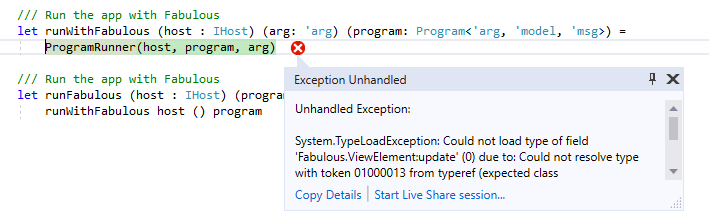
Unhandled Exception:
System.TypeLoadException: Could not load type of field 'Fabulous.ViewElement:update' (0) due to: Could not resolve type with token 01000013 from typeref (expected class 'Microsoft.FSharp.Core.FSharpValueOption`1' in assembly 'FSharp.Core, Version=4.6.0.0, Culture=neutral, PublicKeyToken=b03f5f7f11d50a3a') assembly:FSharp.Core, Version=4.6.0.0, Culture=neutral, PublicKeyToken=b03f5f7f11d50a3a type:Microsoft.FSharp.Core.FSharpValueOption`1 member:(null)
Why FSharpValueOption? It should be Option or ValueOption.
Happypig375
on 2 Jul 2019
FSharpValueOption is the full name of ValueOption.
I saw this kind of error only when I was missing a dependency on FSharp.Core 4.6
TimLariviere
on 2 Jul 2019
Apparently Fabulous.fsproj's <PackageReference Include="FSharp.Core" /> restored FSharp.Core.4.0.0.1.
Edit: It's from the Xamarin.Android project template!
Edit 2: Problem solved. Thank you!
Edit 3: Problem not solved...
Happypig375
on 2 Jul 2019
let runner =
App.program
|> Program.withConsoleTrace
|> (fun x ->
for x in System.AppDomain.CurrentDomain.GetAssemblies() do
System.Diagnostics.Debug.WriteLine(x.FullName)
System.Diagnostics.Debugger.Break()
x)
|> XamarinFormsProgram.run app
[0:] FSharp.Core, Version=3.98.4.0, Culture=neutral, PublicKeyToken=0738eb9f132ed756
Ugh
Happypig375
on 2 Jul 2019
I F O U N D T H E R E A S O N!
I found the reason.
The <Import Project="$(MSBuildExtensionsPath)\Xamarin\Android\Xamarin.Android.FSharp.targets" /> __has to__ come before <Reference Include="FSharp.Core">, or else the FSharp.Core that came with .NET Framework will be picked.
https://github.com/fsprojects/Fabulous/blob/6adb30b237370d27f16db6f3e2425e4f5b1aa17e/Fabulous.XamarinForms/samples/CounterApp/Droid/CounterApp.Droid.fsproj#L107
https://github.com/fsprojects/Fabulous/blob/6adb30b237370d27f16db6f3e2425e4f5b1aa17e/Fabulous.XamarinForms/samples/CounterApp/Droid/CounterApp.Droid.fsproj#L253
The line below _replaced_ the FSharp.Core from above!!! Ugh.
Happypig375
on 2 Jul 2019
Oh, good job finding that one!
FSharp.Core is always implicitly imported, and that leads to a lot of issues in my opinion...
targets files are recommended to be imported at the bottom of project files, usually.
Will need to fix that.
Also saw we have old imports that haven't been cleaned.
https://github.com/fsprojects/Fabulous/blob/b586048933923b1f67f2f0d59e6dd44cdfd90033/Fabulous.XamarinForms/samples/CounterApp/Droid/CounterApp.Droid.fsproj#L49-L65
TimLariviere
on 2 Jul 2019
Issue distilled to #492
Happypig375
on 4 Jul 2019
I have had the same exception on startup ( Could not load type of field 'Fabulous.ViewElement... Could not resolve type ...'Microsoft.FSharp.Core.FSharpValueOption etc) happen to me a couple of times this week, but on iOS instead. Android has been fine.
In each case I have tracked down the problem to this line in my fsproj:
    <Reference Include="FSharp.Core">
      <Private>True</Private>
    </Reference>
which needed to be replaced with
    <Reference Include="FSharp.Core">
      <HintPath>..\packages\FSharp.Core.4.7.2\lib\netstandard2.0\FSharp.Core.dll</HintPath>
    </Reference>
 Ryan-Palmer-CIT
on 10 Jul 2020
Ryan-Palmer-CIT
on 10 Jul 2020
@Ryan-Palmer-CIT Could you open another issue, please?
I think we need to include your fix in the templates.
TimLariviere
on 10 Jul 2020
Related issues
 xperiandri
·
4Comments
Happypig375
·
3Comments
TimLariviere
·
4Comments
TimLariviere
·
8Comments
xperiandri
·
4Comments
Happypig375
·
3Comments
TimLariviere
·
4Comments
TimLariviere
·
8Comments
 slang25
·
6Comments
slang25
·
6Comments
Most helpful comment
I have had the same exception on startup ( Could not load type of field 'Fabulous.ViewElement... Could not resolve type ...'Microsoft.FSharp.Core.FSharpValueOption etc) happen to me a couple of times this week, but on iOS instead. Android has been fine.
In each case I have tracked down the problem to this line in my fsproj:
which needed to be replaced with