Fabulous: Button Text changes should not be animated
When setting the view, nothing gets animated (correctly) except Button.Text gets animated (incorrectly). This creates several visual distractions including:
- Appearance of an ellipsis if the new title is shorter
- A quick fade out and fade back in (on iOS) that looks like a flicker
- Text moving if the text length changes
This is especially bad if your UI has a lot of buttons because now everything is flickering.
For comparison, note how Label and Entry text is not animated.
 praeclarum
All 7 comments
TBH, I'm worried this might be a bug with Forms. Need to find out what's triggering the animation.
praeclarum
on 2 Feb 2019
It's not an issue in Fabulous itself. I reproduced it in both Fabulous and C# Xamarin.Forms.
Fabulous
// Copyright 2018-2019 Fabulous contributors. See LICENSE.md for license.
namespace TestAnimationFSharp

open System.Diagnostics
open Fabulous
open Fabulous.XamarinForms
open Xamarin.Forms

module App =
    type Model =
      { Toggled: bool }

    type Msg =
        | Toggle

    let fullText = "Lorem ipsum dolor sit amet, consectetur adipiscing elit. Aenean tempus vestibulum justo eu porttitor."
    let smallText = "Lorem"

    let init () = { Toggled=false }

    let update msg model =
        match msg with
        | Toggle -> { model with Toggled = not model.Toggled }

    let view (model: Model) dispatch =
        View.ContentPage(
          content = View.StackLayout(padding = 20.0, verticalOptions = LayoutOptions.Center,
            children = [
                View.Button("Toggle", command = (fun () -> dispatch Toggle))
                View.Button(if model.Toggled then fullText else smallText)
                View.Label(if model.Toggled then fullText else smallText)
                View.Entry(if model.Toggled then fullText else smallText)
            ]))

    let program = Program.mkSimple init update view

type App () as app =
    inherit Application ()

    let runner =
        App.program
        |> XamarinFormsProgram.run app
Xamarin.Forms
<?xml version="1.0" encoding="utf-8"?>
<ContentPage xmlns="http://xamarin.com/schemas/2014/forms"
             xmlns:x="http://schemas.microsoft.com/winfx/2009/xaml"
             xmlns:d="http://xamarin.com/schemas/2014/forms/design"
             xmlns:mc="http://schemas.openxmlformats.org/markup-compatibility/2006"
             mc:Ignorable="d" x:Class="TestAnimationCSharp.MainPage">
    <StackLayout Padding="20" VerticalOptions="Center">
        <Button x:Name="ToggleButton" Text="Toggle" />
        <Button x:Name="TestButton" Text="Lorem" />
        <Label x:Name="TestLabel" Text="Lorem" />
        <Entry x:Name="TestEntry" Text="Lorem" />
    </StackLayout>
</ContentPage>
using System;
using Xamarin.Forms;
using Xamarin.Forms.PlatformConfiguration.iOSSpecific;

namespace TestAnimationCSharp
{
    public partial class MainPage : ContentPage
    {
        const string FullText = "Lorem ipsum dolor sit amet, consectetur adipiscing elit. Aenean tempus vestibulum justo eu porttitor.";
        const string SmallText = "Lorem";

        bool _toggled = false;

        public MainPage()
        {
            InitializeComponent();
            On<Xamarin.Forms.PlatformConfiguration.iOS>().SetUseSafeArea(true);
            ToggleButton.Clicked += ToggleButton_Clicked;
        }

        private void ToggleButton_Clicked(object sender, EventArgs e)
        {
            _toggled = !_toggled;
            TestButton.Text = _toggled ? FullText : SmallText;
            TestLabel.Text = _toggled ? FullText : SmallText;
            TestEntry.Text = _toggled ? FullText : SmallText;
        }
    }
}
 TimLariviere
on 12 Jul 2019
TimLariviere
on 12 Jul 2019
Looks like it's the native behavior. Tested it on Xamarin.iOS C# and same result.

TimLariviere
on 12 Jul 2019
It’s not native behavior, it’s a bug.
I would recommend doing a custom renderer to fix it.
Just because you didn’t write the bug, doesn’t mean it’s not a bug and I don’t appreciate this issue being closed.
Sent from my iPhone
On Jul 12, 2019, at 9:23 AM, Timothé Larivière notifications@github.com wrote:
Closed #308.
—
You are receiving this because you authored the thread.
Reply to this email directly, view it on GitHub, or mute the thread.
praeclarum
on 12 Jul 2019
From the Twitter thread, I'm trying to explain how this isn't an issue about what Forms does by default because Forms doesn't have to solve the problem Fabulous is solving: resource reuse.
It's not how "Forms works". We are not using Buttons the way Forms intends. From one frame to the next, the button role, style, size, etc can dramatically change because it is representing a whole different button model. It's a raw resource we reuse.
Our job is to manipulate so it appears to become another button. Forms does not do this and therefore its little animation is fine/makes sense. But Fabulous is different. There is a fundamental misunderstanding on what's going on here, and that scares me a bit.
praeclarum
on 14 Jul 2019
Ok, I think there was a misunderstanding here.
I thought you were saying that changing an existing button's title (same role, same style) shouldn't ever trigger an animation and ellipsis.
So that's what I tested and said
Looks like it's the native behavior.
And it is.
That's what Swift / Xamarin.iOS / Xamarin.Forms do out of the box on iOS (setTitle("xxx", Normal)).
But you're right.
In the case Fabulous determines that the button can be reused, it will do so and on iOS this will play the animation, even if this doesn't make sense for the user.
This is a problem.
So reopening the issue.
Now the thing is:
- How can we determine that the reused button is the "same" (animation vs no animation)?
- How should we remove this animation? Disabling button reuse on iOS only? Writing a custom renderer that developers could unintentionally replace and make the bug come back when writing their own?
- Should we completely remove the animation?
TimLariviere
on 14 Jul 2019
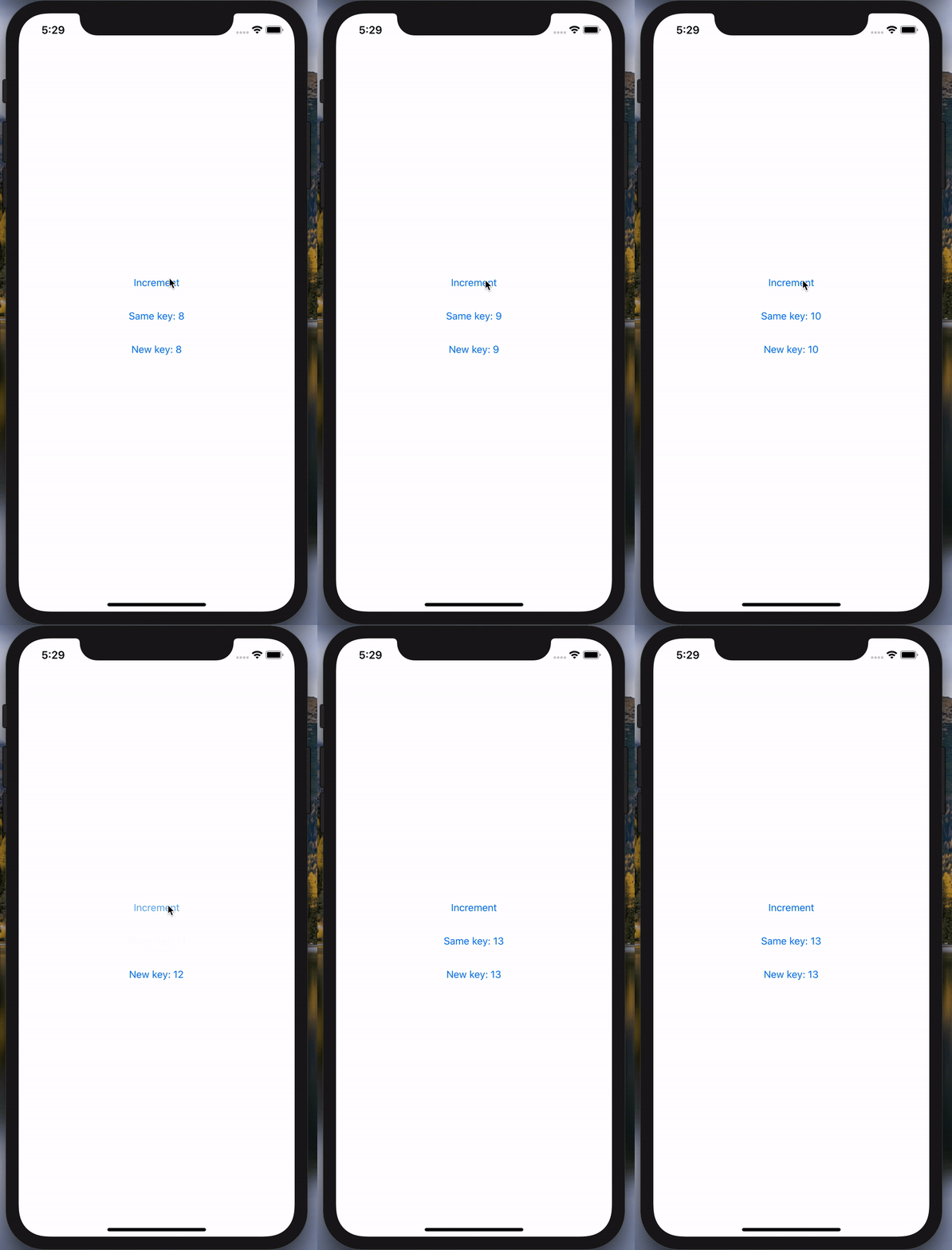
In the recently released v0.55, we introduced the concept of keyed nodes.
It lets you assign a key string to your controls so you can give hints to Fabulous on how to reuse the controls.
See more here: https://fsprojects.github.io/Fabulous/Fabulous.XamarinForms/views-perf.html#views-differential-update-of-lists-of-things
It helps with this issue by letting you ensure Fabulous won't accidentally trigger the fade-in/fade-out animation by reusing a button when you were expecting a new button.
So by setting keys to your buttons, the iOS animation will only trigger when you actually want to reuse the same button. (default iOS behavior)
UI controls whose keys are not present on the next update will be destroyed.
If you don't set any key, Fabulous will reuse all buttons as it did previously.
NOTE: Don't use this key only has a way of disabling the animation. This is not the intended use case for it.
If you want to get rid of the iOS animation, please look for an official iOS way of doing this.
Changing the keys all the time will prevent Fabulous from optimizing the UI when it can.
View.Button(
    key = "same_key",
    text = sprintf "Same key: %i" model.Count
)

View.Button(
    key = sprintf "new_key_%i" model.Count,
    text = sprintf "New key: %i" model.Count
)
TimLariviere
on 27 Jul 2020
Related issues
 kevinha
·
13Comments
kevinha
·
13Comments
 sergey-tihon
·
9Comments
sergey-tihon
·
9Comments
 dsyme
·
5Comments
dsyme
·
8Comments
dsyme
·
5Comments
dsyme
·
8Comments
 willsam100
·
3Comments
willsam100
·
3Comments