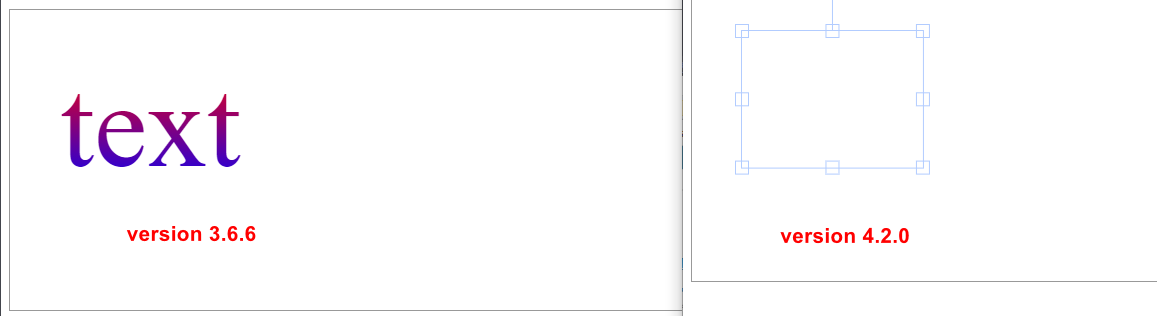
Fabric.js: Text gradient not working on 4.2.0 but working on 3.6.6
Version
4.2.0
Test Case
https://jsfiddle.net/r2k6e8u7/2/
Information about environment
Nodejs or browser: Browser
Which browsers: Chrome 86
Steps to reproduce
- Create fabric.Text
- Set 'fill' with fabric.Gradient
<!DOCTYPE html>
<html lang="en">
  <head>
    <title>Gradient Issue</title>
    <!-- Working -->
    <!-- <script src="https://cdnjs.cloudflare.com/ajax/libs/fabric.js/3.6.6/fabric.min.js"></script> -->

    <!-- Not working -->
    <script src="https://cdnjs.cloudflare.com/ajax/libs/fabric.js/4.2.0/fabric.min.js"></script>
  </head>
  <body>
    <canvas
      id="c"
      width="1000"
      height="300"
      style="margin-top: 10px; border: 1px solid #999"
    ></canvas>
    <script>
      const canvas = (window._canvas = new fabric.Canvas("c"));

      const textInstance = new fabric.Text("text", {
        top: 50,
        left: 50,
        padding: 0,
        fontSize: 120,
      });

      const handleGradientChange = () => {
        var angle = 135;
        var opacityGradient = 100;

        var anglePI = parseInt(180 - angle, 10) * (Math.PI / 180);

        var angleCoords = {
          x1: Math.round(50 + Math.sin(anglePI) * 50) / 100,
          y1: Math.round(50 + Math.cos(anglePI) * 50) / 100,
          x2: Math.round(50 + Math.sin(anglePI + Math.PI) * 50) / 100,
          y2: Math.round(50 + Math.cos(anglePI + Math.PI) * 50) / 100,
        };

        let gradient = {
          type: "linear",
          gradientUnits: "percentage",
          coords: {
            x1: angleCoords.x1,
            y1: angleCoords.y1,
            x2: angleCoords.x2,
            y2: angleCoords.y2,
          },
          colorStops: [
            { offset: 0, color: "red", opacity: opacityGradient / 100 },
            { offset: 1, color: "blue", opacity: opacityGradient / 100 },
          ],
        };

        return gradient;
      };

      textInstance.set("fill", new fabric.Gradient(handleGradientChange()));

      canvas.add(textInstance);
    </script>
  </body>
</html>
Expected Behavior
- Text gradient working
Actual Behavior
- Text gradient not working
bug
 natuan62
All 2 comments
https://github.com/fabricjs/fabric.js/pull/6098/files
i think the problem is in this PR.
I tried to change the code to fix something, breaking something else.
 asturur
on 24 Oct 2020
asturur
on 24 Oct 2020
👍1
i m actually trying hard to fix this.
Is hard to have shapes and text have gradients support working correctly
asturur
on 25 Oct 2020
👍1
Was this page helpful?
0 / 5 - 0 ratings
Related issues
 urcoder
·
5Comments
urcoder
·
5Comments
 amancqlsys
·
5Comments
amancqlsys
·
5Comments
 semiadam
·
3Comments
semiadam
·
3Comments
semiadam
·
3Comments
semiadam
·
3Comments
 bhaskardas9475
·
4Comments
bhaskardas9475
·
4Comments